v0.3.0 — Native-feel batch (title bar · accent · pause · taskbar · shell menu)

A big polish + integration release. Six features ship together to make the app feel like it grew out of Windows instead of being grafted on top of it.
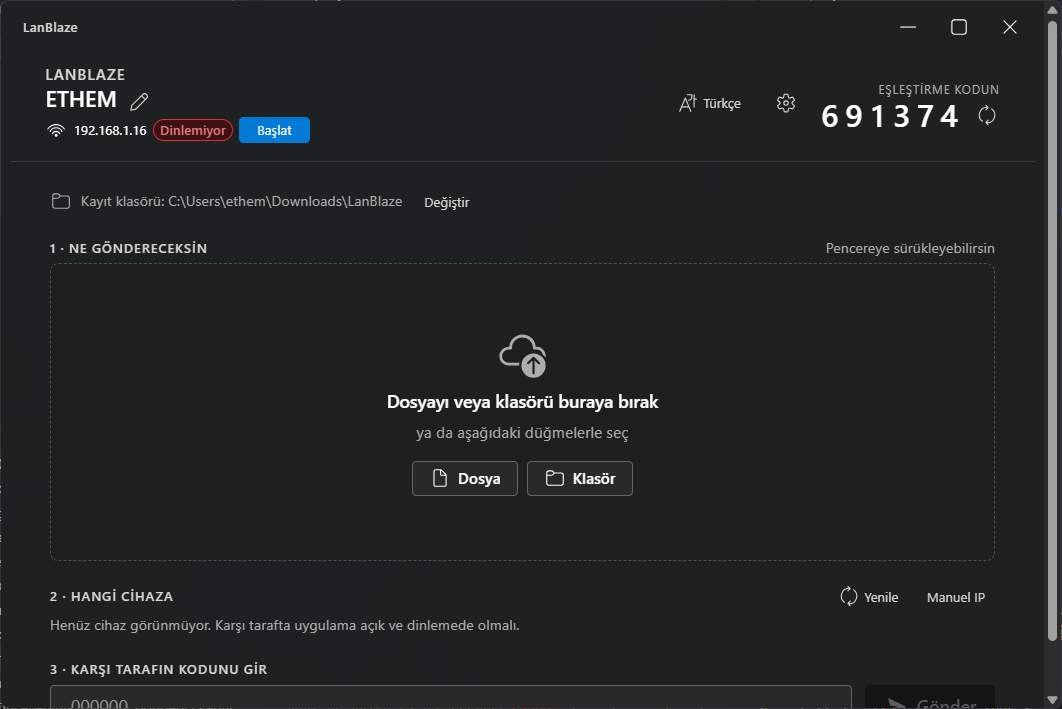
What's new
Custom title bar with edge-to-edge Mica
The OS title strip is gone (decorations: false). Mica now extends all the way to the top of the window. A new <TitleBar/> component handles dragging (data-tauri-drag-region) and exposes Win11-standard 46×32 min/max/close buttons with the correct hover styling — close button hovers to #c42b1c, the rest to a neutral grey.
System accent color
accent.rs reads HKCU\Software\Microsoft\Windows\DWM\AccentColor (DWORD, ABGR) via winreg and the frontend pipes it through applyAccentToTheme(), overriding ~12 Fluent brand tokens (background / foreground / stroke / compound brand). Buttons, badges, the progress bar, the selected peer tile — all of them pick up whatever colour you set in Windows.
Settings → Appearance → "Use system accent color" lets you toggle it off if you prefer the Fluent default blue.
Pause / Resume
Each active transfer now has a ⏸ button next to the ×. Pressing it stops the worker task at the next chunk boundary on your side; the other side notices via TCP back-pressure and stops draining too. ▶ resumes from exactly where it left off — no protocol handshake, no .part rewrite.
Backend: PauseToken (tokio::sync::Notify + AtomicBool) per transfer, registered in AppState.pause. Sender and receiver chunk loops call pause.wait_if_paused().await between every read/write.
Windows taskbar progress overlay
taskbar.rs initialises ITaskbarList3 once (behind a OnceLock<Mutex<…>> so COM stays single-apartment) and the frontend invokes set_taskbar_progress(value, total, state) every time the active-transfers list changes:
- Active → green bar tracks total bytes
- Any transfer paused → yellow bar
- All done → no overlay
Window state persistence
tauri-plugin-window-state remembers size, position, and maximized state across launches. Zero UI surface — you'll just notice the window comes back where you left it.
Windows Explorer "Send via LanBlaze" right-click menu
Right-click any file or folder (or empty space inside a folder) → "Send via LanBlaze". The app opens (or focuses, if already running) with your selection pre-loaded into the compose; you just pick a peer + code and hit send.
tauri-plugin-single-instancemakes the second launch hand its argv to the running instance instead of opening a duplicate window.- New NSIS hook script
installer/hooks.nshwrites three registry entries on install — files, directories, folder backgrounds — all under HKCU so install stays UAC-free. Uninstall reverses them. - Argv flows from the installer-spawned process →
tauri-plugin-single-instancecallback →shell://send-pathsevent → frontend listener →selectedPaths.
Install (Windows)
Download LanBlaze_0.3.0_x64-setup.exe below. Per-user install (no UAC). Installs over v0.2.x and keeps everything — settings, trusted devices, history, last-checked-update timestamp.
The installer is unsigned, so SmartScreen will say "Unknown publisher". Click More info → Run anyway.
Changes since 0.2.5
feat(v0.3.0): custom title bar, accent, pause, taskbar, shell menu, window state(13200bf)docs: refresh main screenshot for v0.3.0(a9b84c0)
Upgrade notes
- First launch after upgrade: the Windows context-menu entries get registered the moment NSIS finishes; no extra step.
- Pause/Resume + taskbar overlay are live the moment you start a transfer.
- Custom title bar: if you don't see it, your Mica setting was already opaque — the new bar is the same height (32 px) as Win11 standard, so layouts won't reshuffle.