Releases: ethemdemirkaya/lan-file-transfer
Release list
v0.3.1 — Title bar buttons fix

Quick fix for v0.3.0: the custom title bar's minimize and maximize buttons did nothing. Only close worked.
What happened
Tauri 2 makes you opt into each window API individually in the capability list. v0.3.0 swapped the OS title bar for a custom one but only core:window:allow-close was permitted, so the other buttons' invokes silently no-op'd.
Fix
Added the missing capabilities:
core:window:allow-minimizecore:window:allow-toggle-maximize+allow-maximize+allow-unmaximize+allow-is-maximizedcore:window:allow-start-dragging— also ensuresdata-tauri-drag-regionis rock-solid for window dragging
Install
Download LanBlaze_0.3.1_x64-setup.exe below. Installs over v0.3.x and keeps settings + history + trust list.
Changes since 0.3.0
fix(titlebar): grant the window-API capabilities that the custom buttons need(23fb0f4)
v0.3.0 — Native-feel batch (title bar · accent · pause · taskbar · shell menu)
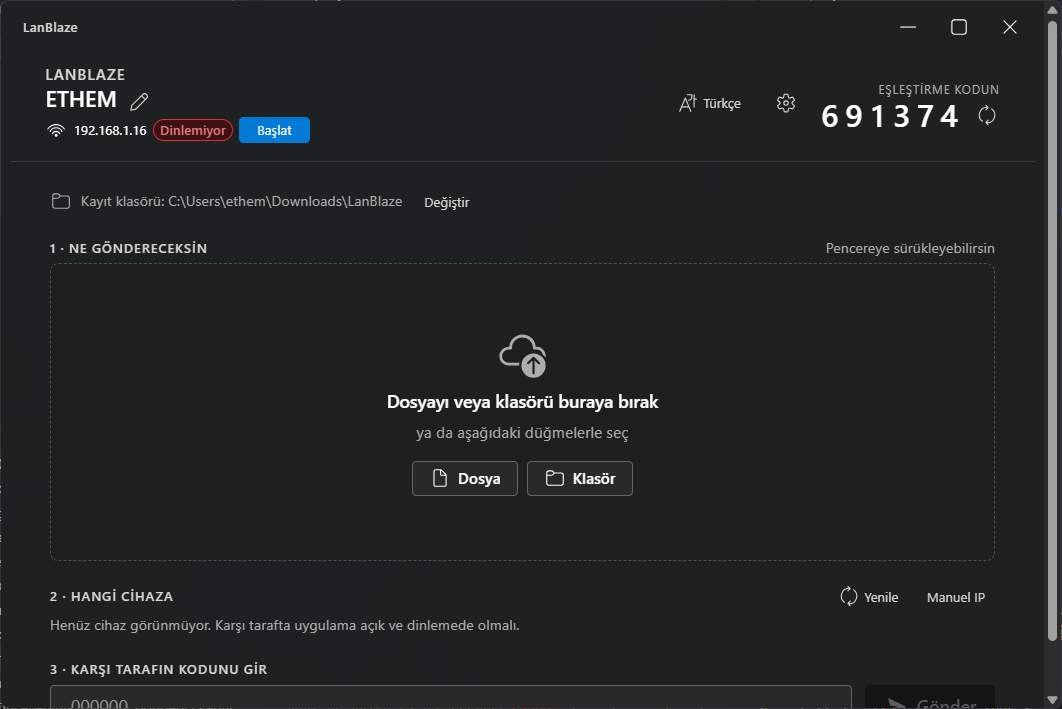
A big polish + integration release. Six features ship together to make the app feel like it grew out of Windows instead of being grafted on top of it.
What's new
Custom title bar with edge-to-edge Mica
The OS title strip is gone (decorations: false). Mica now extends all the way to the top of the window. A new <TitleBar/> component handles dragging (data-tauri-drag-region) and exposes Win11-standard 46×32 min/max/close buttons with the correct hover styling — close button hovers to #c42b1c, the rest to a neutral grey.
System accent color
accent.rs reads HKCU\Software\Microsoft\Windows\DWM\AccentColor (DWORD, ABGR) via winreg and the frontend pipes it through applyAccentToTheme(), overriding ~12 Fluent brand tokens (background / foreground / stroke / compound brand). Buttons, badges, the progress bar, the selected peer tile — all of them pick up whatever colour you set in Windows.
Settings → Appearance → "Use system accent color" lets you toggle it off if you prefer the Fluent default blue.
Pause / Resume
Each active transfer now has a ⏸ button next to the ×. Pressing it stops the worker task at the next chunk boundary on your side; the other side notices via TCP back-pressure and stops draining too. ▶ resumes from exactly where it left off — no protocol handshake, no .part rewrite.
Backend: PauseToken (tokio::sync::Notify + AtomicBool) per transfer, registered in AppState.pause. Sender and receiver chunk loops call pause.wait_if_paused().await between every read/write.
Windows taskbar progress overlay
taskbar.rs initialises ITaskbarList3 once (behind a OnceLock<Mutex<…>> so COM stays single-apartment) and the frontend invokes set_taskbar_progress(value, total, state) every time the active-transfers list changes:
- Active → green bar tracks total bytes
- Any transfer paused → yellow bar
- All done → no overlay
Window state persistence
tauri-plugin-window-state remembers size, position, and maximized state across launches. Zero UI surface — you'll just notice the window comes back where you left it.
Windows Explorer "Send via LanBlaze" right-click menu
Right-click any file or folder (or empty space inside a folder) → "Send via LanBlaze". The app opens (or focuses, if already running) with your selection pre-loaded into the compose; you just pick a peer + code and hit send.
tauri-plugin-single-instancemakes the second launch hand its argv to the running instance instead of opening a duplicate window.- New NSIS hook script
installer/hooks.nshwrites three registry entries on install — files, directories, folder backgrounds — all under HKCU so install stays UAC-free. Uninstall reverses them. - Argv flows from the installer-spawned process →
tauri-plugin-single-instancecallback →shell://send-pathsevent → frontend listener →selectedPaths.
Install (Windows)
Download LanBlaze_0.3.0_x64-setup.exe below. Per-user install (no UAC). Installs over v0.2.x and keeps everything — settings, trusted devices, history, last-checked-update timestamp.
The installer is unsigned, so SmartScreen will say "Unknown publisher". Click More info → Run anyway.
Changes since 0.2.5
feat(v0.3.0): custom title bar, accent, pause, taskbar, shell menu, window state(13200bf)docs: refresh main screenshot for v0.3.0(a9b84c0)
Upgrade notes
- First launch after upgrade: the Windows context-menu entries get registered the moment NSIS finishes; no extra step.
- Pause/Resume + taskbar overlay are live the moment you start a transfer.
- Custom title bar: if you don't see it, your Mica setting was already opaque — the new bar is the same height (32 px) as Win11 standard, so layouts won't reshuffle.
v0.2.5 — In-app update check
The app now tells you when a newer release is out, without you having to remember to come back to the GitHub page.
What's new
Auto update check on launch
On startup (and at most once every 12 hours, throttled via localStorage) the app fetches https://api.github.com/repos/ethemdemirkaya/lan-file-transfer/releases/latest and compares the tag against the running version. If something newer is on GitHub, a Fluent info MessageBar appears at the top of the main view:
LanBlaze 0.2.6 mevcut [İndir] [Sürüm notları] [×]
- Download / İndir opens the release page in your OS browser.
- Release notes does the same; both target the same page.
- × (Dismiss) stores that specific version in localStorage so the same banner doesn't reappear. The next time a different version ships, you'll see the banner again.
Manual check from Settings
Settings → Updates now has a "Check for updates" button with inline status ("Checking…" / "You're up to date") and the same install banner inline if something newer turns up.
Localized
All new strings translated for the 10 bundled UI languages.
Why not silent auto-install?
Tauri's auto-updater plugin (tauri-plugin-updater) does silent install but it needs:
- An ed25519 signer keypair (private key needs to live somewhere safe and survive lost laptops).
- Per-release
.sigartefacts produced withTAURI_SIGNING_PRIVATE_KEYat build time. - A hosted
latest.jsonfeed.
That's worth setting up properly alongside GitHub Actions and signed releases in 0.3.x. For now this lightweight "tell me when there's something new, take me to it" flow is zero-extra-dep, works today, and leaves the user in control.
Plumbing details
src/lib/tauri.ts:checkForUpdate(currentVersion)does the fetch +compareSemverand never throws (network/parse failures resolve tonull).- New backend command
open_external_url(url): cross-platform (cmd /c starton Windows,openon macOS,xdg-openon Linux), rejects anything that isn'thttp(s)://so a stray frontend invoke can't run arbitrary commands. - No new crates pulled in; the check uses the WebView's built-in fetch.
Install (Windows)
Download LanBlaze_0.2.5_x64-setup.exe below. Per-user install (no UAC). Installs over v0.2.x and keeps settings + trust list + history.
Changes since 0.2.4
feat(updates): check GitHub Releases on launch + Settings → Check now(936068a)
v0.2.4 — Labeled metric grid + d/h/m/s ETA
Smaller UX polish: nobody could tell which speed number was which in the active-transfer row. Now each metric has its own label and the ETA actually counts days and hours when that's what's left.
What's new
Labeled metric grid
The cramped "28.9 MB/s · ⌀ 81.4 MB/s" header and the second-line "ağdan: X · diske: Y" are gone. In their place, the active-transfer row now shows a strip of labeled tiles directly under the progress bar:
Sender
NOW           AVERAGE       ETA
28.9 MB/s     81.4 MB/s     1m 27s
Receiver
NETWORK       DISK          AVERAGE       ETA
37.0 MB/s     34.3 MB/s     81.3 MB/s     1m 32s
Big value, tiny uppercase label on top — so you don't have to remember which number is which.
ETA in d / h / m / s
formatEta() now picks the two most meaningful units:
27s2m 15s1h 30m2d 4h
Returns — when the rate is too unstable to estimate.
Smarter pacer on the receiver
Used to compute the ETA from instantNetwork only. When the disk can't keep up that number is misleading. Now uses min(instantNetwork, instantDisk), so whichever side is the real bottleneck drives the estimate.
Install (Windows)
Download LanBlaze_0.2.4_x64-setup.exe below. Per-user install, no UAC. Installs over v0.2.x and keeps your settings + trust list + history.
Changes since 0.2.3
ui(progress): labeled metric grid + d/h/m/s ETA, less ambiguous(765b055)
v0.2.3 — Cancel transfers from either side
Either side can now stop an in-flight transfer, and the other side gets told who pulled the plug.
What's new
Cancel button on every active transfer
- A small × button now sits on the right of every active-transfer row, on both the sender and the receiver.
- Click → the side you're on registers a
tokio::select!against an in-memory oneshot and aborts the worker task. The socket is dropped, the writer task drains, the partial file (if resumable) stays on disk for next time. - Completion toast and the entry in Settings → Recent activity tell you who cancelled:
- "Canceled by you" if your side pressed it
- "Canceled by peer" if the other side did
- All three labels (Cancel / Canceled by you / Canceled by peer) translated for the 10 bundled UI languages.
How "who cancelled" gets figured out
- The side that pressed the button just maps the
tokio::select!arm ontoTransferError::Cancelled. - The other side sees the socket get yanked and reads one of
UnexpectedEof / ConnectionAborted / ConnectionReset / BrokenPipe(or, on the receiver, aProtocol("unexpected EOF")when the sender shut down mid-body). Both sides classify those ascanceled_by_peerinstead of bubbling them up as a generic io error.
Install (Windows)
Download LanBlaze_0.2.3_x64-setup.exe below. Per-user install, no UAC. Re-running over an existing install upgrades in place and keeps your settings + trusted devices + history.
Changes since 0.2.2
feat: cancel transfers from either side (sender or receiver)(8afbab9)
Upgrade
Just install over v0.2.2 — same settings.json, same history.json, same trust list.
v0.2.2 — Sender pipeline + 4MB socket buffers + sequential-scan
Performance release aimed squarely at the many-tiny-files case. Single-large-file throughput is unchanged (already saturated on gigabit).
What changed
Sender now pipelines disk-read against socket-write
The per-file loop used to do open → read chunk → socket write strictly in sequence. With 22 000 files the CreateFile syscalls alone burned ~15 seconds before any actual bytes moved.
A dedicated tokio task now owns the socket write side. The reader feeds it through mpsc::channel<WriterCmd>(16). The reader is free to start opening / streaming the next file while the previous file's tail is still draining onto the wire, so disk-read and network-send overlap.
WriterCmd is either Bytes(Vec<u8>) (appended to the BufWriter) or FlushAndAck(oneshot) (force a flush + notify; used right before reading the peer's resume-offset reply so the header has actually hit the wire).
4 MB socket buffers on both sides
Added socket2 dep. Both sender and receiver call set_send_buffer_size / set_recv_buffer_size to 4 MB after connect/accept. That's enough kernel buffering to keep the TCP window open across the short disk-read pauses the pipeline can't fully eliminate.
FILE_FLAG_SEQUENTIAL_SCAN on Windows
Source files now open with NTFS's "sequential access" hint — bigger read-ahead, smaller cache footprint per file. Roughly 2-3× on streamed-through tiny files. Falls back to plain read flag on non-Windows.
Bug fix
- Trust list: trusted senders no longer make the accept dialog pop up while the transfer auto-runs in parallel. The receiver used to emit
incoming://requesteven on the trusted path "so the UI could show it as in-flight"; the UI saw the event and opened the dialog. Now only thetransfer://startedevent fires for trusted peers, which is enough to surface the live progress row.
Expected impact
On the user's repro (22 069 files / 7.95 GB / Wi-Fi LAN):
- Before: ~28 MB/s average, ETA ~5 min
- After: target 60–90 MB/s average
Single big file: unchanged (already at ~110 MB/s on gigabit).
Install (Windows)
Download LanBlaze_0.2.2_x64-setup.exe from the assets below. Per-user install (no UAC). Re-running over an existing install upgrades in place and keeps your settings + trusted devices + history.
Changes since 0.2.1
feat: güncellenmiş güvenilir gönderici kabul mantığı(6b6196d) — trust dialog fix + README badges/tech stackperf(sender): pipeline disk read against socket write; +4MB SO_SNDBUF/RCVBUF; FILE_FLAG_SEQUENTIAL_SCAN(caeb7e1)
v0.2.1 — Live transfer rates + mDNS refresh
Polish release on top of 0.2.0. Transfers now show what's actually happening on the wire and on disk in real time, and the mDNS asymmetric-discovery bug is fixed.
What's new
Live per-direction rates
- Instant MB/s (last emit interval) shown big, next to ⌀ average since the transfer started.
- Remaining files counter and an ETA derived from the live rate.
- Receiver only: a second inline line shows
network: X · disk: Y MB/sseparately. If the two numbers diverge, the slow side is obvious.
Receiver: network ↔ disk decoupling
The per-file loop used to read from TCP and write to disk in the same async task, so the two rates were always identical and the in-flight buffer was zero. The receiver now spawns a separate writer task connected to the reader by a bounded mpsc::channel<Vec<u8>>(8) (~2 MB in-flight). The reader does TCP read + blake3 + send; the writer does write_all + atomic disk counter. They drift naturally when the disk is the bottleneck.
mDNS asymmetric discovery — fixed
Bug: if device X opens first and Y opens later, Y sees X (Y sends a fresh query on join, X answers) but X often doesn't see Y because mdns-sd's built-in join announcements get lost on Wi-Fi multicast and the background re-announce interval is long.
New ↻ Refresh button next to the Manual IP toggle in Step 2. Under the hood it:
- Re-issues the browse query, so the daemon resends our question on the wire.
- Re-broadcasts our own advertisement (
unregister+register). - Restarts the browser thread so newly-resolved peers reach the UI.
Press it whenever a peer fails to show up; it's also fine to leave the discovery to run in the background — this is just the user-controlled nudge.
Install (Windows)
- Download
LanBlaze_0.2.1_x64-setup.exefrom the assets below. - Run it. Pick your installer language, choose per-user or all-users install.
- On first launch allow the Windows Defender Firewall prompt — check Private networks + Allow access.
Installer is unsigned, so SmartScreen will show "Unknown publisher". Click More info → Run anyway.
VM testing (VirtualBox)
To test peer discovery and end-to-end transfers without a second physical machine:
- VM Settings → Network → Adapter 1: Bridged Adapter with the host's Wi-Fi/Ethernet selected (NAT will not work — mDNS multicast doesn't reach the host).
- Adapter Type: Intel PRO/1000 MT Desktop. Promiscuous: Allow All on Wi-Fi.
- Install Windows in the VM, install this same
setup.exeinside. - If discovery doesn't show the VM straight away, press the new ↻ Refresh button on the host side — that usually surfaces it within a second.
Changes since 0.2.0
feat: live per-direction rates, remaining-files counter, mdns refresh(3246106)chore: bump to 0.2.1(68a71d9)
v0.2.0 — Background-friendly + trust + history + accessibility
A big feature batch. LanBlaze now behaves like a proper desktop app — it lives in the tray, starts with Windows, fires real system notifications, remembers your transfers, and trusts the senders you tell it to.
What's new
Background-friendly
- System tray icon with "Show LanBlaze" / "Quit" menu and left-click to restore.
- Close-to-tray (Settings): when on, the close button hides the window instead of quitting, so the receiver keeps running.
- Start with Windows (Settings): wires up
tauri-plugin-autostart; the autostart launch keeps the window hidden so it starts silently. - System notifications: incoming requests and completed transfers fire OS-level toasts via
tauri-plugin-notification, even when the window is in the background.
Trust list
- The incoming-request dialog now has an "Always trust this device" checkbox.
- Trusted senders skip the dialog entirely on subsequent transfers (still shown as in-flight; just auto-accepted).
- Manage the trust list from Settings → Trusted devices with a one-click remove.
Disk-space pre-check
Before accepting a transfer, the receiver checks the destination volume for ~1.05× the announced size and rejects with a clear reason instead of failing mid-write.
Persistent history
Transfers are now appended to history.json (alongside settings.json in the OS app-config dir), capped at the 200 most recent entries. Visible under Settings → Recent activity with a clear button.
Settings drawer
Single side drawer with everything in one place:
- Theme — system / light / dark (overrides the OS theme follow)
- Sound on incoming transfers (Web Audio chime)
- System notifications toggle
- Start with Windows
- Close to tray
- Trusted devices
- Recent activity
Sound
Short two-tone chime plays on incoming requests and completed transfers (off by default for the previous version — now on, gated by Settings).
Accessibility
- ARIA labels on all icon-only buttons (regenerate, rename, settings, remove).
<section>elements wired toaria-labelledby.- Peer tiles are now
role=button+ keyboard activatable +aria-pressed.
Install (Windows)
- Download
LanBlaze_0.2.0_x64-setup.exefrom the assets below. - Pick your installer language, choose per-user or all-users install.
- On first launch allow the Windows Defender Firewall prompt — check Private networks + Allow access.
Installer is unsigned, so SmartScreen will show "Unknown publisher". Click More info → Run anyway.
Upgrade notes from 0.1.x
- Existing settings (
settings.json) are auto-migrated — new fields default to safe values (theme=system, sound on, notifications on, autostart off, close-to-tray off, empty trust list). history.jsonis created on the first completed transfer.
Known limitations
- Still Windows only.
- No transport encryption yet — TLS is on the roadmap.
- Auto-updater is intentionally deferred — wiring it up needs a signer keypair and signed release artefacts; will land in 0.2.1.
- The installer's "install for me / all users" page title still falls back to English when Turkish is selected (Tauri-bundled NSIS language pack is missing those strings; cosmetic only).
Changes since 0.1.1
feat: background-friendly + trust + history + theme + sound + a11y(029f73a)chore: bump to 0.2.0(4ab6da0)chore: defer updater plugin to a later release(3b2baf6)docs: refresh main screenshot for v0.2.0(3b3db2b)
v0.1.1 — Custom installer + 10 languages
A polish release: the setup experience and the app itself now both speak multiple languages, and the installer is no longer a stock template.
What's new
Custom NSIS installer
- Per-user or all-users install — the installer asks at first run; per-user path needs no admin rights.
- Language selector on the first installer page (10 locales).
- Branded artwork — custom header bitmap, sidebar bitmap, and installer icon.
- LZMA compression — smaller download (~2.7 MB).
- Start menu folder is
LanBlaze.
App-level internationalization
The whole UI is now translated. You can switch on the fly from the top-right language menu; choice is remembered next launch. Bundled locales:
| English | Türkçe | Español |
| Deutsch | Français | 日本語 |
| 中文 (Simplified) | Русский | Português |
| العربية (RTL) |
Auto-detect uses the OS language, falling back to English if unsupported.
Install
- Download
LanBlaze_0.1.1_x64-setup.exefrom the assets below. - Run it. Pick your installer language, then choose install for me only (no UAC) or all users.
- On first launch allow the Windows Defender Firewall prompt — check Private networks + Allow access.
Installer is unsigned, so SmartScreen will show "Unknown publisher". Click More info → Run anyway to proceed.
From source
git clone https://github.com/ethemdemirkaya/lan-file-transfer
cd lan-file-transfer
git checkout v0.1.1
npm install
npm run tauri build
Requires Node ≥ 20 and stable Rust.
Known limitations
- Windows only in this release.
- No transport encryption yet — pairing code prevents accidental cross-talk, not eavesdropping. TLS is on the roadmap.
- The "install for me / all users" page on the installer still shows its title in English when Turkish is selected — Tauri's bundled NSIS language pack is missing those strings; cosmetic only.
Changes since v0.1.0
feat: i18n with 10 languages + custom NSIS installer (v0.1.1)— 7d0a27d
v0.1.0 — First public release
LanBlaze is a fast, cloudless file transfer app for devices on the same LAN.
No accounts, no internet, no relay servers.
Highlights
- mDNS peer discovery — devices on the LAN show up automatically.
- 6-digit pairing code — every send is gated on the receiver's code, wrong code is rejected instantly with no user prompt.
- Single-stream pipeline — many small files are sent back-to-back over one TCP connection (no per-file ack), so the 50 000-tiny-files case doesn't collapse to single-digit MB/s.
- blake3 integrity check end-to-end, with atomic
.part→ final rename. - Resume support for files ≥ 8 MiB — kill mid-transfer, restart, it picks up from the byte that hit disk.
- Drag and drop files or folders onto the window.
- Per-transfer destination override in the incoming dialog.
- Path-traversal safe — absolute paths, drive letters and
..are rejected. - Windows 11 Fluent look with Mica background, follows system light/dark theme.
Install (Windows)
- Download
LanBlaze_0.1.0_x64-setup.exefrom the assets below. - Double-click to install (per-user, no UAC).
- On first launch, allow access in the Windows Defender Firewall prompt — check Private networks + Allow access.
The installer is unsigned, so SmartScreen will show "Unknown publisher". Click More info → Run anyway if you want to proceed.
Build from source
git clone https://github.com/ethemdemirkaya/lan-file-transfer
cd lan-file-transfer
npm install
npm run tauri build
Requires Node ≥ 20 and a recent stable Rust toolchain.
Quick start
- First launch prompts for a device name and default destination folder.
- Top right of the main screen shows your 6-digit pairing code — share it with the sender.
- To send: drop files / folders, pick the destination device from the list (or paste an IP), enter the receiver's code, hit Send.
To verify on a single machine, use 127.0.0.1 as the manual IP and your own pairing code.
Protocol
Version 2 wire format (all integers little-endian, one TCP stream per transfer):
```
[u32 hello_len][HELLO JSON]
[u32 ack_len][HELLO_ACK JSON]
repeated per file:
[u16 path_len][path bytes][u64 size][u8 resumable]
if resumable == 1: [u64 offset] ← receiver → sender
[size - offset bytes of file body]
[32 bytes blake3 of the full file]
[u16 0]
```
Files below 8 MiB skip the resume handshake to keep the small-files pipeline at zero extra RTTs.
Known limitations
- Windows only for this release (Linux / macOS not built yet).
- No transport encryption — relies on the LAN being trusted; pairing code prevents accidental misrouting, not eavesdropping. TLS is on the roadmap.
- Installer is unsigned — SmartScreen warning is expected.