Repository navigation

Folio 0.4.0: a graph of your wiki, Obsidian canvases and bases, and a timer you share
Folio now shows how your pages link. Open Graph in the sidebar and the space becomes a map: pages are nodes, links are edges, folders are colours, and the biggest hubs carry their names. Next to every document sits a local graph of its neighbours one to three links away. Nothing is drawn from a separate store: the graph is built from the same page index that powers backlinks and search, and a page you cannot open is never a node.
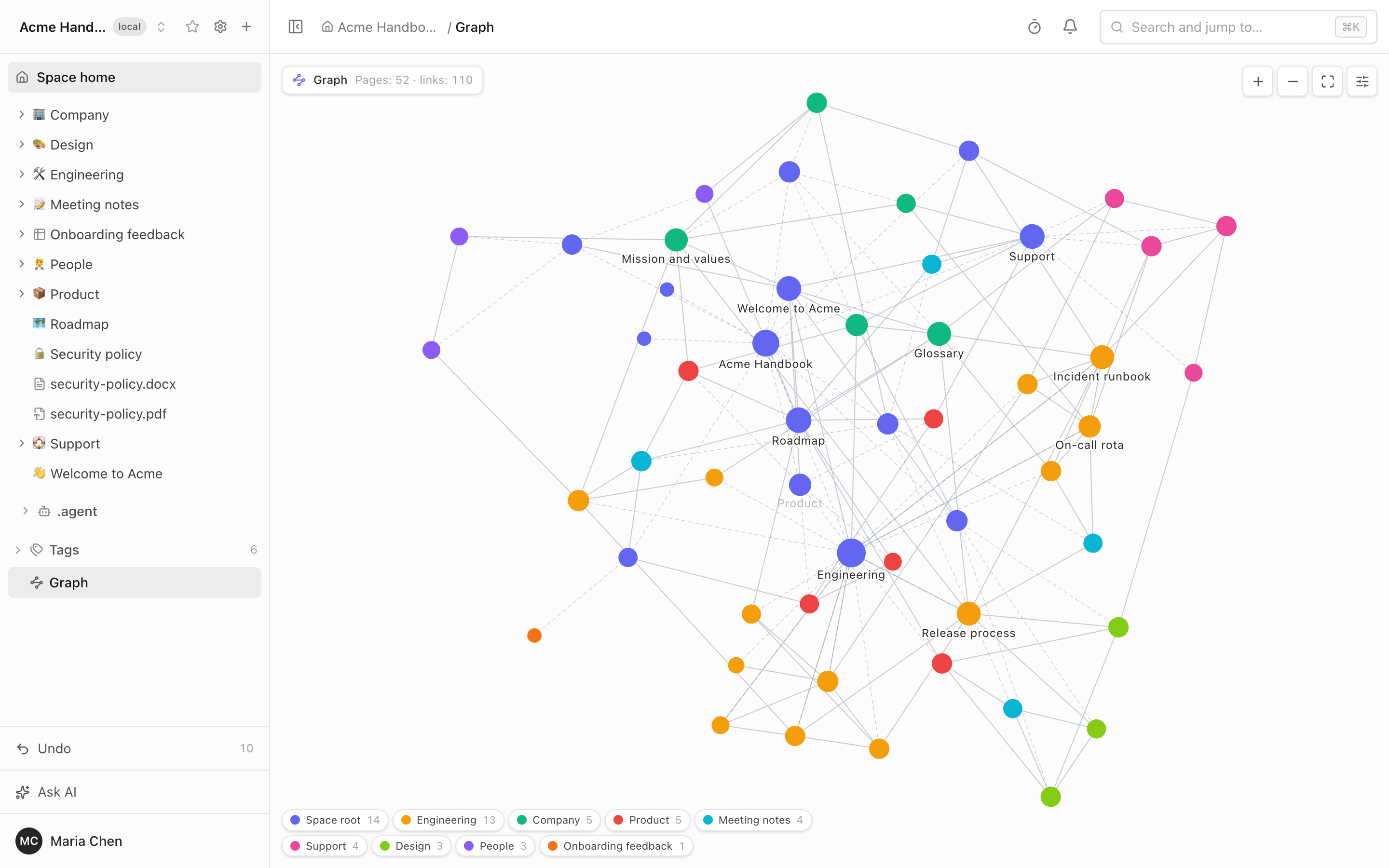
The graph. Labels follow the zoom: at the overview only the top hubs are named, zoom in and more titles fade in, never one over another. A "Tree structure" toggle adds the page tree as dashed lines, so a nested space is not a cloud of dots. A page of another space that you may open appears with its space in its name. Filters use the search grammar (tag:, in:, kind:, prop:), colour groups follow the top folder, the page kind, a tag or your own query. Agents get it too: the new MCP tool get_graph, and the built-in assistant uses it.
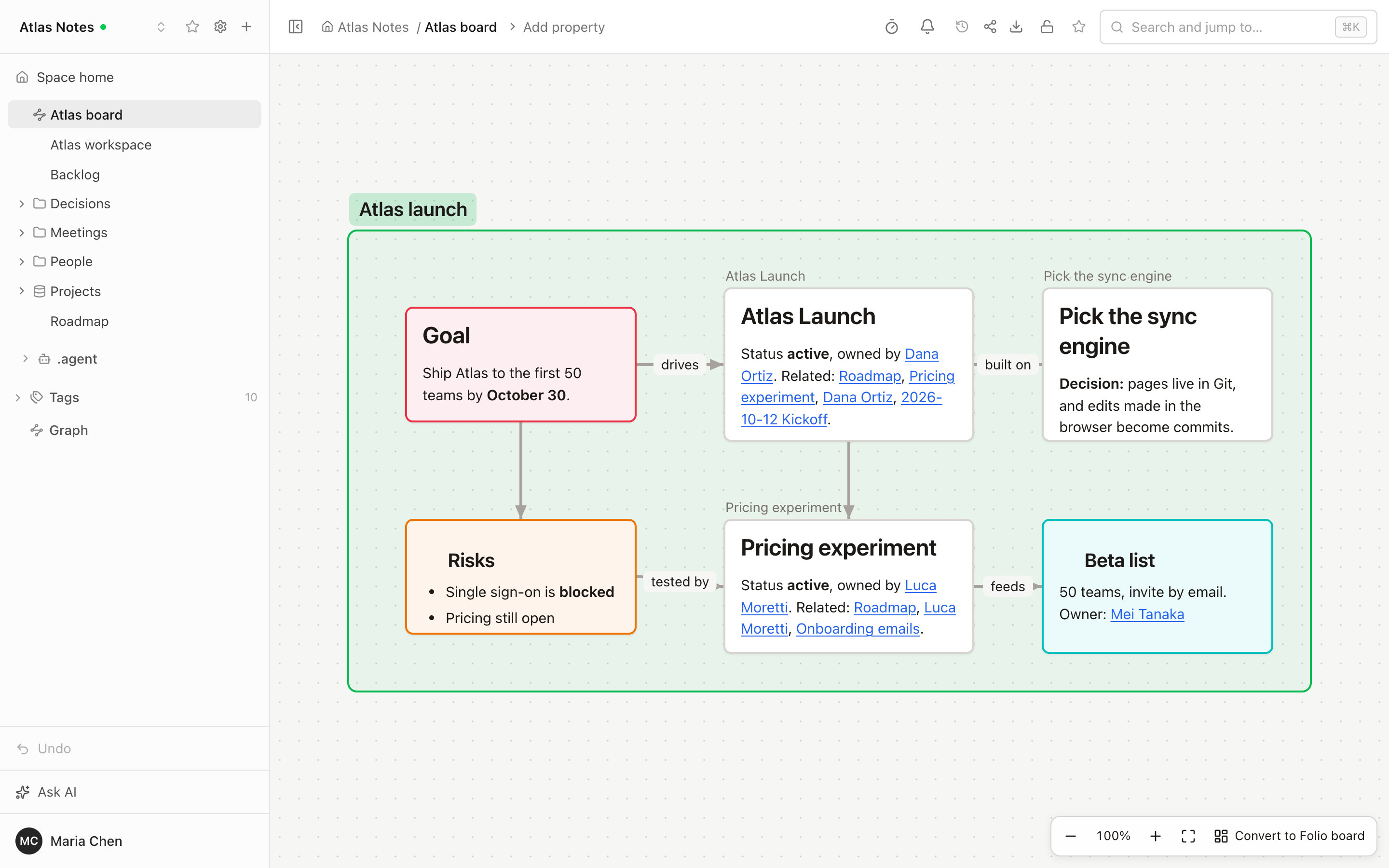
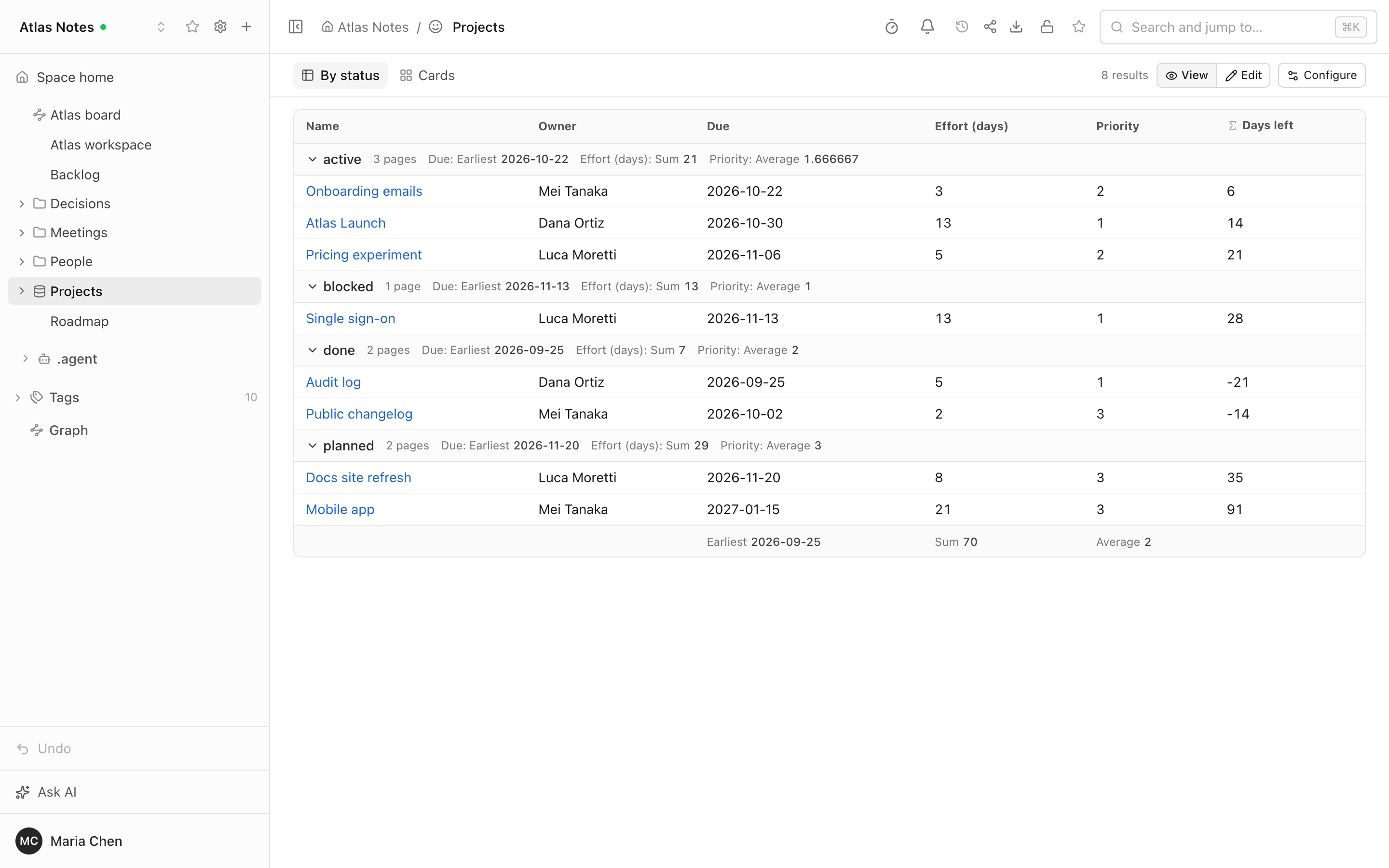
Obsidian canvases and bases open as pages. A .canvas file renders as it does in Obsidian: text cards as Markdown, note cards, images, web cards, groups, and connections with arrows and labels. It is read-only; "Convert to Folio board" makes an editable whiteboard in one commit and leaves the canvas as it was. A .base file is a saved query over the pages of the space, shown as a table, cards or a list, with grouping, sorting, formulas and column summaries. An Edit toggle changes a cell by changing that page's property, and a visual editor ("Configure") edits views and filters without disturbing the rest of the file.
Smaller things that add up.
- A timer that belongs to the page. The clock icon in the header starts a countdown (1, 3, 5 or 10 minutes, or your own) that everyone with the page open sees and hears end together.
- Properties on every kind of page, including data tables, forms, boards and files, not only documents.
- Folio AI and MCP build forms, tables and bases. The agent can create a form with the table its answers go to, change table columns and views, write a base, and turn a canvas into a board. The MCP server now has 40 tools, 20 of them read-only (it was 26).
- A pasted Folio link unfurls in Slack and Microsoft Teams into a card with the title, place, opening text and headings, built with the access of the person who shared it. Off until you set it up: docs/CHAT-PREVIEWS.md.
- Optional error reporting. Set
SENTRY_DSNto a Sentry project of your own and a "Report a problem" dialog appears. Off by default; with no DSN nothing is loaded and nothing is contacted. - Indexing no longer blocks the server. A large table, a long list or one very large document used to hold the server for minutes at startup; big documents are now indexed in chunks and health checks keep passing.
- The Russian interface is gone. Folio speaks English and Ukrainian; a saved Russian choice becomes Ukrainian.
Honest limits: the graph shows at most 10,000 pages (the most recently changed ones), has no saved layouts, and is not shown on public sites or share links. Bases are supported in part: kanban and map views, plugin functions and ![[x.base]] embeds are not, a query looks at up to 5,000 candidate pages and shows 200 rows at a time, and a base is not shown on public sites. Canvases are shown, not written, except that a rename rewrites the cards that point at the renamed note. The timer lives in the memory of the server, so a restart clears it. A Slack or Teams preview is a snapshot of the page at the moment of sharing. The full list is in LIMITATIONS.md.
Links: https://foliowiki.online, try it without installing: https://demo.foliowiki.online (shared, resets every 24 hours).
Upgrading
Back up first, then update as usual (docs/INSTALL.md). Four migrations are new since 0.3.0: 045 (chat links), 046 and 047 (the canvas and base page kinds) and 048 (a saved ru language becomes uk). They apply at startup and are one-way, so an upgraded database cannot go back to 0.3.x without restoring the backup. The first start re-reads every document once, because Folio page links are now indexed as links (index version 3). That scan is cooperative now: the server answers health checks while it runs, and a space of 3,000 pages with 1 to 2 MB documents is indexed without the server going quiet. A connection check that expects 26 MCP tools now sees 40.
Full changelog 0.4.0
A graph of how your pages link, Obsidian canvases and bases, and a few tools for
working together. The space opens as a graph (across spaces, with the page tree
as dashed lines) and every page has a local graph panel. Obsidian canvases open
as pages, Obsidian bases run as live tables, cards and lists whose cells you can
edit, and a canvas converts to a Folio board. A page gets a shared countdown
timer, the properties panel works on every page kind, Folio links are indexed as
page links, and a link pasted into Slack or Microsoft Teams unfurls into a card.
Folio AI and MCP now build forms, tables and bases (the MCP server has 40 tools,
and a get_graph tool reads the link graph). Optional error reporting with a
"Report a problem" dialog is off by default. Indexing no longer blocks the
server. The interface now speaks English and Ukrainian only (the Russian
interface is removed). Adds migrations 045 to 048.
Added
- A reload no longer loses a form you were building or filling in. The form
editor keeps a local draft of everything on screen (title, description, submit
text, fields with help text and "required", order, fields not saved yet) and
offers it back after a reload with "Restore" / "Discard"; closing the editor with
unsaved changes asks whether to keep editing, close and keep the draft, or discard
it, and closing the tab warns. A person filling in a form (signed in, through a
share link, or an embedded form) gets their answers back after a reload with a
"Clear" link, and they are removed once the response is sent. Drafts live in the
browser only, per user and per form; file contents and sensitive field types are
never stored. - Optional error reporting and a "Report a problem" dialog (off by default).
SetSENTRY_DSNto the DSN of a Sentry project of your own and the server and
the browser report unhandled errors and 5xx answers (a sample of traces too:
SENTRY_TRACES_SAMPLE_RATE, default 0.1), and the user menu gets "Report a
problem": a message, an optional screenshot (picked or pasted), the page path
without its query, the page id and kind, the release and the browser, tied to
the last error the person ran into. Nothing goes to the Folio authors. No page
content, search words, request bodies, cookies,Authorizationheaders or query
strings are sent (a share token in a path becomes[token]); the user is the
internal id only; there is no Session Replay; expected 4xx answers are not
reported. With no DSN nothing is loaded and nothing is contacted. Builds given
SENTRY_AUTH_TOKEN,SENTRY_ORG,SENTRY_PROJECTandFOLIO_RELEASEupload
source maps and delete them from the output. Details:
docs/INSTALL.md. - Graph view across spaces and with the tree structure. A page of another
space that you may open appears in the graph, labelled "space / title" in its
own colour, and opens in its own space. A "Tree structure" toggle (on by
default) adds the page tree's parent → child lines, dashed, so a nested space
is not a cloud of dots; in the local graph the parent, the children and the
siblings (two steps away) are neighbours too. The graph API takestree=1. - A clearer local graph panel. A visible Depth label with a hint on each
button (direct links, through one page, through two pages), a header that
collapses the section (remembered for every page), and an empty state that
says how to get links. - Canvases in an Obsidian vault follow renames, like notes. In a
light-footprint space (an Obsidian vault, a notes repository) the.canvas
file used to be left alone, so a file card read "File not found" after a note
was renamed or moved through Folio. The canvas is now rewritten in every space
by the same rules as the wikilinks of notes: only the changed path strings are
touched, every other byte stays, and the edit rides the rename's own commit. - Free names for canvases and bases. As in Obsidian, the name of a canvas or
a base is its file name. "Rename" in the page tree menu takes any valid file
name, such as "My tasks" with a space or non-Latin letters (no/ \ : * ? " < > |,
no leading or trailing dot, up to 200 bytes), keeps the.canvas/.base
extension, moves the page's property sidecar along, rewrites links to the file
(wikilinks, Markdown links, file cards of other canvases, vaults included) in
one commit, and keeps the page id. A name already taken is refused with a clear
error; a change of letter case is allowed.POST /api/pages/:id/renamenow
renames the file for these two kinds as well, andPOST /api/pages/:id/slug
takes a free name for them (other pages still take a lowercase slug). - The built-in assistant and MCP build every kind of page. Folio AI in Agent
mode, and any MCP client with awritetoken, can now create and change forms
and the table their answers go to, change data table columns and views, and
turn an Obsidian canvas into an editable board. Seven new tools (40 in all, 20
of them read-only):create_form,update_form(the same steps as the form
editor: a new field adds a column to the paired table, a removed field keeps
its column and answers; a staleetagis refused),folio_table_update_column,
folio_table_delete_column,folio_table_save_view,folio_table_delete_view
andconvert_canvas_to_board.read_pageon a form returns its fields and
etag. Astatuscolumn created through MCP without options gets the status
preset, as in the web app. The assistant has two new skills, for forms and for
the syntax of bases, and its Ask mode hides exactly the tools that write. - MCP: tags, properties and bases. Five new tools (the MCP server now has
33 tools, 20 of them read-only).list_tags(space, prefix?, limit?)returns
the space's tag tree with page counts,list_properties(space)the property
keys in use with their type, page count and sample values; both count only
pages the caller can open.rename_tag(space, from, to)renames a tag across
the space like the web app (bodies,tags:/labels:, tables, boards and
files; one commit authored by the token's owner), changes only pages the
caller can edit and reports how many pages it changed and skipped.
set_page_properties(id, properties, etag?, merge?)writes a page's
properties for any page kind through the same code as the properties panel
(a staleetagfails with the current etag, reserved table and form keys are
refused,merge: truechanges only the keys given).save_base(space, yaml, path?, id?, etag?)creates a.baseor replaces one, refuses invalid YAML
with the line number, and returns a preview of the first view. - Link previews in Slack and Microsoft Teams. A Folio link pasted into a
message unfurls into a card with the page's title, breadcrumb, opening text,
headings, tags and last update (rows and columns for a data table), built with
the Folio access of the person who shared it. People connect their own Folio
account once from the chat app (Sign in with Slack or the Teams sign-in window,
then Folio's own OAuth consent, read only); a page they cannot open gives a
card with no title, and a restricted page shows its title only because the
whole channel sees the card. Share links and public-site pages unfurl without
connecting. New settingsFOLIO_SLACK_*andFOLIO_TEAMS_*; a new
Administration → Chat integrations page with the Slack manifest and the Teams
app package; "Chat apps" in API tokens to disconnect. Database migration 045.
See docs/CHAT-PREVIEWS.md. - Obsidian Bases (
.base). A base from an Obsidian vault opens as a page:
a saved query over the pages of its space that you may open, shown as a table,
cards (cover from animage:property) or a list, with group by, sort,
limit, column summaries (the built-in ones and your own formulas), display
names, and the base's and the view's filters combined withand/or/
not. Formulas and filters run in a safe evaluator of our own (noeval):
arithmetic, comparisons, date arithmetic with durations, lists, objects,
regular expressions,this, and the usual string, number, date, list, link,
file and object functions;html(),image(),icon()and plugin functions
are not supported (a formula column shows "formula not supported", a filter
using one is ignored with a warning), andkanbanandmapviews fall back to
a table with a notice. Access is applied in SQL, as in search and the graph, so
a page you cannot open is never a row; a query looks at up to 5,000 candidate
pages and shows 200 rows at a time. An Edit toggle changes a cell in place: it
edits that page's property (only pages you can edit, only note properties,
neverfile.*orformula.*, never a Folio key holding a foreign value). A
visual editor ("Configure") edits views, filters, formulas and display names
and has a raw YAML tab; saving keeps unchanged blocks and views byte for byte,
comments and unknown keys included, in one commit by you. Create one with
"+ → New base" or the quick switcher's "New base", or turn a search into a base
with "Save as base…".basecode blocks in documents render the same view
(read-only, withthismeaning the document); share links and public sites
show a note instead. A base exports to Markdown as its YAML in abasefence,
andkind:baseworks in search. New REST routes
GET /api/pages/:id/base,GET /api/pages/:id/base/source,
PUT /api/pages/:id/baseandPOST /api/spaces/:space/base/preview, and a
read-only MCP toolquery_base;read_pageon a base returns its YAML andfetchrenders its rows
as a table. Database migration 047. Not yet:kanbanandmapviews, editing
cells inside an embedded block, attachments as rows,![[x.base]]embeds, and
a base across spaces. - Graph view. A "Graph" row under Tags in the sidebar opens the space as a
graph: pages are nodes, links are edges, and tags, attachments and unresolved
links can be added. A "Local graph" section at the top of a document's
right-hand panel shows the page and its neighbours 1 to 3 links away (out, in
or both) and opens full size. Hover highlights neighbours, click opens the
page, nodes drag, the canvas zooms and pans, and on a touch screen the first
tap selects. A compact settings panel, remembered per space, has filters in the
search grammar, colour groups (top folder, page kind, tag or your own query),
display options and the four layout forces. The graph is built on the server
from the page index in a few queries (5,000 pages in about 150 ms) with page
access applied in SQL: a page you cannot open is never a node, a ghost or an
edge. Above 10,000 readable pages the most recently changed 10,000 are shown.
New REST routesGET /api/spaces/:space/graphand
GET /api/pages/:id/graph, and a read-only MCP toolget_graph(the MCP
server now has 27 tools); the built-in AI assistant can use it too. The
renderer is a small canvas withd3-force, loaded only when a graph is opened. - Shared page timer. A timer icon in the header of every page (and of a folder
listing): 1, 3, 5, 10 minutes or a custom time up to 3 hours, a livemm:ss
countdown, pause / resume / +1 min / reset. It belongs to the page: everyone who
has it open sees the same countdown and reaches zero together, with a soft chime
(generated in the browser) and a "Time is up" toast; a muted-speaker icon and a
hint appear while the browser still blocks sound. Editors on the page control it,
everyone else who can read the page watches. The state lives in server memory (not
in the page, Git or the audit log) and travels over the existing/eventssocket,
only to people who can read the page.GET/POST /api/pages/:id/timer. Single
server process, like the live editing rooms. No migration. - Obsidian canvases (
.canvas, JSON Canvas 1.0) open as pages. A canvas is
shown as it is, read-only — Folio never writes the file while showing or
indexing it: an infinite canvas with pan, zoom and fit, text cards rendered as
Markdown (Obsidian syntax included), note cards with the note's start or the
#heading/#^blockthey are narrowed to, images, audio and video, web page
cards with their URL, groups with labels and background images, Obsidian's
colours in light and dark, and curved connections with arrows, labels and
colours. A card pointing at a page you may not open shows only "No access".
Text cards are searchable, their#tagstag the canvas, file cards and links
in text cards appear in backlinks and unresolved links, and MCPread_page
returns anoutlineof the canvas. Convert to Folio board makes a new,
editable whiteboard from a canvas in one commit, showing first what the board
cannot keep; the canvas stays. Renaming or moving a page a canvas points at
updates the canvas in any space, an Obsidian vault included. Migration046_page_kind_canvas.sql. - Properties on data tables, forms, boards and files. The properties panel
now appears on every page kind except folders, as a thin row above the page
("Properties (N)" at the top left). A data table or a form keeps its properties
in its own front matter, next to the keys that define it (schema, views,
fields): those stay hidden and byte-for-byte untouched, and a table or form
save keeps the properties. A board, a PDF or an Office file keeps them in a
sidecar YAML file,.folio/<path>.props.yaml, created by the first property,
deleted with the last, committed on its own with every save, and moved, trashed
and restored together with its page; a sidecar changed in git is picked up on
the next scan. Tags and properties of all of them work in search (tag:,
prop:), in the tag tree and rename, and in MCPget_page_metadata.
Fixed
-
Graph, bases and the "New base" dialog, after a visual check. The space graph
no longer draws every label into an unreadable mass: labels fade in with the zoom
like Obsidian's (the top hubs at the fitted overview, more as you zoom in, none
over another; a hovered or selected node and its neighbours stay labelled), and
"Text fade threshold" still sets when they all appear. Folders are named by the
title of their page (Tech / Prompts) in the graph legend and in thefile.folder
column of a base, instead of their slugs; filters and sorting still compare the path.
The base editor lists columns, sort, group and summaries by their plain names
(Name, Folder, Tags, Modified, …, or the base'sdisplayName) with the raw key as
a muted hint. "New base" opens at once, and on a phone the graph's counts no longer
sit under the zoom buttons. -
Links Folio writes itself are page links. The URL "Copy link" gives
(https://<host>/s/<space>/p/<id>), a pasted page address,/s/<space>/p/<id>
as the assistant and MCP write it, the space home/s/<space>and a folder
route were indexed as external links, so a space linked this way showed its
pages and no links in the graph, and backlinks, orphans, unresolved links,
bases andget_backlinksmissed them. They now resolve to the page by id, in
any space, on the instance's own host (PUBLIC_URL) or root-relative; an
unknown id is an unresolved link; other hosts, share links and public-site
addresses stay external. Every document is indexed again on the next start. -
Indexing no longer blocks the server. Some Markdown constructs (a large
table, a long list or quote, a paragraph with thousands of links, one large
HTML block) took far more than linear time to index, and a single big
document could hold the server for minutes, so health checks failed while it
started. Big documents are now indexed in chunks with pauses between them; a
space of 3,000 pages with 1–2 MB documents is indexed while the server keeps
answering within a fraction of a second.
Changed
- A browser that asks for Russian gets Ukrainian. Folio's interface languages
are English and Ukrainian; a savedruinterface choice from an older database
becomesuk(migration048), and any other unknown browser language still
falls back to English. - Reading mode is read-only for properties. In Reading mode the properties
are shown as text and chips for everyone; adding, editing and removing them
happens in Live and Source.