Repository navigation
Run a single instance
Some applications run once: a second start, from a file manager or a terminal, should bring the running window forward and hand it the file, not open a second copy. In this guide, a viewer lists the files that later starts pass to it.
public class SingleInstance {
  public static void main(String[] args) {
    ApplicationParameters parameters = ApplicationParameters.builder().name("Viewer").build();
    Optional<Application> instance = Application.createSingleInstance(parameters, args);
    if (instance.isEmpty()) {
      return; // Another instance runs, and has the arguments now.
    }
    try (Application application = instance.get()) {
      Window window =
          application.show(
              WindowParameters.builder()
                  .title("Viewer")
                  .size(new WindowSize(560, 360))
                  .resource("instance/index.html")
                  .build());
      application.onSecondInstance(
          event -> {
            window.focus();
            window.emit("opened", String.join(" ", event.arguments()));
          });
      window.bind("firstArguments", Void.class, _ -> List.of(args));
      application.run();
    }
  }
}-
createSingleInstance(parameters, args)returns the application in the first process. In every later one, it handsargsand the working directory to the first, and returns empty, having opened nothing: that process simply ends. - The processes find each other by the name of the application, which is required.
-
onSecondInstancehears every later start, with itsarguments()andworkingDirectory(), after the oldest window has come to the front. A relative path in the arguments is relative to that working directory, not to the one of the first process.
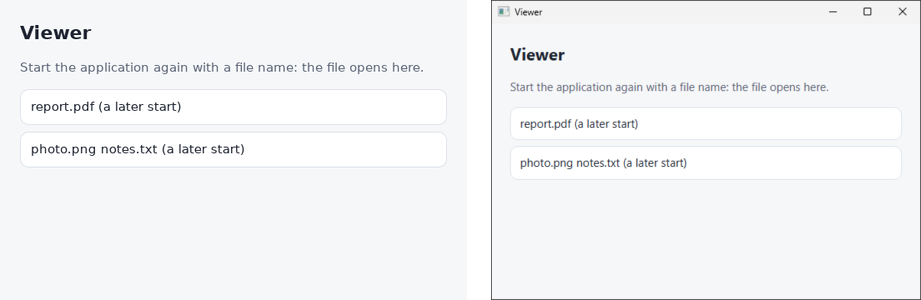
Try it from two terminals: start the viewer, then start it again with a file name while it runs, and the file shows up in the first window, while the second start ends.
./gradlew run
./gradlew run --args=report.pdf- Windows: the processes meet through a socket in the temporary directory of the user, which needs Windows 10 or later. The window comes forward from the background too.
- macOS: the socket is in the temporary directory of the user.
- Linux: the socket is in
$XDG_RUNTIME_DIR. On Wayland, the window may only ask for attention rather than come forward, as the compositor decides.
To hear of the links and the files that the system opens with the application, such as from a
double click in the file manager, use application.onOpen; see
Open your own links and files.