Repository navigation
Show progress in the taskbar
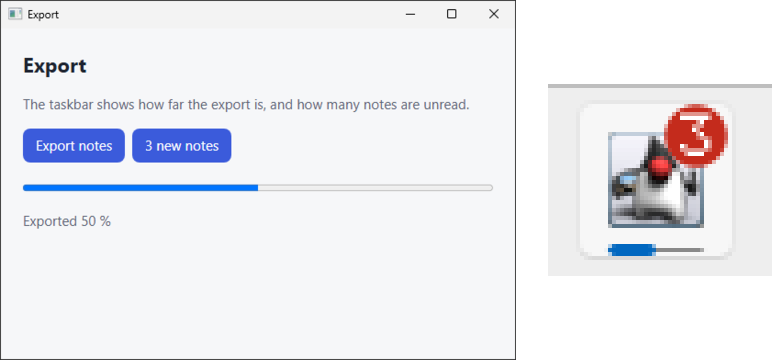
The icon of the application in the taskbar or the Dock can show how far a long task is, and a count such as the number of unread notes, so the user sees both without opening the window. In this guide, an export fills the bar on the icon, and a button puts a count on it.
public class Taskbar {
  public static void main(String[] args) {
    Application.launch(
        WindowParameters.of("Export", 560, 360),
        window -> {
          Application application = window.application();
          window.bind(
              "export",
              Void.class,
              _ -> {
                for (int step = 1; step <= 10; step++) {
                  Taskbar.pause(800);
                  application.progress(step / 10.0);
                  window.emit("progress", step * 10);
                }
                application.progress(TaskbarProgress.none());
                return null;
              });
          window.bind(
              "unread",
              Integer.class,
              count -> {
                application.badgeCount(count);
                return null;
              });
          window.loadResource("taskbar/index.html");
        });
  }

  private static void pause(long millis) {
    try {
      Thread.sleep(millis);
    } catch (InterruptedException e) {
      Thread.currentThread().interrupt();
    }
  }
}
The progress stays on the icon until the next call. TaskbarProgress has a form for each state:
| Call | What the icon shows |
|---|---|
progress(0.4) or progress(TaskbarProgress.of(0.4))
|
A bar at 40 % |
progress(TaskbarProgress.indeterminate()) |
A bar that moves without an end |
progress(TaskbarProgress.paused(0.4)) |
A paused bar, yellow on Windows |
progress(TaskbarProgress.error(0.4)) |
A failed bar, red on Windows |
progress(TaskbarProgress.none()) |
No bar |
badgeCount(3) |
The count 3; badgeCount(0) takes it away |
The progress and the count belong to the application, not to one window: every window shows them where the platform shows one per window, and a window that opens later shows them too.
The page sets the same with lwjwae.taskbar:
await lwjwae.taskbar.progress(0.4);                            // a bar at 40 %
await lwjwae.taskbar.progress({ state: "paused", value: 0.4 }); // none, normal, indeterminate, paused, or error
await lwjwae.taskbar.progress(null);                           // no bar
await lwjwae.taskbar.badge(3); // 0 for none| Platform | Progress | Count |
|---|---|---|
| Windows | The button of every window, through ITaskbarList3. |
A red circle with the number over the button, 9+ from 10 on, through SetOverlayIcon. The taskbar shows it only with its small buttons off, which is the default. |
| macOS | A bar over the icon in the Dock, the same in every state. An indeterminate bar stands still. | The badge of the icon in the Dock. |
| Linux | The com.canonical.Unity.LauncherEntry signal over D-Bus. The task manager of KDE Plasma and the dock of Ubuntu show it. An indeterminate bar shows nothing, and an error asks for attention. |
The count of the same signal. |
- On Linux, the signal names the desktop entry of the program,
NAME.desktop, as the Gradle plugin installs it. Under./gradlew run, the desktop has no entry for the application, so the icon shows nothing. - The bar on the page and the bar on the icon are separate: update both, as the export here does
with its
progressevent.