Repository navigation
famstack 0.4.0

The family's server learns what the family keeps: a diary, lists, a calendar.
famstack started as document filing over Matrix: send a letter to the family
chat and it lands in Paperless, tagged and summarized. The idea was to stay
fully local and still get the most out of what the family files, for the
family.
Since the first release, a lot has happened, and it took longer than
planned. We use famstack at home every day, and that use kept growing the
scope: voice memos become a diary, the shopping list and the school dates
live in the chat, and the wiki opens with the family instead of a file tree.
The server also got easier to keep running, with updates in one command and
a menu bar app.
And we finally got Stacky, the family agent, to a state where it is useful.
We test drive it at home every day: it puts the milk on the shopping list
from a voice message, ticks off what is done and answers from what the
family has filed. It is still beta, and it has rough edges, but it is the
part of famstack we are most excited about.
0.4.0 is the first final release since 0.2.x and the foundation the
next releases build on. 0.5.0 is about Stacky as the family's assistant,
and about the family wiki that writes itself, refined further.
Updating: from 0.4.0-rc.2 it is ./stack update and ./stack restart.
From 0.3.0-beta.3 the move is by hand, once: see Upgrading.
Your automatic family diary from the Memories room
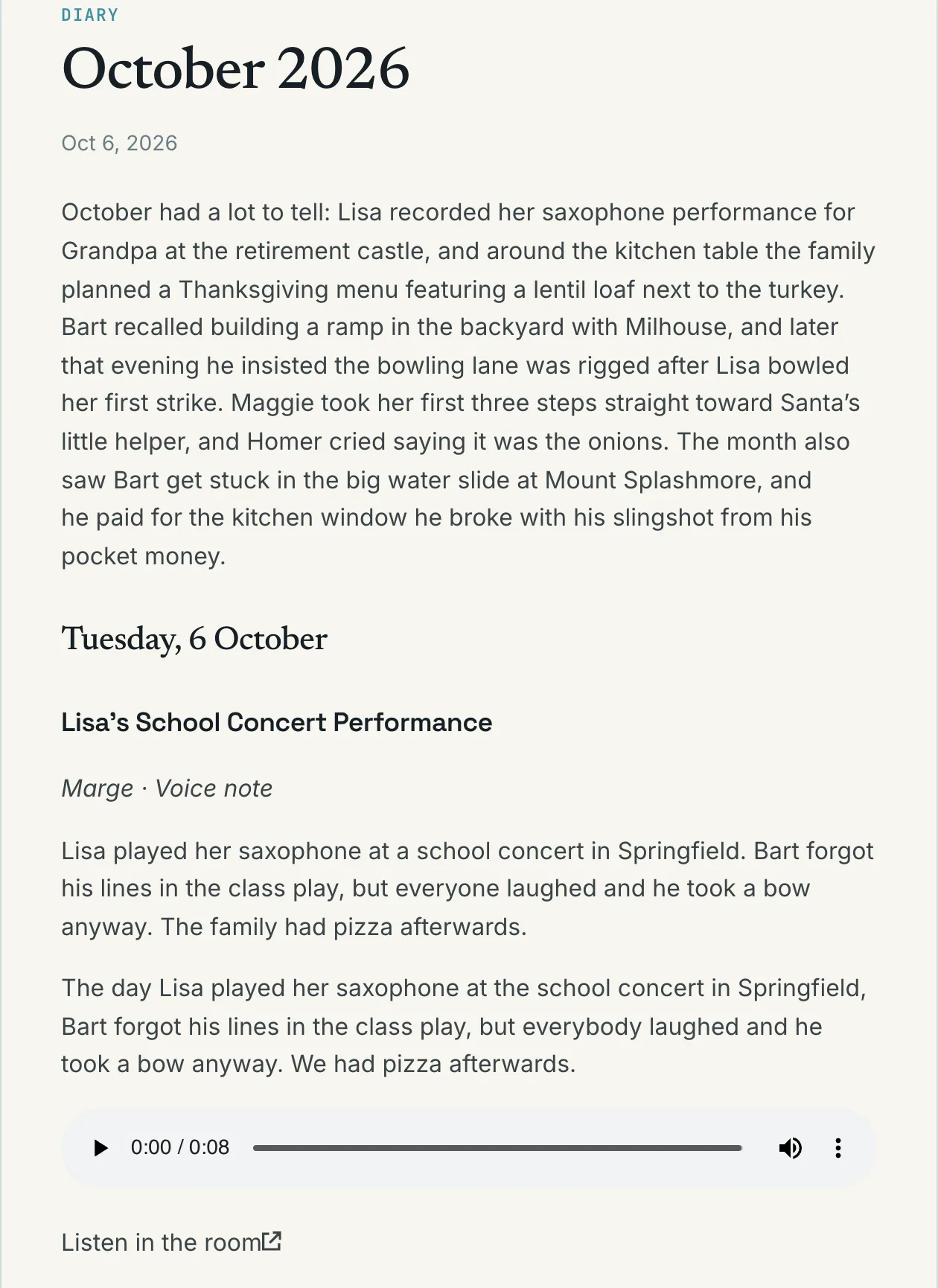
Post a voice memo, a photo or a few lines in the Memories room, and famstack
turns it into a diary in the family wiki, month by month and in the household
language, with each recording playable and each photo shown. Every night it
reads what was added; the next morning the archivist posts a card under each
entry with its title, people, date and facts. Reply in the card's thread,
typed or spoken, to fix a name or a date. The correction is kept under the
name of the person who made it. After two weeks without a memory, the
archivist reminds the family.
Lists and calendar items as first-class citizens
Groceries, the packing list for the camping trip, a topic's to-dos and the
family calendar are lists in the family memory. Ask Stacky, the family agent,
to add, tick or move items, by text, by voice or with a photo of a
handwritten list, or use ./stack memory list. The archivist puts the dates
from a school letter or an appointment confirmation on the calendar, and a
document's tasks on its topic's list. The wiki shows what is still open on
every topic and person page. Stacky is beta.
The family wiki as central source of information
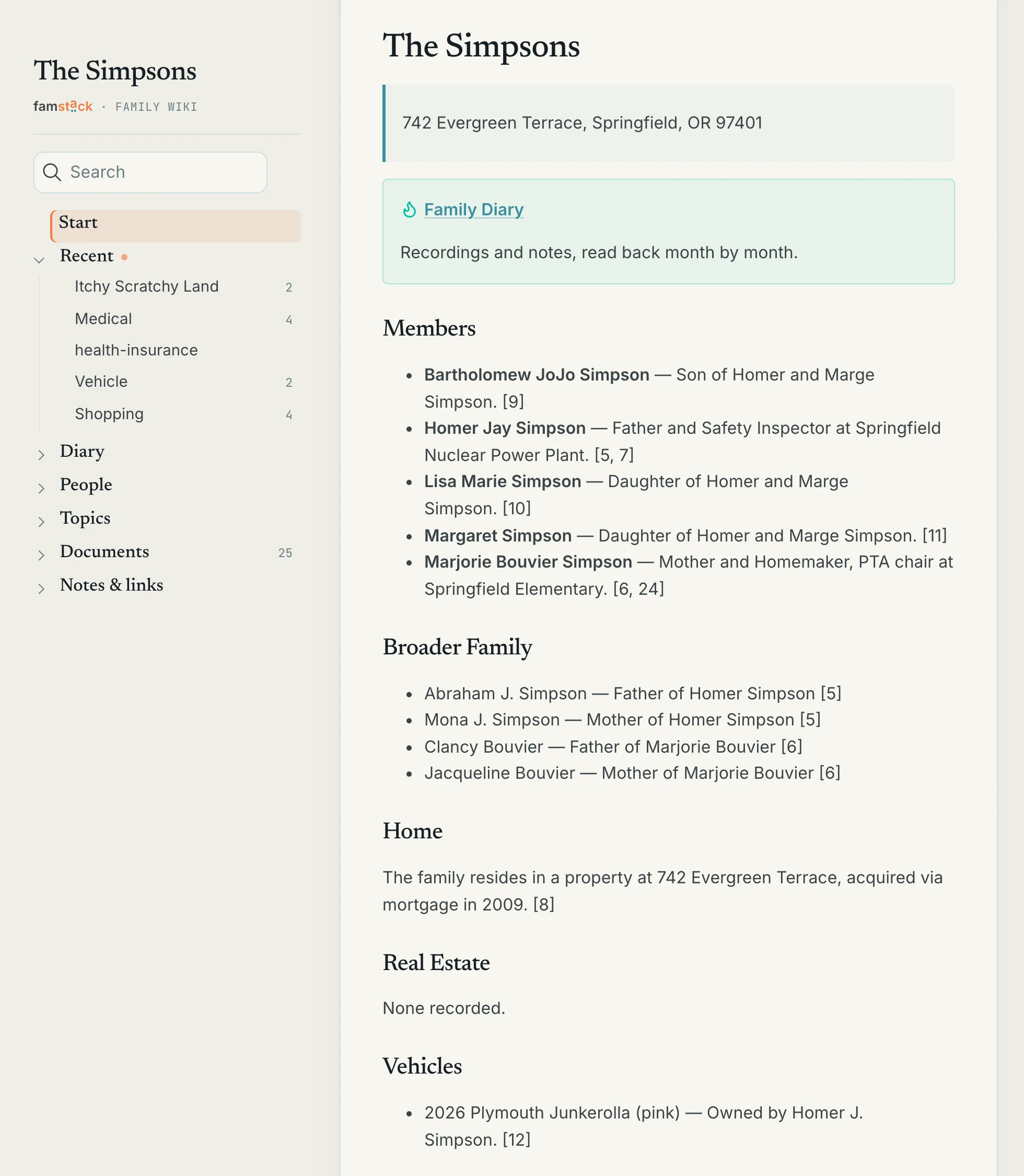
The home page opens with the family: the household facts at a glance, what
happened last month and what is ahead. Person and topic pages are written in
the family's voice, in English or German, and the menu follows what the
family looks for: Lists, Diary, People, Topics, Documents. Everyone the
family knows can have a page, a baby or a grandparent without a chat account
included (./stack memory person add). Every page can show or play the
photo, file or recording it came from.
Encryption support for bots
Element X encrypts every direct chat, so until now a family on Element X
could not talk to the archivist or Stacky one to one. The bots now read the
encrypted rooms they are invited to, photos, files and voice messages
included. Inviting a bot is the family's choice to have famstack read that
room, encrypted or not; a chat without a bot stays private.
Talk to the bots instead of typing
A voice message is transcribed once, and every bot treats it like a typed
message (#85): the archivist files it, and Stacky answers one that starts
with its name, quoting what it heard so a misheard word is easy to spot.
Whisper knows the family's names and topics before it listens, so "Bart" no
longer comes back as "Part", and it no longer invents phrases on a silent
recording. Long recordings in the Memories room become a short summary with
exact quotes, the full transcript folded below it. Stacky can also answer
out loud on the server Mac (./stack ai say, #236), and the voices for the
house's languages, German included, are downloaded on ./stack up ai
(#264).
Use an AI server you already run
./stack ai switch <url> points famstack at an AI server it does not
manage: a bigger Mac elsewhere in the house, or an AI app on this Mac
(localhost). Voice messages go to the same server, unless you name a
speech server of their own. The command checks the server, warns when the
address is outside the home network, and ./stack ai switch managed
switches back to the engine famstack runs here (#168). A 16 GB Mac can run
the stack and leave the model to a machine with more memory.
Updates in one command
./stack update moves your install to the newest release and names what it
changed; ./stack restart restarts exactly the stacklets that run outdated
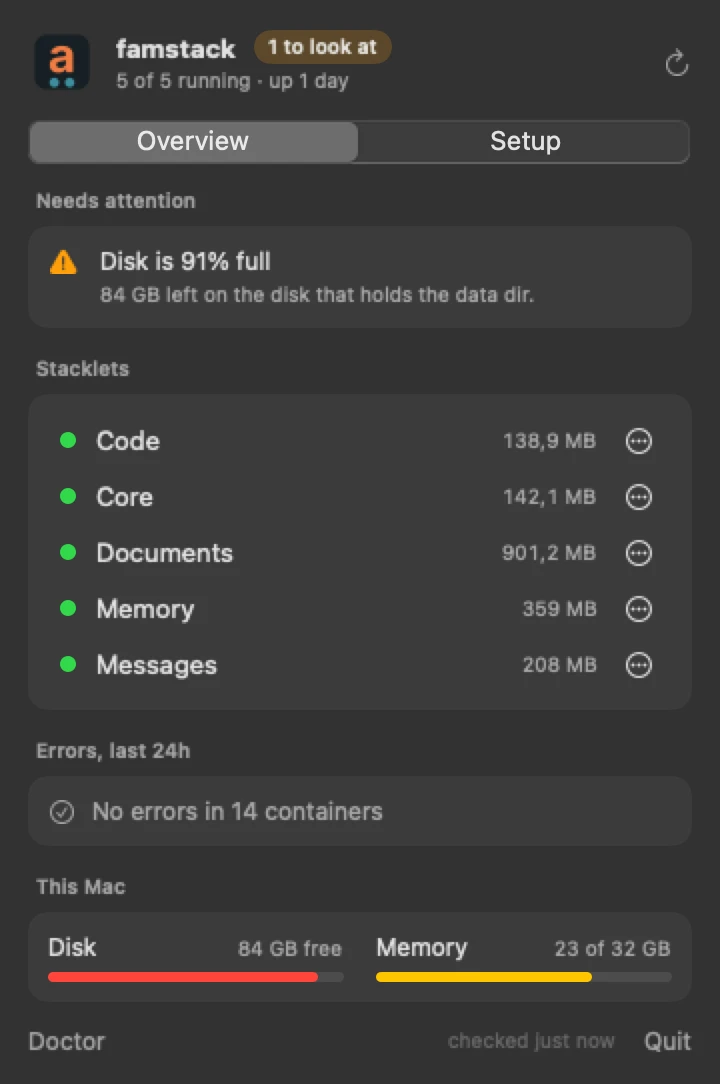
code, and ./stack list and ./stack doctor mark them. A menu bar app
(beta) shows the stack and starts and stops it: ./stack app install.
More in 0.4
- Stacky (beta): reads a photo sent with a caption, takes a reply to its question without its name, and shows what it is doing while a long answer runs. A turn takes 8 to 16 s instead of 12 to 50 s on the demo rig. The admin can allow stacklet commands with
[agent] allow(#93, #233). - Archivist: answers when you start or end a message with its name, files documents under every person by any name the family uses, links the wiki page in its reply (#122), keeps your captions and replies on the capture, files a link card with your words when a page cannot be read (#96), and files a room in the language you set with
!config language. - Family memory:
./stack memory askanswers from the family memory, search covers the diary and the wiki pages and ranks rare words first, and every hit links to its page, so Stacky cites what it read (#81)../stack memory wiki updatebrings the wiki up to date at once. - Backups (beta): the chat server is backed up too: its database, signing key and voice recordings (#87). Each stacklet gets a folder of its own;
./stack backup migratemoves an existing disk (#88). - Running the server: domain mode serves your own names with HTTPS through Caddy, with certificates from Hetzner or Cloudflare (beta, #111, #186). Paperless, Immich and Forgejo sign in through an OIDC provider stacklet (#125, #128, #129).
up,down,restartanddestroytake several stacklets. Afamstackcommand works from any directory. The installer asks for the family's language. Stacklets that famstack does not ship load from~/famstack-extensions. Every container image is pinned to a version (#114). - Security: admin passwords no longer appear in the output of a failed install, and port 42000 serves only the
/golinks, not searches and logs.
Fixed
- Local AI: the engine and Whisper start on every
./stack up ai, also after./stack down ai. Transcript cleanup cannot hold the AI server for 30 minutes, other machines in port mode can use this Mac's AI, and oMLX installs without Homebrew stopping to ask (#171, #181). - Stacky: no more endless tool loops (#82). It's way faster with recent versions of oMLX, and finally usable. It answers in the language the message was written in (#249), acts only for the person who wrote, and recognizes a topic room named in German.
- Archivist: files in the household language whatever the source language (#86), reads the cited documents in full when it defers in any language (#271), puts only what the family has to do on a topic's list, files photos as notes, keeps a corrected capture at its path so links keep working, and takes a retry of a failed filing as a reply in its thread.
- Chat: Element opens at
http://localhost:42030on the server and in the apps elsewhere, the family admin is admin in every family room, invites no longer stall for minutes, and a fresh install posts the Memories welcome. - Wiki: a welcome page instead of a 404 on a fresh install (#84), a wiki that keeps rebuilding when one page fails, the "From:" link on document pages (#183), and no false mirror errors in the log (#83).
- The
stackcommand: shows image downloads and why compose failed, removes a failed stacklet's containers ondestroy, saves a setting without rewriting the rest ofstack.toml, and./stack doctorcompares a container with the compose config and prints its fixes as commands you can run (#95). - Elsewhere: the nightly backup finds
diskutil,mountanddocker(#188), SSH clone URLs work in domain mode,./stack code repo listworks without naming an owner (#232), and Paperless admins can have a quote in their password.
Where it's rough
- Stacky is beta. On its first start it cannot sign in until you run
./stack restart core, then./stack restart agent(#173). It sometimes answers in the household language when you wrote in another one. - 16 GB Macs. The local 9B model fits only with voice off and little else running. Point the stack at an AI server elsewhere in the house with
./stack ai switch <url>. - ChatAI is deprecated and will be removed from famstack in 0.5.0. Ask the AI in the chat, through Stacky.
- Backups are beta.
- Several bots in one room. Talking to the bots got easier: start or end a message with a bot's name to reach it. In a room with several bots it is not perfect yet.
Open an issue or come to the Discord.
Upgrading
From 0.4.0-rc.2
./stack update
./stack restart
./stack restart with no argument restarts the stacklets that run outdated
code. Stacky keeps its conversations; its rules for answering (AGENTS.md)
are replaced by the release's on every start. Dream is off: what it wrote
moves to ~/famstack-data/agent/dream-archive/, nothing is deleted.
From 0.4.0-rc.1
The same two commands, then the steps from the
0.4.0-rc.2 notes.
Stacky starts its conversations afresh (see below).
From 0.3.0-beta.3
0.3.0-beta.3 has no ./stack update, so this move is by hand, once. Run it
in the famstack checkout.
-
Back up
~/famstack-dataand the configuration:tar czf famstack-config-$(date +%F).tgz stack.toml users.toml .stack/ -
If ChatAI runs, stop it and leave it stopped. 0.3.0-beta.3 ran Open
WebUI'smainimage, and the version 0.4.0 pins refuses that database:./stack down chatai
-
Move to the release and restart every stacklet once. The containers
0.3.0-beta.3 started carry no release label, so nothing else tells you
they run old code. The stack stays down while the new images download:git fetch --tags && git checkout v0.4.0 ./stack doctor ./stack restart all -
Preview the topics the ontology adds (Music, Sport, Hobby, Celebration,
Friends, Family Life)../stack memory ontologyreplaces your vault's
ontology.tomlwith the shipped one, so merge topics you added by hand
first:./stack memory ontology --dry-run
-
Add the people without a chat account, such as a baby:
./stack memory person add "Maggie Simpson" --as marge
Scripts that call the memory commands need the new names:
| 0.3.0-beta.3 | 0.4.0 |
|---|---|
./stack memory wiki |
./stack memory wiki update --all (or --home, --member, --topic, --topics) |
./stack memory person <name> |
./stack memory person show <name> |
./stack memory topic <topic> todo |
./stack memory list show <topic> |
What changes by itself
- Stacky starts its conversations afresh. Its engine moved to a newer
nanobot, which stores conversations differently. What Stacky saved to the
family memory stays. - The bots keep their logins and devices; there is nothing to re-invite.
They read the encrypted rooms they are already in, so remove a bot from
any room famstack should not read. - Each topic's
todos.mdbecomes a list under<bucket>/lists/, every item
and tick kept. - Every chat account gets a person file under
family/people/. - Photos the archivist filed as bookmarks move to notes, a minute after it
starts. - Optional:
./stack backup migratemoves a backup disk to one folder per
stacklet;./stack app installinstalls the menu bar app.
Every change in detail: the 0.4.0-rc.1
and 0.4.0-rc.2 notes.