fixed keyboard shortcuts on MacOS [#7892]#7893
Conversation


|
The test failures are unrelated, there's #7752 that should fix that |


|
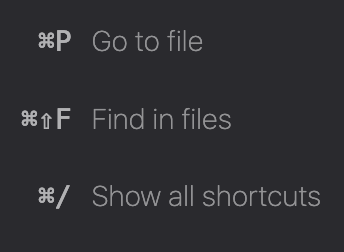
Nice work. I'd like others to weigh in here; the key representations look "bunched" or too close to me:
I wonder if some |

|
See #7892 (comment) for my comments about the font family. For spacing, we could use some letter spacing for macOS only. Or we could use thin spaces: |

|
Changing the font-weight to normal may fix the bunched feeling. |

|
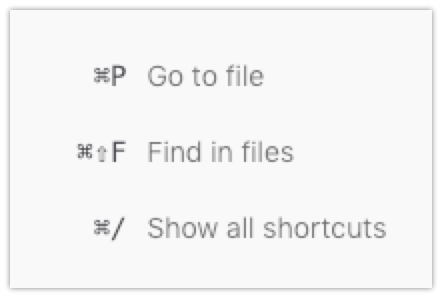
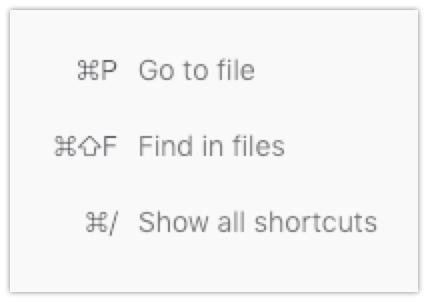
So right now we have this: After trying out the suggestion from #7892 comment, it looks like this: Changing font-weight makes no effect. |
|
Applying the styles only to macOS requires a selector like: :root[platform="mac"] .welcomebox .shortcutKey {
...
}Which works for the Debugger in Firefox, but not in "Launchpad" mode (the HTML element doesn't have that attribute). It looks like instead the platform attribute is added to a div in the body, so the relevant selector would become: :root[platform="mac"] .welcomebox .shortcutKey,
.launchpad-root[platform="mac"] .welcomebox .shortcutKey {
...
}@darkwing, do you know if there is some automation in place that converts the first selector form to the second one? Or do we need to write both? |
|
In launchpad mode I'm seeing styles like this, which seem to come from mozilla-central but the selector was tweaked: :root.html [platform="linux"] {
--monospace-font-family: monospace;
}Original: :root[platform="linux"] {
--monospace-font-family: monospace;
} |
|
Ah, my font-weight comment was based on David's screenshot but looks like your version is different. Latest version looks good but I miss the bolding of the shortcuts :) |
|
If we use the mac system font we can probably use |

|
Lots of good discussion here! @fvsch can you summarize the change to be made in one comment? |
|
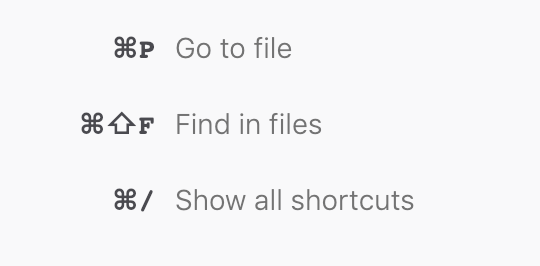
I went through the comments and implemented them in a suggested way. Right now the welcomebox looks on Mac as follows: |

| * License, v. 2.0. If a copy of the MPL was not distributed with this | ||
| * file, You can obtain one at <http://mozilla.org/MPL/2.0/>. */ | ||
|
|
||
| :root[platform="mac"] .welcomebox .shortcutKey, |

There was a problem hiding this comment.
This rule should be placed after the styles for .welcomebox .shortcutKey, to keep a logical order.
There was a problem hiding this comment.
Do you think now it's the correct place? :)
|
|
||
| :root[platform="mac"] .welcomebox .shortcutKey, | ||
| .launchpad-root[platform="mac"] .welcomebox .shortcutKey { | ||
| --monospace-font-family: monospace; |
There was a problem hiding this comment.
So I'm not very fond of the monospace font here. It looks like with font-family: monospace on a mac, Firefox may end up using Courier, which is not something we have elsewhere in DevTools. The --monospace-font-family CSS variable is actually defined so that we can specify a specific monospace font on each platform, so we shouldn't override it, even locally in some branch of the DOM.
It would be more interesting here IMO to try to use San Francisco, which seems to be the font used in the issue's screenshots. According to Can I Use, Firefox for Mac supports the -apple-system on macOS. For Chrome, it seems that the system-ui value is supported. So maybe something like:
[platform="mac"] .welcomebox .shortcutKey {
  font-family: system-ui, -apple-system, sans-serif;
  font-weight: 600;
}There was a problem hiding this comment.
This solutions seemed fine both on Chrome and FF. I also changed font-weight to 500, as it looks better.
|
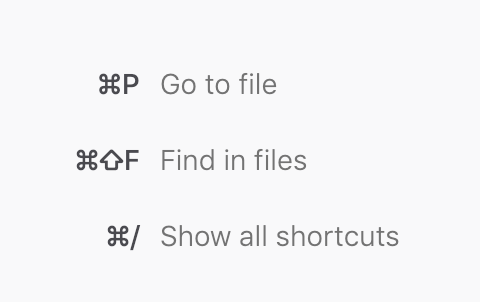
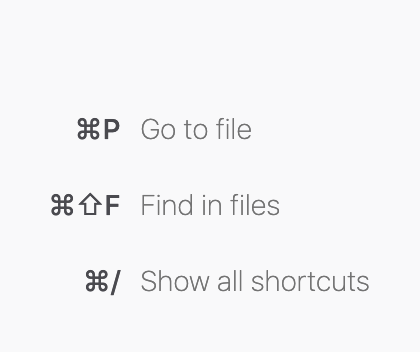
@bamanczak Can you show updated screenshots of the result on Mac, in Firefox and Chrome? |
|
As requested, screenshot from Chrome: |
|
Thank you for the update @bamanczak ! We'll have a look! |
|
I love this @bamanczak ! Thank you! |


6 participants


Fixes #7892
Here's the Pull Request Doc
https://firefox-dev.tools/debugger.html/docs/pull-requests.html
Summary of Changes
Test Plan
yarn test(Tests: 10 skipped, 1649 passed, 1659 total)