Repository navigation
Export_algorithm
ℹ️ Updated to qgis2fds 2.0.x
This page describes the NIST FDS > Export FDS case algorithm in detail. For calculated-result import, see Import algorithm.
Export FDS case converts a georeferenced QGIS project into a self-contained input case for the Fire Dynamics Simulator (FDS). It samples elevation and landuse data on one common metric grid, applies ignition polygons, constructs the FDS mesh domain, and writes either a triangulated GEOM terrain or an explicit OBST terrain.
The exporter only generates the case files, it does not start FDS.
The new implementation retains the original parameter names of qgis2fds 1.x series, so the data files should be fully compatible:
chid, origin, nmesh, pixel_size, tex_pixel_size, cell_size, t_begin, t_end, fds_path, landuse_type_filepath, text_filepath, wind_filepath, dem_layer, landuse_layer, extent_layer, fire_layer, and export_obst.
Parameter values are stored under the qgis2fds group in the current QGIS project and become the defaults the next time the algorithm is opened. Relative file and directory paths are resolved from the directory containing the QGIS project, so a project must already have been saved before relative paths or remote raster downloads can be used. The exporter marks changed project state as dirty but never saves the whole QGIS project automatically.
Before processing starts, the algorithm checks the required inputs and the following basic constraints:
-
chidmay contain letters, digits, underscores, periods, and hyphens; -
t_endmust be greater than or equal tot_begin; - a landuse type CSV file is required when a landuse raster or fire layer is selected;
- a catalog used with a fire layer must contain at least two surface rows;
- the output directory and all optional files must be resolvable from the project.
The exporter runs on the QGIS main thread because downloading and adding a local raster can modify the active project by adding new local layers of data.
Progress is divided into six stages. During the processing, messages prefixed with [qgis2fds] identify the current stage, the data being processed, dimensions and coordinate systems, generated file sizes, and the context of any failure.
The algorithm first loads the landuse surface catalog, wind schedule, and optional free FDS text.
The landuse type file is a CSV table with a header and at least two columns. Each subsequent non-empty row should contain:
- an integer raster class code; and
- a complete FDS
SURFnamelist containing anID.
Codes and surface IDs must be unique. The catalog maps every terrain cell from its integer landuse value to an FDS surface. An unknown code falls back to code 0 when it exists, or otherwise to the first catalog row; the exporter reports the unknown codes as a warning.
The final two catalog rows define the default fire surfaces: the penultimate row is used for the one-cell perimeter and the final row for the polygon interior.
A fire feature can override either default through its bc_out and bc_in fields.
Selecting a fire layer requires a surface catalog with at least two rows so both default fire surfaces are defined. A landuse raster also requires a surface catalog, even when no fire layer is selected.
When no surface catalog, landuse raster, or fire layer is supplied, qgis2fds
creates a built-in code 0 → INERT catalog so a DEM-only case remains
valid.
The optional wind CSV should contain Time, Speed, and Direction columns.
All values must be finite, speed cannot be negative, and times must be strictly increasing; duplicate times are rejected because FDS ramp coordinates must be unique. With a schedule, qgis2fds writes one speed ramp and one direction ramp connected to WIND. Without it, the case contains a constant zero-speed wind.
If text_filepath is set, its UTF-8 text is inserted near the end of the generated input, immediately before TAIL.
Surrounding whitespace is trimmed, while the enclosed content is otherwise retained. This allows advanced namelists to be added without changing the plugin, but the user is responsible for ensuring that the added FDS syntax is valid and does not conflict with generated records.
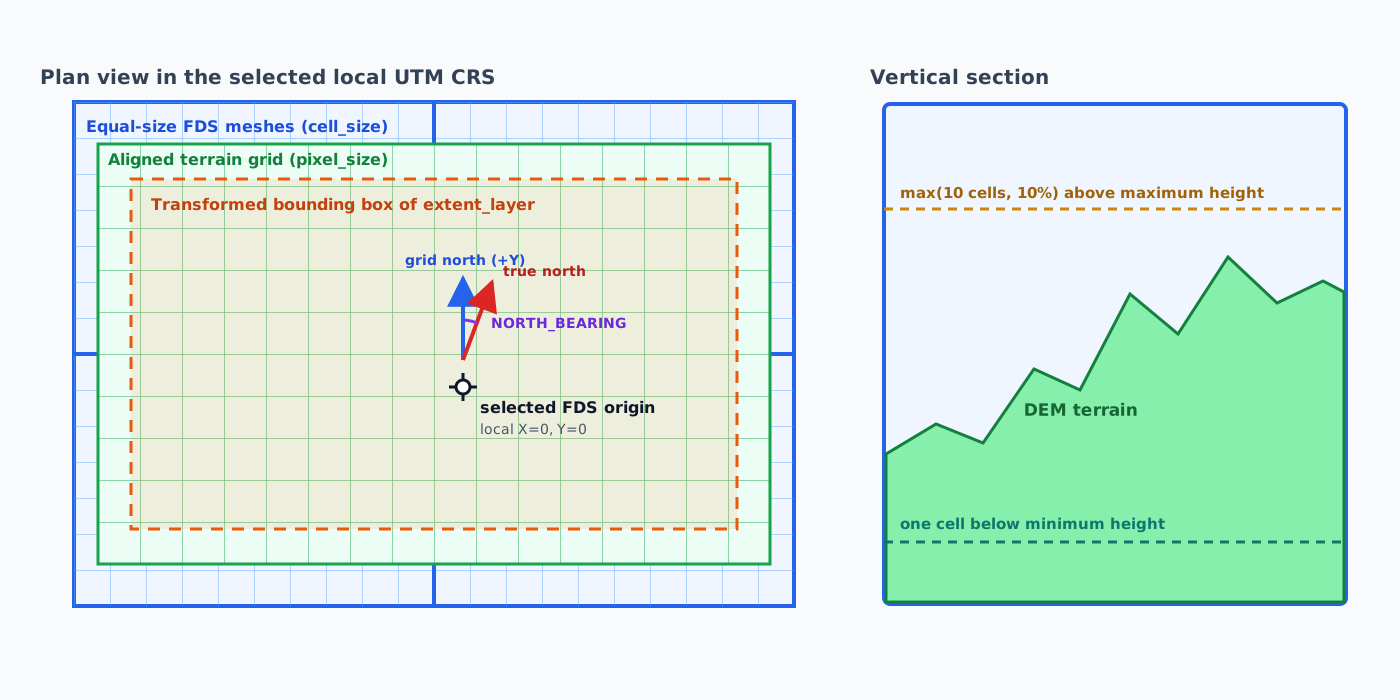
FDS works in metres, while QGIS source layers may use different projected or geographic coordinate reference systems (CRSs). qgis2fds therefore creates one local working grid:
- Transform the bounding box of
extent_layerto WGS 84. - Use
originwhen supplied, interpreting it in the project CRS; otherwise use the extent centroid. - Select the local UTM zone from that origin, including the standard Norway and Svalbard zone exceptions. The supported latitude range is 80° S to 84° N.
- Transform the extent and origin to that UTM CRS.
- Expand the transformed extent symmetrically to a whole number of
pixel_sizecells, with at least two cells along each axis. - Calculate
NORTH_BEARINGat the origin. This is the clockwise angle from projected grid north (the positive local Y direction) to true north.
All raster sampling and fire classification use this cell-centred grid. Horizontal FDS coordinates are later written relative to the selected origin, whereas terrain elevations retain the vertical values supplied by the DEM.
The DEM is required; landuse is optional. Both layers must be valid and have a valid CRS.
A remote layer is never passed directly to the gdalwarp transformation: qgis2fds first downloads the required numeric subset as a local GeoTIFF:
- Transform the terrain-grid bounds to the source coverage CRS.
- Read the native grid and resolution. WMS, WCS, and rendered remote sources are resolved through the corresponding WCS coverage; other numeric remote providers are read through their raw data provider.
- Verify that the source covers the complete requested domain.
- Align the request to the native pixel grid and add a buffer on every side where the source coverage permits it.
- Download and validate a one-band numeric GeoTIFF, including its CRS, extent, dimensions, and native resolution.
- Atomically publish it in the project's
layers/directory with a unique name such as<layer>_qgis2fds_local_<id>.tif. - Add a uniquely named local layer at the root of the QGIS Layers panel, and make it the stored qgis2fds
dem_layerorlanduse_layerselection.
The original remote layer remains linked and unchanged. Selecting it again for a later export causes a new download and another local layer: local copies are not cached, reused, migrated, grouped, or deduplicated.
The current export immediately samples the new local copy. It also becomes the stored parameter selection for the next time the Processing dialog is opened in the same QGIS session. Save the project manually to retain that layer and selection after QGIS is closed.
Each local source is warped once to the exact UTM grid rather than transformed cell by cell:
- elevation uses bilinear resampling because it is continuous;
- landuse uses nearest-neighbour resampling because class identifiers are categorical.
The sampled blocks are stored as dense NumPy arrays with rows ordered from south to north. Any missing DEM cell stops the export and reports its grid coordinates.
Missing or non-finite landuse samples become code 0, and finite class values are rounded to the nearest integer. If no landuse raster is selected, every cell is initialized as code 0.
Fire features are transformed to the terrain UTM CRS. Empty geometries are ignored and invalid geometries are repaired when possible. For every usable feature, qgis2fds determines two class codes:
-
bc_in, rounded to an integer, for the polygon interior; -
bc_out, rounded to an integer, for a perimeter one terrain cell wide.
Missing or non-numeric values use the final-two-row catalog defaults described above. The perimeter is constructed by buffering the original polygon by one pixel_size. A terrain cell is changed when its centre lies inside the corresponding geometry.
All buffered perimeters are painted first and all original interiors second. Consequently, a fire polygon interior takes precedence over an overlapping perimeter, including when different fire features overlap.
Fire codes and original landuse codes then pass through the same surface-catalog lookup and fallback rules.
nmesh is a maximum, not a guaranteed mesh count. qgis2fds searches integer X/Y factor pairs whose product does not exceed that value, preferring a well-balanced mesh aspect ratio and then greater use of the permitted meshes. Every mesh has identical dimensions and the array is set with a MULT namelist.
For each horizontal axis, the number of cell_size mesh cells is rounded upward until the terrain fits. If cell_size is empty or zero, pixel_size is used. If the terrain would end exactly on the mesh boundary, one more cell is added. The resulting margin is divided equally between opposite sides. This positive, symmetric padding keeps the sampled terrain strictly inside the FDS mesh domain.
The lower boundary is rounded down to a multiple of cell_size at least one cell below the minimum DEM elevation. Clearance above the highest elevation is the larger of ten mesh cells or 10% of the elevation range measured from the lower boundary. At least 11 vertical cells are allocated. The same vertical extent is used by every replicated mesh.
qgis2fds tries to render the currently visible, valid QGIS project layers over the UTM terrain extent. It uses a white background, preserves the map layer order, and calculates image dimensions from tex_pixel_size.
The PNG is skipped with a warning if there are no visible layers, rendering fails, either dimension exceeds 16,384 pixels, the image would exceed 100,000,000 pixels, or rendering exceeds 60 seconds. The timeout prevents an unavailable remote map layer from blocking the export indefinitely. Texture failure does not stop FDS case generation; TERRAIN_IMAGE is simply omitted.
GEOM is the preferred representation for new cases. qgis2fds writes <chid>_terrain.bingeom in the portable little-endian FDS BINGEOM format and references it with:
&GEOM ID='Terrain', SURF_ID=..., BINARY_FILE='<chid>_terrain.bingeom',
      IS_TERRAIN=T, EXTEND_TERRAIN=T /
The binary surface contains (columns + 1) × (rows + 1) vertices and two triangles per terrain cell. Vertex elevation is the mean of the neighbouring cell-centre DEM samples; edge vertices use the available neighbours without extrapolation.
Both triangles in a cell receive that cell's one-based surface index in the ordered SURF_ID list. EXTEND_TERRAIN=T tells FDS to extend the terrain over the small padded margin up to the mesh boundaries.
When export_obst is true, no new BINGEOM file is written. Each sampled terrain cell becomes an OBST prism from the domain lower Z boundary to its DEM elevation, with the resolved landuse/fire surface on its faces.
The nearest terrain row or column is repeated into the west, east, south, and north padding strips. Explicit corner obstructions close the remaining rectangles. The entire padded horizontal mesh domain is therefore covered rather than leaving gaps around the raster.
The text serializer writes a complete FDS input file <chid>.fds in fds_path.
The FDS input and BINGEOM companion are written through temporary files and atomically replaced on success, reducing the chance of leaving a partially written case after an error.