Repository navigation
Wiring
Two ways to hang an OLED on a Raspberry Pi: four wires for I2C, seven for SPI. The settings page's Wiring selector names the common ways and takes a custom one; wire to a named one and nothing else needs setting.
Voltage. The Pi's GPIO are 3.3 V and not 5 V tolerant. Power a module from 3.3 V (pin 1 or 17) unless its own page states a regulator and level shifter; a few modules are 3.3 V only and a 5 V supply damages them. The drawings print the voltage on the wire.
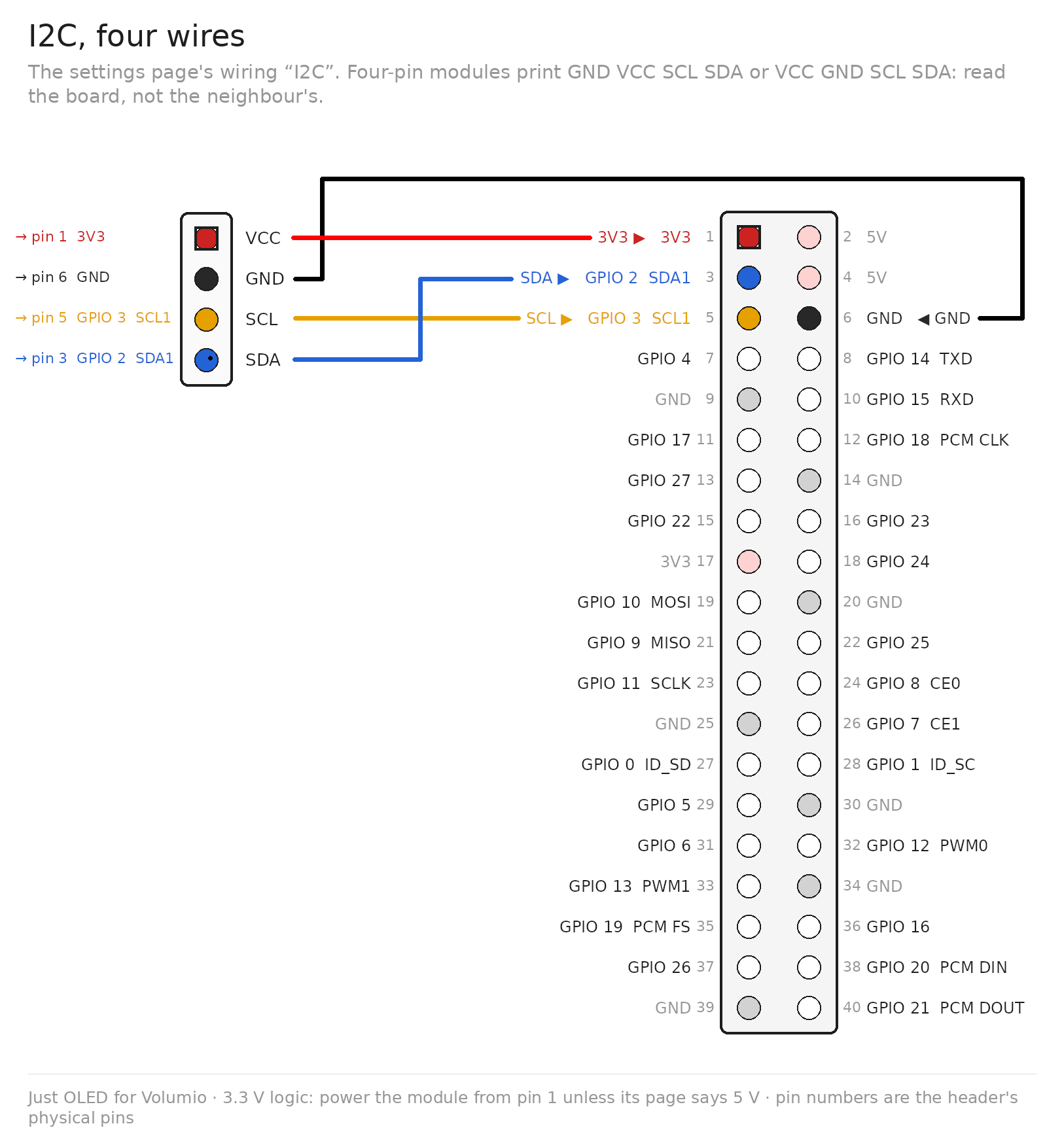
| Module pin (as printed) | Raspberry Pi | BCM | Header pin |
|---|---|---|---|
| VCC (VDD, 3V3) | 3.3 V | 1 | |
| GND | GND | 6 | |
| SDA (DIN on a Waveshare board in I2C mode) | SDA1 | GPIO 2 | 3 |
| SCL (CLK on a Waveshare board in I2C mode) | SCL1 | GPIO 3 | 5 |
Four-pin modules print the pins in either order, GND VCC SCL SDA or VCC GND SCL SDA: read the board, not the neighbour's. Volumio's own boot configuration enables this bus (dtparam=i2c_arm=on); the installer adds it where it is missing. This is the I2C wiring on the settings page; the address is found automatically. The bus runs at the Pi's 100 kHz unless the I2C bus speed setting raises it: at 100 kHz a 128x64 panel refreshes ten times a second, at 400 kHz twenty-five.
A module whose Waveshare-style seven-pin header is set to I2C by its solder resistors (BS0/BS1, R1/R2 or two 0R jumpers; see the module's page) connects DIN to SDA and CLK to SCL; CS and DC are left open or tied as the module's page says, and DC usually chooses the address, 0x3C low, 0x3D high. RES on such a module must not be left floating: the four-pin modules reset themselves at power-on, but a seven-pin module in I2C mode, and most of the 2.42" SSD1309 boards, bring the reset out and the controller stays dark until the pin is high. Tie RES to 3.3 V (pin 1 or 17), or to a GPIO that the I2C wiring does not use. The I2C wiring has no reset pin of its own, as the four-pin modules have none to drive.
I2C, custom on the settings page takes another bus or address: bus 0 is the HAT EEPROM bus on GPIO 0 and 1 (pins 27 and 28), enabled with dtparam=i2c_vc=on; a bus number of 3 or more makes a software bus on any two GPIOs you name (dtoverlay=i2c-gpio), slower than the hardware bus. Both lines go into /boot/userconfig.txt when you save and take a restart.
Two wirings are in common use, and both are on the settings page. They differ only in the two GPIOs for DC and RST.
| Module pin (as printed) | Role | SPI, generic (mpd_oled, luma) | SPI, Waveshare (the module pages) |
|---|---|---|---|
| VCC | power | 3.3 V, pin 1 | 3.3 V, pin 1 |
| GND | ground | GND, pin 6 | GND, pin 6 |
| DIN, D1, SDA, MOSI, SI | data | MOSI, GPIO 10, pin 19 | MOSI, GPIO 10, pin 19 |
| CLK, D0, SCL, SCK | clock | SCLK, GPIO 11, pin 23 | SCLK, GPIO 11, pin 23 |
| CS | chip select | CE0, GPIO 8, pin 24 | CE0, GPIO 8, pin 24 |
| DC, D/C | data / command | GPIO 24, pin 18 | GPIO 25, pin 22 |
| RST, RES | reset | GPIO 25, pin 22 | GPIO 27, pin 13 |
SPI, generic, the pins as a seven-pin module from mpd_oled's or luma's world prints them:

SPI, Waveshare, the pins as every Waveshare module page prints them:
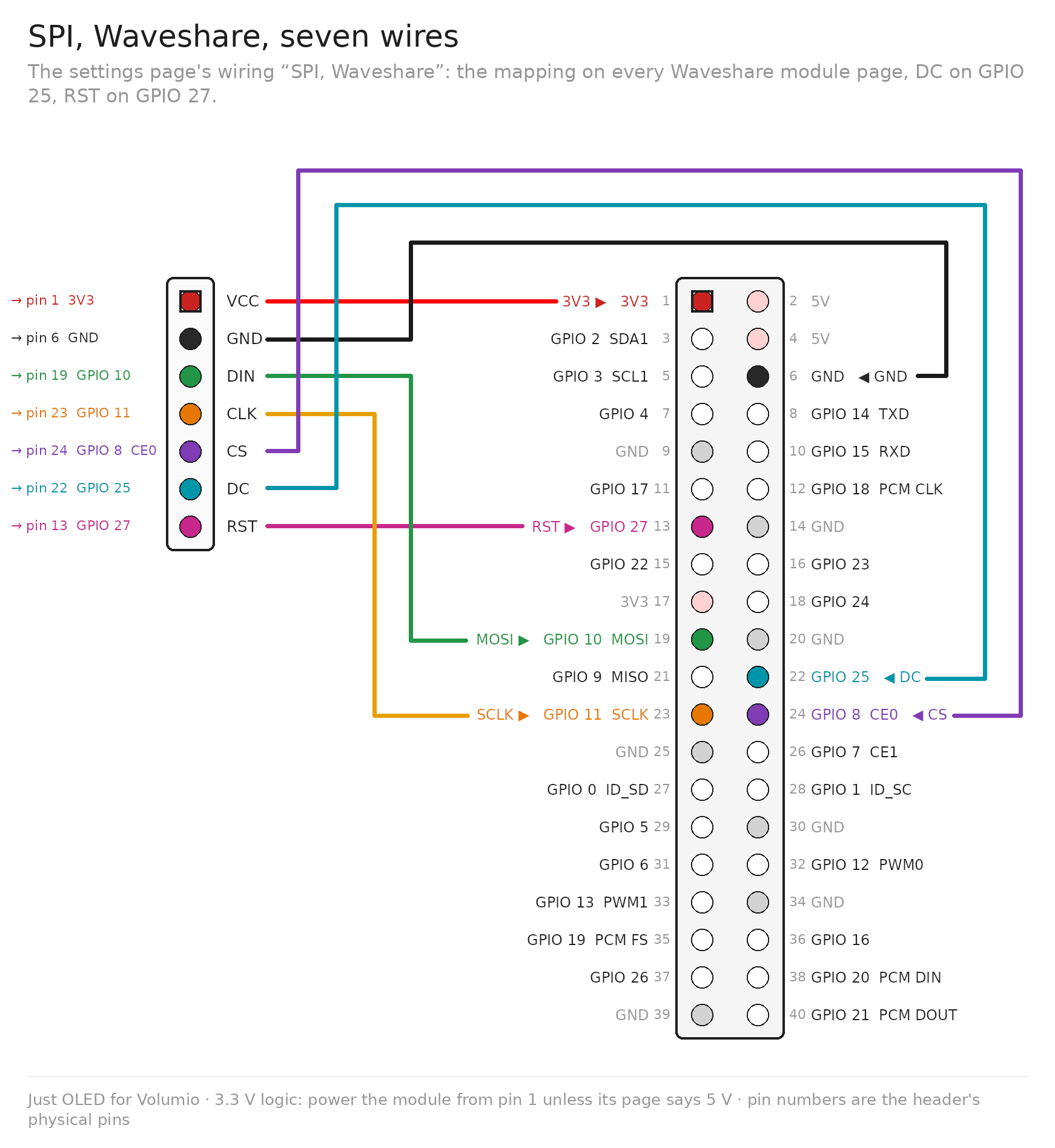
A module wired from a Waveshare page needs SPI, Waveshare; a player coming from mpd_oled, or wired from a luma example, needs SPI, generic. SPI, custom takes any bus, chip select (CE1 is GPIO 7, pin 26) and GPIOs.
SPI needs dtparam=spi=on; the installer writes it into /boot/userconfig.txt where it is missing and the plugin asks for the restart.
The three drawings above cover every module on the settings page's named wirings; the module's pin labels, as the vendors print them, are in the drawings and the tables. A drawing per catalogue entry, in the vendor's exact pin order, follows as modules go through the bench.
On an x86 player the plugin works with a USB I2C adapter that gives a /dev/i2c-N (a CH341A board, for one). Set the bus number on the settings page to the adapter's; no boot configuration is written on a PC. SPI modules need a Pi.