Updating FreeScout
- Method 1. Update from web interface (recommended)
- Method 2. Update using console script
- Method 3. Update using GIT
- Method 4. Manual updating
- Troubleshooting
Before updating the app make sure to backup application files and database.
Open FreeScout and go to Manage » System » Status. In App Version section click Check for updates and follow instructions:
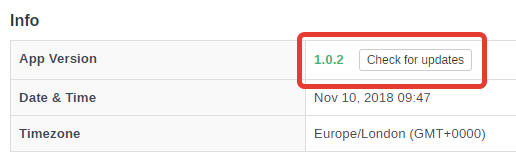
Updating process may take several minutes, do not close browser window until it finishes or shows an error. Sometimes when updating finishes you may see the "Error occurred" message, but FreeScout shows a new version and functions normally.
If self-updater script fails:
- Try to update again.
- If still does not work, switch to another update methods.
This method requires SSH console and GIT. Make sure to use Composer 1.x.
- Go to the root of your FreeScout application.
- Run update script:
tools/update.sh
- Follow instructions.
This method requires SSH console and GIT.
- Pull updates from GitHub:
git pull
- Run the following console command:
php artisan freescout:after-app-update
Use this method only if you can not use console or GIT.
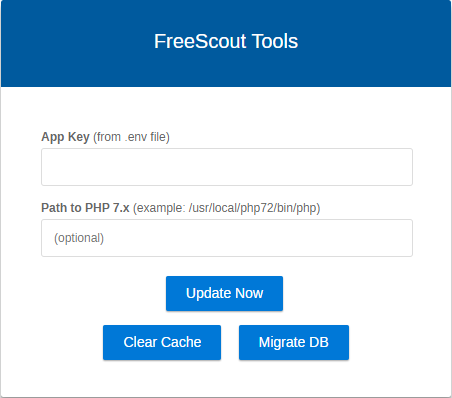
- Enter APP_KEY from your
.envfile and click Update App button. - Open and check application.
First thing you need to do is to check logs in /storage/logs.
If self-updater script hits your hosting's PHP memory size limit or `PHP max execution time
- Try to update again.
- If still does not work, switch to another update methods.
If you are facing a database error
Try to run Migration via https://example.com/tools.php or by executing console command:
php artisan migrate
Permission denied when writing to some file
Check permissions section in "Manage > System > Status".