Repository navigation
Privacy Cleaner
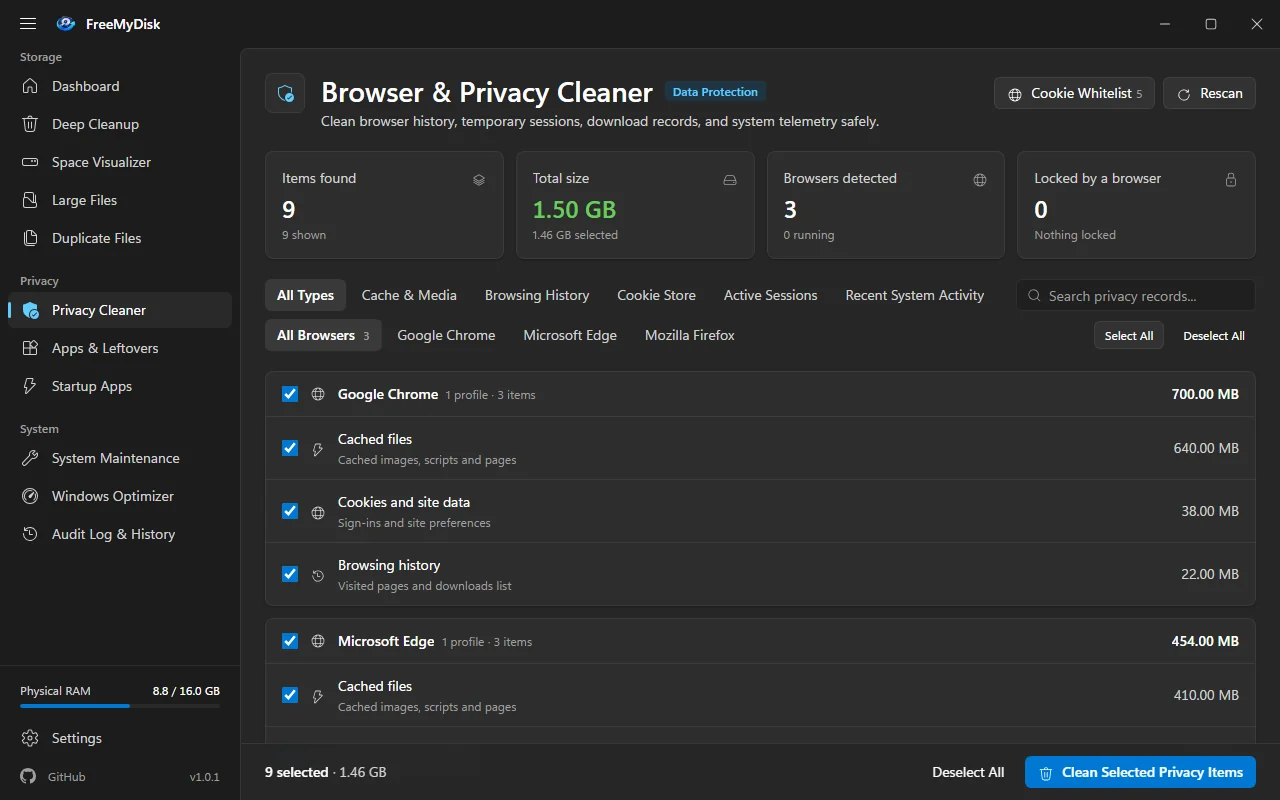
Privacy Cleaner removes the traces your browsers and Windows keep about what you do: caches, browsing history, cookies, download lists, open sessions and recent activity. Everything is grouped per browser and per profile, so you see exactly what each item is before you remove it.
| Type | What it is | What happens when you clear it |
|---|---|---|
| Cache & Media | Cached images, scripts and pages | Pages load once from the internet again. Nothing else changes |
| Browsing History | Pages you visited | History and address bar suggestions are gone |
| Cookie Store | Cookies and site data | You are signed out of websites, except the ones on your whitelist |
| Active Sessions | Open tabs and session data | The browser no longer restores the previous session |
| Recent System Activity | Windows recent files and activity traces | Recent lists in Windows start empty |
The cards at the top show how many items were found, their total size, how many browsers were detected and whether any are locked.
- Filter by type with the tabs, or by browser with the browser chips.
- Tick what you want to remove. Select All and Deselect All work on the current filter.
- Select Clean Selected Privacy Items and confirm.
Select Cookie Whitelist and add the sites you want to stay signed in to, such as your email or bank. Their cookies are kept every time you clear cookies.
A running browser keeps its history and cookie databases locked. Privacy Cleaner never forces them. Locked items are marked and can't be selected, except caches. Close the browser, then select Rescan.
Deep Cleanup clears browser caches to free space and never touches cookies, history or passwords. Privacy Cleaner is for privacy: history, cookies, sessions and activity. Use Deep Cleanup for space, and Privacy Cleaner when you want to remove traces.
- Privacy and Data: what FreeMyDisk itself stores and sends (nothing but the update check)