Wires, Buttons and Keypads

Wires are the lifeblood of electronics! Wait, no, electricity is the lifeblood. Wires are more like the arteries. The veins? No matter…
Wires are by far the easiest module you'll have to defuse. A wire module can have 3-6 wires on it, and only one correct wire needs to be cut. All you have to do in KAaNE is input how many wires there are, and list what colors those wires are from top to bottom. Sometimes, it'll ask if the "last digit of the SN is odd". SN stands for serial number, and it usually looks something like this:

In this case, the last digit of the SN is 1, so the last digit of the SN is odd. If you want to respond to Yes/No questions, Here's a list of acceptable responses:
- y
- Y
- yes
- Yes
- YES
- n
- N
- no
- No
- NO

You might think that a button telling you to press it is pretty straightforward. That’s the kind of thinking that gets people exploded.
The Button module is the 2nd easiest you'll encounter. To start off, input the color and text of the button in KAaNE. Afterwards, it'll ask you a set of questions, such as "Is there a FRK lit indicator?" Battery and Indicator references can be found in the Appendix pages. To answer to Yes/No questions, please look above in the "Wires" section.

I'm not sure what these symbols are, but I suspect they have something to do with occult.
The Keypad module would be the 2nd easiest module if it wasn't for the character identification. Luckily for you, we have made a character guide in response to this problem.
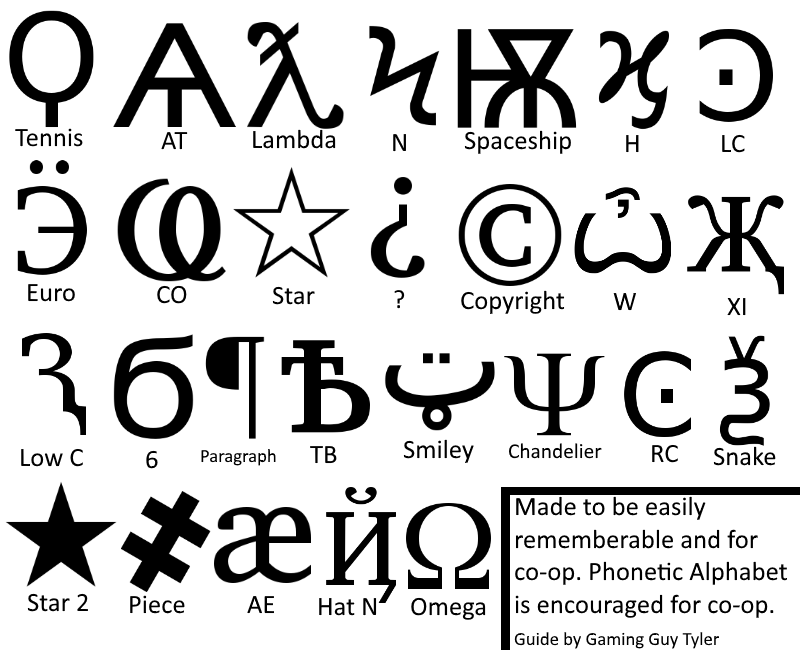
This character guide was made to be easily remember-able, easy to figure out, but most importantly: fast to input in KAaNE. All you have to do in KAaNE is to input the keys into KAaNE, and it'll tell you the correct order to press them.