Parte uno
Matriz de LEDs:

Esquemático interior matriz:
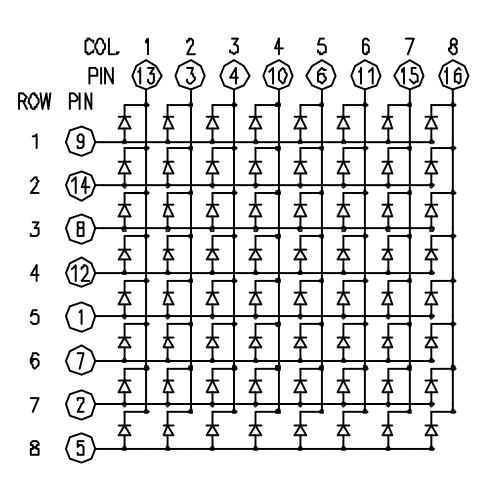
Conexiones con el arduino
| Matrix pin no. | Row | Column | Arduino pin number |
|---|---|---|---|
| 1 | 5 | - | 13 |
| 2 | 7 | - | 12 |
| 3 | - | 2 | 11 |
| 4 | - | 3 | 10 |
| 5 | 8 | - | 16 (analog pin 2) |
| 6 | - | 5 | 17 (analog pin 3) |
| 7 | 6 | - | 18 (analog pin 4) |
| 8 | 3 | - | 19 (analog pin 5) |
| 9 | 1 | - | 2 |
| 10 | - | 4 | 3 |
| 11 | - | 6 | 4 |
| 12 | 4 | - | 5 |
| 13 | - | 1 | 6 |
| 14 | 2 | - | 7 |
| 15 | - | 7 | 8 |
| 16 | - | 8 | 9 |

Matriz control
const int row[8] = {
  2,7,19,5,13,18,12,16 };

const int col[8] = {
  6,11,10,3,17,4,8,9  };
Código de test
// 2-dimensional array of row pin numbers:
const int row[8] = {
  2,7,19,5,13,18,12,16 };

// 2-dimensional array of column pin numbers:
const int col[8] = {
  6,11,10,3,17,4,8,9  };

// 2-dimensional array of pixels:
int pixels[8][8];

// cursor position:
int x = 5;
int y = 5;

void setup() {
  // initialize the I/O pins as outputs
  // iterate over the pins:
  for (int thisPin = 0; thisPin < 8; thisPin++) {
    // initialize the output pins:
    pinMode(col[thisPin], OUTPUT);
    pinMode(row[thisPin], OUTPUT);
    // take the col pins (i.e. the cathodes) high to ensure that
    // the LEDS are off:
    digitalWrite(col[thisPin], HIGH);
  }

  // initialize the pixel matrix:
  for (int x = 0; x < 8; x++) {
    for (int y = 0; y < 8; y++) {
      pixels[x][y] = HIGH;
    }
  }
}

void loop() {
  for(int x=0;x<8;x++){
    for (int y=0;y<8;y++){
      // draw the screen:
      pixels[x][y] = LOW;
      refreshScreen();
      delay(80);
      pixels[x][y] = HIGH;
      refreshScreen();
    }
  }
}

void refreshScreen() {
  // iterate over the rows (anodes):
  for (int thisRow = 0; thisRow < 8; thisRow++) {
    // take the row pin (anode) high:
    digitalWrite(row[thisRow], HIGH);
    // iterate over the cols (cathodes):
    for (int thisCol = 0; thisCol < 8; thisCol++) {
      // get the state of the current pixel;
      int thisPixel = pixels[thisRow][thisCol];
      // when the row is HIGH and the col is LOW,
      // the LED where they meet turns on:
      digitalWrite(col[thisCol], thisPixel);
      // turn the pixel off:
      if (thisPixel == LOW) {
        digitalWrite(col[thisCol], HIGH);
      }
    }
    // take the row pin low to turn off the whole row:
    digitalWrite(row[thisRow], LOW);
  }
}