Falcon
 Falcon
Falcon is the example app for go-term, and it is a full terminal emulator in its own right. It spawns a real shell over a PTY and renders through a GPU-accelerated canvas. It runs vim, less, htop, tmux, and any modern TUI.
It is the reference embedder for term/workspace: multi-tab, multi-pane,
save and restore, config-file driven. It is also a daily driver on macOS,
and it targets macOS, Linux, and Windows (ConPTY).
Falcon is young, and it does not hide that. It is pre-1.0, ad-hoc signed on macOS, and its ecosystem is a fraction of the size of a twenty-year-old terminal. What it does, it does without the things that age a terminal. The config file reloads live, the layout survives restarts, and the renderer keeps up with the protocol surface modern tools expect.
Prebuilt binaries attach to each go-term release: a macOS DMG, a Linux tarball, and a Windows zip.
brew install go-gui-org/tap/falconUntil Falcon is Developer ID signed and notarized, Gatekeeper blocks the first launch. Right-click the app in Finder and choose Open. Releases are ad-hoc signed.
Download falcon-<version>-linux-amd64.tar.gz from the release page. It
contains the binary, a .desktop entry, the icon, and install
instructions. It needs SDL2, FreeType, HarfBuzz, Pango, fontconfig, and
GLib at runtime.
Download falcon-<version>-windows-amd64.zip and unzip it anywhere. There
are no runtime dependencies beyond a stock Windows 10/11.
cd examples/falcon
go run .
Build a versioned binary from the repo root. The build stamps
git describe --tags into the About dialog:
make build-falconOr install it:
go install github.com/go-gui-org/go-term/examples/falcon@latestA go install build has no linker-stamped tag. The About dialog falls back
to the module version, then the embedded VCS revision, then dev.
make appThis produces Falcon.app in the repo root. It uses the bundled icon.
| Flag | Default | Meaning |
|---|---|---|
--workspace <path> |
default path, if it exists | Workspace JSON to restore on startup |
--save-workspace <path> |
--workspace, else the default path |
Workspace JSON to write on quit |
--record <path.gtr> |
off | Record the starting pane's session |
--replay <path.gtr> |
off | Play back a recording instead of starting a shell |
--replay-speed <n> |
1 |
Playback speed multiplier |
--replay-idle-limit <dur> |
0 (no cap) |
Cap any single gap between recorded frames |
--replay-loop |
off | Restart playback at the end of the recording |
--replay is a viewer path, not a multiplexer: one pane, no tabs, no
shell, no workspace persistence.
Falcon saves its tab and pane layout on quit and restores it on the next
launch, with no flags needed. The default file is workspace.json in the
go-term config directory.
- Restore falls back to a fresh workspace on a missing, unparseable, or version-mismatched file. A bad workspace file never blocks startup.
-
Cmd+Ssaves the layout to the same file the quit path writes. - Saving happens on both quit paths: the close request and the last shell exiting.
- With live shells open, quitting asks for confirmation first.
- New tabs and splits inherit the focused pane's working directory.
Point --workspace and --save-workspace at different files to keep a
read-only template layout that startup restores but quit never overwrites.
Falcon reads the shared go-term config file: an INI at
~/.config/go-term/config, parsed by term/workspace, not by falcon
itself. Font, theme, scrollback, bell, scrollbar, keybindings, and the
child environment are all set there.
-
Cmd+,opens the config file in the OS-default editor. It writes a commented stub first when the file does not exist. This binding belongs to falcon, not the library, and it is not rebindable. -
Cmd+Shift+,reloads the file into every open pane without restarting.
Every section, key, default, and rebindable action is on the Configuration page.
Falcon registers the built-in Default plus the whole bundled corpus: 602
color themes. Press Cmd+Shift+T to browse them with a live preview and a
filter. That is the intended way to choose one. Any name is also valid for
the theme key in the config file.
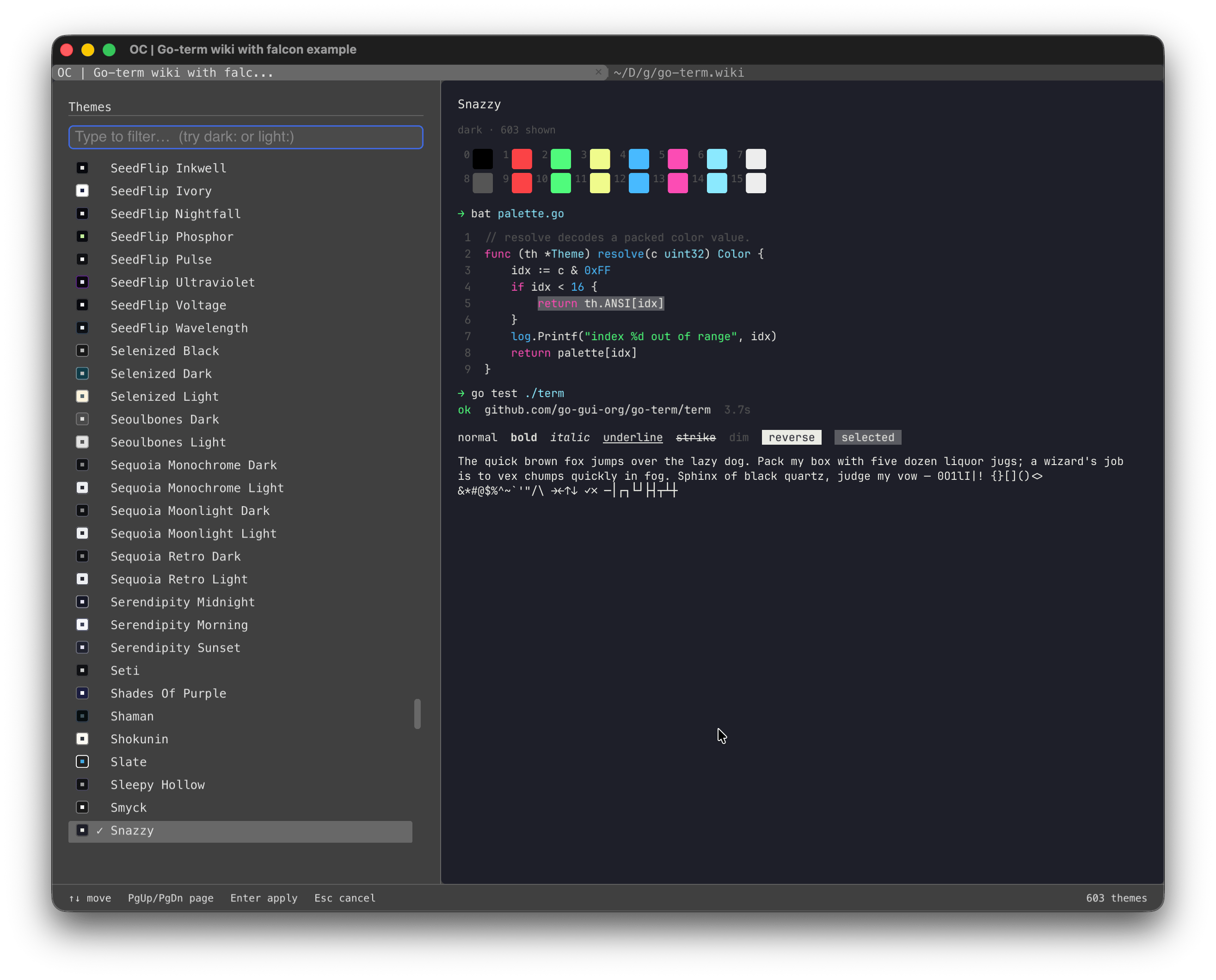
Type to filter the list, and the preview follows the selection. The
browser shares its shortcuts with the command palette: Up/Down move,
Enter applies, Escape closes.
The default is JetBrainsMono NFM at 12pt. The family must be spelled as
the font's own name table spells it. If the font is not installed, set
[font] family to something that is, for example Menlo.
The features that carry a working day are here:
- Tabs and split panes, with the layout restored on launch
- A reloadable config file, so a change applies without restarting
- A theme browser over 602 themes, with live preview
- Copy mode, find with regex, and keyboard link hints
- Broadcast input for driving several hosts in lockstep
- Session recording and playback, for demos and bug reports
- Desktop notifications when a long command finishes
- Shell integration: prompt jumping, failure jumping, output selection
- Kitty Graphics Protocol, sixel, and iTerm2 images, so yazi and superfile render at full quality
- Full Unicode: wide characters, emoji, ZWJ joins, and UAX#9 bidirectional text for right-to-left scripts
-
minimum-contrast, which keeps truecolor output readable on a light theme
The rendering is GPU-accelerated, and the parser is verified against recorded byte streams. Flicker and protocol drift are treated as bugs rather than facts of life. The shell integration is installed with one line in your rc file. See Usage.
The honest summary: falcon is new, and its feature set is deliberate rather than maximal. It does not have iTerm2's scripting surface or tmux control mode, and its plugin ecosystem is nothing next to a decade-old project. What it offers instead is a small, coherent core that holds up for a full day of work.
| Terminal | Platforms | Config | Tabs / splits | Save & restore | Session replay | Theme count |
|---|---|---|---|---|---|---|
| Falcon | macOS, Linux, Windows | INI file, live reload | Yes | Yes | In-app | 603 |
| iTerm2 | macOS | Preferences, profiles | Yes | Yes | Timelapse | 20+ built-in, importable |
| kitty | macOS, Linux | kitty.conf | Yes | No | No | Few built-in, importable |
| WezTerm | macOS, Linux, Windows | Lua | Yes | No | Yes (replay) | importable |
| Alacritty | macOS, Linux, Windows | YAML/TOML | No (no tabs or splits) | No | No | importable |
| Windows Terminal | Windows | JSON | Yes | Partial (startup) | No | Built-in |
| Ghostty | macOS, Linux | config file | Yes | No | No | Hundreds built-in |
A few notes on the rows:
- iTerm2 is the incumbent on macOS, and the standard against which falcon measures itself. It is mature, scriptable, and deeply integrated with macOS. Falcon's matching gestures: workspace persistence, iTerm2 file-transfer compatibility, session recording, and the same middle-click and wheel conventions. What falcon does not try to match is a 20-year feature accumulation.
- kitty set the bar for GPU rendering and the image protocol that bears its name. Falcon implements that protocol, so tools tuned for kitty behave identically. kitty's configuration is a full language. falcon's is a plain INI file.
- WezTerm is the multiplexer-first choice, with a Lua config and its own replay story. Falcon matches the pane model with a simpler config and a replay viewer built into the emulator itself.
- Alacritty is minimal on purpose: no tabs, no splits, one shell per window. Falcon is the opposite: the terminal to use when the layout matters and the config file stays human-readable.
- Windows Terminal owns the Windows default, with a JSON config and deep OS integration. Falcon is the option when you want one terminal across all three platforms with the same config file.
- Ghostty is the newest incumbent, and the closest in spirit: a small, fast, native terminal with a plain config file. Falcon adds workspace save and restore, in-terminal session replay, and a 600-theme browser with a live picker.
The config file is the cleanest point of comparison. [font] family,
[general] theme, and a [keybindings] section cover the changes most
people make, and Cmd+Shift+, applies them without a restart. There is no
config language to learn and no profile editor to click through.
The source lives at
github.com/go-gui-org/go-term.
Report rendering bugs with a .gtr recording: it reproduces the problem
instead of describing it. See Usage for recording.
Run the tests before you file a patch:
go test ./...