SuperNanno 0.0.23

Nano, but modern.
A professional terminal text editor built with Python, Textual, and Tree-sitter.
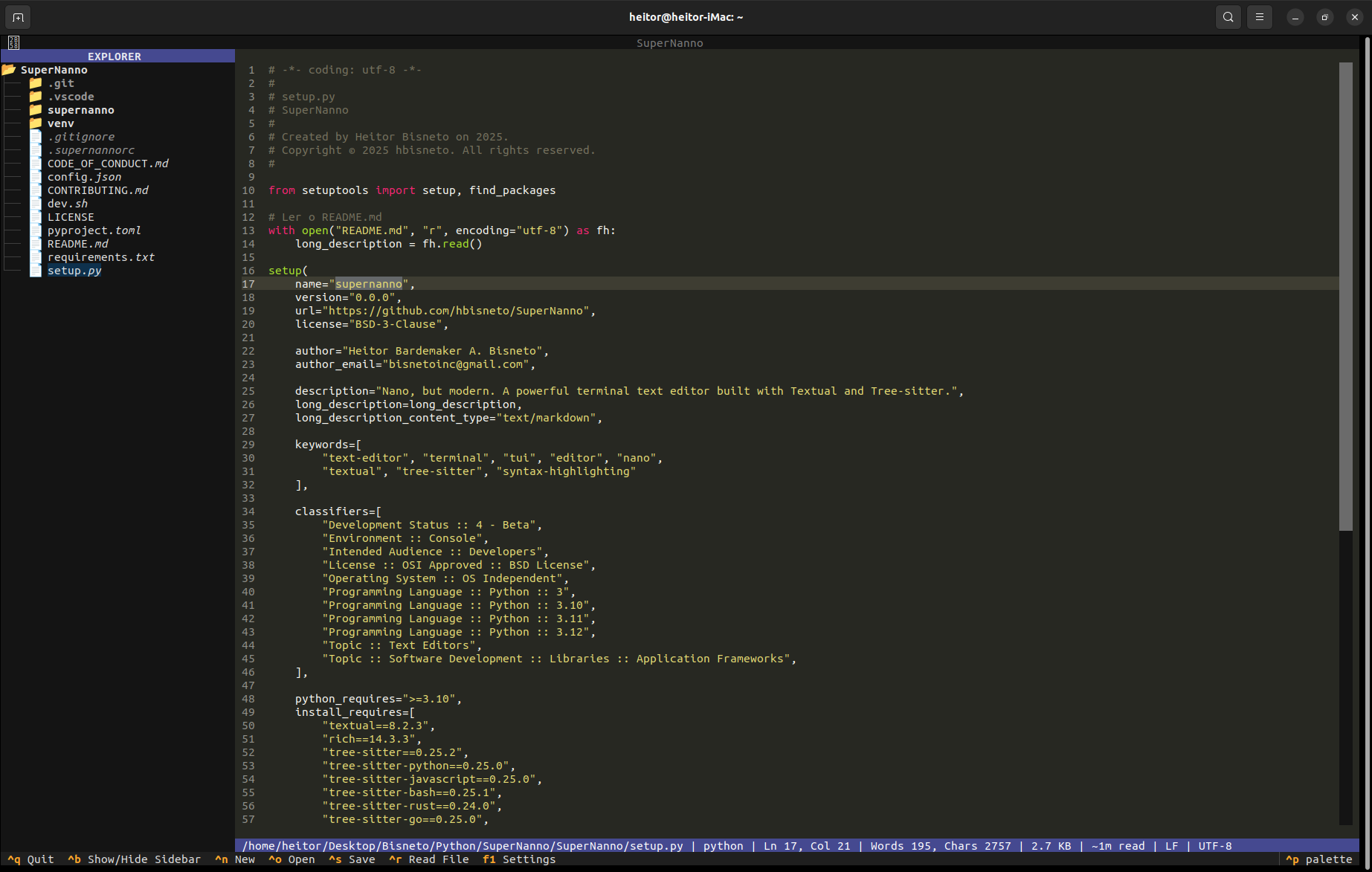
About the Project
SuperNanno is a modern terminal text editor inspired by the classic Nano, rebuilt from scratch using contemporary Python technologies and a service- and event-driven architecture.
It combines the simplicity and speed of traditional terminal editors with features commonly found in modern IDEs, including:
- Incremental syntax highlighting powered by Tree-sitter
- Rich terminal interface built with Textual
- Integrated file explorer in the sidebar
- Advanced search and replace with configurable strategies
- Session restoration, automatic backups, and comprehensive observability
- Real-time configuration with hot reload
- Automatic diagnostic reports for GitHub issues
Designed with maintainability, modularity, and developer ergonomics as core principles.
Features
Core Editor
- Full-featured text editing with advanced cursor movement, selection, and smooth scrolling
- Mouse support (click-to-position and scrolling)
- Auto-indentation, tab conversion, and trailing whitespace cleanup
- Current line highlighting and configurable line numbers
Syntax Highlighting
- Tree-sitter support for 16 major languages (Python, JavaScript, Rust, Go, Bash, and more)
- Intelligent fallback to Pygments
- Automatic language detection based on file extension
Search & Replace
- Literal, Case-sensitive, and Regular Expression search modes
- Highlights all matches
- Interactive replace confirmation workflow
Sidebar & Navigation
- Integrated directory tree (
Ctrl + B) - Responsive layout
Session & Backup
- Automatic restoration of the last editing session
- Configurable
.bakbackups before overwriting files
Observability
- Structured JSON logging with correlation IDs
- Centralized
ErrorServicewith semantic error classification - Automatic GitHub issue generation with
Ctrl + X
Configuration
.supernannorcconfiguration file (Nano-style)config.jsonwith asynchronous hot reload- Graphical settings interface (
F1)
Keyboard Shortcuts
| Shortcut | Action |
|---|---|
Ctrl+N |
New file |
Ctrl+O |
Open file |
Ctrl+S |
Save |
Ctrl+F |
Search |
Ctrl+H |
Search and replace |
Ctrl+B |
Toggle sidebar |
Ctrl+X |
Generate diagnostic report |
Ctrl+Q |
Quit |
F1 |
Settings |
Installation
From PyPI (Recommended)
pipx install supernannoOr:
pip install supernannoFor Developers
git clone https://github.com/hbisneto/SuperNanno.git
cd SuperNanno
bash dev.sh
Run with:
supernanno [file]
supernanno +42 main.py          # Open at line 42
supernanno +/TODO app.py        # Open and search for "TODO"
Requirements
- Python 3.10+
pipx(recommended for isolated installations)
Why SuperNanno?
| Feature | Nano | SuperNanno | Vim/Neovim |
|---|---|---|---|
| Native terminal application | ✅ | ✅ | ✅ |
| Works out of the box | ✅ | ✅ | ❌ |
| Tree-sitter syntax highlighting | ❌ | ✅ | ✅ |
| Integrated file explorer | ❌ | ✅ | (plugin) |
| Session restoration | ❌ | ✅ | (plugin) |
| Structured logging | ❌ | ✅ | ❌ |
| Built-in diagnostic reporting | ❌ | ✅ | ❌ |
| Python extensibility | ❌ | ✅ | ❌ |
Architecture
SuperNanno follows a service- and event-oriented architecture featuring:
AppContextas the central facade- Clear separation between the Textual UI and business logic
- Strategy Pattern for search implementations
- Resilient error handling throughout the application
Useful Links
- Repository: https://github.com/hbisneto/SuperNanno
- Documentation: https://github.com/hbisneto/SuperNanno/blob/main/README.md
- Issues: https://github.com/hbisneto/SuperNanno/issues
- PyPI: https://pypi.org/project/supernanno/
Made with ❤️ by Heitor Bardemaker A. Bisneto (@BisnetoDev)
Built in public — contributions are welcome! See CONTRIBUTING.md.
Contributors

BisnetoDev