Repository navigation
esp32loader v1.0.0

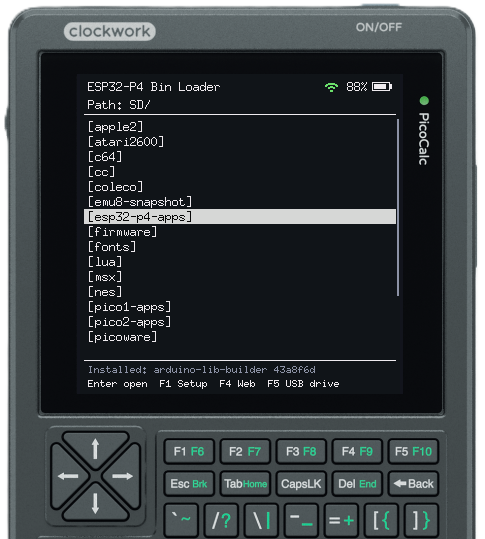
First release of esp32loader, an SD-card firmware loader for a Waveshare ESP32-P4-WIFI6 fitted in a ClockworkPi PicoCalc. Copy .bin files to the microSD card, pick one on the LCD, and the loader flashes and boots it.
Features
- File browser on the PicoCalc LCD. Before flashing, it checks the chip ID, chip revision and app descriptor of the selected
.bin. Plain app images and merged*.factory.binimages both work. - Hold Up (or F1/F5) while resetting to come back to the loader from any app.
- F1 Setup: pick the Wi-Fi network, the folder to open at switch-on, and the on-screen help.
- F4 Web file manager: upload, download, rename, delete and flash files from a browser. It keeps running in the background after you press Esc, and a Wi-Fi icon shows it is on.
- F5 USB drive mode: share the SD card with a PC. This needs the board's 4-pin USB OTG header.
- The serial console works as a second keyboard.
Files
| File | What it is | Flash at |
|---|---|---|
esp32loader-v1.0.0-full.bin |
bootloader + partition table + otadata + loader, for a first install | 0x0 |
esp32loader-v1.0.0-app.bin |
the loader only, to update an existing install and keep the installed app | 0x20000 |
These files are built for ESP32-P4 chip revision v3.x with 32 MB flash. Run esptool.py --chip esp32p4 chip_id to check your chip. For a v1.x chip, build from source as described in the README.
First install
- Connect the board's USB-C port (the CH343 serial port) to the PC.
- Install esptool with
pip install esptool. You can also use the copy that comes with ESP-IDF. - Flash the full image. On Windows the port is
COMx; on Linux and macOS it is/dev/ttyACM0or similar.If the board doesn't enter download mode by itself, hold BOOT, press RESET, then let go of BOOT.esptool --chip esp32p4 -p COMx -b 460800 write_flash 0x0 esp32loader-v1.0.0-full.bin - Press reset. The loader starts, because no app is installed yet.
This replaces the board's bootloader and partition table. The partition layout is factory (loader, 2 MB), then ota_0 (your app, 10 MB), then a ~20 MB FAT storage partition.
Update an existing install
To update the loader but keep the app you installed:
esptool --chip esp32p4 -p COMx -b 460800 write_flash 0x20000 esp32loader-v1.0.0-app.bin
Use it
- Format a microSD card as FAT32 and copy
.binfiles to it, in any folder. - Switch the PicoCalc on. To reach the loader once an app is installed, hold Up (or F1/F5) and press reset, or power-cycle.
- Use Up/Down to choose a file and Enter to see its details, then press Enter again to flash and run it. Backspace or Left goes to the parent folder.
- F1 opens Setup and the help, F4 starts the web file manager and F5 starts USB drive mode.
From your own app, call binloader_reboot_to_menu() from main/loader_api.h to jump back to the loader.
The README has the full documentation.