Wii Controllers
Pair a Wii Remote, Nunchuk, Classic Controller, or Wii U Pro Controller over Bluetooth and map it like any other pad.
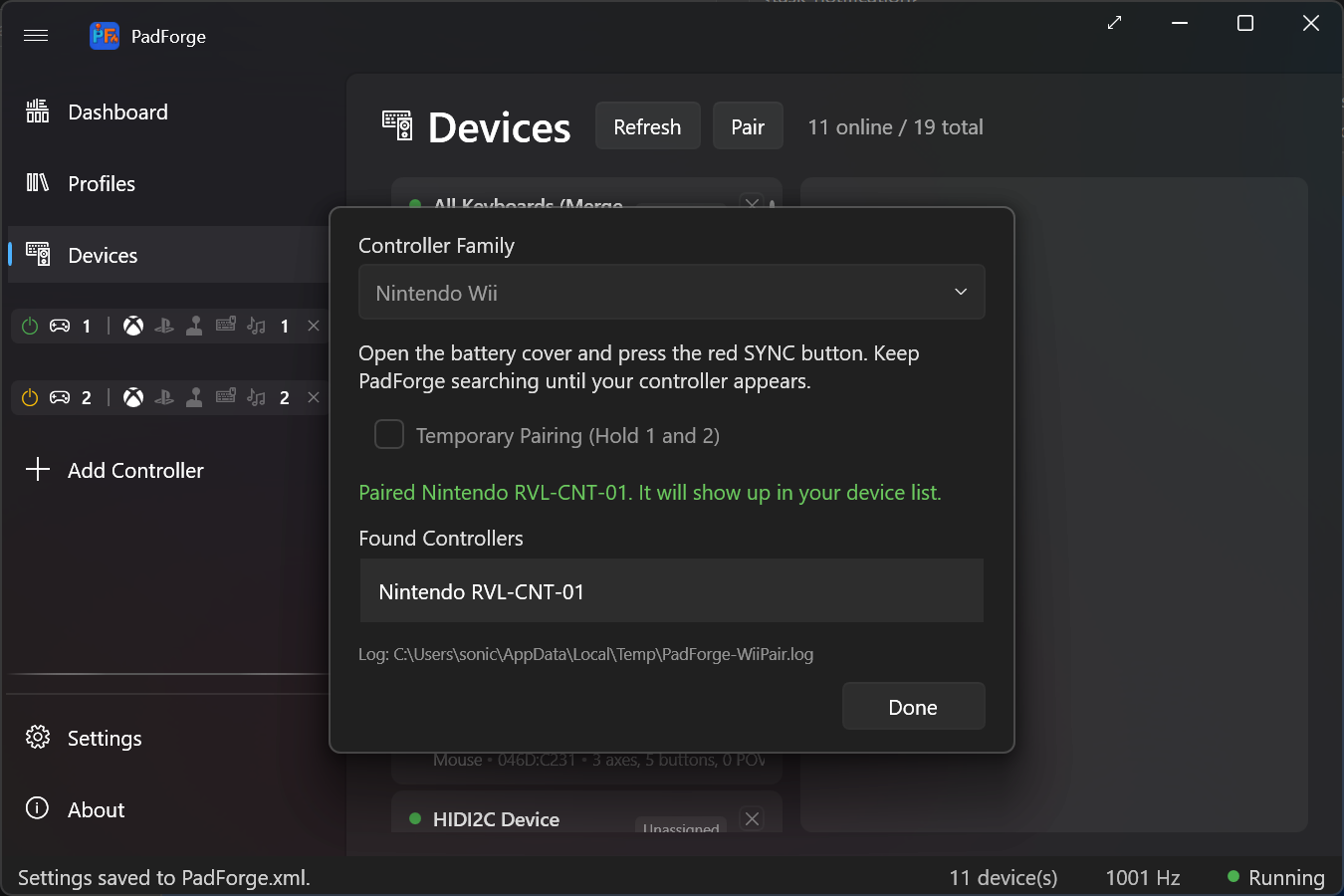
The Windows pairing wizard can't pair a Wii controller on its own. The controller's Bluetooth PIN is six raw bytes, not a typed string, and the right bytes depend on which sync button you press. PadForge runs the whole handshake with a Win32 Bluetooth flow, so you pair from inside the app.
- Open the Devices page.
- Click Pair, next to Refresh. The Pair a Controller dialog opens.
- Leave Controller Family on Nintendo Wii (the only entry today).
- Press the red SYNC button under the battery cover on the back of the controller.
- The controller appears in the found-controllers list while the progress ring spins. Select it and click Pair.
- On success, Cancel becomes Done. Click it to close.
Pressing SYNC bonds the controller. You pair once, and it reconnects on any button press afterward.
Check Temporary Pairing (Hold 1 and 2) before you scan, then hold the 1 and 2 buttons instead of pressing SYNC. This pairs for the current session only. It does not bond the controller, so you re-pair the next time.
PadForge reads all four forms through SDL's hidapi_wii driver. Each maps as a normal pad on the Mappings tab.
| Controller | Layout |
|---|---|
| Wii Remote / Wii Remote Plus | 11 buttons on the MISC slots (the remote has no face buttons): A, B, 1, 2, +, -, Home, and the four D-Pad directions. |
| Wii Remote + Nunchuk | The same 11 MISC buttons, plus the Nunchuk stick on Left X/Y, the C button on Left Shoulder, and the Z button on Left Trigger. |
| Classic Controller | Standard gamepad layout. |
| Wii U Pro Controller | Standard gamepad layout. |
Attach or detach a Nunchuk while the remote stays connected and PadForge re-identifies the controller without a restart.
The Wii Remote's accelerometer and the Wii Motion Plus gyro flow through the same sensor pipeline as any other motion pad. Gyro-to-mouse, gyro-to-stick, and motion mapping all work. See Gyro for calibration, sensitivity, and the engage controls.
These Wii features are out of scope for 3.5.0. They are tracked in issue #146 for a later release:
- The IR camera as a mouse or right-stick pointer.
- The Wii Remote speaker as a feedback channel.
- The Wii Balance Board as an input device.
- A Bluetooth radio. The Wii controller connects over Bluetooth, so the PC needs a working adapter.
- PadForge runs elevated. The Windows Bluetooth stack writes the link key itself, so nothing touches the registry.
- Devices: the Pair button and the paired controller's device card.
- Gyro: tune the Wii Remote's motion sensors.
- Driver Management: HIDMaestro and HidHide driver setup.