Adaptive Triggers
Per-trigger feedback effects for DualSense and DualSense Edge, with a live preview that draws the curve before you pull the trigger.
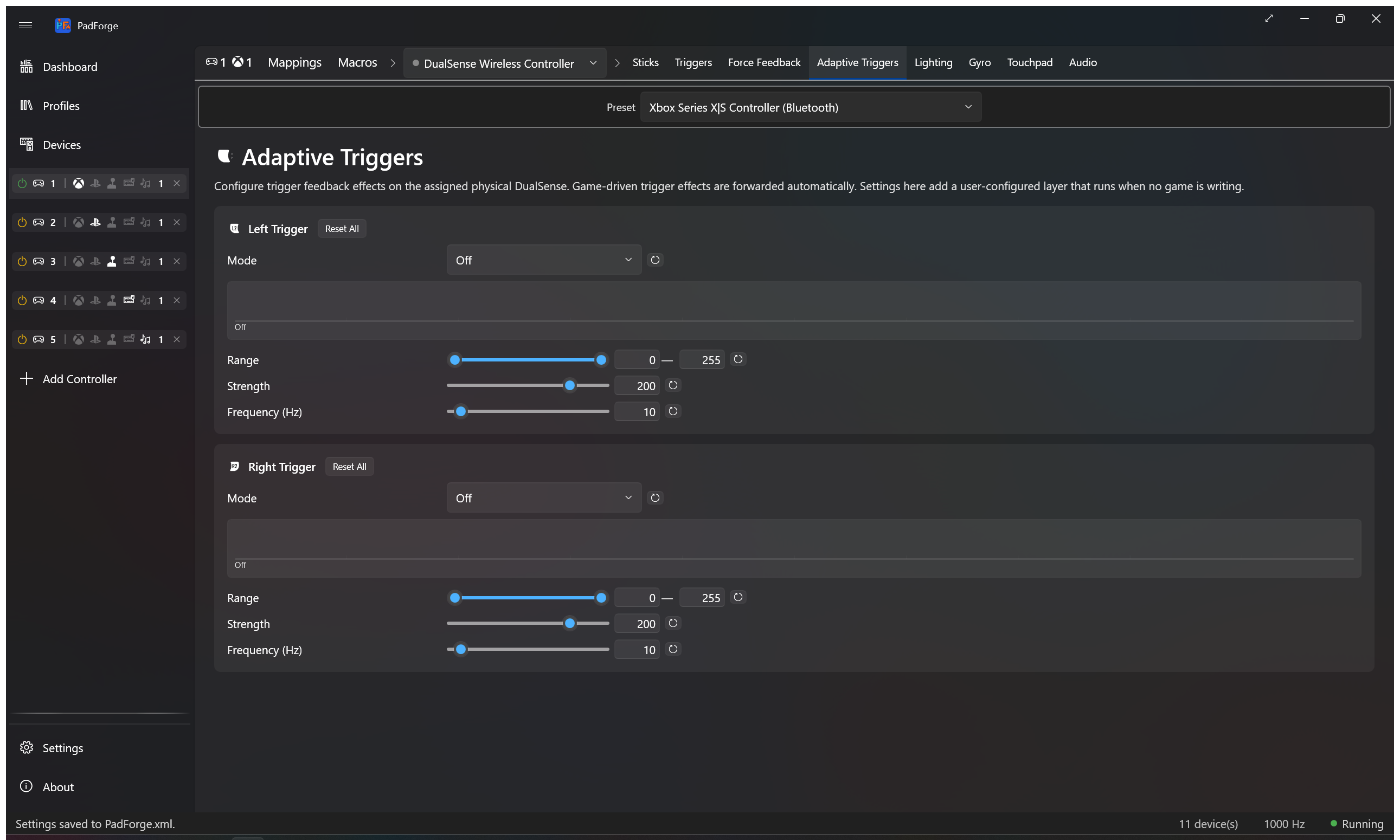
The Adaptive Triggers tab appears only when the active slot has a DualSense or DualSense Edge assigned as a physical device. Slots without a DualSense don't see the tab.
These settings drive the trigger when no game is writing to it. Game-driven effects (Returnal, Astro, Gran Turismo 7) pass through a separate path and override these settings while the game runs.
Seven modes match Sony's ScePadTriggerEffectParam types.
| Mode | Feel |
|---|---|
| Off | No resistance. Trigger feels normal. |
| Feedback | Constant push-back from the start point to fully pressed. |
| Weapon | Soft pull into a firm click at the end point. Gun-trigger feel. |
| Vibration | Continuous buzz once you cross the start point. |
| Multi-Position Feedback | Ratcheting force bumps inside the start-to-end range. Like clicking through detents. |
| Slope Feedback | Resistance ramps from light at the start point to full at the end point, then holds at peak. Bow-draw feel. |
| Multi-Position Vibration | Short buzz bursts inside the start-to-end range. |
Three modes use the firmware's simple parameter form (Feedback, Weapon, Vibration). Three use the 10-zone bitmap encoding (Multi-Position Feedback, Slope Feedback, Multi-Position Vibration).
A live graph under the mode dropdown shows the resistance or vibration shape across the full trigger pull. Left edge is released. Right edge is fully pressed. Ten faint ticks mark the firmware's 10 zone boundaries.
The shape updates as you drag the Range, Strength, and Frequency sliders. You see what the firmware will receive before pulling the trigger.
| Mode | Shape on the preview |
|---|---|
| Off | Empty track |
| Feedback | Solid bar from start to the right edge |
| Weapon | Solid bar inside [start, end] with a click marker at the end |
| Vibration | Continuous sine wave from start onward |
| Multi-Position Feedback | Alternating bumps inside [start, end] |
| Slope Feedback | Triangular ramp from start to end, held at peak past end |
| Multi-Position Vibration | Stuttering sine bursts inside [start, end] |
The graph follows the app theme. It uses the same Accent and Control brushes as the rest of the UI.
Each trigger has its own card with three sliders.
A dual-thumb slider over 0–255. The bytes map linearly to the firmware's 10 zone indices. Byte 0 is zone 0. Byte 255 is zone 9.
Some modes use only the start thumb. Feedback uses start. Vibration uses start. The graph shows which thumb is active.
0–255 force level. PadForge round-half-ups into the firmware's 3-bit zone strength.
| Byte range | Zone strength |
|---|---|
| 0 | 0 (inactive) |
| 1–31 | 1 (lightest) |
| 32–63 | 2 |
| ... | ... |
| 224–255 | 8 (firmest) |
Default is 200 (firm but not maxed). Setting strength to 0 encodes the trigger as Off no matter which mode is picked.
0–255 byte. Used by Vibration and Multi-Position Vibration to set the firmware's autoTrigger pulse rate. The firmware effectively uses the low end of this range. Values above about 30 don't feel different from each other. Default is 10.
Setting frequency to 0 with a vibration mode encodes the trigger as Off. The preview graph hides the wave.
Every slider has its own reset button. Start and end snap to 0 and 255. Strength snaps to 200. Frequency snaps to 10. A Reset at the top of each trigger card clears every parameter on that trigger and resets the mode.
When Weapon is the active mode, a Load GameCube preset button appears under the Mode dropdown.
- Pick Weapon as the mode.
- Click Load GameCube preset.
- The sliders fill with the firmware bytes used by Mxater's DualSenseSupport and DualSenseY-v2. Start is about 56 %, end is about 63 %, force at max. The result is the physical click-feel of a real GameCube trigger.
- Pair with a trigger ceiling on the Trigger Deadzones tab and an axis-to-button mapping from Button and Axis Mappings for an analog-then-digital trigger.
The sliders stay editable after loading. It's a one-click loader, not a lock.
Each trigger's effect block is 11 bytes inside the DualSense USB Report 0x02 / BT Report 0x31 payload. One mode byte plus 10 parameter bytes. The synth lives in Ds5EffectSynthesizer.cs and follows the byte layouts in Nielk1's TriggerEffectGenerator.
| Mode | Opcode | Layout |
|---|---|---|
| Off | 0x00 |
All zeros |
| Feedback | 0x01 |
[start_pos, force] |
| Weapon | 0x02 |
[start_pos, end_pos, force] |
| Vibration | 0x06 |
[freq, force, start_pos] |
| Multi-Position Feedback | 0x21 |
active-zone bitmap (2 bytes) plus packed 3-bit strengths (4 bytes) |
| Slope Feedback | 0x21 |
same shape as Multi-Position Feedback, with strengths interpolated linearly from 1 at the start zone to peak at the end zone |
| Multi-Position Vibration | 0x26 |
active-zone bitmap, packed strengths, frequency at byte 9 |
PadForge writes these bytes only when no game is driving the trigger. When the game writes its own DS5 effect block into USB Report 0x02 / BT Report 0x31, the dispatcher forwards those bytes to the physical pad unchanged.
- For Multi-Position Feedback, narrow the Range to a partial span (such as 50–150) to feel the bumps. The default 0–255 range spreads them across the whole pull and can feel like one rough surface.
- For Weapon, set the end point close to where you want the click. Strength governs the click force, not the soft zone before it.
- For Slope, the gradient is most pronounced at high strength (200+). At low strengths the ramp from 1 to 3 is too subtle to feel.
- The Frequency slider is shown for every mode. Only Vibration and Multi-Position Vibration use it. The value persists for when you switch back to a vibration mode.
- Force Feedback: rumble passthrough, audio bass rumble, and constant force on the body motors.
- Trigger Deadzones: floor, ceiling, and curve for the trigger axis before it reaches the game.
- Impulse Triggers: Xbox impulse trigger motors, audio bass trigger rumble, and constant trigger force.
- Lighting: lightbar modes, palettes, and Input Reactive overlay.
- Button and Axis Mappings: the trigger axis source picker.