Repository navigation
Releases: hiibrarahmad/syscura
Release list
Syscura 1.0.0

Syscura 1.0.0, the first full release
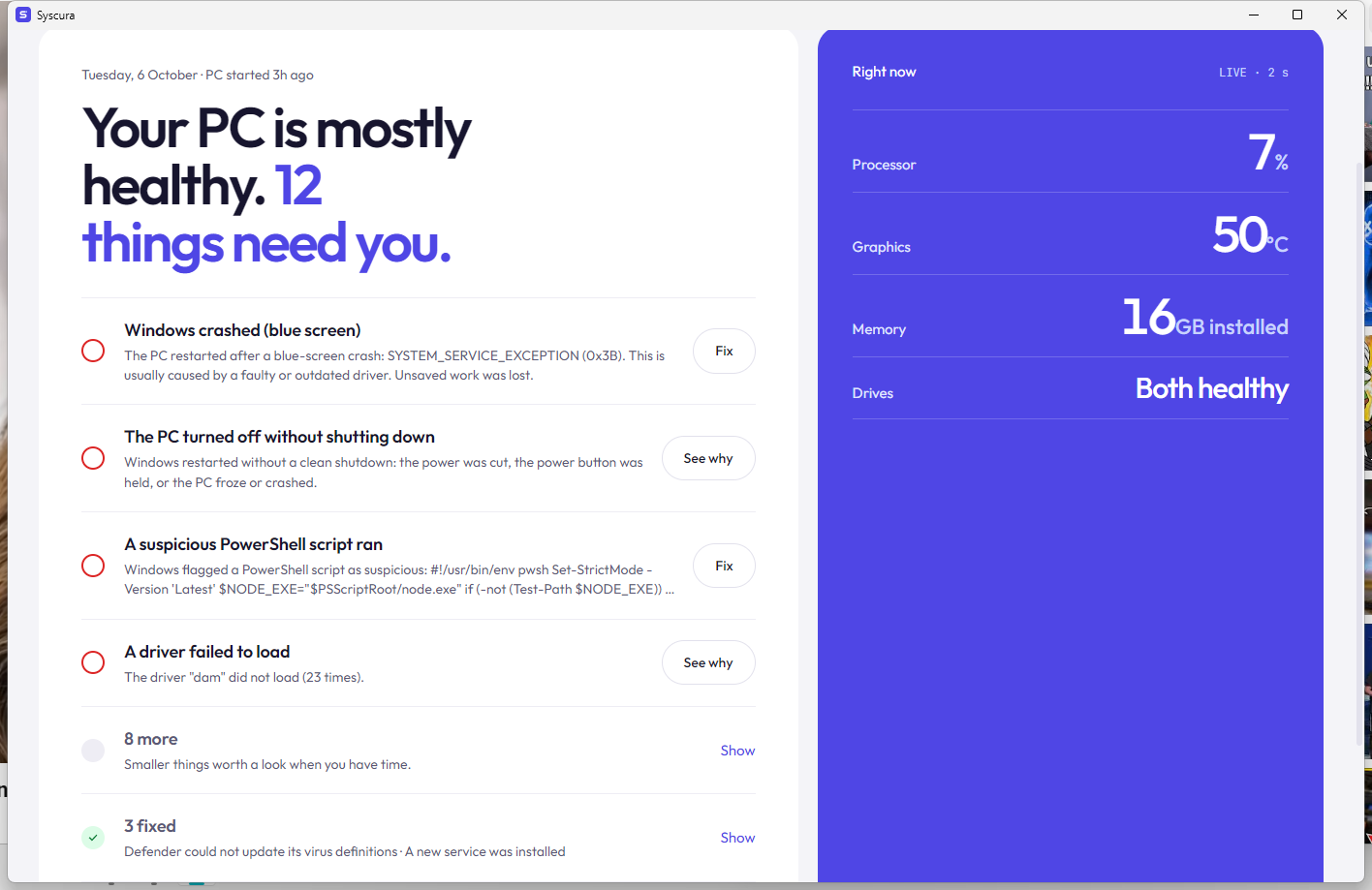
Syscura is a free, open-source health and security guard for Windows 10 and 11. It explains every alert in plain words, fixes what it safely can, checks whether the fix really worked, and catches what antivirus can miss, using ~14 MB of memory.
⬇️ Install
- Download
Syscura-1.0.0-setup.exebelow. - Double-click it. SmartScreen warns because Syscura isn't code-signed yet: More info → Run anyway, then Yes.
- Next → Install → Finish. Background protection starts as a Windows service, and Syscura sits in the tray (^ next to the clock) after every restart.
Coming from a beta or the portable zip? Just run the Setup. It replaces the old copy (never a second one), and your history and settings are kept.
✨ What Syscura does
- 🩺 Explains every alert: what happened, whether it's harmful, and what to do. Blue-screen stop codes are decoded; harmless noise is marked safe to ignore.
- 🛠️ Fixes safely: safe fixes run by themselves. Everything else asks first, makes a restore point and can be undone. Nothing is ever deleted without you.
- ✅ Honest results: "SFC found nothing wrong, so it was not the cause", not a fake "fixed". After any fix, the AI checks whether it really worked.
- 🕵️ Catches what antivirus misses. A light live process watch flags fake Windows processes, unsigned programs in Temp/Downloads/AppData, and Office starting PowerShell. A startup check flags unsigned programs and hidden scripts that start with Windows.
- 🗂️ Processes page: every running program, live, with publisher, signature, CPU and memory. Open its folder, scan it with Defender, or stop it.
- 🦠 Virus files: open the folder, or delete the file or its whole folder (to the Recycle Bin, after a warning). The problem closes itself once the file is gone. You can also let Defender remove it, or run a Defender Offline scan.
- 🧠 Remembers: Mark as safe once and Syscura never warns again. A problem that returns gets the fix that worked before.
- ✦ Free AI help, no key needed: opens ChatGPT, Claude, Copilot, Gemini or Google AI Mode with the problem written out. Or add a free Gemini key for in-app answers with web search.
- 🔬 Accurate hardware on any PC:
- read fresh from Windows: exact Windows version and build, board, BIOS, CPU, every RAM stick, GPU, drives, monitors, battery and more;
- details your PC doesn't report can be looked up online with AI, and are marked as such.
- 🛡️ Warnings and backup: notifications for serious problems, even with the window closed, and a copy-only backup to another drive.
- 🔄 Updates itself: checks GitHub daily. Download and install verifies the SHA-256 checksum, installs in place and keeps your data.
✅ Tested
Every change is tested automatically on clean Windows machines:
- Hardware, process and startup checks: Windows Server 2022 and 2025.
- Agent and command-line tool: start, answer, problems and process list.
- Installer: fresh install → service running and auto-start present → install again over itself (history kept, still one copy) → replace an old portable copy (one service) → clean uninstall.
Full list of changes: CHANGELOG.md · Something wrong? Report it
Made by Ibrar Ahmad · GitHub · LinkedIn · Website · If Syscura helped you, a ⭐ helps others find it.
Syscura 0.1.0-beta.2 — new look, free AI help, honest fixes
Syscura 0.1.0-beta.2: new look, free AI help, honest fixes
The biggest update yet. Syscura now looks brand new, gets free AI help without needing a key, checks with the AI whether a fix actually worked, warns you about serious problems, and backs up your files.
✨ Highlights
🎨 New Verdict design. A clean light (and dark) look with a top tab bar. Every screen opens with one plain sentence that answers "is my PC OK?", for example "Your PC is mostly healthy. Two things need you." New logo and icons.
✦ Free AI help, no key needed. Every problem and event has buttons that open ChatGPT, Claude, Copilot, Gemini or Google AI Mode in your browser with the whole question already written out, or search Google for the exact error. Add an optional free Gemini key and Syscura explains the problem with Google Search and picks fixes from its own safe list. When one model's free limit is used up, it falls back to the next free model by itself.
✅ AI fix check. When a fix finishes (SFC, DISM, a Defender scan, a service restart...), Syscura asks the AI whether that result means the problem is fixed. You get Fixed / Not fixed / Not sure and the next step. No key? Ask Google AI if it worked sends the same question to your browser.
🩺 Honest results. If SFC finds nothing to repair, Syscura now says "found nothing wrong, so it was not the cause". The problem stays open with a What next box: next fix, AI check, web search. It no longer pretends the problem was fixed. Problems no longer get stuck on "Fixing…" after a restart.
💥 Blue screens explained. Stop codes are decoded with their usual cause, for example 0x3B → SYSTEM_SERVICE_EXCEPTION, usually a faulty or outdated driver.
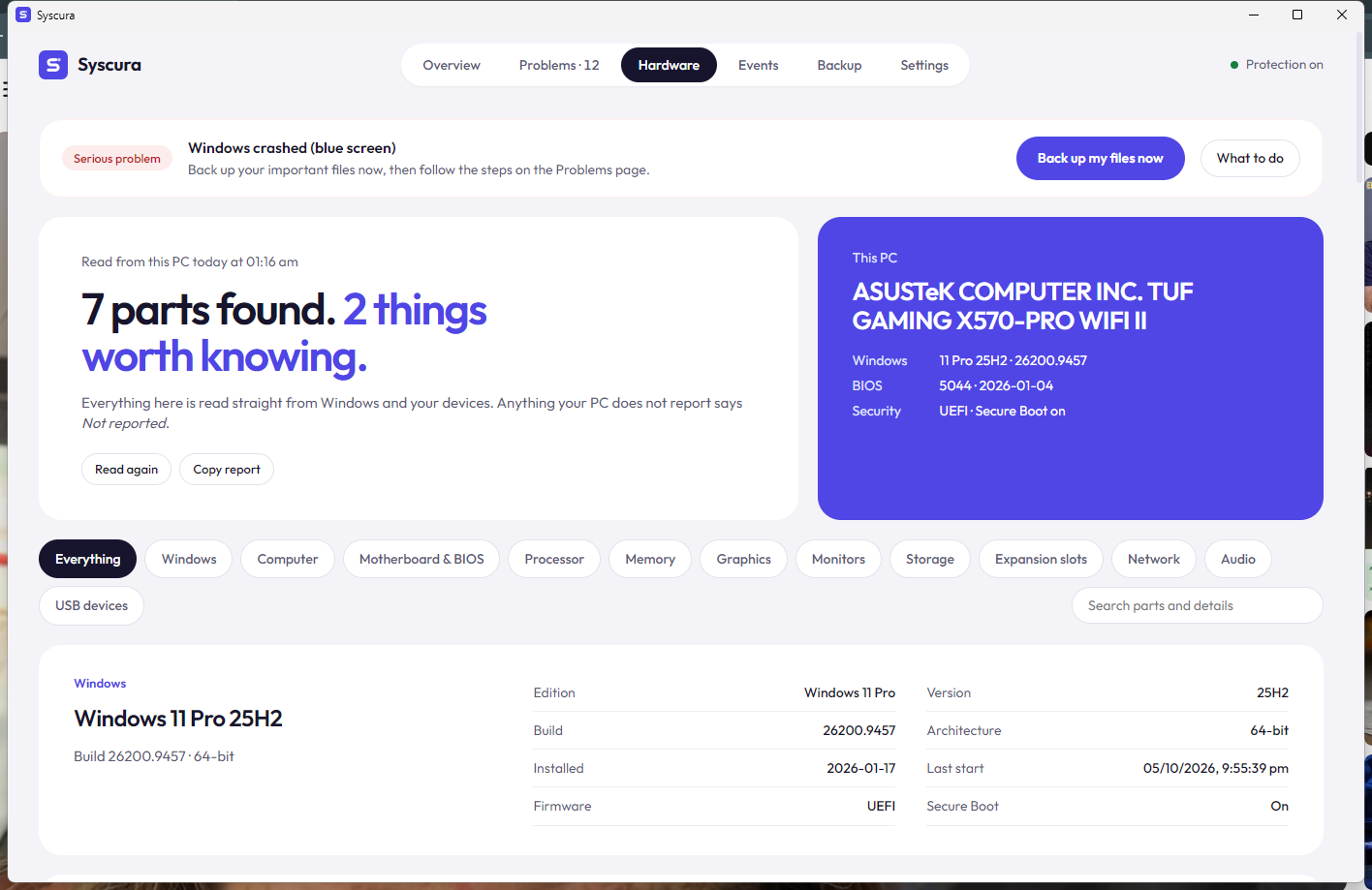
🛡️ Warnings and backup. Serious problems (virus found, failing drive, blue screens) show a red banner and a Windows notification. The new Backup page copies your folders to another drive or USB stick with one click. It only copies, never deletes or overwrites.
🔬 Hardware that's right on any PC. The board photo views are gone. Every PC is different, so Syscura now reads an accurate, detailed report fresh at every start:
- the exact Windows 11 version and build, firmware and Secure Boot;
- board and BIOS, CPU, every RAM stick's part number, GPU;
- drives with health and wear, real monitor model names, battery wear, network, audio and USB.
Anything your PC doesn't report says Not reported. Copy report makes support easy.
🔒 Still safe and private
- The AI can only pick from Syscura's fixed list of 19 actions. It never runs commands, and the agent re-checks every pick.
- Anything that isn't safe asks first and makes a restore point. Reversible changes have Undo. Nothing is deleted.
- Before anything goes to an AI, your user name, PC name, folder paths, e-mail and IP addresses are masked. The key is stored in Windows Credential Manager. No telemetry.
- The background agent still uses ~14 MB of RAM and 0% CPU when idle.
⬇️ Install
- Download
Syscura-0.1.0-beta.2-windows-x64.zipbelow and unzip it. - Run Syscura.exe and press Start. Then Install as a Windows service (recommended, one admin prompt).
- Updating from beta.1: stop the service (
syscura-agent uninstallas admin, orsc stop Syscura), replace the files, and start it again. Your history is kept.
SmartScreen will warn you because the beta isn't code-signed yet: More info → Run anyway. Check your download against SHA256SUMS.txt.
Full list of changes: CHANGELOG.md
Found something wrong? Open an issue. The new Wrong hardware info form helps make Syscura accurate on every kind of PC. If Syscura helped you, a ⭐ helps others find it.
Syscura 0.1.0-beta.1 (public beta)
Syscura 0.1.0-beta.1: first public beta 🎉
Syscura is a tiny, free PC health guardian for Windows. It explains what Windows' alerts actually mean, fixes what it safely can, and shows your hardware on a real photo of your motherboard.
Highlights
- 🩺 24 rules that turn Windows events into plain-language findings with a harmful: yes / maybe / no verdict, including harmless noise you can ignore. On first start it checks the last 7 days.
- 🛠️ Safe fixes: safe ones run by themselves (rate limited), the rest ask first. Every fix is verified, reversible ones can be undone, and nothing is ever deleted.
- 🛡️ Security watch: Defender detections and protection changes, new services (signature + location check), cleared event logs, suspicious PowerShell.
- 🖼️ Real-photo board view with exact labels (first verified profile: ASUS TUF GAMING X570-PRO WIFI II; every other board gets a generated map).
- 🔬 Deep part details: RAM voltage and decoded part numbers, GPU VBIOS / PCIe link / power limit, drive health, USB devices by port.
- 🪶 Tiny: background agent ~13 MB RAM, 0% CPU when idle.
Install
- Download
Syscura-0.1.0-beta.1-windows-x64.zipbelow and unzip it to a folder you keep. - Run Syscura.exe → Start protection.
- Optional: Install as a Windows service (one admin prompt) so it starts with Windows and can apply fixes that need admin rights.
Warning
This beta is not code-signed yet, so Windows SmartScreen will warn you. Choose More info → Run anyway. Compare the files with SHA256SUMS.txt if you want to be sure they are the ones built here.
Known limits
- Windows 10/11 only for now.
- CPU temperature and board voltages are not shown (Windows only shares them with kernel drivers); CPU load and real clock speed are.
- Only one board has a verified real-photo profile so far. Request yours or help build it.
Found something odd? Open an issue. Ideas welcome in Discussions.