Web interface
A page that shows what each station sends, keeps the most recent raw uploads, and lets you place a field without editing a file or restarting WeeWX.
The interface is enabled by the installer, on port 8080, with a token generated at install time that differs on every machine. No setup is required.
The driver logs the full address at startup:
INFO user.ultimatepush.driver: The web interface is at
http://1.2.3.4:8080/?token=abcdefg12345
To retrieve the address later:
python -m user.ultimatepush --url
The address contains the token, so treat the log as you would treat weewx.conf.
In a container, the address reported is the container's own, because that is where the process runs. Use the address of the host and whichever port the container publishes.
To close the port:
[UltimatePush]
    [[web]]
        enable = false
A Raspberry Pi or similar on a private network, with no proxy in front of it.
   Console                              Raspberry Pi 1.2.3.4
      |                                 WeeWX, running as user weewx
      |  POST /abcdefg12345/report          +-------------------------+
      +-------------------------------->|  :8000   the readings   |--> weewx.sdb
                    every 16 to 60 s    |                         |
   Laptop, phone                        |  :8080   this page      |
      |  GET :8080/?token=...           +-------------------------+
      +-------------------------------->
Both ports are above 1024, so neither requires root. Installing and pointing the console are in Installation; this page is what you open afterwards.
| The driver | /etc/weewx/bin/user/ultimatepush/ |
weewx.conf |
/etc/weewx/, owned by root |
| Settings written by this page | /var/lib/weewx/ultimate-push-web.conf |
| Which consoles are accepted | in the database, with a file beside it as a fallback |
WeeWX runs as the user weewx and /etc/weewx is owned by root. This is why the
interface writes to /var/lib/weewx rather than to weewx.conf.
Leave this off unless there is a proxy in front. With it on and no proxy present, any
client can supply an address of its choosing in X-Forwarded-For, and the rate limiter
described below would count invented addresses instead of the real one.
Placing a field is a decision only the person who installed the sensor can make. A WN34
reports on tf_ch1 whether it is a spike in a raised bed or a lead in a pool. The
driver does not guess, because two sensors in one column cannot be separated afterwards.
Without the interface, that decision is made by reading a log entry, adding a line to
weewx.conf, restarting WeeWX, waiting for an upload and reading the log again. It
also omits the information that matters most: whether the column is already in use.
The interface shows, for each raw field, what arrived, its last value, where it would be written, whether a column exists, and how many earlier values that column holds.
The top bar has four views. Stations is where the work is done, one station at a time. Field map puts every station's readings on one page. weewx.conf is the configuration file itself. Checklist is what is still in the way, with a count beside it.
A strip under the top bar repeats that count on every view. A station that is uploading happily looks healthy on its own page, and the reason none of it is being recorded can be a console two entries down the list being turned away.
Stations is a list on the left and one station on the right. Everything under that station's tabs is about the station you picked, so a tab means the same thing wherever you reached it from.
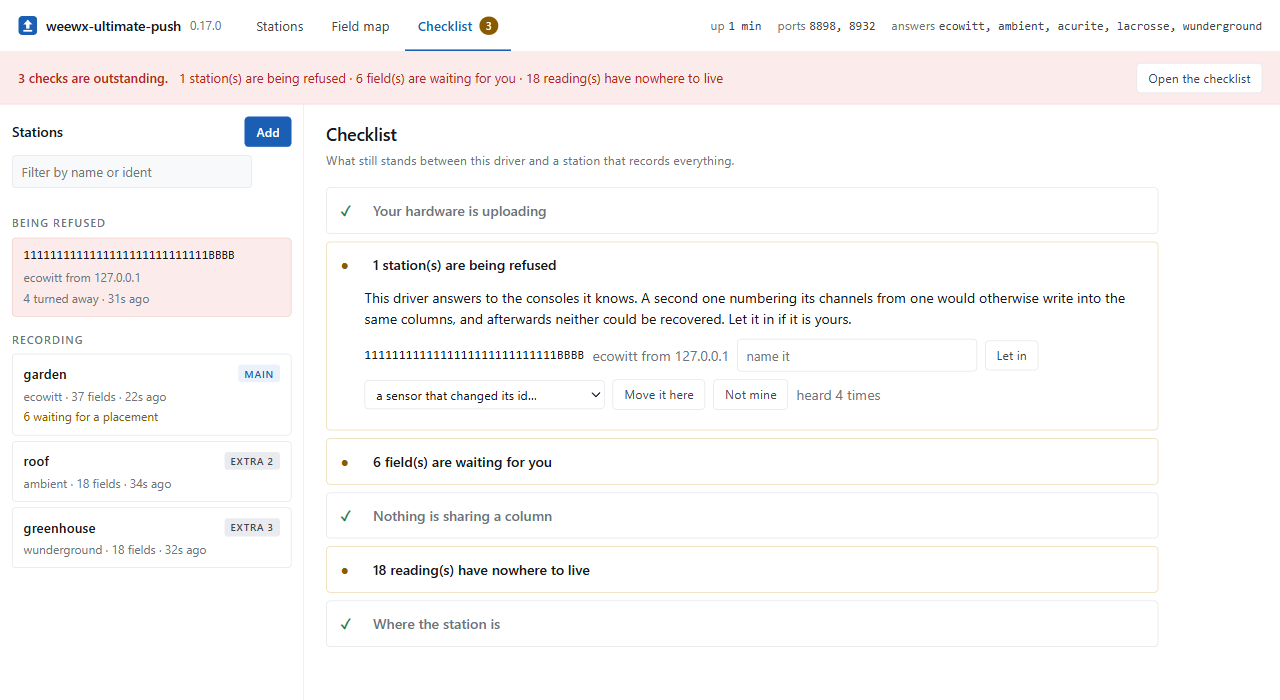
Until a station is recording properly, the page opens on a checklist of what still stands in the way. It has no step numbers and no fixed order: it determines what is true each time it is loaded.
| Your hardware is not pointing here | Enter a name and select the hardware. For hardware whose path is yours to choose, the driver generates one and displays the settings to enter. The page detects the first upload without being reloaded. |
| Something is being turned away | A console the driver does not know. One click accepts it. |
| A field is waiting for you | Placements only you can make. |
| Readings have nowhere of their own to go | Which readings were dropped, which station sent them, and which station holds the column. |
| A reading has no column | With the weectl commands. |
| The station does not know where it is |
[Station] in weewx.conf, which this driver cannot write, so the block to paste is displayed. |
Once everything is resolved the checklist stops asking and remains as a status page. A console that appears a year later puts its step back at the top.
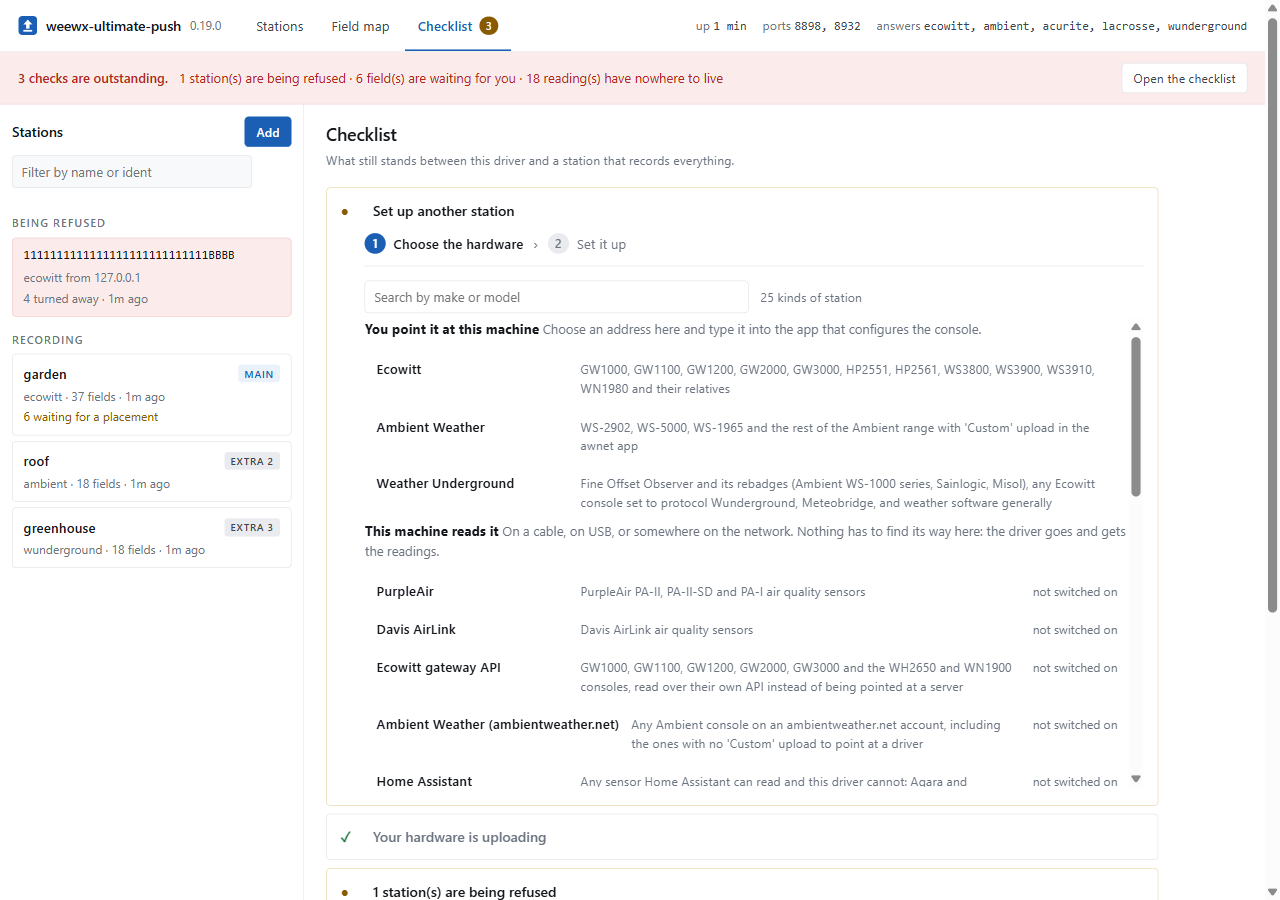
Add above the station list opens this. It is two steps, because the list of hardware and the form for one of them do not fit on a screen together.
Choose the hardware. Every kind of station this driver knows, in three groups by what you have to do: point the console at this machine, let this machine read a driver, or change something on the network and wait for the station to turn up. Each entry names the models it covers, and the search box reads those as well as the names, so somebody holding a GW1100 does not have to know that this driver calls it Ecowitt. The list scrolls inside itself, and the rest of the checklist stays where it is.
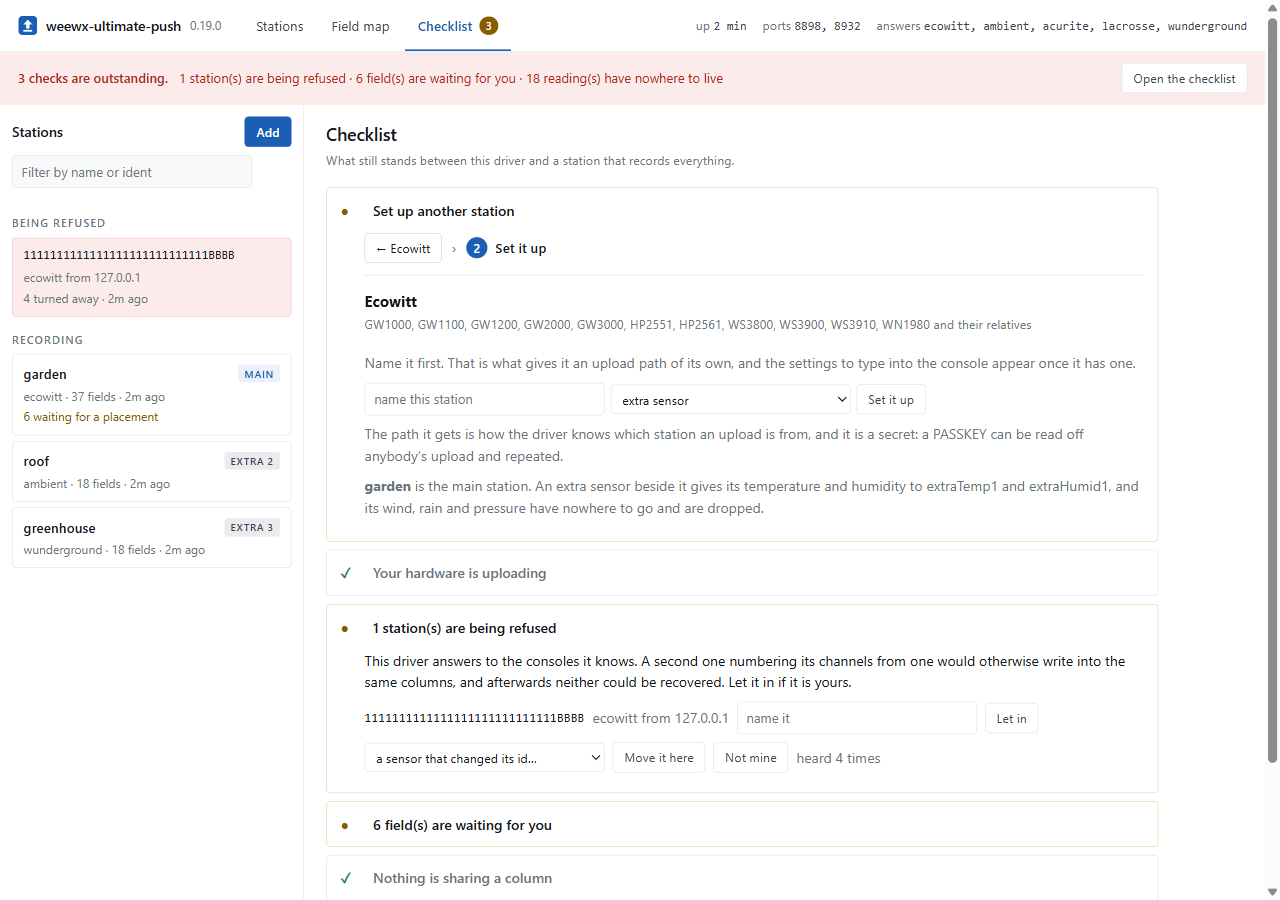
Set it up. The list goes away and the form takes its place. Above it is the way back, carrying the name of what you chose, so there is no guessing which hardware the form belongs to. Going back keeps what you searched for.
Selecting a role is part of that form: the first station is the main station, and every station after it is offered as an extra sensor. See Stations and Hosted hardware.
A console this driver can hand something to is named first, and the settings to type into it appear once it has been. What it is given differs by hardware: an upload path, or an ID and a password. See Stations.
Nothing is shown before the name. The path does not exist until the station has one, and showing the address and the port without it invites somebody to type those in, reach the path, and use the driver's general one instead. The console then uploads as a stranger while the station they just made sits there having never been heard from.
A driver picked from the middle group shows its own settings, with the defaults its author wrote, because they come from the driver's own configuration editor rather than from a copy kept here. It is opened before anything is saved, so a serial port that is not there is a message rather than an entry to take out again, and it starts at once without a restart. A protocol this driver is not listening for is listed too, greyed, with what switching it on takes.
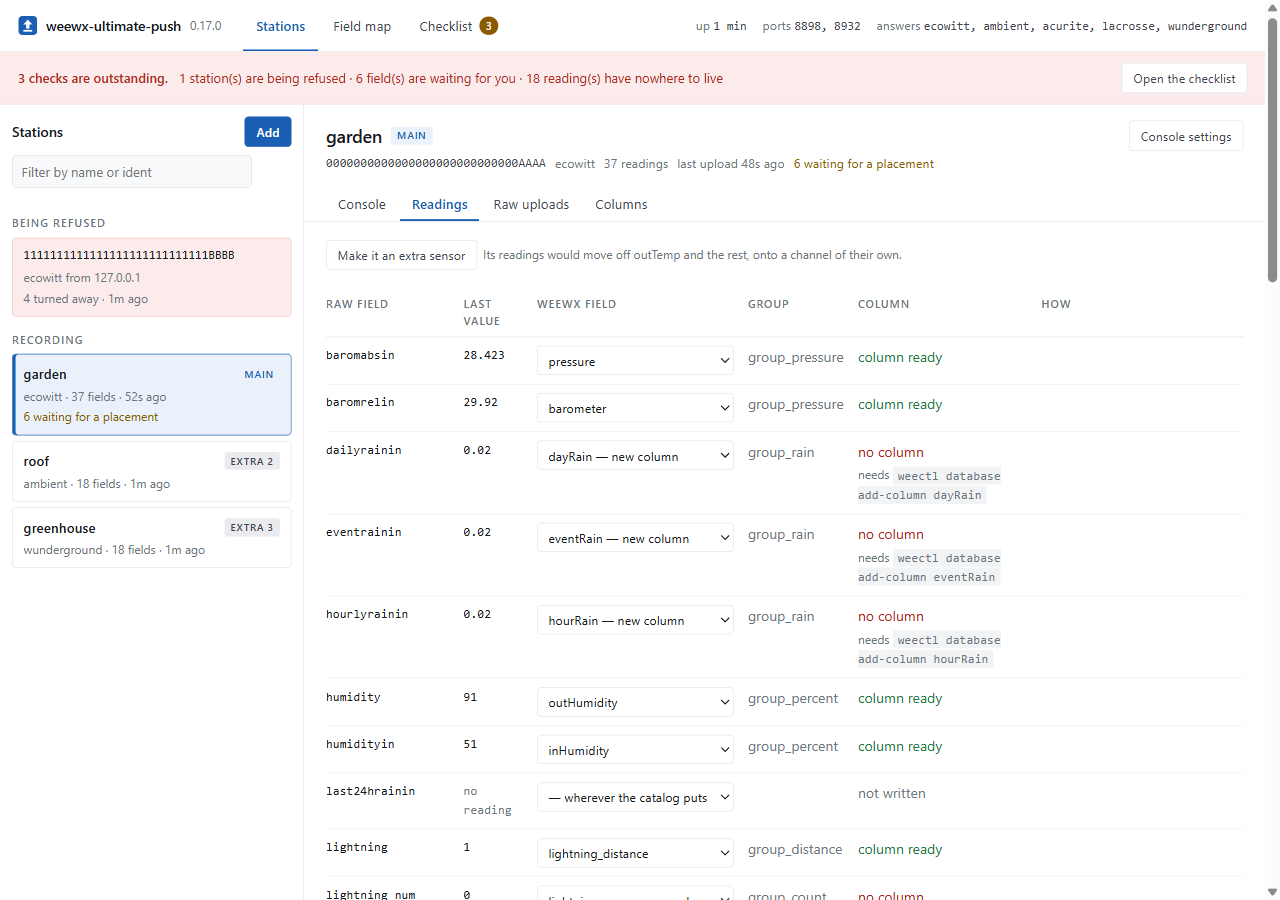
The list on the left holds every station the driver knows, in the order you meet them:
- Being refused. A console uploading into nothing because the driver does not know it. Selecting it shows what it last sent, which is what tells your own new console apart from a stranger's, and the buttons to let it in or dismiss it.
- Recording. Stations that are being written to the archive, with what each is for, how many readings it sends, and when it was last heard.
- Set up, not heard yet. Named here and still silent. Its console settings are on its Console tab.
Selecting a station keeps the tab you were on, so two stations' raw uploads can be compared without going back through the same tab each time.
The console settings for that station, with its own upload path. The checklist shows these once and then stops; a console that has to be set up again a year later needs them again. Also the station's name, role and channel, which archive columns it fills with a button to release them, and a button to remove it.
A station this driver reads rather than waits for shows its driver's settings here instead, with buttons to reopen it, make it the archive station, or remove it. See Hosted hardware.
Stations declared in weewx.conf are shown but not editable, and say so. The console
adopted as the first one ever heard is shown but has no settings to change, because it
is named in no file.
Every raw field this station has sent, its last value, where it is written, and whether a column exists for it.
The selector in each row offers the WeeWX fields that measure the same thing first,
then everything else, then nowhere, then a field of your own. Numbered families run
to 16, past the end of the standard schema, so extraTemp12 is offered even though no
database has a column for it. Each option states what it costs: new column, or the
station and reading that already hold it.
One WeeWX field takes one reading. Selecting a field that is taken reports who holds it
and changes nothing until you confirm, after which the reading that held it is placed
nowhere rather than left to take turns in the column.
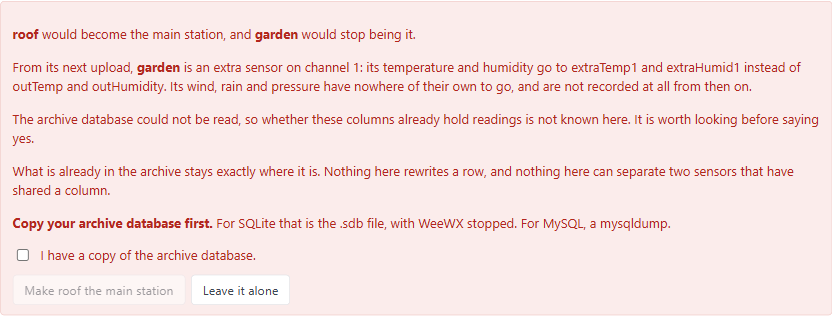
A field with no column has a button in the row that creates it. A selection takes effect on the next upload.
The last twenty uploads from this station, newest first, with a copy button. Anything
that names the station is redacted, so they are safe to attach to an issue. This
replaces enabling log_raw and watching the log.
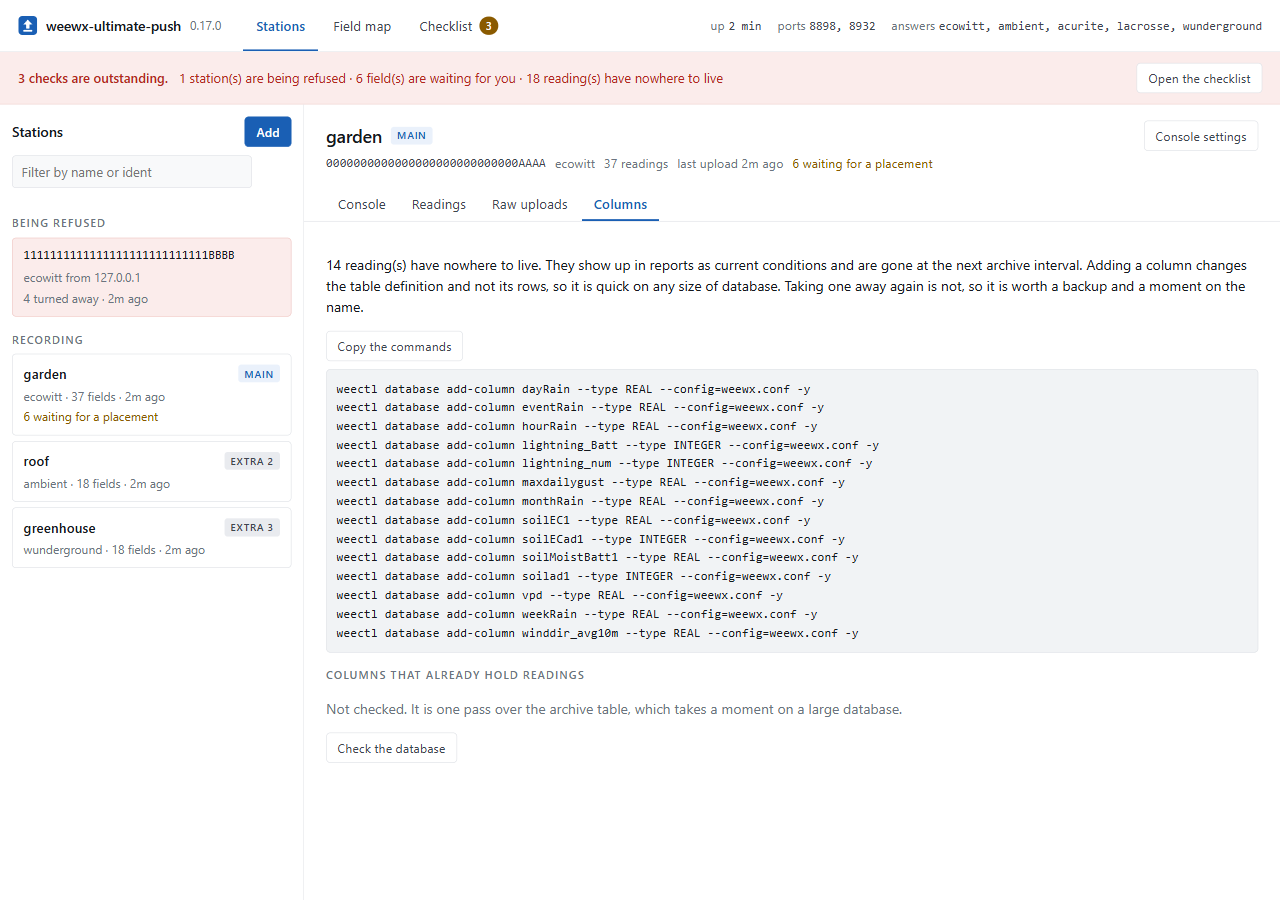
Which of this station's readings have nowhere to be written, with the weectl database add-column commands. The archive table is also checked for what it already holds. That
check is one pass over the table, so it runs when you first open the tab rather than on
every load.
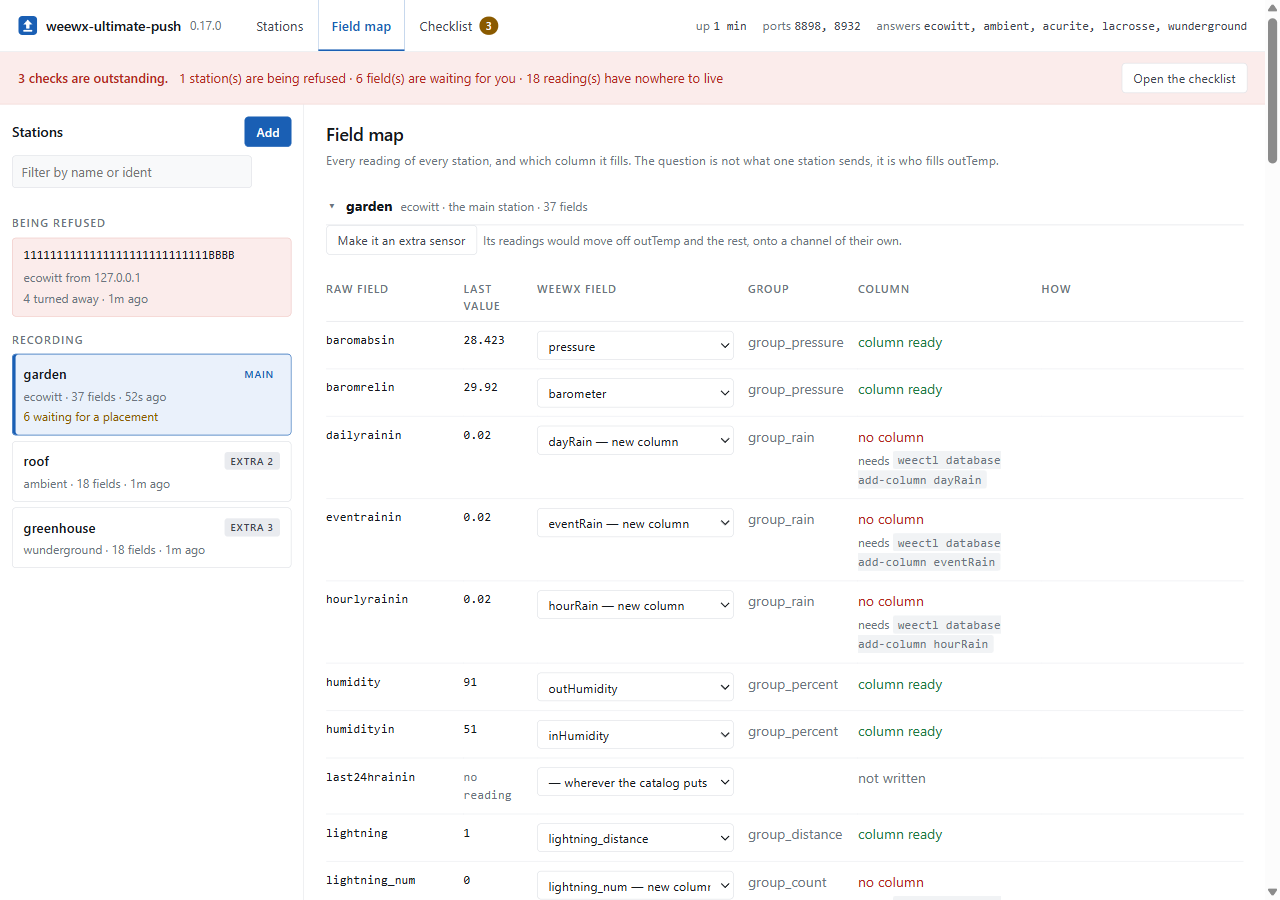
Every station at once, one block each, collapsible. The same rows as a station's
Readings tab, for the question a single station cannot answer: not what a given station
sends, but which station fills outTemp. With a station per page that answer is spread
over two pages, neither of which shows the collision that matters.
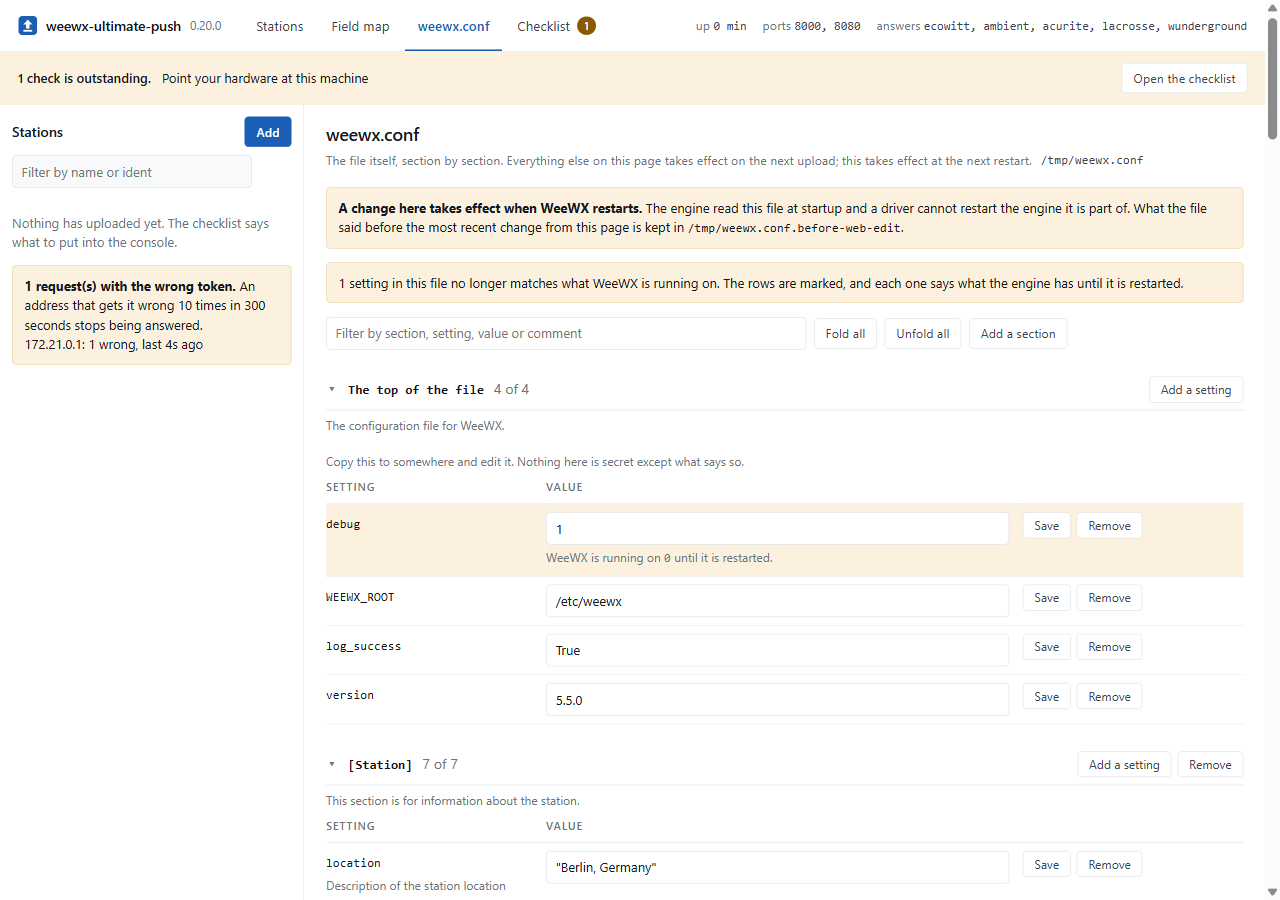
The whole configuration file, section by section, with the comment above each setting
beside it. [Station], [StdReport] and every skin under it, [StdWXCalculate], the
stanza of every service you run. Most of it belongs to WeeWX rather than to this driver,
and today the only way to read it is an ssh session.
Section headings are written the way the file writes them, [[Defaults]] and
[[[[Groups]]]], so that what you read here is what you look for if you do open the
file. The filter matches a section, a setting, a value or a comment. Sections fold, and
a filter unfolds whatever it found.
A change takes effect when WeeWX restarts. The engine read the file at startup, and a driver cannot restart the engine it is part of. Every setting the file and the running engine now disagree about is marked, and the row says what the engine has until then.
Values are written the way the file writes them: several values separated by commas are
a list, and a value with a comma of its own is quoted. location = "Berlin, Germany" is
one string and shows its quotes for that reason. A value with a # in it is refused
unless it is quoted, because everything after an unquoted one is a comment.
Adding. Add a setting on a section heading puts a new one in that section, and
refuses a name the section already has. Add a section takes the whole heading path,
one heading per line, and the section above the last one has to exist already. Changing
and adding are separate for one reason: a typed name that is not in the file is nearly
always a typo, and a typo written to weewx.conf is a setting that looks set and does
nothing.
Removing a section that holds settings asks twice, with the count in the question.
Under a package installation weewx.conf belongs to root while WeeWX runs as the
weewx user, so the page can read the file and not change it. It says so above the
table, and every row offers the line with its headings, ready to paste into the file:
[StdReport]
    [[Defaults]]
        [[[Units]]]
            [[[[Groups]]]]
                group_altitude = meter
To change it from here instead, give the file to the user WeeWX runs as:
sudo chown weewx /etc/weewx/weewx.conf
The directory it is in stays root's. That is enough, because the file is filled in
place where the directory cannot be written. What it means is that anybody holding the
token can change weewx.conf, which is the same access weectl gives from a terminal
and a larger thing than placing a field. On a network you do not trust, leave it.
A setting whose name says it holds a secret — password, token, api_key and the
like — is listed with an empty box rather than its value. The interface is HTTP, so
anything it shows travels in the clear over whatever is in between, and a database
password does not need to. Typing a new value replaces it; an empty box changes nothing.
Comments, quoting and layout survive, because the file is read and one value changed in
it rather than being rebuilt. What the file said before the most recent change from this
page is kept beside it as weewx.conf.before-web-edit, overwritten each time.
The first write indents the blank lines inside a section, which is how configobj
writes them. Nothing else in the file moves.
Where the directory can be written, the file is replaced rather than filled: the new one is written beside it and moved into place, so a power cut leaves the old file rather than half of a new one. It keeps its mode and takes the owner WeeWX runs as. Where the directory belongs to somebody else, the file is filled in place instead, and a power cut in the middle of that leaves it short. The backup is what puts it back.
The file is read again immediately before every write, so an edit made in a terminal between two changes here is carried over rather than overwritten.
Not to weewx.conf, for two reasons that concern the timing rather than the file. WeeWX
is running from it, so a placement written there has no effect until a restart, and a
field map has to take effect on the next upload. And a field map is this driver's, while
weewx.conf is yours.
Settings the interface changes are written to ultimate-push-web.conf, beside the
console list, in the same format as weewx.conf. They are read on the next upload,
without a restart.
Anything that does require a restart — the port, protocols, path — is displayed as a
block to copy rather than written. The weewx.conf view above will write those, with the
restart that they cost.
The file holds three kinds of entry:
[stations]
    [[path:/abcdefg12345/report]]
        path = /abcdefg12345/report
        protocol = ecowitt
        name = garden
        role = main

[columns]
    outTemp = path:/abcdefg12345/report
    extraTemp1 = path:/hijklmn67890/report

[hardware]
    station_types = Vantage
    [[Vantage]]
        role = main
        [[[options]]]
            driver = weewx.drivers.vantage
            type = serial
            port = /dev/ttyUSB0
[stations] is what the interface knows about the consoles that upload, [columns] is
which station fills which archive column, and [hardware] is the drivers it is running,
each with the section weewx.conf would otherwise carry.
[stations] holds the stations the interface set up or accepted, keyed by identity.
[columns] records which station fills which archive column, so that ownership survives
a restart. Both are described in Stations.
Editing the file by hand works and is read on the next upload, but the interface rewrites the whole file the next time something changes in it, and comments added by hand do not survive that.
A placement written by the interface takes precedence over [[field_map_extensions]] in
weewx.conf. Each row states where the value it is showing came from.
A station declared under [[stations]] is different. Its field map is part of that
declaration, and the interface displays it and declines to change it, as it does the
station's name, role and channel.
The interface is protected by a token, a rate limiter, and the address the socket is bound to.
This is a weather station rather than a bank. The intent is that a stray scanner, a curious guest and a mistyped address all come to nothing, and that you can see that it happened.
Ten wrong tokens from one address within five minutes, and that address stops receiving answers: not an error, an empty reply. A correct token does not help either, because the check is not reached.
The limit is not a fixed penalty. Attempts fall out of the window and the address is answered again. A correct token clears the count, so an address that mistyped the token four times and then supplied it correctly is not left one attempt from a lockout.
One address exceeding the limit never affects another, or anyone on the network could lock you out of your own station.
    [[web]]
        tries = 10
        window = 300
The page reports what has been attempted, so that it is not only in the log:
3 request(s) with the wrong token.
1.2.3.11: 3 wrong, last 2m ago
That record survives a successful login, because reading it requires supplying the correct token first.
The interface serves plain HTTP. The token is in the URL on the first request, so it appears in browser history and in the logs of anything in between. On a private network that is a bounded exposure; across the internet it requires TLS in front.
Ten random characters is approximately sixty bits. At ten attempts per five minutes, exhausting that takes longer than the remaining lifetime of the sun. A token chosen by hand is weaker, and the rate limiter is what makes even that impractical from outside. The driver refuses to start with fewer than ten characters.
The token is checked by the driver rather than by the listener. The listener would check it first, which sounds preferable but is not: its check runs before any of this driver's code, so a wrong token would be answered and forgotten, and there would be nothing to count.
Anyone with the token can change the field map. There are no roles.
A page on another site cannot drive the API, which takes JSON with a token header. A
browser will not send that cross-origin without a preflight, and the listener answers no
OPTIONS request.
If you put a reverse proxy in front, there is no reason to give it a secret path as well. Both are strings in the same address and both appear in the same browser history. Use a plain path and let the token do the work; it is the one the rate limiter counts against.
Bind the interface to localhost and reach it through a tunnel:
    [[web]]
        enable = true
        port = 8080
        address = localhost
        token = ...
ssh -L 8080:localhost:8080 you@your-weewx-machine
Then open http://localhost:8080/?token=... locally.
Alternatively, put a reverse proxy with a certificate in front and let it handle TLS and, if required, a second layer of authentication.
The interface can also be restricted to known addresses:
allowed_hosts = 1.2.3.9, 1.2.3.10The listener can require a token, and that check runs before anything else. It would then apply to the readings as well, and most of this hardware cannot send a token. One port cannot both require a token and accept a console that has none.
The interface therefore has its own listener, its own port and the token. The data port is unchanged.
These are a subsection of [UltimatePush].
Whether to open the port. The installer sets it to true. Default is false, so an
installation upgraded from a version before the interface existed keeps its port shut
until you ask for it.
Which port the interface listens on. Default is 8080.
Bind to one address. localhost makes the interface unreachable from the network.
Default is every interface.
Required, at least 10 characters. Generated by the installer, and different on every
installation. To change it, make one with python -m user.ultimatepush --secret and
restart. No default.
How many wrong tokens from one address before it stops being answered. Default is 10.
Over how many seconds those attempts are counted, and how long the silence lasts.
Default is 300.
Comma-separated addresses to accept requests from. Default is anywhere.
Take the client address from X-Forwarded-For. Use only with a proxy you control.
Default is false.
Where the file below is written is set by override_file, which is a driver option
rather than one of these. See Configuration.
Restart WeeWX. A driver cannot restart the engine it is part of.
Run weectl. Adding a column rewrites the archive table. The commands are
displayed; running them is yours.
Show anything from before the driver started. The activity it shows is held in memory and is lost on restart. The database holds the readings; this holds what happened to them on the way in.
Put a change to the port, the protocols or the path into effect. Those define the
socket, which is created once at startup. They can be written to weewx.conf from the
weewx.conf view, and they apply at the next restart like anything else there. The
driver's own pages display the block to paste instead.