Repository navigation
OCR
ocr embeds an invisible OCR text layer into scanned PDFs — fully offline, inside the same single binary that does everything else. After OCR, scans become searchable, selectable, copy-pastable and machine-extractable.
pdfcpu2 ocr scan.pdf scan_ocr.pdf
pdfcpu2 extract -m text scan_ocr.pdf - # now yields real text- Every image drawn on the selected pages (all pages by default) is rendered to a bitmap.
- The embedded PP-OCR detection + recognition models locate text lines and read them.
- Recognized characters are placed as an invisible text layer over each image, mapped through the image's page transformation — so selection highlights land exactly on the visible glyphs, even for rotated, scaled or skewed scans.
- Every processed image is marked; re-running
ocrnever re-processes already-OCRed images (idempotent). Pages without image content are left untouched.
pdfcpu2 embeds the PP-OCRv6 tiny det+rec models (ppocr.bin, ~6 MB, fp32), converted from PaddlePaddle's official ONNX releases. Inference runs on a pure Go engine — no cgo, no ONNX runtime, no Python, no SIMD intrinsics; scalar fp32 math, parallelized across goroutines.
Supported scripts: Chinese and English (the PP-OCR ch model family), including digits, punctuation and mixed CJK/Latin lines.
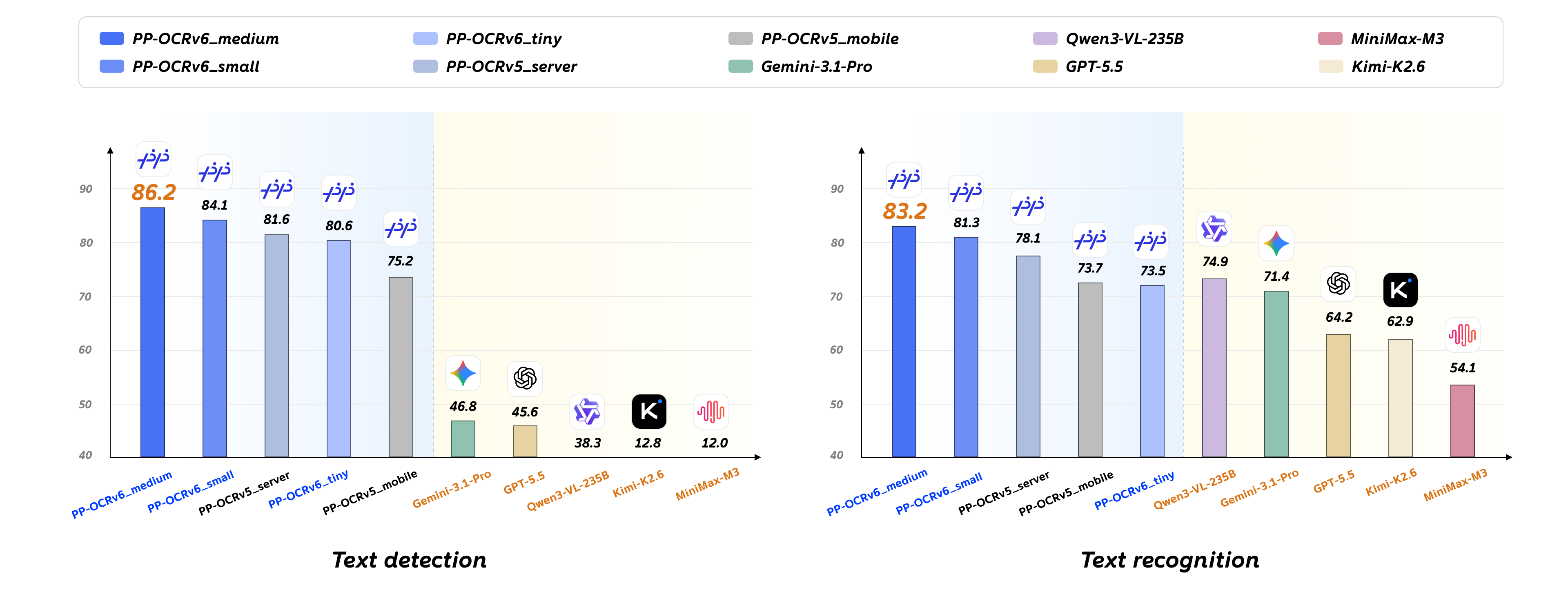
On PaddlePaddle's published benchmark (model card), specialized OCR models dominate general-purpose vision LLMs — especially on text detection:
| Model | Text detection | Text recognition |
|---|---|---|
| PP-OCRv6_medium | 86.2 | 83.2 |
| PP-OCRv6_small | 84.1 | 81.3 |
| PP-OCRv5_server | 81.6 | 78.1 |
| PP-OCRv6_tiny (embedded) | 80.6 | 73.5 |
| PP-OCRv5_mobile | 75.2 | 73.7 |
| Gemini-3.1-Pro | 46.8 | 71.4 |
| GPT-5.5 | 45.6 | 64.2 |
| Qwen3-VL-235B | 38.3 | 74.9 |
| Kimi-K2.6 | 12.8 | 62.9 |
| MiniMax-M3 | 12.0 | 54.1 |
And unlike any API-based model: no network, no tokens, no per-page cost, no rate limits, no data leaving your machine.
pdfcpu2 ocr inFile outFile [-pages pageSelection] [password flags]
| Arg | Meaning |
|---|---|
inFile |
input PDF (stdin not supported for ocr) |
outFile |
output PDF |
-p, --pages |
page selection, see Page Selection |
--opw / --upw (+-file variants) |
passwords for encrypted input |
Examples:
# Full document
pdfcpu2 ocr scan.pdf scan_ocr.pdf

# First 10 pages only
pdfcpu2 ocr scan.pdf scan_ocr.pdf -pages 1-10

# Encrypted input
pdfcpu2 ocr --upw secret scan.pdf scan_ocr.pdfpackage main
import (
"context"
"fmt"
"github.com/huzpsb/pdfcpu2/pkg/api"
"github.com/huzpsb/pdfcpu2/pkg/pdfcpu/model"
)
func main() {
ctx := context.Background()
conf := model.NewDefaultConfiguration()
// Returns the number of images processed.
// Supports cancellation via ctx.
n, err := api.OCRFile(ctx, "scan.pdf", "scan_ocr.pdf", []string{"1-10"}, conf)
if err != nil {
panic(err)
}
fmt.Println("images OCRed:", n)
}Scans → searchable archive:
pdfcpu2 ocr scan.pdf scan_ocr.pdf
pdfcpu2 optimize scan_ocr.pdf scan_final.pdf
Scans → text for RAG / LLM ingestion (no viewer needed):
pdfcpu2 ocr scan.pdf scan_ocr.pdf && pdfcpu2 extract -m text scan_ocr.pdf corpus/scan.txtMixed digital + scanned document: ocr only touches pages with image content; digital pages keep their existing (superior) text layer. Just run it on the whole file.
Incremental top-up: already-processed images are skipped, so after appending new scans you can re-run ocr over the whole file cheaply.
- Handwriting, exotic scripts outside the model's dictionary, and severely degraded scans will degrade in quality like any OCR engine — validate on your corpus.
- The invisible layer stores recognized lines; it does not preserve style information (bold/italic/font).
- For arbitrary (non-scan) PDFs, page rasterization is available via Render, and Solidify can freeze a whole document into image-only pages.