Repository navigation
Releases: iDevGIS/PS-WRAP
Release list
PS-WRAP v0.12.2

Link: friends' voices are smooth and their mics work again, friends can give the controller back and check their devices, and the Link card shows who's talking and who's playing.
Changed
- Link card: who's talking, who's playing and who's reacting stand out. A friend who is talking gets blue ripples around their picture and a live sound wave next to their name. The friend holding the controller gets a glowing green row, a controller badge and a green Playing chip. Reactions pop out of the friend's picture.
- Friends can give the controller back. One tap on Playing on the friend page hands it back to you.
- Friends can choose their microphone (▾ on the mic button), and Check devices before joining or Devices in the room: controller with a drift test and an edge test, mic with playback, speakers, keyboard layouts and camera.
- About now links to the website.
Fixed
- Friends' voices no longer cut in and out. PS-WRAP keeps a buffer that adapts to the friend's connection, recovers lost voice packets and catches up quietly in long sessions. In a test with an uneven connection, the cuts went from about 50 in 10 seconds to none.
- Friends' microphones were silent since 0.11.6. Fixed on the friend page; friends just reload it.
Website
Community
Questions, help and beta builds: Discord https://discord.gg/6VTSxu8JRf
Download
Already on 0.12.1? Click the Update 0.12.2 chip on the home screen, or About › Check for updates.
PS-WRAP-v0.12.2-win64.zip: unzip anywhere and run PS-WRAP.exe. PS-WRAP-Diagnostics.exe is in the same folder if something goes wrong.
SHA-256: F5616A4C3107626B719CC6921723ED7355E05AD0A7AD44E9C7B0499C10F7CB4F
Full list in CHANGELOG.md. Report problems in Issues. AGPL-3.0; the source for this release is tag v0.12.2.
PS-WRAP v0.12.1
Fixes the PS-WRAP team's view getting stuck in a full Link room, lets the speaker go up to 200%, and shows friends' pictures to the team while they watch.
Added
- Speaker volume up to 200%. The volume sliders (home screen speaker chip, status bar, stream menu, Settings) now go past 100% for quiet games. Above 100% PS-WRAP boosts the sound itself, with a limiter that rounds off the loudest peaks so it doesn't crackle; the percentage turns orange. Recordings and the sound sent to Link friends stay at the normal level.
- PS-WRAP Link: friends' pictures for the team. While the PS-WRAP team watches a room you allowed, friends' profile pictures go straight to the team's view over its encrypted connection. They don't pass through the server, aren't saved, and disappear when the team leaves.
Fixed
- PS-WRAP Link: the team's view stayed on "Waiting for the host's picture…" when 4 friends were already connected directly (for example after giving the controller to a Stage viewer). The team now always gets in, and a friend who really can't get a seat gets a message instead of waiting forever.
Changed
- Privacy Policy: friends' profile pictures go to the team's view while the team watches a room you allowed.
Website
Community
Questions, help and beta builds: Discord https://discord.gg/6VTSxu8JRf
Download
Already on 0.12.0? Click the Update 0.12.1 chip on the home screen, or About › Check for updates.
PS-WRAP-v0.12.1-win64.zip: unzip anywhere and run PS-WRAP.exe. PS-WRAP-Diagnostics.exe is in the same folder if something goes wrong.
SHA-256: A569951F52C54C84FEAF1EB256F1C765479B5693FBEFFF9262FB678BECBAEA6B
Full list in CHANGELOG.md. Report problems in Issues. AGPL-3.0; the source for this release is tag v0.12.1.
PS-WRAP v0.12.0
Link rooms for a bigger audience: Stage Broadcast sends your game once through the PS-WRAP server to many viewers, and Both mixes it with the 4 direct seats. Plus a sharper 1080p High quality.
Added
- Room type. A new ROOM TYPE row in the Link panel (stream menu › Link):
- Direct P2P: the room as before. Up to 4 friends, each connected straight to your PC, with the lowest delay.
- Stage Broadcast: your PC sends the game once to the PS-WRAP server, which passes it on to the viewers (up to 15 per room in the beta). Viewers watch at 1080p with the game sound and your mic, chat, send reactions and can ask for the controller. Your upload stays the same however many people watch. The delay is a little higher than Direct, and viewers can't use their mic.
- Both: the first 4 friends connect directly, and everyone after them joins the Stage. Same invite link for everyone.
- Give the controller to a Stage viewer: press Give controller as usual; the viewer moves to a direct connection first (a few seconds), then gets the controller and their mic.
- Change the room type while the room is open: same room, same invite link. Going back to Direct P2P removes the Stage viewers; direct friends stay.
- The Link card shows "2/4 DIRECT · 5 ON STAGE", and "Watching on Stage" next to Stage viewers.
- 1080p High in the friend page's Quality menu: a higher bitrate for a sharper picture in fast scenes (about 15 Mbps per friend).
Fixed
- Friend page: the mic and speaker buttons now show whether they are on or off (Mic off / Mic on / Muted by host, Sound off / Sound on, red when the sound is off).
Changed
- Privacy Policy: on Stage, the PS-WRAP server passes your picture and sound on to the viewers (encrypted on the way, but not end to end; nothing is recorded). Use Direct P2P to keep everything between your PC and your friends.
Beta notes
- Stage Broadcast is new: tell us on Discord how it runs for you.
Website
Community
Questions, help and beta builds: Discord https://discord.gg/6VTSxu8JRf
Download
Already on 0.11.9? Click the Update 0.12.0 chip on the home screen, or About › Check for updates.
PS-WRAP-v0.12.0-win64.zip: unzip anywhere and run PS-WRAP.exe. PS-WRAP-Diagnostics.exe is in the same folder if something goes wrong.
SHA-256: 27E3B53D230CB8C909B2C2E01E71D873E5164B4A92883772E2AF1C9CD838798C
Full list in CHANGELOG.md. Report problems in Issues. AGPL-3.0; the source for this release is tag v0.12.0.
PS-WRAP v0.11.9
Link works with HDR streams, and the PS-WRAP team can only look at a Link room if you allow it.
Added
- PS-WRAP Link with HDR. You no longer need to turn off HDR on the PS5 to use Link. Your own picture stays HDR; friends get it converted to normal (SDR) brightness and color, because web browsers can't take an HDR stream. Colors on the friend's side can look a little different from yours.
- The team asks before watching. To help with a problem or check for misuse, the PS-WRAP team can ask to watch a Link room. A purple bar appears on your Link card (also when it's folded) and in the stream menu › Link: Allow or Decline. No answer within 60 seconds counts as Decline. If you allow it, they join as PS-WRAP team: view only, no controller, no mic, and they don't take one of the 4 friend seats. You can remove them any time.
Changed
- Privacy Policy and Terms: the team can't join a room without your permission, and may close a beta room that is misused and block its internet connection from beta rooms for a while.
Website
Community
Questions, help and beta builds: Discord https://discord.gg/6VTSxu8JRf
Download
Already on 0.11.8? Click the Update 0.11.9 chip on the home screen, or About › Check for updates.
PS-WRAP-v0.11.9-win64.zip: unzip anywhere and run PS-WRAP.exe. PS-WRAP-Diagnostics.exe is in the same folder if something goes wrong.
SHA-256: 68EA4177779BD11915FA80DD64E9E3D1A150DF72FBC580C8B4635655B6BE6340
Full list in CHANGELOG.md. Report problems in Issues. AGPL-3.0; the source for this release is tag v0.11.9.
PS-WRAP v0.11.8
The Link card can be moved and folded so it doesn't cover the game.
Changed
- Move the Link card. Drag it by its top row (LINK · watching) anywhere on the picture; it stays there next time. Double-click the top row to put it back in the top-left corner.
- Fold the Link card. The – button folds it to just the top row and + opens it again (also remembered). When a friend asks for the controller, the request still shows while the card is folded.
Website
Community
Questions, help and beta builds: Discord https://discord.gg/6VTSxu8JRf
Download
Already on 0.11.7? Click the Update 0.11.8 chip on the home screen, or About › Check for updates.
PS-WRAP-v0.11.8-win64.zip: unzip anywhere and run PS-WRAP.exe. PS-WRAP-Diagnostics.exe is in the same folder if something goes wrong.
SHA-256: AEFFE67F677EA58B4916EC7C61DA60182587E5C70353F23553505204D046733E
Full list in CHANGELOG.md. Report problems in Issues. AGPL-3.0; the source for this release is tag v0.11.8.
PS-WRAP v0.11.7
PS-WRAP Link: the friend's controller vibrates, and a friend who refreshes gets back in (with the controller).
New
- Vibration on the friend's controller. While a friend has the controller, the game's vibration goes to them: rumble, and the DualSense haptics turned into rumble strength. Works in Chrome and Edge (PC and Android) and Safari on a Mac, with a controller plugged into the friend's device; on Android with the on-screen controller, the phone itself buzzes on strong hits. Safari on iPhone and iPad and Firefox can't vibrate a controller from a web page. On the friend's side it is rumble only: the fine DualSense feel and adaptive triggers don't carry over.
- Back in after a refresh. A friend who refreshes the page within a minute goes straight back into the room without pressing Join. If they had the controller and come back within 15 seconds, it goes back to them by itself ("… is back with the controller"), unless you removed them, took the controller back or gave it to someone else in the meantime.
Changed
- While a friend has the controller, your own controller stays still and keeps its light color. Both come back when you get the controller back.
Website
Community
Questions, help and beta builds: Discord https://discord.gg/6VTSxu8JRf
Download
Already on 0.11.6? Click the Update 0.11.7 chip on the home screen, or About › Check for updates.
PS-WRAP-v0.11.7-win64.zip: unzip anywhere and run PS-WRAP.exe. PS-WRAP-Diagnostics.exe is in the same folder if something goes wrong.
SHA-256: 06CAF1AD5CCD221FBDFF7CC7A22D9BEA7A81BDE0E59219379435BCACEBD66E4C
Full list in CHANGELOG.md. Report problems in Issues. AGPL-3.0; the source for this release is tag v0.11.7.
PS-WRAP v0.11.6
Link fixes: the speaker no longer goes quiet, and friends can set the game and voice volume separately. If you use Link, update from 0.11.5.
Fixed
- No sound from the speakers after a while with Link on. Friends' voices opened a second sound stream on the same speaker, and the speaker could stop playing altogether; changing the volume or the device didn't bring it back. Friends' voices now play through PS-WRAP's own sound output, and PS-WRAP also watches the speaker: if Windows stops taking sound for 2 seconds, it reopens the speaker by itself.
Changed
- Game and voice volume for friends. Your microphone now reaches friends on its own channel, separate from the game sound. The 🔊 button on the friend page opens Game and Voices sliders and Mute all, and the page remembers the levels (iPhone included).
- Friends' voices follow your speaker settings. The speaker volume, the speaker you pick in the stream menu and echo cancellation now apply to friends' voices too. They are still not saved in recordings.
Website
Community
Questions, help and beta builds: Discord https://discord.gg/6VTSxu8JRf
Download
Already on 0.11.5? Click the Update 0.11.6 chip on the home screen, or About › Check for updates.
PS-WRAP-v0.11.6-win64.zip: unzip anywhere and run PS-WRAP.exe. PS-WRAP-Diagnostics.exe is in the same folder if something goes wrong.
SHA-256: CA31BDF1BAFBB34FFB105E99911FD134F8D41FA039CA7F268E27C7DCBF5406E6
Full list in CHANGELOG.md. Report problems in Issues. AGPL-3.0; the source for this release is tag v0.11.6.
PS-WRAP v0.11.5
PS-WRAP Link (beta): friends watch your game in a web browser, chat, send reactions, talk, and play when you hand them the controller.
New
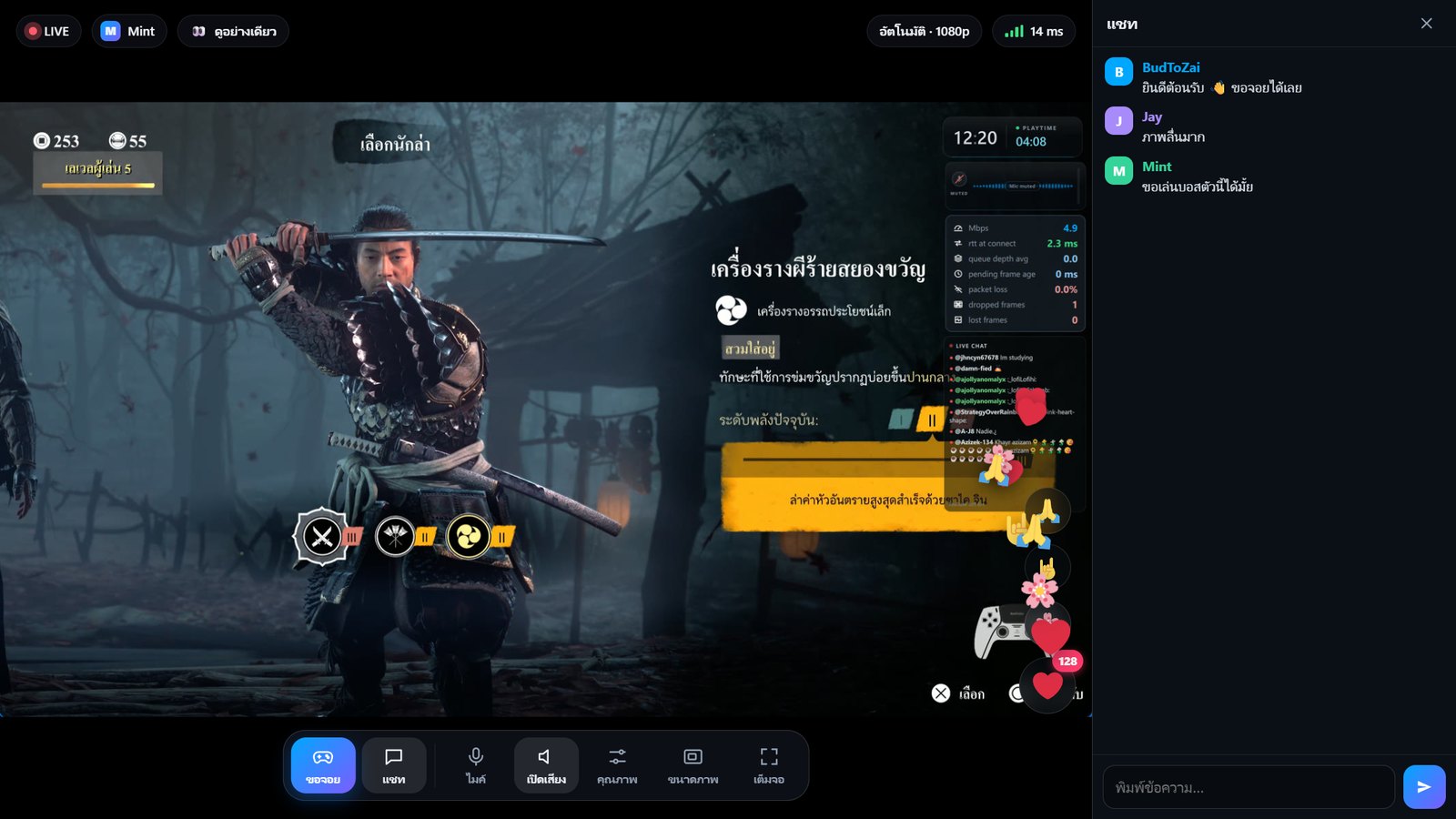
- PS-WRAP Link (beta). Turn it on with Link in the stream menu (CAPTURE) or Ctrl+Shift+J. The invite link is copied for you; send it to up to 4 friends. They open it in Chrome, Edge or Safari, on a PC or a phone, with nothing to install, and see and hear the game with very little delay (about 20 ms on a home network in our tests).
- Hand over the controller. A friend presses Ask to play; you press Give controller on the Link card (Ctrl+Shift+G) and Take back when you want it (Ctrl+Shift+U). One friend at a time, because the console accepts one remote controller. Friends play with their own controller, with keyboard and mouse (Standard, Ghost of Tsushima PC keys, Shooter and Racing layouts), or with the on-screen controller on a phone (two sticks, D-pad, every button, portrait and landscape).
- Chat, reactions and voice. Friends' messages show in the Live Chat overlay with their profile picture, ❤️ 🌸 🤘 🙏 reactions float up over the game, and friends can turn on their mic so you hear them. Mute anyone from the Link card.
- Made for streaming live. The QR code in the Link panel stays hidden until you press Show, so viewers can't scan it, and New link cancels the old one.
Beta limits
- SDR streams only: turn off HDR on the PS5.
- Friends hear the game and you, but not each other yet. Friends' voices aren't in your recordings.
- Touchpad swipes (for example Guiding Wind in Ghost of Tsushima) can't be sent yet.
- Up to 2 Link rooms per internet connection. Link may be limited or stopped while it's in beta.
- Friends see your screen with the overlays you have turned on.
Link connects through our server link.ps-wrap.com. The picture, sound and chat go directly between you and your friends, encrypted, and only pass through our relay (still encrypted) when a direct connection isn't possible. The server keeps connection logs with IP addresses for up to 30 days. Details in the updated Privacy Policy and Terms.
Website
Community
Questions, help and beta builds: Discord https://discord.gg/6VTSxu8JRf
Download
Already on 0.10.0? Click the Update 0.11.5 chip on the home screen, or About › Check for updates.
PS-WRAP-v0.11.5-win64.zip: unzip anywhere and run PS-WRAP.exe. PS-WRAP-Diagnostics.exe is in the same folder if something goes wrong.
SHA-256: 7CD8F3EA3A0C40CEC4C8BC06F7D23A36031959ADED4B757C93FDB6DADEBCE630
Full list in CHANGELOG.md. Report problems in Issues. AGPL-3.0; the source for this release is tag v0.11.5.
PS-WRAP v0.10.0
Rumble Boost, testing vibration and the light bar, and the game's name while playing.
New
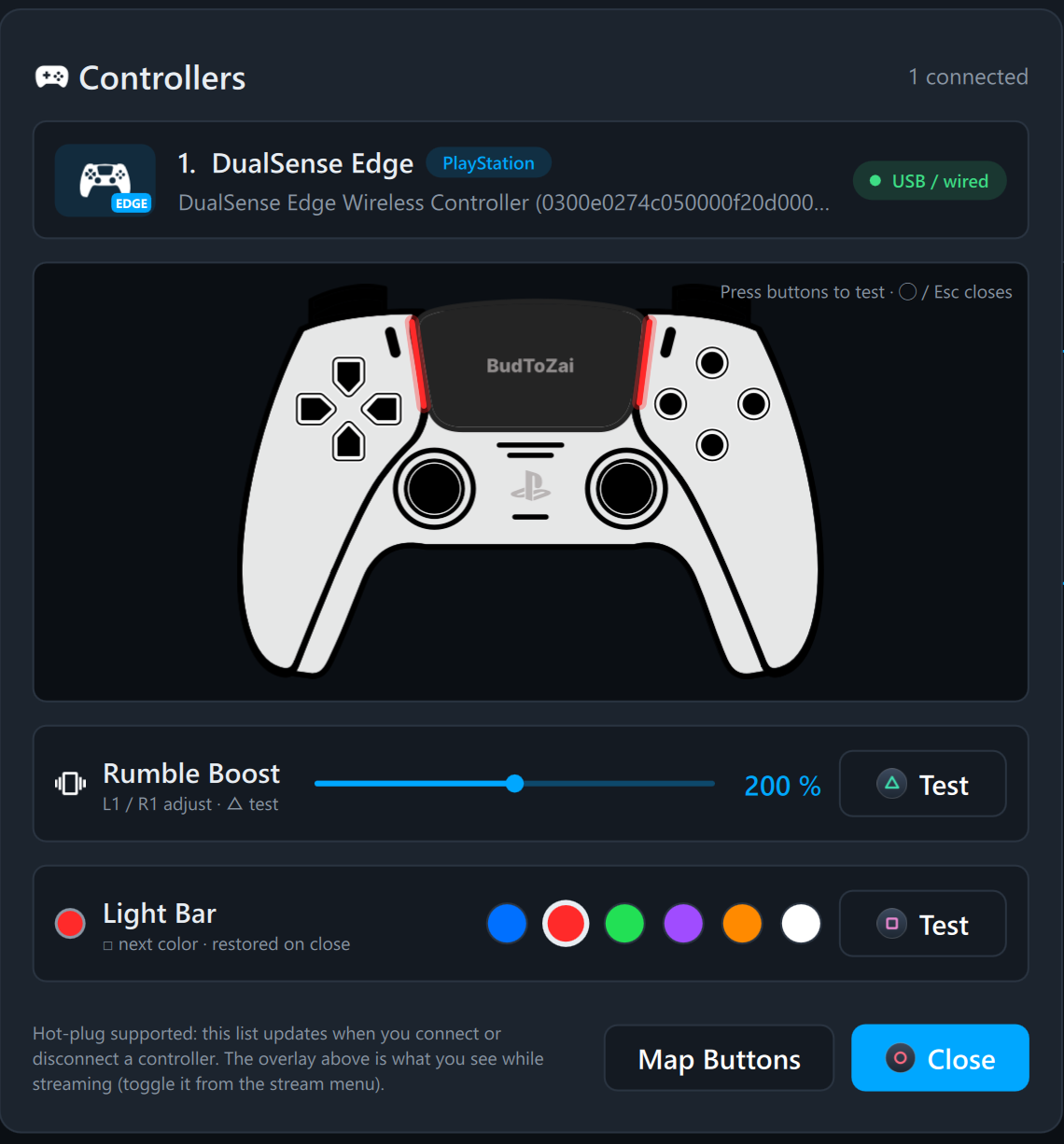
- Rumble Boost. Make your controller vibrate harder, from 100% to 300%, in Settings › Controllers › Vibration or in the controller panel (the controller chip on the home screen). It boosts the rumble games send to the motors, which had no strength setting before, and the Rumble Haptics conversion. It helps most when the game asks for a light or medium rumble; a controller already shaking at full strength can't go further. On a DualSense the PS5's own Vibration Intensity still applies, so set it to Strong on the console too.
- Test vibration and the light bar in the controller panel. △ Test (or △ on the controller) plays three pulses, light, medium and strong, with your boost applied; L1 / R1 change the boost by 10%. Light Bar (DualSense and DualShock 4) has six colors: click a dot or press □, and both the controller and its picture on screen light up. Closing the panel stops the vibration and puts the light back.
- The game's name while playing. The game running on the console shows on the status bar and under the clock overlay. It is read from the console on your home network. PS4 only for now: a PS5 doesn't report the running game this way.
Website
Community
Questions, help and beta builds: Discord https://discord.gg/6VTSxu8JRf
Download
Already on 0.9.0? Click the Update 0.10.0 chip on the home screen, or About › Check for updates.
PS-WRAP-v0.10.0-win64.zip: unzip anywhere and run PS-WRAP.exe. PS-WRAP-Diagnostics.exe is in the same folder if something goes wrong.
SHA-256: C2FE455522E6E7AD29FC8CC5588043445F940199DD2236D57DB66826E9DFEA7E
Full list in CHANGELOG.md. Report problems in Issues. AGPL-3.0; the source for this release is tag v0.10.0.
PS-WRAP v0.9.0
Redesigned Settings, the console PIN with a controller, and the mouse wheel works again.
New
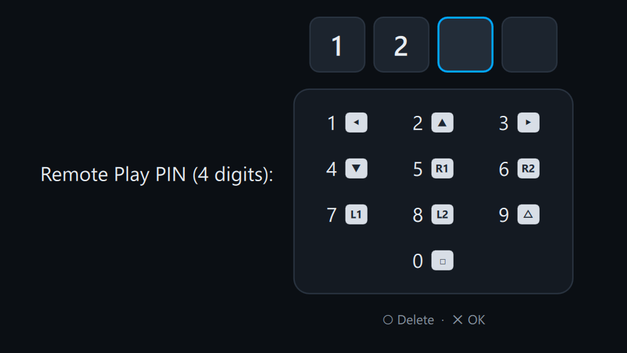
- Enter the console PIN with a controller. The Console Login PIN prompt when connecting (also over PSN) and Set console pin on the home screen now work like the passcode screen on the PS5: each button types one digit (◀1 ▲2 ▶3 ▼4 R1 5 R2 6 L1 7 L2 8 △9 □0, shown on an on-screen keypad), the fourth digit confirms by itself and Circle deletes. Keyboard and mouse still work.
- Join Discord in About and Ask on Discord in PS-WRAP-Diagnostics.
Changed
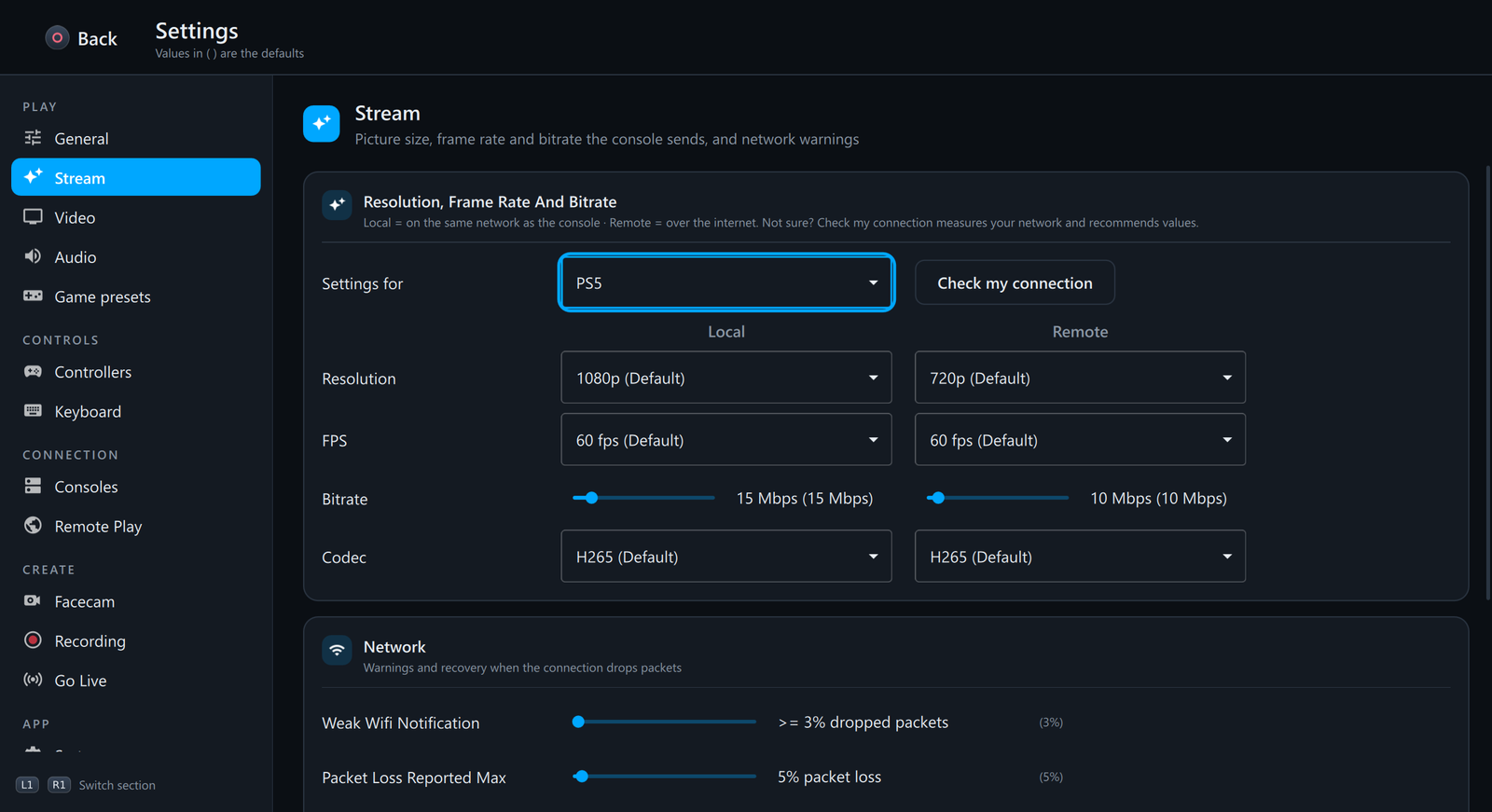
- Redesigned Settings. Pages are regrouped so related options sit together, with an icon for every page in the sidebar (Play, Controls, Connection, Create, App) and titled cards on every page. Facecam, Recording and System have their own pages; the Steam Deck options and the stream menu button combo moved to Controllers, and the Wi-Fi and packet loss warnings to Stream. Every setting keeps its value and works with a controller (L1/R1 switch page).
- Fits small windows. Below 1100 px wide the sidebar shrinks to icons, and settings stack with their name on top when a page is narrow. Settings is also about 15% more compact than the TV-sized home screen, with slim scroll bars.
- About starts with a PS-WRAP on GitHub section.
Fixed
- Mouse wheel scrolling. The mouse wheel did nothing anywhere in PS-WRAP; it now scrolls Settings, lists and dialogs (during a stream only over overlays).
Community
Questions, help and beta builds: Discord https://discord.gg/6VTSxu8JRf
Download
Already on 0.8.0? Click the Update 0.9.0 chip on the home screen, or About › Check for updates.
PS-WRAP-v0.9.0-win64.zip: unzip anywhere and run PS-WRAP.exe. PS-WRAP-Diagnostics.exe is in the same folder if something goes wrong.
SHA-256: 5E321A513AF7BB83E337D3846DE6D03C5F629A44D7B02BA5437A6417C0E30670
Full list in CHANGELOG.md. Report problems in Issues. AGPL-3.0; the source for this release is tag v0.9.0.