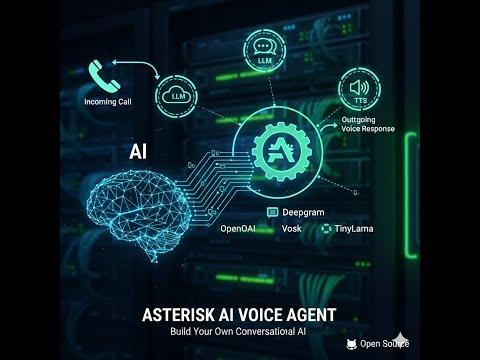
An open-source AI Voice Agent that integrates with Asterisk/FreePBX using the Asterisk REST Interface (ARI). It features a production-ready, two-container architecture with Hybrid ARI call control, SessionStore state management, ExternalMedia RTP integration for reliable real-time audio capture and file-based TTS playback for robust conversation handling.
This project is designed to be the most powerful, flexible, and easy-to-use open-source AI voice agent for Asterisk. Here’s what makes it different:
- Asterisk-Native: No external telephony providers required. It works directly with your existing Asterisk/FreePBX installation.
- Truly Open Source: The entire project is open source (MIT licensed), so you have complete transparency and control.
- Hybrid AI: Seamlessly switch between cloud and local AI providers, giving you the best of both worlds.
- Production-Ready: This isn’t just a demo. It’s a battle-tested, production-ready solution.
- Cost-Effective: With local AI, you can have predictable costs without per-minute charges.
- Modular AI Providers: Easily switch between cloud and local AI providers.
- ✅ Deepgram Voice Agent: Fully implemented for a powerful cloud-based solution.
- ✅ OpenAI Realtime: Works out of the box—just set
OPENAI_API_KEYin.envand select the OpenAI template/provider. - ✅ Local AI Server: A dedicated container that runs local models (Vosk for STT, Llama for LLM, and Piper for TTS) for full control and privacy.
- High-Performance Architecture: A lean
ai-enginefor call control and a separatelocal-ai-serverfor heavy AI processing ensures stability and scalability. - Hybrid ARI Architecture: Call control using ARI with "answer caller → create mixing bridge → add caller → create ExternalMedia and add it to bridge" flow.
- SessionStore State Management: Centralized, typed store for all call session state, replacing legacy dictionary-based state management.
- Real-time Communication: ExternalMedia RTP upstream capture from Asterisk with ARI-commanded file-based playback; engine↔AI servers use WebSocket.
- Docker-based Deployment: Simple, two-service orchestration using Docker Compose.
- Customizable: Configure greetings, AI roles, and voice personalities in a simple YAML file.
Follow these 3 steps to get a working agent.
- Clone and install
git clone https://github.com/hkjarral/Asterisk-AI-Voice-Agent.git
cd Asterisk-AI-Voice-Agent
./install.sh
When prompted, choose your preferred configuration. The installer will:
- Create/update
.env(prefilled from existing values on reruns; blank keeps current). - Write
config/ai-agent.yamlfrom the canonical pipelines template and set your selection as the active default (pipeline or monolithic provider). - Set up the media path symlink.
- Start only what is required for your selection:
- Local/Hybrid: start
local-ai-server(wait for health), thenai-engine. - Cloud-only/Monolithic: start
ai-engineonly.
- Local/Hybrid: start
- Verify health
curl http://127.0.0.1:15000/healthExpect "audiosocket_listening": true.
- FreePBX dialplan (AudioSocket-first)
Add the context from
docs/FreePBX-Integration-Guide.md(from-ai-agent, etc.), then route a test call to it.
Hello World (optional, Local AI):
python3 tests/test_local_ai_server_protocol.py # With local-ai-server runningIf you want to use OpenAI Realtime out of the box:
- During
./install.sh, select the OpenAI Realtime option when prompted (the installer keeps the pipelines template and setsdefault_providerto OpenAI Realtime for monolithic operation). - Add your API key in
.env:echo "OPENAI_API_KEY=sk-..." >> .env
- Start just the engine (no local models needed):
docker-compose up --build -d ai-engine
The system is configured via config/ai-agent.yaml and a .env file for secrets.
The installer is idempotent and pipeline-aware. It always writes config/ai-agent.yaml from the canonical pipelines template and then:
- Sets
active_pipelinefor Local/Hybrid/Cloud-OpenAI choices. - Sets
default_providerfor monolithic choices (OpenAI Realtime or Deepgram). - Updates
llm.initial_greetingandllm.promptviayqwhen available, with a safe append fallback otherwise.
- The canonical source for the agent greeting and persona lives in
config/ai-agent.yamlunder thellmblock:llm.initial_greetingllm.prompt
- Precedence rules at runtime:
- Provider or pipeline-specific overrides (e.g.,
providers.openai_realtime.instructionsorproviders.deepgram.greeting) if explicitly set llm.promptandllm.initial_greetingin YAML- Environment variables
AI_ROLEandGREETINGas defaults
- Provider or pipeline-specific overrides (e.g.,
This ensures all providers and pipelines stay aligned unless you intentionally override them per provider/pipeline.
./install.shprompts for ARI credentials, API keys, Greeting, and AI Role.- All prompts are prefilled from
.envon reruns; leaving a field blank keeps its existing value.
- All prompts are prefilled from
- The installer always writes
config/ai-agent.yamlfrom the canonical pipelines template and then:- Sets
active_pipelinefor Local/Hybrid/Cloud-OpenAI choices. - Sets
default_providerfor monolithic choices (OpenAI Realtime or Deepgram).
- Sets
- It updates
llm.initial_greetingandllm.promptviayqwhen available, with a safe append fallback otherwise. ${VAR}placeholders in YAML remain supported; the loader expands these at runtime.- Service startup is selection-aware:
- Local/Hybrid:
local-ai-serveris started first and waited on, thenai-engine. - Cloud-only/Monolithic: only
ai-engineis started.
- Local/Hybrid:
default_provider:openai_realtime(monolithic fallback; pipelines are the default path viaactive_pipeline)asterisk: Connection details for ARI.providers: Specific configurations for each AI provider.
For a full, option-by-option reference (with recommended ranges and impact), see docs/Configuration-Reference.md. For practical presets, see docs/Tuning-Recipes.md.
ASTERISK_ARI_USERNAME&ASTERISK_ARI_PASSWORDDEEPGRAM_API_KEY(if using Deepgram)
LOCAL_LLM_MODEL_PATH: absolute path to an alternative GGUF file mounted into the container.LOCAL_LLM_MAX_TOKENS: cap the number of response tokens (default48for faster replies).LOCAL_LLM_TEMPERATURE,LOCAL_LLM_TOP_P,LOCAL_LLM_REPEAT_PENALTY: sampling controls for the TinyLlama runtime.LOCAL_LLM_THREADS,LOCAL_LLM_CONTEXT,LOCAL_LLM_BATCH: advanced performance knobs; defaults auto-detect CPU cores and favour latency.LOCAL_STT_MODEL_PATH,LOCAL_TTS_MODEL_PATH: override default Vosk/Piper models if you preload alternates undermodels/.
The application is split into two Docker containers for performance and scalability:
ai-engine: A lightweight service that connects to Asterisk via ARI, manages the call lifecycle, and communicates with AI providers.local-ai-server: A dedicated, powerful service that pre-loads and runs local STT, LLM, and TTS models, exposing them via a WebSocket interface.
┌─────────────────┐      ┌───────────┐      ┌───────────────────┐
│ Asterisk Server │◀────▶│ ai-engine │◀────▶│ AI Provider       │
│ (ARI, RTP)      │      │ (Docker)  │      │ (Deepgram, etc.)  │
└─────────────────┘      └───────────┘      └───────────────────┘
                           │     ▲
                           │ WSS │ WebSocket
                           ▼     │
                         ┌─────────────────┐
                         │ local-ai-server │
                         │ (Docker)        │
                         └─────────────────┘
This separation ensures that the resource-intensive AI models do not impact the real-time call handling performance of the ai-engine. The system uses ExternalMedia RTP for reliable audio capture and file-based TTS playback for robust conversation handling. Streaming TTS is planned as a future enhancement.
- ✅ PRODUCTION READY: Full two-way conversation system working perfectly!
- ✅ Real-time Audio Processing: ExternalMedia RTP with SSRC mapping
- ✅ State Management: SessionStore-based centralized state management
- ✅ TTS Gating: Perfect feedback prevention during AI responses
- ✅ Local AI Integration: Vosk STT, TinyLlama LLM, Piper TTS
- ✅ Conversation Flow: Complete STT → LLM → TTS pipeline working
- ✅ Architecture Validation: Refactored codebase with clean separation of concerns
- ✅ Observability: ConversationCoordinator drives
/health+/metrics(Prometheus friendly)
Current milestones and acceptance criteria live in docs/plan/ROADMAP.md. Update that file after each deliverable so anyone (or any AI assistant) can resume the project with a single reference.
Contributions are welcome! Please see our Contributing Guide for more details on how to get involved.
Have questions or want to chat with other users? Join our community:
- GitHub Issues
- Community Forum (coming soon)
This project is licensed under the MIT License. See the LICENSE file for details.
If you find this project useful, please give it a ⭐️ on GitHub! It helps us gain visibility and encourages more people to contribute.