Mukau Docker Containerization Structure
To be able to manage and isolate different applications installed on its servers across different projects Mukau implements an architecture based on Docker containerization.
Below is a diagram that best illustrates this architecture.
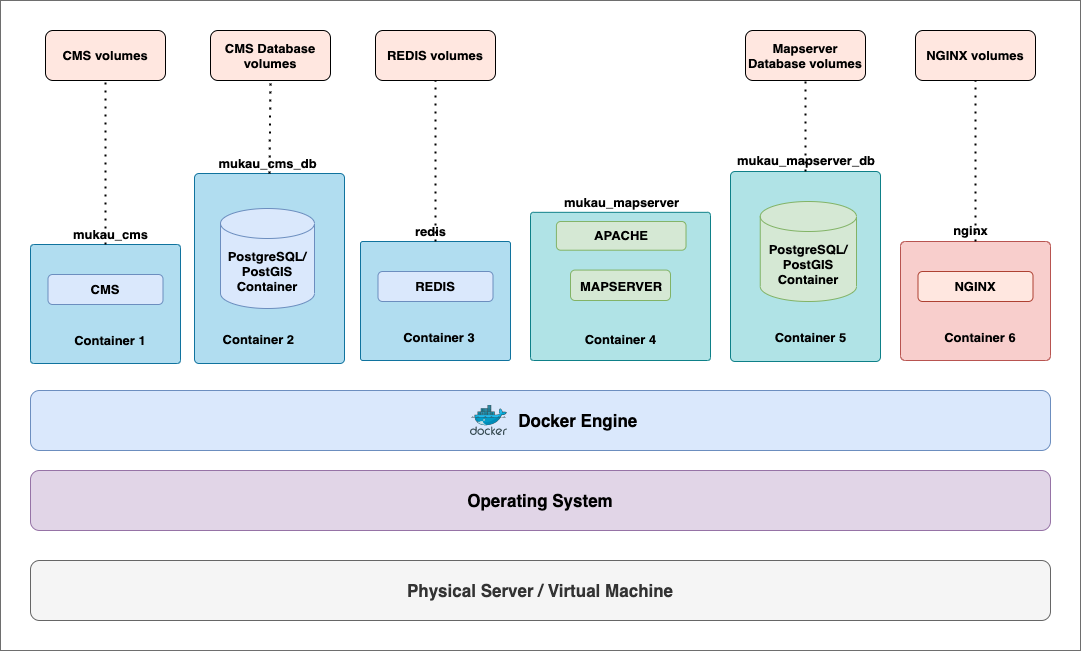
Docker is a software platform that uses OS-level virtualization to enable the set up and delivery of applications using containers. Containers allow to package all the parts of an application and deploy it as one entity. This enables the isolation of the containers from one another and provides a consistent environment that makes the development lifecycle of applications easy and seamless.
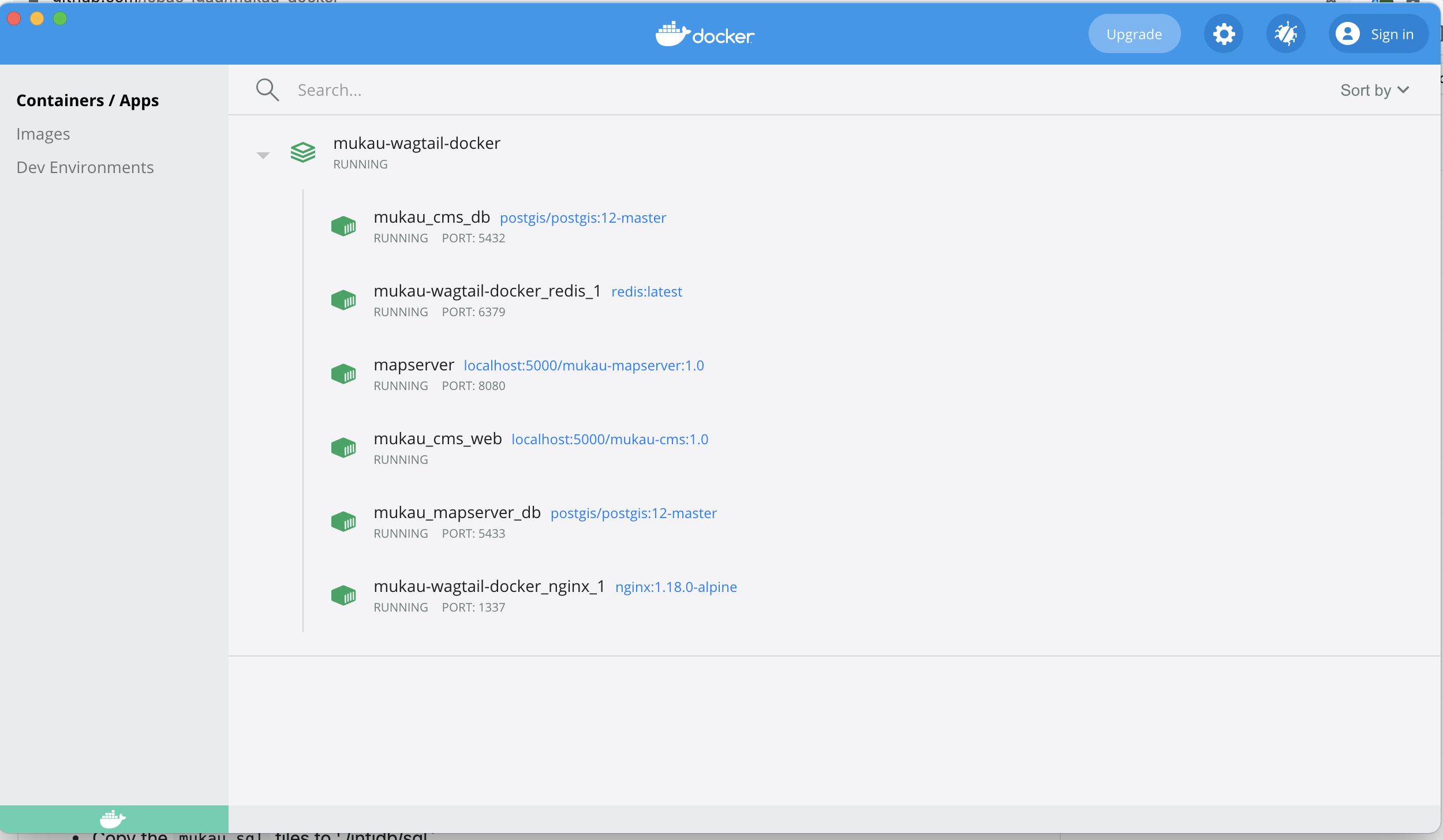
There are currently 6 containers namely:
- mukau_cms_web - for the wagtail-based cms web application using python:3.8.1-slim-buster, an official Python runtime based on Debian 10 "buster" as a parent image.
- mukau_cms_db - postgresql database based on the official PostGIS image for storing cms users,roles,grups,page content, etc. connects with mukau_cms_web.
- redis - in-memory data structure store, used as a database, cache, and message broker.
- mukau_mapserver_db - postgreSQL/postgis database based on the official PostGIS imagefor storing and managing vector and raster data of the Map Viewer and Side-by-Side Maps and other analytical components.
- mapserver - the main GIS engine based on CentOS 7 official image for connecting to the mukau_mapserver_db database and rendering the layers for consumption.
- nginx - web server used as a reverse proxy based on the official NGINX Docker Image
The containers are able to connect and communicate with each other using a docker bridge network.
In docker, by default all files created inside a container are stored in a writable layer inside the container. This means that the data does not persist when the container no longer exists and it can be difficult to get the data out of the container if another process needs the data. Docker provides Volumes and Bind Mounts to store files in the host machine so that the files are per- sistent even after the container stops.
Volumes are stored in a part of the host filesystem which is managed by docker, while Bind mounts are stored anywhere on the host system
The mukau_mapserver_db is currently linked with one Volume for persisting the postgres database data, and a bind mount for scripts and SQL files that need to be populated to the database while the mukau_cms_db is currently linked with one Volume for persisting the postgres database data.
On the other hand, the mukau_cms_web container currently contains one Volume for persisting the cms files and two bind mounts for persisting the static and media files. These mounts contain files and source code that can be updated and the container restarted without need for rebuilding the containers on each update.
nginx container contains one Volume for persisting the nginx configuration where reverse proxy rules are defined and two bind mounts for persisting the static and media files served to the cms.
redis container contains one bind mount for persisting redis data.
Below is the complete docker-compose file with the above specifications.
version: '3'

services:
  mukau_cms_web:
    container_name: mukau_cms_web
    restart: always
    build:
      context: ./mukau-cms
      dockerfile: Dockerfile
    image: ${WEB_IMAGE_URI}
    command: gunicorn mukau_wagtail_cms.wsgi:application --bind 0.0.0.0:8000
    expose:
      - 8000
    environment:
      - DEBUG='true'
      - DB_PORT=5432
      - DB_NAME=${POSTGRES_DB_CMS}
      - DB_PASSWORD=${POSTGRES_PASSWORD_CMS}
      - DB_USER=${POSTGRES_USER_CMS}
      - DB_HOST=mukau_cms_db
      - HOST_IP=${HOST_IP}
      - PROTOCOL=${PROTOCOL}
      - HOST=${HOST_IP}
      - RECAPTCHA_PUBLIC_KEY=${RECAPTCHA_PUBLIC_KEY}
      - RECAPTCHA_PRIVATE_KEY=${RECAPTCHA_PRIVATE_KEY}
    depends_on:
      - mukau_cms_db
    volumes:
      - ./mukau-cms:/home/app/web
      - static_volume:/home/app/web/static
      - media_volume:/home/app/web/media

  mukau_cms_db:
    container_name: mukau_cms_db
    image: postgis/postgis:12-master
    ports:
      - ${POSTGRES_PORT_CMS}:5432
    volumes:
      - postgres_data:/var/lib/postgresql/data/
    env_file:
      - .env.prod.db

  redis:
    restart: always
    image: redis:latest
    ports:
      - "6379:6379"
    volumes:
      - redisdata:/data

  mukau_mapserver_db:
    image: postgis/postgis:12-master
    container_name: mukau_mapserver_db
    volumes:
        - mukau_msdb_data:/var/lib/postgresql
        - ./mukau-mapserver/database/initdb:/docker-entrypoint-initdb.d/
    ports:
      - ${POSTGRES_PORT_MS}:5432
    environment:
      - POSTGRES_DB=${POSTGRES_DB_MS}
      - POSTGRES_USER=${POSTGRES_USER_MS}
      - POSTGRES_PASSWORD=${POSTGRES_PASSWORD_MS}
      - GIS_USER=${GIS_USER}
      - GIS_USER_PASS=${GIS_USER_PASS}
      - MAP_USER=${MAP_USER}
      - MAP_USER_PASS=${MAP_USER_PASS}

  mapserver:
    image: ${MAPSERVER_IMAGE_URI}
    build:
      context: ./mukau-mapserver/mapserver
      dockerfile: Dockerfile
    container_name: mapserver
    ports:
      - target: 80
        published: ${MAPSERVER_PORT}
        mode: host
    environment:
        - HOST=${HOST_IP}
        - HOST_IP=${HOST_IP}
        - HOST_WEB_PORT=${MAPSERVER_PORT}
        - PROTOCOL=${PROTOCOL}
        - DB_HOST=mukau_mapserver_db
        - DB_MAP_USER=${MAP_USER}
        - DB_MAP_USER_PASSWORD=${MAP_USER_PASS}
        - DB_NAME=${POSTGRES_DB_MS}
        - DB_SCHEMA=public
        - DB_PORT=5432

  nginx:
    image: nginx:1.18.0-alpine
    volumes:
      - static_volume:/wagtail_static
      - media_volume:/wagtail_media
      - ./nginx/nginx.conf:/etc/nginx/conf.d/default.conf
    ports:
      - ${CMS_PORT}:80
    depends_on:
      - mukau_cms_web

volumes:
  postgres_data:
  static_volume:
  media_volume:
  redisdata:
mukau_msdb_data:Currently Docker compose is used as the local docker development tool for defining and running the Mukau system containers. With Docker compose, a YAML file is used to configure the application's services, then with a single command, all the services from the configuration can be started.
Some of the features provided by Docker Compose include:
- Multiple isolated environments on a single host
- Preserve volume data when containers are created
- Only recreate containers that have changed
- Variables and moving a composition between environments for example different varia- bles for development and staging environments
- Orchestrate multiple containers that work together
This provides an excellent tool for development, testing and staging environments for the Mukau system.
The instructions for a local setup and configuration are described Mukau Installation Instructions Overview .
A private docker registry that uses the official docker registry image was installed on the server that is currently hosting the East Africa Hazards watch system here at ICPAC. The private registry enables to host the built images for the Mukau system and also helps to keep track and manage the different versions of the built images. This also helps to make quick updates by just pulling new versions of the images and re-deploying on the virtual machines.
The registry was secured and is running behind a Nginx proxy configured with the ICPAC SSL certificate. Authentication was also setup. To access the images in the registry, you need a username and a password. The registry is accessible at https://eahazardswatch.icpac.net/v2/