Architecture
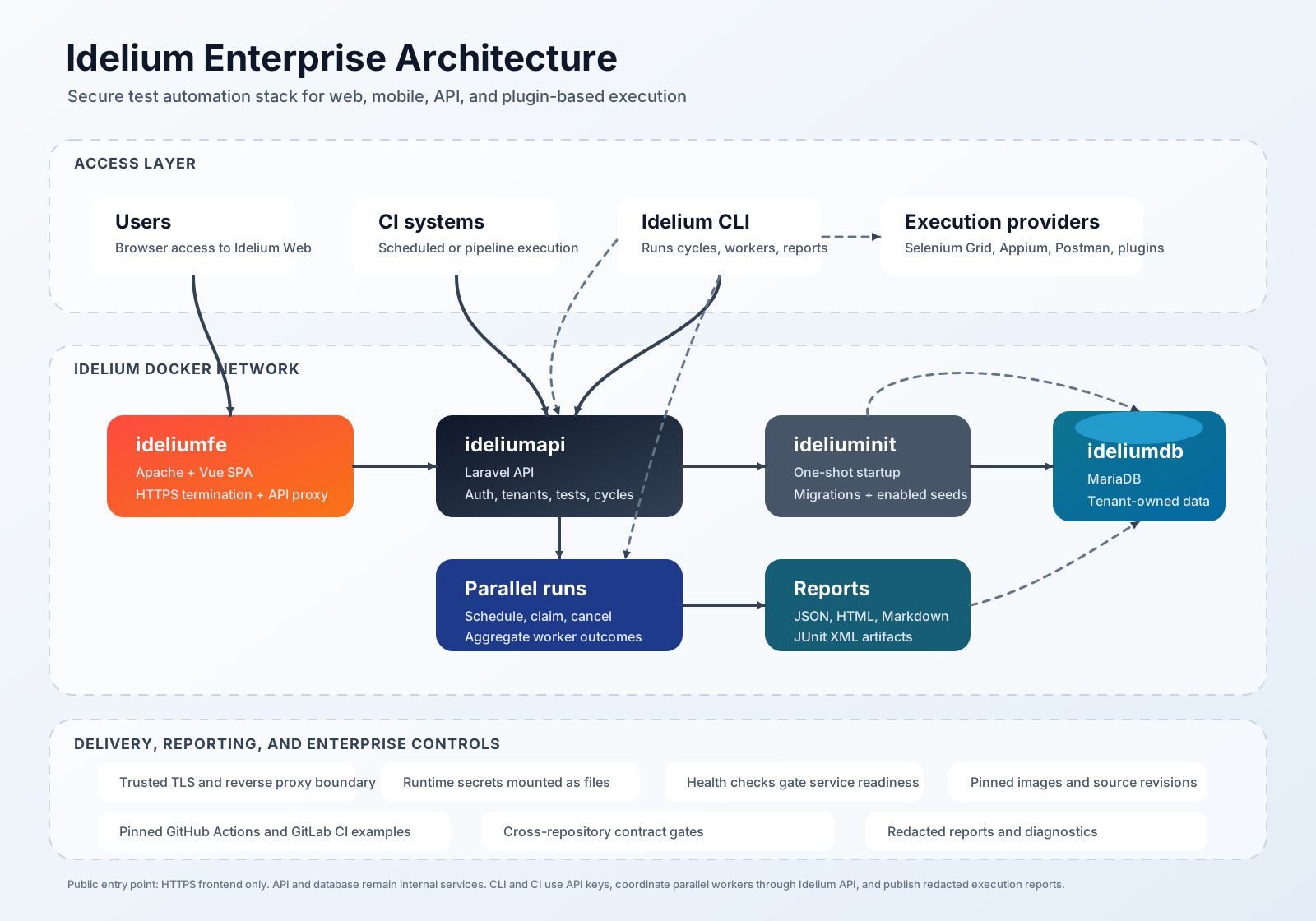
Idelium is designed as a separated administration, API, execution, and data platform. The Docker stack keeps the public surface small: users and execution agents enter through the HTTPS frontend, while API and database services remain inside the Docker network.
This page reflects the current roadmap implementation across Idelium Docker, API, Web, and CLI. The architecture now includes tenant-safe parallel run scheduling, worker coordination, cancellation, report downloads, pinned CI examples, and cross-repository contract gates.
| Layer | Component | Responsibility |
|---|---|---|
| User and automation access | Browser, Idelium CLI, CI systems | Configure tests, launch cycles, and submit execution results |
| Edge | ideliumfe |
Serves the Vue application, terminates HTTPS, and reverse-proxies API traffic |
| Application | ideliumapi |
Authenticates users and API keys, manages projects, tests, cycles, and results |
| Parallel control plane |
parallel_run_schedules API |
Schedules parallel executions, enforces idempotency and concurrency limits, tracks workers, cancellation, and deterministic aggregate results |
| Initialization | ideliuminit |
Runs migrations and explicitly enabled seeders before API startup |
| Data | ideliumdb |
Stores tenant-owned application data in MariaDB |
| Runner profile | idelium-cli-runner |
Optional Compose runner used by CI and local integration tests to execute cycles inside the Docker network |
| Execution providers | Selenium Grid, Appium, Newman/Postman targets, plugins | Execute browser, mobile, API, or custom test steps |
| Delivery gates | GitHub Actions, GitLab CI, contract checks | Run pinned CI examples, publish reports, and verify cross-repository compatibility |
- A user opens Idelium Web through
https://localhostor the configured production origin. - Idelium Web calls the API through the frontend reverse proxy.
- Idelium API validates authentication, authorization, and tenant ownership before reading or writing data.
- Idelium CLI retrieves project, cycle, environment, and step definitions from the API using a customer API key.
- For parallel execution, the API creates a tenant-scoped parallel run schedule, enforces idempotency and requested concurrency, then workers claim capacity with stable worker identifiers.
- The CLI executes the selected Selenium, Appium, Postman/Newman, or plugin steps.
- Execution results are reported back to Idelium API and stored in MariaDB.
- The API aggregates worker outcomes deterministically and exposes queued, active, completed, failed, and cancelled states to Idelium Web.
- Idelium Web lets users inspect parallel runs, classified failures, and server-confirmed cancellation state.
- When the API advertises available outputs, Idelium Web enables JUnit, JSON, Markdown, and HTML report downloads for the execution.
Parallel execution is coordinated by the API rather than by client-side state. Every schedule, lookup, worker mutation, cancellation, and result read is scoped to the authenticated customer and project. The API validates concurrency limits, idempotency keys, terminal states, and worker status transitions before writing state.
The CLI remains the execution boundary. It can run locally, in CI, or through
the optional idelium-cli-runner Compose profile. Local and CI runs can produce
standard reports:
- JSON for machine-readable diagnostics;
- HTML for human review;
- Markdown for pull requests or release artifacts;
- JUnit XML for CI test report ingestion.
Reports and diagnostics must be generated from redacted execution data. API keys, credentials, authorization headers, session identifiers, and tenant data must never be printed or embedded in exported diagnostics.
The Docker repository publishes pinned GitHub Actions and GitLab CI examples
under docs/ci/. They validate immutable component revisions, start Idelium
with health readiness, run the CLI non-interactively, propagate CLI exit codes,
and upload JSON, HTML, Markdown, and JUnit artifacts.
Cross-repository compatibility is guarded by
scripts/cross-repository-contract-gate.sh. The gate verifies that the Docker,
API, Web, and CLI checkouts still expose the published authentication,
configuration, execution, result, and report boundaries. When expected revision
environment variables are provided, they must be full 40-character commit SHAs
and must match the checked-out repositories.
- Only the HTTPS frontend should be exposed to users.
- The API and database remain internal Docker services.
- Secrets are mounted as files or supplied by the runtime secret provider.
- Demo mode uses generated local secrets; production mode requires managed secrets and a trusted TLS certificate.
- Health checks gate startup order so the frontend is not reported ready before the database, initialization, and API are healthy.
- Selenium Grid, Appium, and Newman are optional execution integrations. They are configured outside the base API/Web/DB stack unless an explicit Compose profile or external execution host is selected.
- Parallel execution infrastructure is optional. The base stack remains the administration/API/data plane; Selenium Grid, Appium, and runner containers are enabled through explicit profiles or external execution hosts.
- CI examples must pin actions, Docker images, and component revisions. Real credentials must come only from protected CI secrets or mounted secret files.
For enterprise use, place the Docker stack behind the organization's network controls, use a trusted certificate chain, rotate secret files through a managed process, and keep API/Web/stack image references tied to reviewed source revisions. Execution hosts should be isolated by tenant or environment where required, and logs must redact credentials, API keys, session identifiers, and authorization headers.
Use the cross-repository gate before publishing coordinated changes that affect CLI arguments, API route contracts, Web report controls, Compose profiles, CI examples, or report artifact names. This keeps the free and open-source project friendly to contributors while maintaining enterprise-grade upgrade discipline.