





Quick Start | Elements | Composition | Customization | Themes | Ecosystem | Examples
herald maps familiar HTML elements (H1-H6, P, Blockquote, UL, OL, Code, HR, Tables, Alerts, and inline styles) to styled terminal output, built on lipgloss v2.
It ships with a Rose Pine-inspired default theme, built-in themes matching the Charm ecosystem (Dracula, Catppuccin, Base16, Charm), and full style customization via functional options and ColorPalette.
Works with any CLI or TUI - and if you use huh or other Charm-based libraries, the built-in themes pair seamlessly with theirs out of the box.
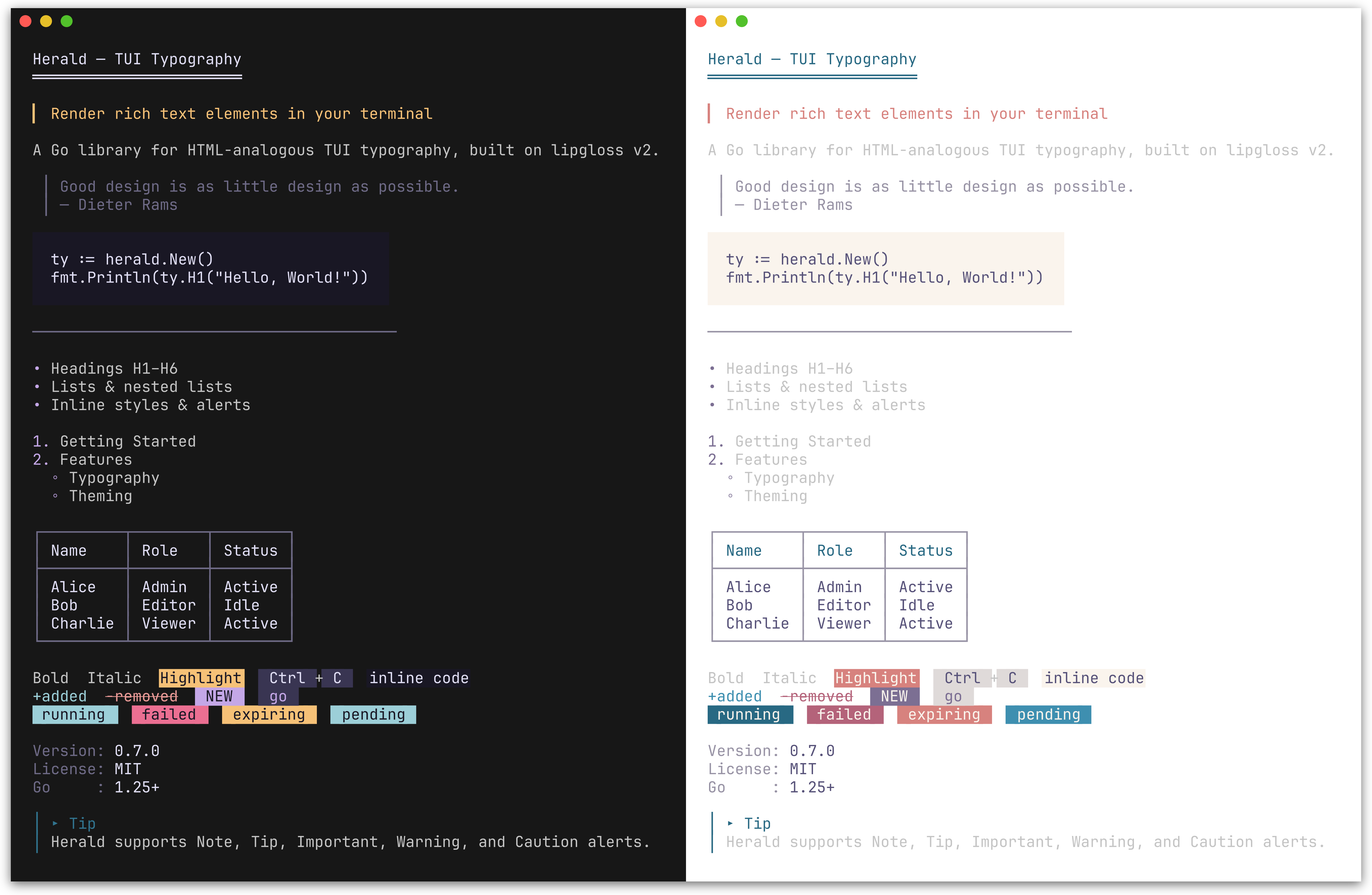
Default Rose Pine theme (dark and light). herald also ships with Dracula, Catppuccin, Base16, and Charm themes.
go get github.com/indaco/herald@latestRequires Go 1.25 or later.
package main

import (
    "fmt"
    "github.com/indaco/herald"
)

func main() {
    ty := herald.New()

    fmt.Println(ty.H1("Getting Started"))
    fmt.Println(ty.P("herald renders terminal typography using lipgloss styles."))
    fmt.Println(ty.UL("Headings", "Block elements", "Inline styles"))
}Preview
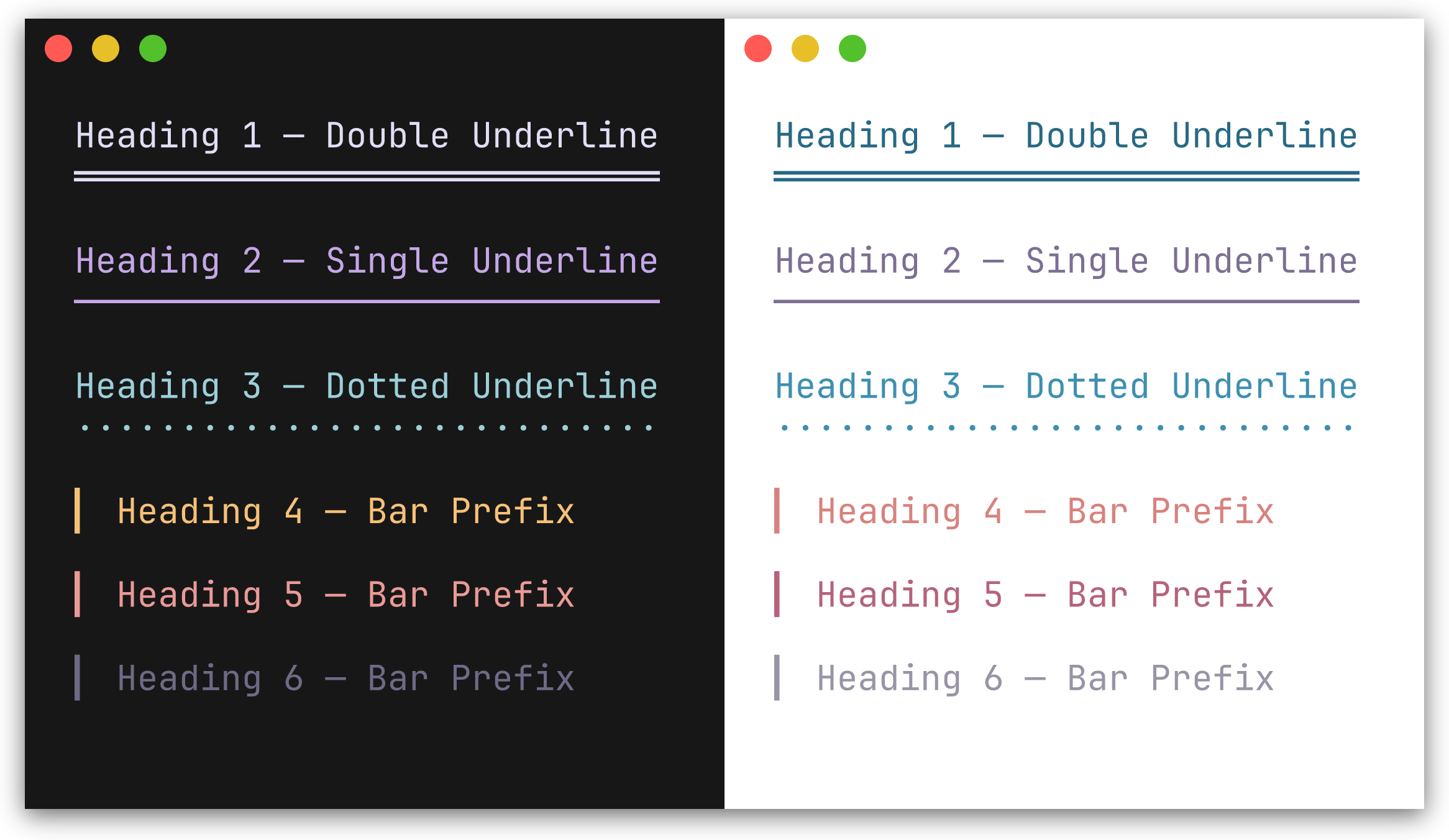
H1-H3 render with a repeated underline character beneath the text. H4-H6 render with a left bar prefix.
| Method | Decoration | Default character |
|---|---|---|
H1(text) |
underline | ═ |
H2(text) |
underline | ─ |
H3(text) |
underline | · |
H4(text) |
bar prefix | ▎ |
H5(text) |
bar prefix | ▎ |
H6(text) |
bar prefix | ▎ |
fmt.Println(ty.H1("Main Title"))
fmt.Println(ty.H2("Section"))
fmt.Println(ty.H4("Subsection"))Preview
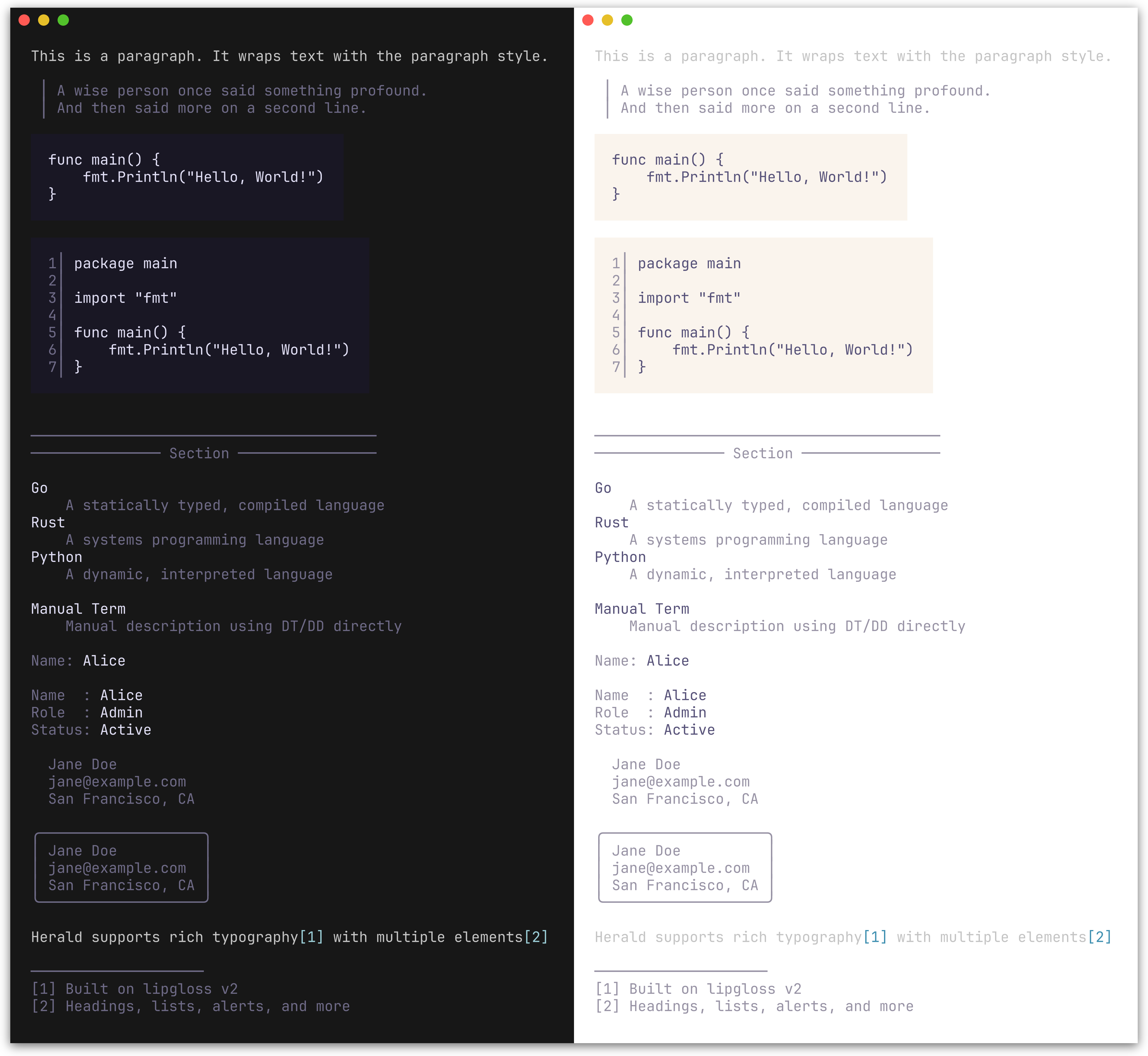
| Method | Description |
|---|---|
P(text) |
Paragraph |
Blockquote(text) |
Indented block with a left bar; supports multi-line input |
CodeBlock(text, lang) |
Fenced code block with padding; optional line numbers and syntax highlighting |
HR() |
Horizontal rule, configurable width and character |
HRWithLabel(label) |
Horizontal rule with a centered label, e.g. ── Section ── |
DL(pairs) |
Definition list from [][2]string pairs (term, description) |
DT(text) |
Definition term (standalone) |
DD(text) |
Definition description (standalone) |
KV(key, value) |
Key-value pair rendered as key: value with independent styling |
KVGroup(pairs) |
Aligned key-value list from [][2]string pairs; keys are right-padded |
Address(text) |
Contact/author block; renders multi-line text in a distinctive italic style |
AddressCard(text) |
Bordered card variant of Address with rounded border |
FootnoteRef(n) |
Inline footnote reference marker, e.g. [1] |
FootnoteSection(notes) |
Numbered footnote list with divider; returns "" if notes is empty |
fmt.Println(ty.Blockquote("First line.\nSecond line."))

fmt.Println(ty.CodeBlock("func main() {\n\tfmt.Println(\"hello\")\n}"))
fmt.Println(ty.HR())
fmt.Println(ty.HRWithLabel("Section"))

fmt.Println(ty.DL([][2]string{
    {"Go", "A statically typed, compiled language"},
    {"Rust", "A systems programming language"},
}))

// Standalone terms and descriptions
fmt.Println(ty.DT("Go"))
fmt.Println(ty.DD("A statically typed, compiled language"))

// Key-value pairs
fmt.Println(ty.KV("Name", "Alice"))

fmt.Println(ty.KVGroup([][2]string{
    {"Name", "Alice"},
    {"Role", "Admin"},
    {"Status", "Active"},
}))

fmt.Println(ty.Address("Jane Doe\njane@example.com\nSan Francisco, CA"))

// Footnotes compose with paragraphs via string concatenation
fmt.Println(ty.P("herald supports rich typography" + ty.FootnoteRef(1) + " with multiple elements" + ty.FootnoteRef(2)))
fmt.Println(ty.FootnoteSection([]string{
    "Built on lipgloss v2",
    "Headings, lists, alerts, and more",
}))Preview
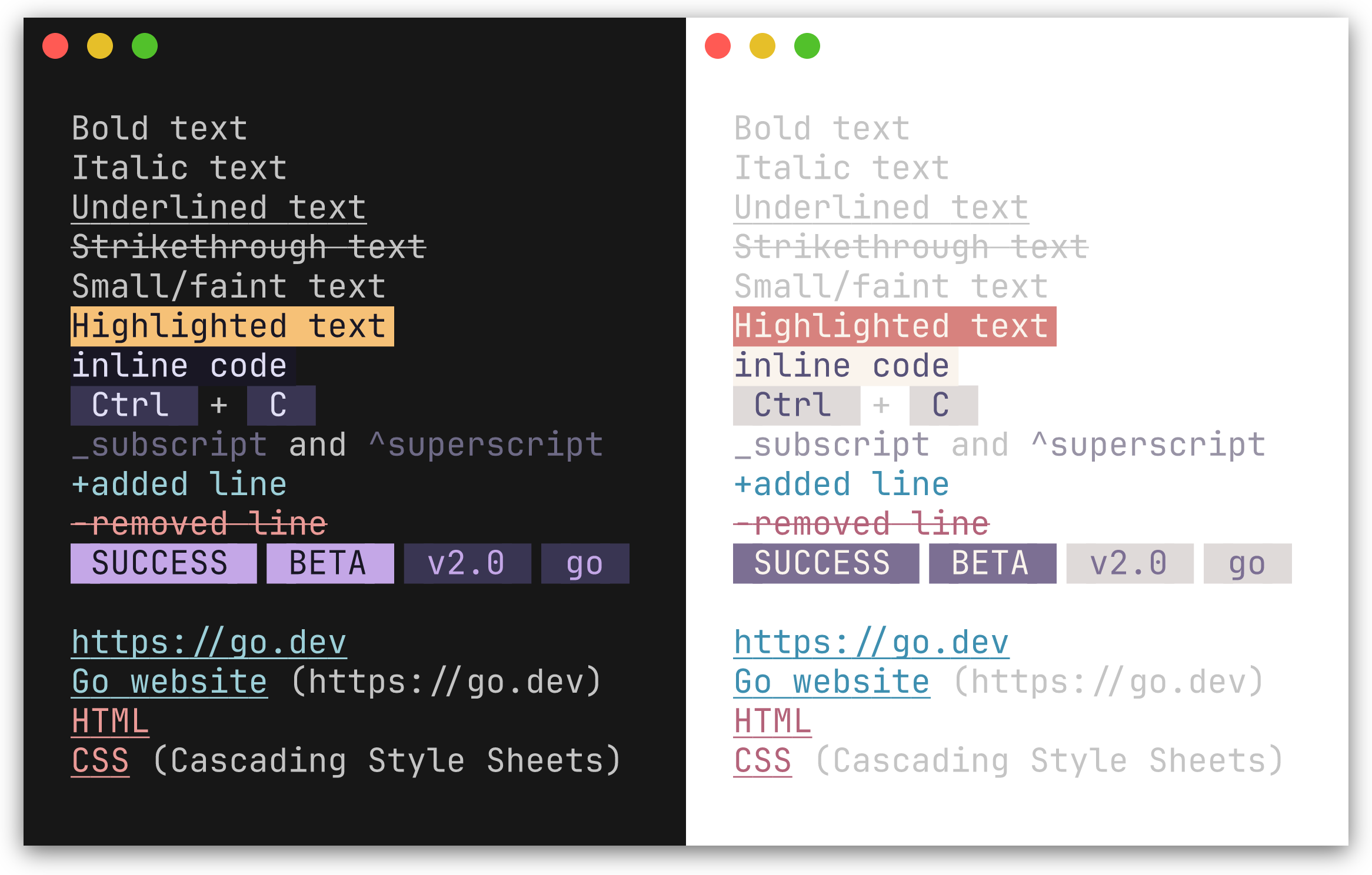
| Method | Renders as |
|---|---|
Code(text, lang) |
Inline code with background highlight; lang is optional, used when a CodeFormatter is set |
Bold(text) |
Bold |
Italic(text) |
Italic |
Underline(text) |
Underlined |
Strikethrough(text) |
Strikethrough |
Small(text) |
Faint |
Mark(text) |
Highlighted background |
Link(label, url) |
Styled link; url is optional - when both differ, renders as label (url) |
Kbd(text) |
Keyboard key indicator |
Abbr(abbr, desc) |
Abbreviation; desc is optional, appended in parentheses |
Sub(text) |
Renders with _ prefix (style not configurable via options) |
Sup(text) |
Renders with ^ prefix (style not configurable via options) |
Ins(text) |
Inserted text, prefixed with + |
Del(text) |
Deleted text, prefixed with -, strikethrough |
Badge(text) |
Styled pill/tag label (e.g. [SUCCESS], [BETA]) |
BadgeWithStyle(text, style) |
Badge with a one-off style override |
Tag(text) |
Subtle pill/category label (lighter variant of Badge) |
TagWithStyle(text, style) |
Tag with a one-off style override |
SuccessBadge(text) |
Badge using the theme's success color (green) |
WarningBadge(text) |
Badge using the theme's warning color (amber) |
ErrorBadge(text) |
Badge using the theme's error color (red) |
InfoBadge(text) |
Badge using the theme's info color (blue) |
SuccessTag(text) |
Tag using the theme's success color |
WarningTag(text) |
Tag using the theme's warning color |
ErrorTag(text) |
Tag using the theme's error color |
InfoTag(text) |
Tag using the theme's info color |
fmt.Println(ty.Bold("important") + " and " + ty.Italic("nuanced"))
fmt.Println(ty.Kbd("Ctrl") + " + " + ty.Kbd("C"))
fmt.Println(ty.Link("Go website", "https://go.dev"))
fmt.Println(ty.Abbr("CSS", "Cascading Style Sheets"))
fmt.Println(ty.Sub("2") + "O" + ty.Sup("n"))
fmt.Println(ty.Ins("added line"))
fmt.Println(ty.Del("removed line"))
fmt.Println(ty.Badge("SUCCESS") + " " + ty.Badge("BETA"))
fmt.Println(ty.Tag("v2.0") + " " + ty.Tag("go"))

// Semantic variants use the theme's status colors automatically
fmt.Println(ty.SuccessBadge("running"), ty.ErrorBadge("failed"), ty.WarningBadge("expiring"), ty.InfoBadge("pending"))
fmt.Println(ty.SuccessTag("healthy"), ty.ErrorTag("critical"), ty.WarningTag("degraded"), ty.InfoTag("maintenance"))
important and nuanced
[Ctrl] + [C]
Go website (https://go.dev)
CSS (Cascading Style Sheets)
_2O^n
+added line
-removed line
SUCCESS BETA
v2.0 go
In a color terminal, Badge renders with a filled background pill and Tag with a lighter variant.
Preview
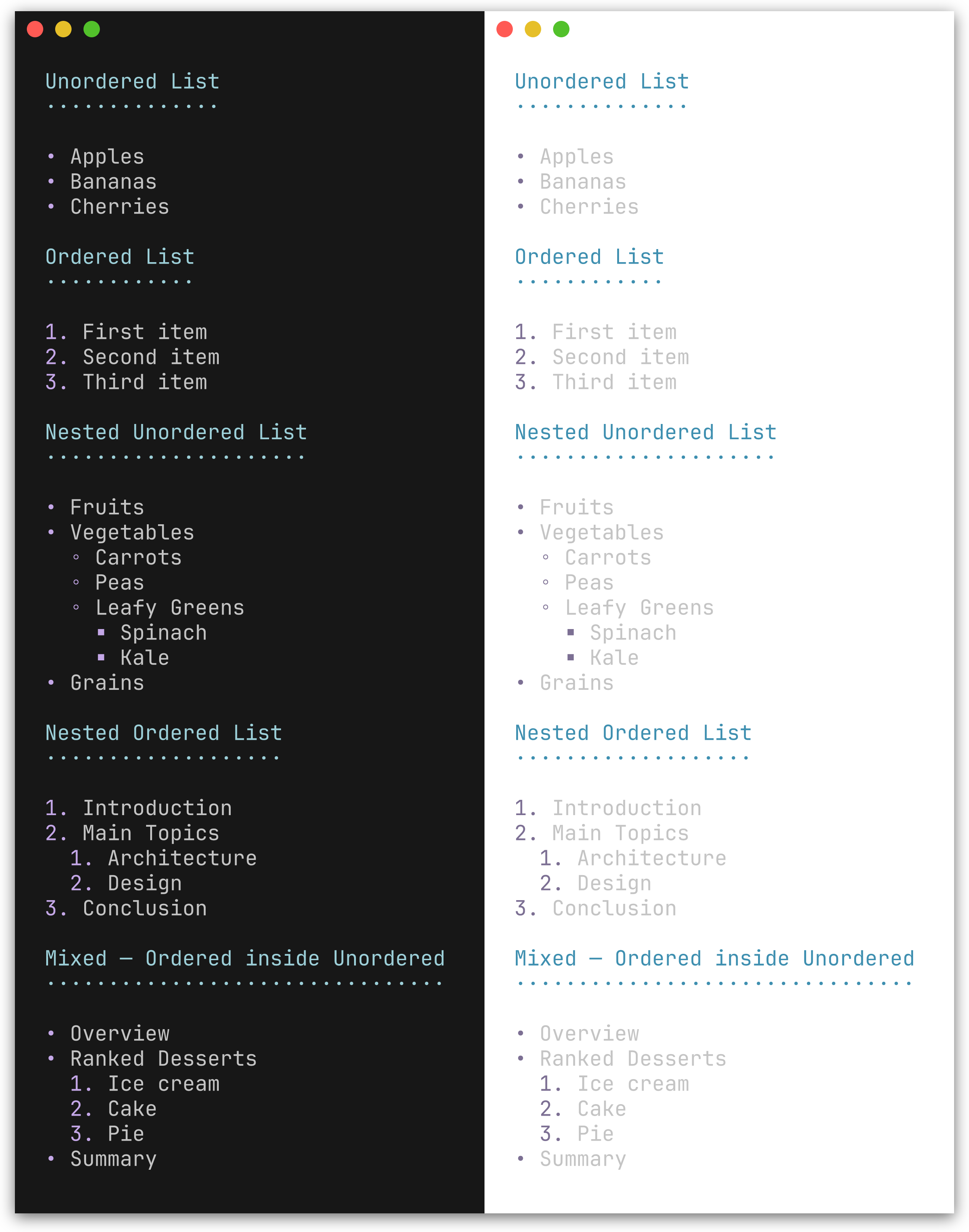
| Method | Description |
|---|---|
UL(items...) |
Unordered list with bullet character (default •) |
OL(items...) |
Ordered list with 1., 2., 3. markers |
NestUL(items...) |
Nested unordered list with bullet cycling |
NestOL(items...) |
Nested ordered list with optional hierarchical numbering |
fmt.Println(ty.UL("Apples", "Bananas", "Cherries"))
fmt.Println(ty.OL("First", "Second", "Third"))NestUL and NestOL render hierarchical lists with configurable indentation, bullet cycling, and mixed nesting.
Constructors:
| Function | Description |
|---|---|
Item(text) |
Leaf item (no children) |
Items(texts...) |
Batch-convert strings to leaf items |
ItemWithChildren(text, children...) |
Item with unordered sub-list |
ItemWithOLChildren(text, children...) |
Item with ordered sub-list |
// Nested unordered list with mixed sub-lists
fmt.Println(ty.NestUL(
    herald.Item("Fruits"),
    herald.ItemWithChildren("Vegetables",
        herald.Item("Carrots"),
        herald.Item("Peas"),
    ),
    herald.ItemWithOLChildren("Ranked Desserts",
        herald.Item("Ice cream"),
        herald.Item("Cake"),
    ),
))
• Fruits
• Vegetables
◦ Carrots
◦ Peas
• Ranked Desserts
1. Ice cream
2. Cake
// Nested ordered list
fmt.Println(ty.NestOL(
    herald.Item("Introduction"),
    herald.ItemWithOLChildren("Main Topics",
        herald.Item("Architecture"),
        herald.Item("Design"),
    ),
    herald.Item("Conclusion"),
))
1. Introduction
2. Main Topics
1. Architecture
2. Design
3. Conclusion
Enable WithHierarchicalNumbers(true) for outline-style numbering (2.1., 2.2.):
ty := herald.New(herald.WithHierarchicalNumbers(true))

fmt.Println(ty.NestOL(
    herald.Item("Introduction"),
    herald.ItemWithOLChildren("Main Topics",
        herald.Item("Architecture"),
        herald.Item("Design"),
    ),
    herald.Item("Conclusion"),
))
1. Introduction
2. Main Topics
2.1. Architecture
2.2. Design
3. Conclusion
Preview
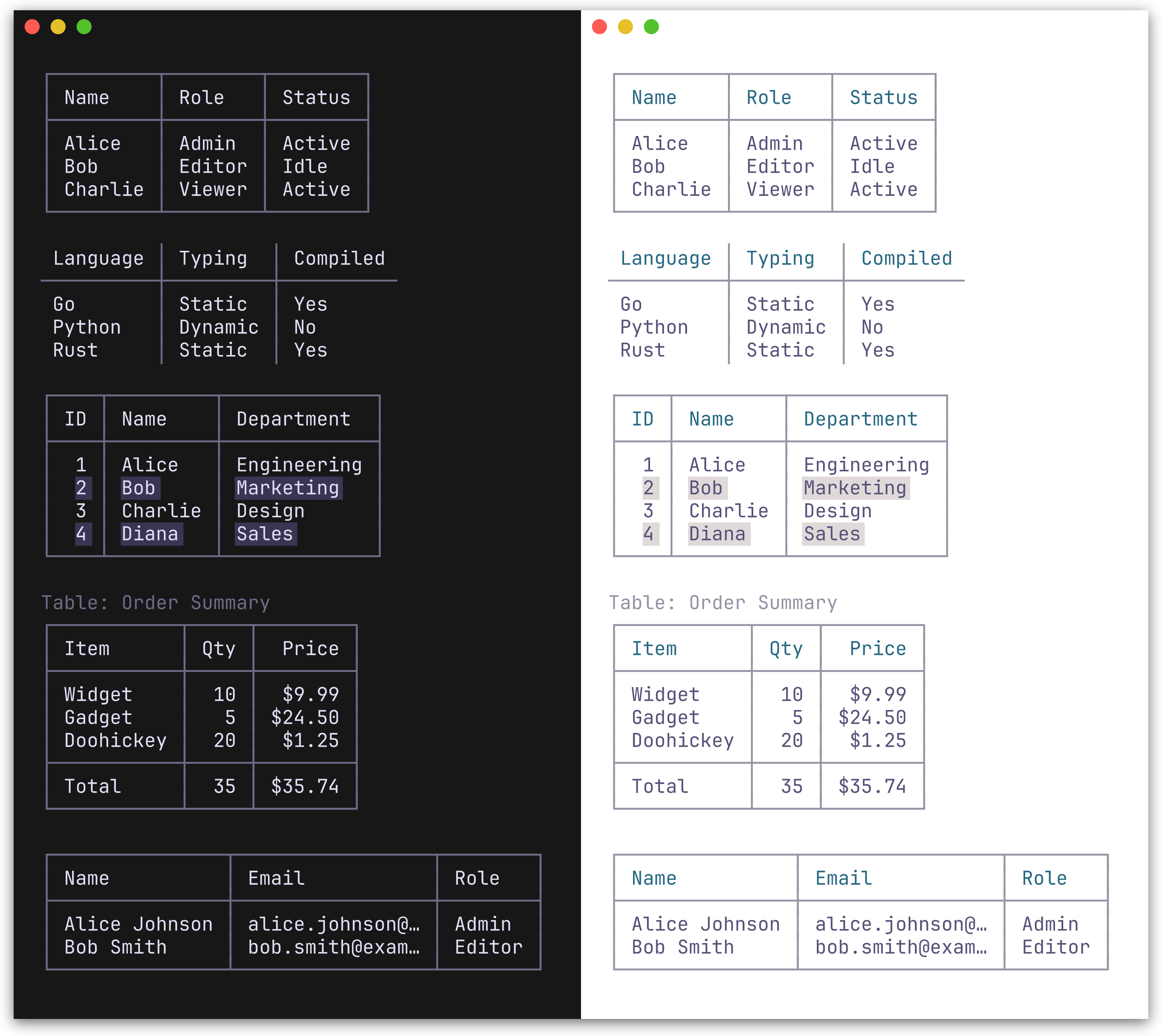
Table renders a table from a [][]string slice. The first row is treated as the header. Two border presets are available: BoxBorderSet() (default, full Unicode box-drawing) and MinimalBorderSet() (header and column separators only, no outer border).
fmt.Println(ty.Table([][]string{
    {"Name", "Role", "Status"},
    {"Alice", "Admin", "Active"},
    {"Bob", "Editor", "Idle"},
}))
Bordered (default):
┌───────┬────────┬────────┐
│ Name  │ Role   │ Status │
├───────┼────────┼────────┤
│ Alice │ Admin  │ Active │
│ Bob   │ Editor │ Idle   │
└───────┴────────┴────────┘
Minimal:
ty := herald.New(herald.WithTableBorderSet(herald.MinimalBorderSet())) Name │ Role │ Status
───────┼────────┼────────
Alice │ Admin │ Active
Bob │ Editor │ Idle
TableWithOpts(rows [][]string, opts ...TableOption) accepts per-table options for column alignment, row separators, striped rows, captions, and footer rows:
// Column alignment, footer row, and caption
fmt.Println(ty.TableWithOpts([][]string{
    {"Item", "Qty", "Price"},
    {"Widget", "10", "$9.99"},
    {"Gadget", "5", "$24.50"},
    {"Total", "15", "$34.49"},
},
    herald.WithCaption("Order Summary"),
    herald.WithFooterRow(true),
    herald.WithColumnAlign(1, herald.AlignRight),
    herald.WithColumnAlign(2, herald.AlignRight),
    // Or set all column alignments at once
    // herald.WithColumnAligns(herald.AlignLeft, herald.AlignRight, herald.AlignRight),
))
// Truncate long cell content
ty.TableWithOpts(rows,
herald.WithMaxColumnWidth(15),
)| Table option | Description |
|---|---|
WithColumnAlign(col, align) |
Set alignment for a column (AlignLeft/Center/Right) |
WithColumnAligns(aligns...) |
Set alignments for all columns positionally |
WithRowSeparators(true) |
Horizontal lines between body rows |
WithStripedRows(true) |
Alternating row background for readability |
WithCaption(text) |
Caption above the table |
WithCaptionBottom(text) |
Caption below the table |
WithFooterRow(true) |
Treat last row as a styled footer with separator |
WithMaxColumnWidth(n) |
Truncate all columns to n chars with … |
WithColumnMaxWidth(col, n) |
Truncate a specific column (overrides global max) |
Preview
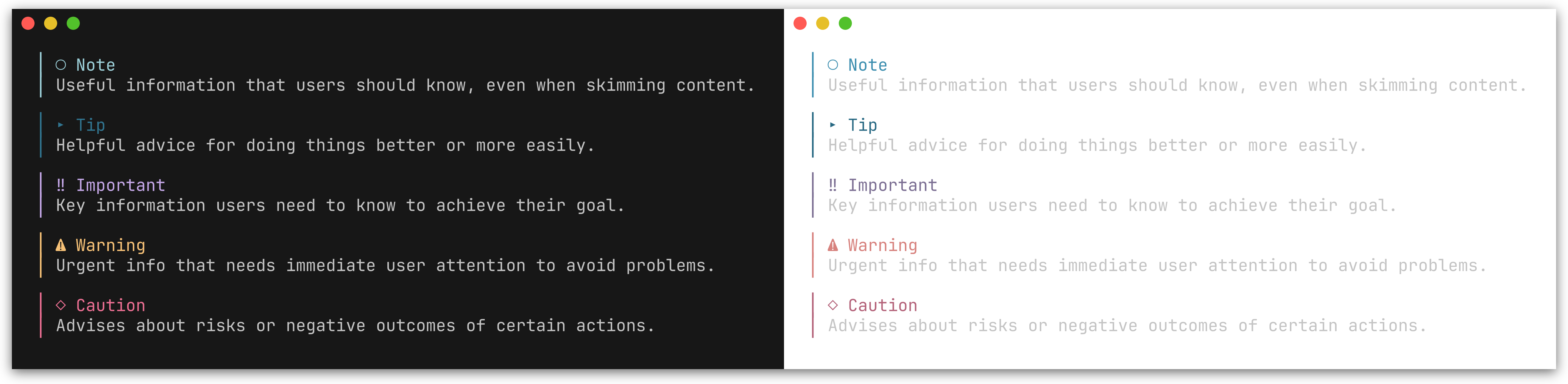
GitHub-style alert callouts with colored bars, icons, and labels. Five types are supported: Note, Tip, Important, Warning, and Caution.
| Method | Icon | Color | Description |
|---|---|---|---|
Note(text) |
○ |
Blue | Useful information for the reader |
Tip(text) |
▸ |
Green | Helpful advice |
Important(text) |
‼ |
Purple | Key information |
Warning(text) |
⚠ |
Amber | Urgent attention needed |
Caution(text) |
◇ |
Red | Risk or negative outcomes |
fmt.Println(ty.Note("Useful information that users should know."))
fmt.Println(ty.Tip("Helpful advice for doing things better."))
fmt.Println(ty.Important("Key information users need to know."))
fmt.Println(ty.Warning("Urgent info that needs immediate attention."))
fmt.Println(ty.Caution("Advises about risks or negative outcomes."))
│ ○ Note
│ Useful information that users should know.
│ ⚠ Warning
│ Urgent info that needs immediate attention.
See examples/002_alerts/ for the full output of all five alert types.
You can also use the generic Alert method with an AlertType:
fmt.Println(ty.Alert(herald.AlertNote, "Generic alert call."))herald provides typography primitives - you compose them for higher-level patterns. Here are some common recipes.
Combine inline styles for colored status output:
ty := herald.New()

// Success / error with Ins/Del
fmt.Println(ty.Ins("Build completed successfully"))  // green, prefixed with +
fmt.Println(ty.Del("3 tests failed"))                // red, prefixed with -

// Semantic badges use the theme's status colors automatically
fmt.Println(ty.SuccessBadge("PASS") + " " + "All checks passed")
fmt.Println(ty.ErrorBadge("FAIL") + " " + "Linter found 2 issues")
fmt.Println(ty.WarningBadge("EXPIRING") + " " + "Certificate expires in 7 days")
fmt.Println(ty.InfoBadge("PENDING") + " " + "Deployment queued")

// Semantic tags for subtle status labels
fmt.Println(ty.SuccessTag("healthy") + " " + ty.Tag("v2.1.0"))

// Generic Badge/BadgeWithStyle for non-semantic cases
fmt.Println(ty.Badge("BETA") + " " + ty.Tag("go"))Pair headings with alerts for contextual guidance:
fmt.Println(ty.H2("Database Migration"))
fmt.Println(ty.Warning("Back up your database before proceeding."))
fmt.Println(ty.P("Run the following command to apply migrations:"))
fmt.Println(ty.CodeBlock("go run ./cmd/migrate up"))Use AddressCard for styled contact information:
fmt.Println(ty.H2("Release v2.0"))
fmt.Println(ty.P("Major performance improvements and new API surface."))
fmt.Println(ty.AddressCard("Maintained by\nJane Doe\njane@example.com"))Compose inline elements and footnotes within paragraphs:
fmt.Println(ty.P(
    "herald" + ty.FootnoteRef(1) + " is built on " +
    ty.Link("lipgloss", "https://github.com/charmbracelet/lipgloss") +
    " and supports " + ty.Bold("rich text") + ", " +
    ty.Code("inline code") + ", and " + ty.Kbd("Ctrl") + "+" + ty.Kbd("C") +
    " key indicators.",
))
fmt.Println(ty.FootnoteSection([]string{"A Go library for TUI typography"}))herald renders typography elements. Layout concerns - padding, centering, and framing - belong at the output boundary using lipgloss directly. This avoids double-wrapping when composing inline elements inside block elements.
Per-element wrapping - apply a frame style to each rendered line:
ty := herald.New()
frame := lipgloss.NewStyle().Padding(0, 2)

fmt.Println(frame.Render(ty.H1("Title")))
fmt.Println(frame.Render(ty.P("Body text with " + ty.Bold("bold"))))
Whole-output wrapping - build all output first, then wrap once:
var buf strings.Builder
buf.WriteString(ty.H1("Title") + "\n")
buf.WriteString(ty.P("Body text") + "\n")
buf.WriteString(ty.HR() + "\n")
fmt.Println(frame.Render(buf.String()))Pass options to herald.New() to override individual styles or tokens.
ty := herald.New(
    herald.WithHRWidth(60),
    herald.WithBulletChar("-"),
    herald.WithH1Style(
        lipgloss.NewStyle().Bold(true).Foreground(lipgloss.Color("#FF0000")),
    ),
)
Style options - each accepts a lipgloss.Style:
| Option | Targets |
|---|---|
WithH1Style - WithH6Style |
Heading levels 1-6 |
| Option | Targets |
|---|---|
WithParagraphStyle |
P |
WithBlockquoteStyle |
Blockquote text |
WithBlockquoteBarStyle |
Blockquote bar |
WithCodeInlineStyle |
Code |
WithCodeBlockStyle |
CodeBlock |
WithHRStyle |
HR |
WithHRLabelStyle |
HRWithLabel |
| Option | Targets |
|---|---|
WithBoldStyle |
Bold |
WithItalicStyle |
Italic |
WithUnderlineStyle |
Underline |
WithStrikethroughStyle |
Strikethrough |
WithSmallStyle |
Small |
WithMarkStyle |
Mark |
WithLinkStyle |
Link |
WithKbdStyle |
Kbd |
WithAbbrStyle |
Abbr |
WithInsStyle |
Ins |
WithDelStyle |
Del |
| Option | Targets |
|---|---|
WithListBulletStyle |
Bullet/number marker |
WithListItemStyle |
List item text |
WithDTStyle |
Definition term |
WithDDStyle |
Definition description |
| Option | Targets |
|---|---|
WithKVKeyStyle |
KV / KVGroup key text |
WithKVValueStyle |
KV / KVGroup value text |
| Option | Targets |
|---|---|
WithAddressStyle |
Address |
WithAddressCardStyle |
AddressCard content |
WithAddressCardBorderStyle |
AddressCard border |
| Option | Targets |
|---|---|
WithBadgeStyle |
Badge |
WithTagStyle |
Tag |
WithSemanticPalette(sp) |
All 8 semantic methods |
WithSuccessBadgeStyle |
SuccessBadge |
WithWarningBadgeStyle |
WarningBadge |
WithErrorBadgeStyle |
ErrorBadge |
WithInfoBadgeStyle |
InfoBadge |
WithSuccessTagStyle |
SuccessTag |
WithWarningTagStyle |
WarningTag |
WithErrorTagStyle |
ErrorTag |
WithInfoTagStyle |
InfoTag |
| Option | Targets |
|---|---|
WithFootnoteRefStyle |
FootnoteRef |
WithFootnoteItemStyle |
FootnoteSection items |
WithFootnoteDividerStyle |
FootnoteSection divider |
| Option | Targets |
|---|---|
WithTableHeaderStyle |
Table header cells |
WithTableCellStyle |
Table body cells |
WithTableStripedCellStyle |
Alternating body rows |
WithTableFooterStyle |
Table footer row |
WithTableCaptionStyle |
Table caption text |
WithTableBorderStyle |
Table border characters |
| Option | Targets |
|---|---|
WithAlertStyle(type, style) |
Alert of given type |
| Option | Targets |
|---|---|
WithCodeFormatter(fn) |
Syntax-highlighting callback for Code and CodeBlock |
Token options - each accepts a string, int, or bool:
| Option | Default | Description |
|---|---|---|
WithH1UnderlineChar(c) |
═ |
Underline character for H1 |
WithH2UnderlineChar(c) |
─ |
Underline character for H2 |
WithH3UnderlineChar(c) |
· |
Underline character for H3 |
WithHeadingBarChar(c) |
▎ |
Bar prefix character for H4-H6 |
| Option | Default | Description |
|---|---|---|
WithBulletChar(c) |
• |
Bullet character for UL |
WithNestedBulletChars(chars) |
•, ◦, ▪, ▹ |
Bullet characters cycling per depth for NestUL |
WithListIndent(n) |
2 |
Spaces per nesting level for NestUL/NestOL |
WithHierarchicalNumbers(b) |
false |
Outline-style numbering for nested OL (e.g. 2.1.) |
| Option | Default | Description |
|---|---|---|
WithHRChar(c) |
─ |
Character repeated for HR |
WithHRWidth(w) |
40 |
Width of HR in characters |
WithBlockquoteBar(c) |
│ |
Left bar character for Blockquote |
WithCodeLineNumbers(b) |
false |
Show line numbers in CodeBlock |
WithCodeLineNumberSep(c) |
│ |
Separator between line numbers and code |
| Option | Default | Description |
|---|---|---|
WithInsPrefix(c) |
+ |
Prefix for Ins (inserted text) |
WithDelPrefix(c) |
- |
Prefix for Del (deleted text) |
| Option | Default | Description |
|---|---|---|
WithKVSeparator(c) |
: |
Separator between key and value in KV/KVGroup |
| Option | Default | Description |
|---|---|---|
WithTableBorderSet(bs) |
BoxBorderSet() |
Border character set (BoxBorderSet or MinimalBorderSet) |
WithTableCellPad(n) |
1 |
Spaces of padding inside each table cell |
| Option | Default | Description |
|---|---|---|
WithFootnoteDividerChar(c) |
─ |
Character repeated for footnote section divider |
WithFootnoteDividerWidth(w) |
20 |
Width of footnote section divider |
| Option | Default | Description |
|---|---|---|
WithAlertBar(c) |
│ |
Left bar character for alerts |
WithAlertIcon(type, icon) |
per-type | Override icon for a specific alert type |
WithAlertLabel(type, label) |
per-type | Override label for a specific alert type |
WithCodeFormatter accepts a func(code, language string) string callback. When set, Code() and CodeBlock() pass the raw text and language string to the formatter before applying the lipgloss style.
import (
    "strings"

    "github.com/alecthomas/chroma/v2/quick"
    "github.com/indaco/herald"
)

func chromaFormatter(style string) func(code, language string) string {
    return func(code, language string) string {
        var buf strings.Builder
        err := quick.Highlight(&buf, code, language, "terminal256", style)
        if err != nil {
            return code
        }
        return strings.TrimRight(buf.String(), "\n")
    }
}

ty := herald.New(
    herald.WithCodeFormatter(chromaFormatter("catppuccin-mocha")),
)

fmt.Println(ty.CodeBlock(`func main() { fmt.Println("hello") }`, "go"))
See examples/200_chroma-syntax-highlighting/ for a chroma-based example, or examples/201_tree-sitter-syntax-highlighting/ for a tree-sitter-based alternative.
Enable line numbers with WithCodeLineNumbers(true). Line numbers are right-aligned, styled with CodeLineNumber (defaults to the Muted palette color), and separated from code by CodeLineNumberSep (default │). Line numbers are added after the CodeFormatter runs, so they work with syntax highlighting.
ty := herald.New(
    herald.WithCodeLineNumbers(true),
)

fmt.Println(ty.CodeBlock("func main() {\n\tfmt.Println(\"hello\")\n}", "go"))
1│ func main() {
2│ fmt.Println("hello")
3│ }
Customize the separator and style:
ty := herald.New(
    herald.WithCodeLineNumbers(true),
    herald.WithCodeLineNumberSep(":"),
    herald.WithCodeLineNumberStyle(lipgloss.NewStyle().Foreground(lipgloss.Color("#888888"))),
)
The following option controls the visual appearance of line numbers:
| Option | Targets |
|---|---|
WithCodeLineNumberStyle |
Code block line numbers |
herald ships with named themes that match huh's built-in color palettes. Colors auto-adapt to light/dark terminal backgrounds using lipgloss.HasDarkBackground. See Pairing with huh for how to use matching themes across herald and huh.
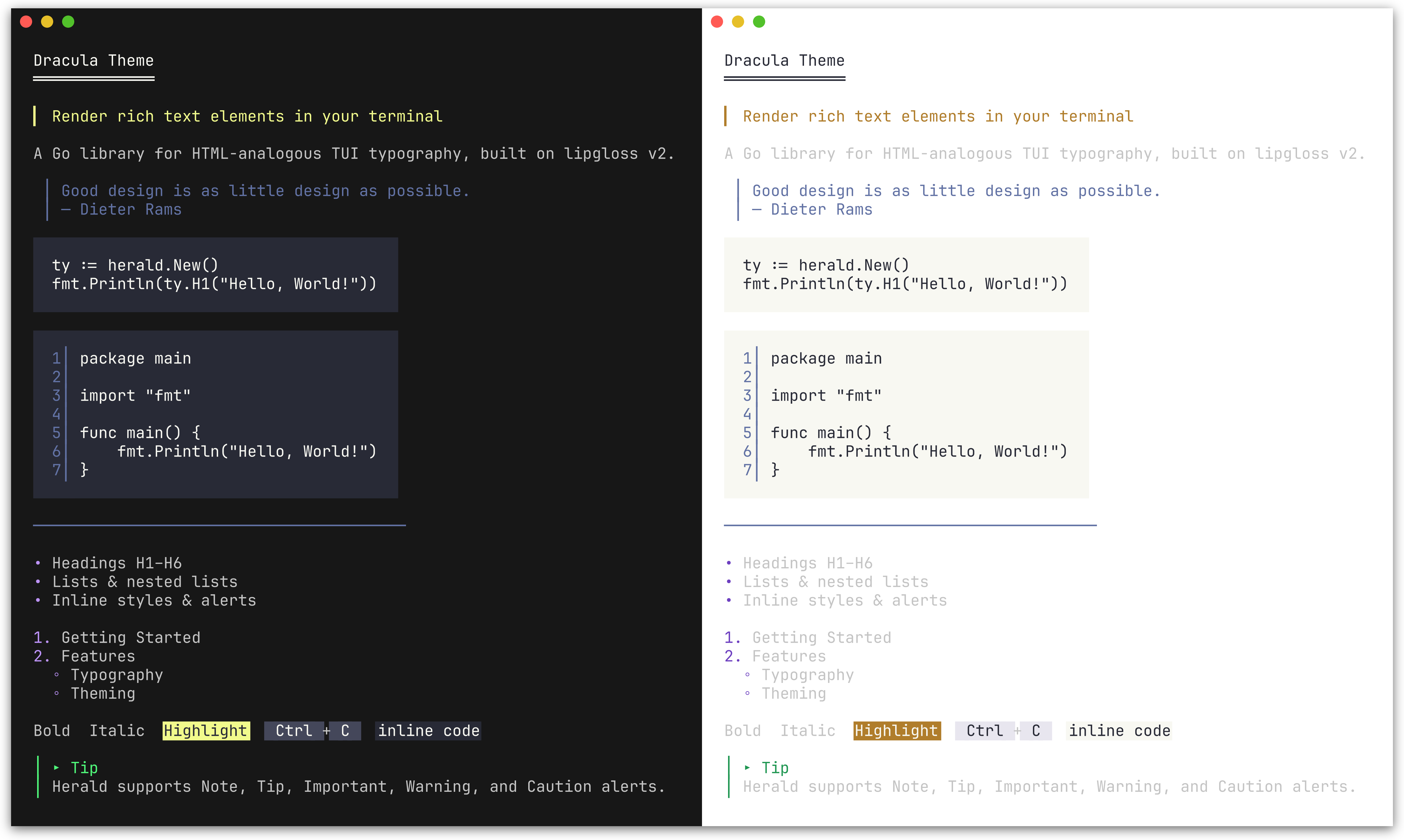 DraculaTheme() |
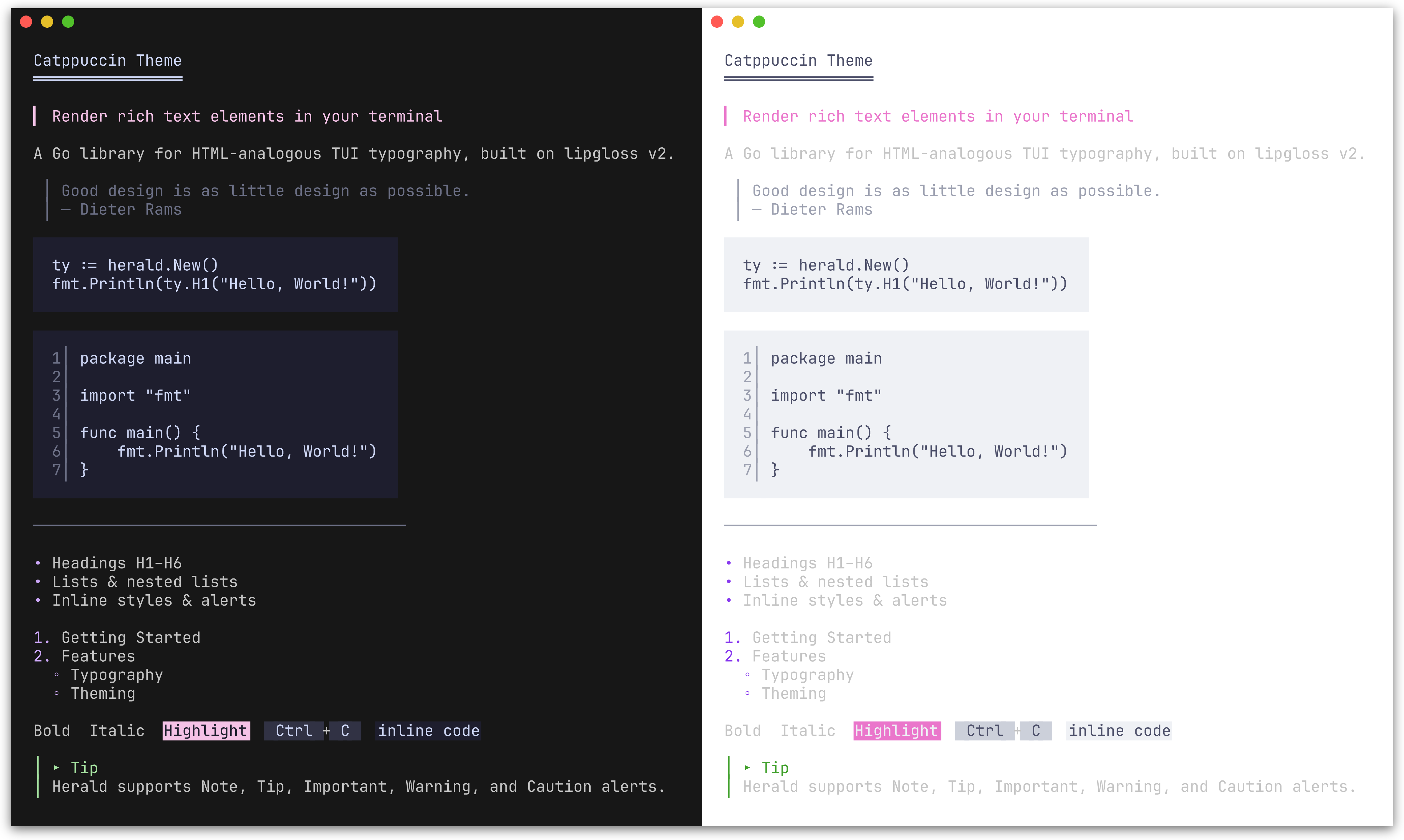 CatppuccinTheme() |
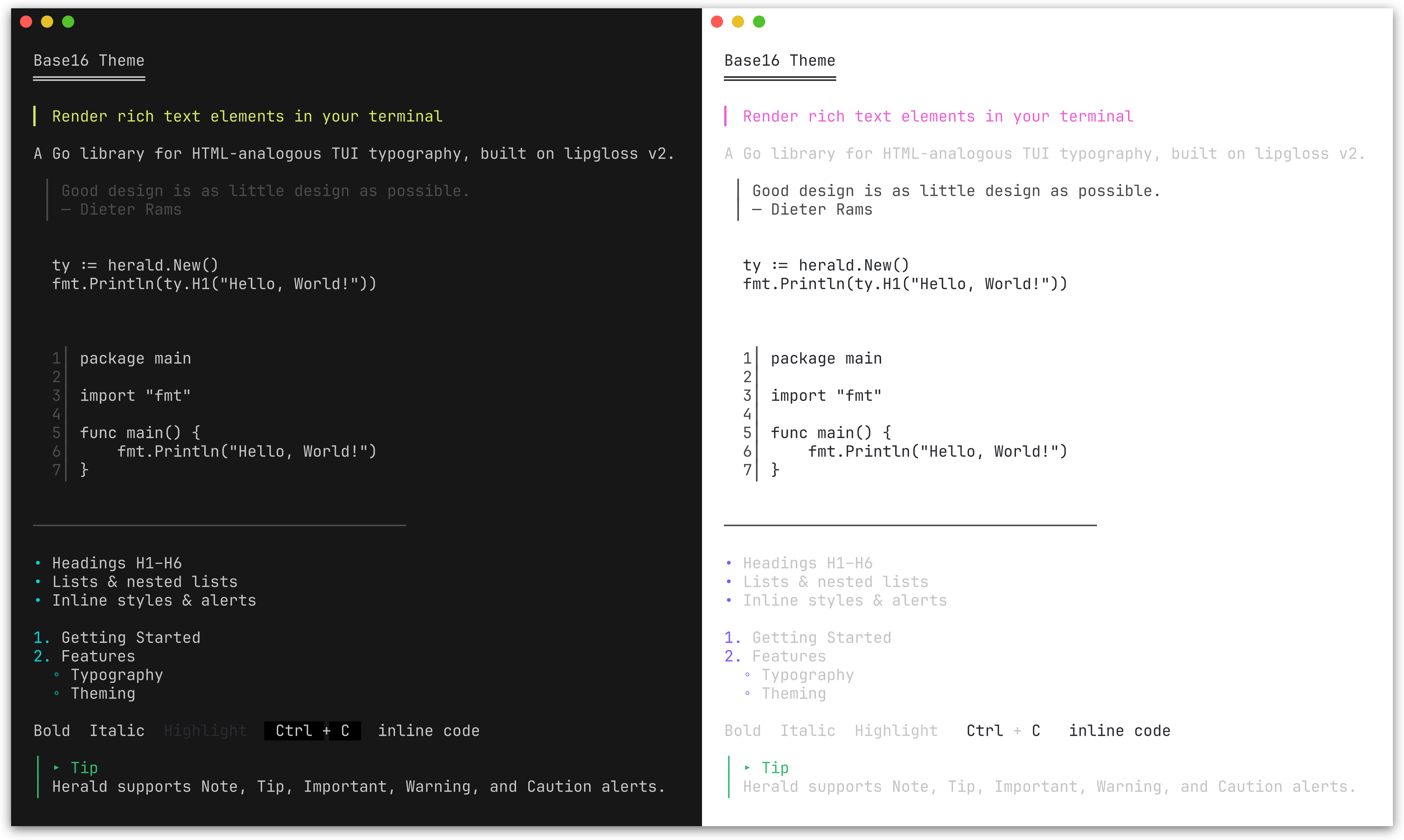 Base16Theme() |
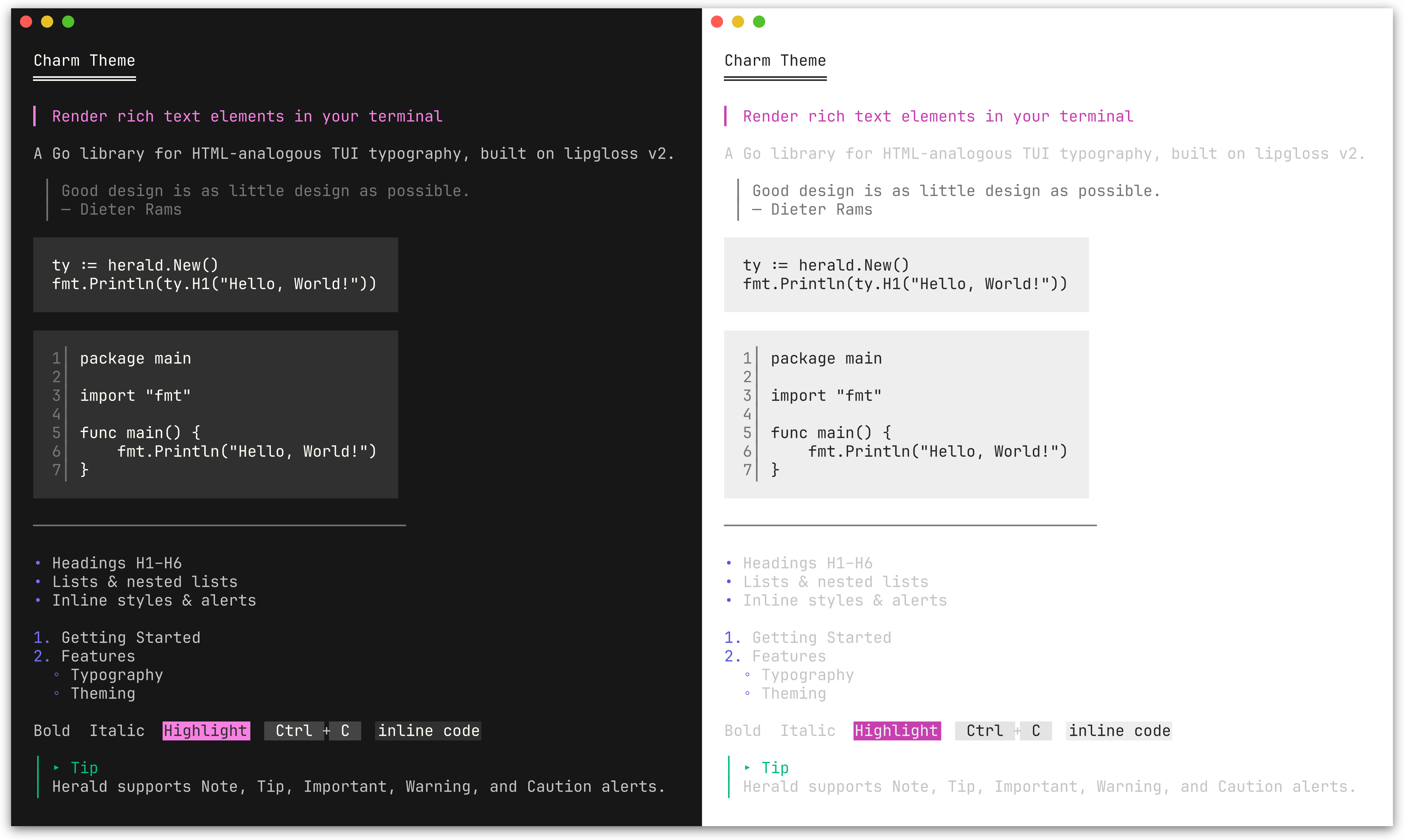 CharmTheme() |
ty := herald.New(herald.WithTheme(herald.DraculaTheme()))ColorPalette lets you define 9 colors and derive a complete theme from them. All style fields map from this palette; token options (characters, widths) are unaffected and retain their defaults. Alert colors are handled separately via AlertPalette.
| Field | Maps to |
|---|---|
Primary |
H1 headings |
Secondary |
H2, list bullets, Badge background, Tag foreground |
Tertiary |
H3, links, Ins, FootnoteRef |
Accent |
H4, mark background |
Highlight |
H5, Abbr, Del |
Muted |
H6, blockquote, HR, HRLabel, sub/sup, DD, KVKey, Address, AddressCard, AddressCardBorder, FootnoteItem, FootnoteDivider, line numbers, table border, caption |
Text |
Body text, paragraphs, list items, inline code, DT, KVValue, table cells, footer |
Surface |
Background for Kbd, Tag, striped table rows |
Base |
Background for inline code, code blocks; mark fg, Badge fg |
Pass the palette to New() via WithPalette, or call ThemeFromPalette to construct a Theme value directly.
Use lipgloss.LightDark to define adaptive colors that automatically adjust to the terminal's background:
lightDark := lipgloss.LightDark(lipgloss.HasDarkBackground(os.Stdin, os.Stdout))

// Nord-inspired palette
palette := herald.ColorPalette{
    Primary:   lightDark(lipgloss.Color("#5E81AC"), lipgloss.Color("#88C0D0")),
    Secondary: lightDark(lipgloss.Color("#81A1C1"), lipgloss.Color("#81A1C1")),
    Tertiary:  lightDark(lipgloss.Color("#8FBCBB"), lipgloss.Color("#8FBCBB")),
    Accent:    lightDark(lipgloss.Color("#EBCB8B"), lipgloss.Color("#EBCB8B")),
    Highlight: lightDark(lipgloss.Color("#BF616A"), lipgloss.Color("#BF616A")),
    Muted:     lightDark(lipgloss.Color("#7B88A1"), lipgloss.Color("#4C566A")),
    Text:      lightDark(lipgloss.Color("#2E3440"), lipgloss.Color("#ECEFF4")),
    Surface:   lightDark(lipgloss.Color("#D8DEE9"), lipgloss.Color("#3B4252")),
    Base:      lightDark(lipgloss.Color("#ECEFF4"), lipgloss.Color("#2E3440")),
}

ty := herald.New(herald.WithPalette(palette))
Each lightDark(lightColor, darkColor) call returns a single adaptive color that picks the right variant based on the terminal background. This is the same approach used by herald's built-in themes and DefaultTheme().
Plain lipgloss.Color values (without LightDark) work too - they apply the same color regardless of terminal background.
SemanticPalette defines four status colors used to derive the themed SuccessBadge, WarningBadge, ErrorBadge, InfoBadge, SuccessTag, WarningTag, ErrorTag, and InfoTag styles.
| Field | Semantic meaning | Default derivation from ColorPalette |
|---|---|---|
Success |
Running, passed, healthy | Tertiary (green in most themes) |
Warning |
Expiring, degraded | Accent (amber in most themes) |
Error |
Failed, critical, down | Highlight (red in most themes) |
Info |
Informational, neutral status | Secondary (blue in most themes) |
ThemeFromPalette automatically derives a SemanticPalette from your ColorPalette, so existing custom palettes produce valid semantic badge and tag styles without any changes.
Use WithSemanticPalette to override all four semantic colors at once:
ty := herald.New(
    herald.WithSemanticPalette(herald.SemanticPalette{
        Success: lipgloss.Color("#22c55e"),
        Warning: lipgloss.Color("#f59e0b"),
        Error:   lipgloss.Color("#ef4444"),
        Info:    lipgloss.Color("#3b82f6"),
    }),
)
Individual styles can be overridden with WithSuccessBadgeStyle, WithErrorTagStyle, and the other per-variant options listed in Badge & Tag.
AlertPalette lets you override the 5 alert colors independently from the main ColorPalette. By default, alert colors are derived from the semantic palette (DefaultAlertPalette maps Info->Note, Success->Tip, Warning->Warning, Error->Caution), with Important using ColorPalette.Secondary. Changing the semantic palette therefore updates alert colors too.
Use WithAlertPalette to override all 5 alert colors independently:
ty := herald.New(
    herald.WithAlertPalette(herald.AlertPalette{
        Note:      lightDark(lipgloss.Color("#0969DA"), lipgloss.Color("#58A6FF")),
        Tip:       lightDark(lipgloss.Color("#1A7F37"), lipgloss.Color("#3FB950")),
        Important: lightDark(lipgloss.Color("#8250DF"), lipgloss.Color("#D2A8FF")),
        Warning:   lightDark(lipgloss.Color("#9A6700"), lipgloss.Color("#D29922")),
        Caution:   lightDark(lipgloss.Color("#CF222E"), lipgloss.Color("#F85149")),
    }),
)
Individual alert icons and labels can also be customized:
ty := herald.New(
    herald.WithAlertIcon(herald.AlertTip, "💡"),
    herald.WithAlertLabel(herald.AlertNote, "Info"),
)
You can combine WithPalette with other options to override specific fields after the palette is applied:
ty := herald.New(
    herald.WithPalette(palette),
    herald.WithHRWidth(60),
    herald.WithBulletChar("-"),
)The easiest way to customize is to start from an existing theme and modify specific fields:
custom := herald.DefaultTheme()
custom.H1 = lipgloss.NewStyle().Bold(true).Foreground(lipgloss.Color("#FF0000")).MarginBottom(1)
custom.BulletChar = "-"

ty := herald.New(herald.WithTheme(custom))
For a fully custom theme, construct a Theme struct directly:
custom := herald.Theme{
    H1:        lipgloss.NewStyle().Bold(true).Foreground(lipgloss.Color("#FFFFFF")),
    H2:        lipgloss.NewStyle().Bold(true).Foreground(lipgloss.Color("#AAAAAA")),
    Paragraph: lipgloss.NewStyle().MarginBottom(1),
    // set remaining Theme fields as needed...

    H1UnderlineChar: "=",
    H2UnderlineChar: "-",
    H3UnderlineChar: ".",
    HeadingBarChar:  ">",
    BulletChar:      "*",
    HRChar:          "-",
    HRWidth:         40,
    BlockquoteBar:   "|",
}

ty := herald.New(herald.WithTheme(custom))herald is designed to complement huh - a form and prompt library for the terminal. Together they cover the full output story of a CLI: herald handles formatted display (instructions, section headers, results, documentation), while huh handles user input.
Since both are built on lipgloss, herald ships with themes that match huh's built-in palettes exactly. You get visual consistency across your entire CLI without any manual style coordination.
ty := herald.New(herald.WithTheme(herald.DraculaTheme()))

fmt.Println(ty.H1("Project Setup"))
fmt.Println(ty.P("Answer a few questions to scaffold your project."))

form := huh.NewForm(
    huh.NewGroup(
        huh.NewInput().Title("Project name").Value(&name),
        huh.NewSelect[string]().Title("Language").Options(...).Value(&lang),
    ),
).WithTheme(huh.ThemeDracula())
form.Run()

fmt.Println(ty.H2("Summary"))
fmt.Println(ty.DL([][2]string{
    {"Name", name},
    {"Language", lang},
}))
See examples/203_huh-form/ for a runnable example, and examples/204_huh-wizard/ for a multi-step wizard combining herald and huh.
herald works inside bubbletea applications - build your content with herald, then display it in a bubbletea viewport or model. Herald handles the typography, bubbletea handles the interactivity.
func buildContent(ty *herald.Typography) string {
    var buf strings.Builder
    buf.WriteString(ty.H1("Release Notes") + "\n")
    buf.WriteString(ty.Badge("STABLE") + " " + ty.Tag("v2.0.0") + "\n\n")
    buf.WriteString(ty.HRWithLabel("Features") + "\n")
    buf.WriteString(ty.UL("New dashboard", "Dark mode support") + "\n")
    buf.WriteString(ty.Tip("Run `go get -u` to upgrade.") + "\n")
    return buf.String()
}

// Pass to a bubbles viewport for scrolling
m.viewport.SetContent(buildContent(ty))
See examples/205_bubbletea-release-viewer/ for a scrollable release notes viewer and examples/206_bubbletea-explorer/ for a sidebar + viewport explorer.
herald works with tview via tview.ANSIWriter, which translates lipgloss ANSI output into tview's internal color tags.
ty := herald.New()

textView := tview.NewTextView().
    SetDynamicColors(true).
    SetScrollable(true).
    SetWordWrap(true)

w := tview.ANSIWriter(textView)
fmt.Fprintln(w, ty.H1("Herald + tview"))
fmt.Fprintln(w, ty.P("ANSI escape sequences are converted to tview color tags."))
fmt.Fprintln(w, ty.UL("Headings", "Lists", "Alerts", "Tables"))
See examples/207_tview-explorer/ for a sidebar + content pane explorer.
Runnable examples are in the examples/ directory:
| Example | Description |
|---|---|
| 000_default-theme | All elements with the default Rose Pine theme |
| 001_lists | Flat, nested, mixed, and hierarchical lists |
| 002_alerts | GitHub-style alert callouts (Note, Tip, Important, Warning, Caution) |
| 003_table | Table rendering: bordered, minimal, alignment, striped rows, captions, and footer |
| 004_semantic-badges | Semantic badge and tag methods with default and custom SemanticPalette |
| 100_custom-options | Override styles, decoration chars, and tokens via functional options |
| 101_custom-palette | Custom adaptive theme from 9 colors using ColorPalette and LightDark |
| 102_builtin-themes | Built-in themes (Dracula, Catppuccin, Base16, Charm) matching huh |
| 103_catppuccin-theme | Build a full theme from the Catppuccin palette |
| 200_chroma-syntax-highlighting | Plug in chroma for syntax-highlighted code blocks |
| 201_tree-sitter-syntax-highlighting | Plug in tree-sitter for AST-based syntax highlighting |
| 202_gotreesitter-syntax-highlighting | Pure-Go tree-sitter highlighting via gotreesitter |
| 203_huh-form | Using herald with huh for interactive TUI forms |
| 204_huh-wizard | Multi-step project scaffolder with herald + huh |
| 205_bubbletea-release-viewer | Scrollable release notes viewer with bubbletea viewport |
| 206_bubbletea-explorer | Sidebar + scrollable content pane explorer with bubbletea |
| 207_tview-explorer | Sidebar + scrollable content pane explorer with tview |
This project is licensed under the MIT License - see the LICENSE file for details.