Repository navigation
Agent API and MCP
Scripts, AI agents, backends and a multi-site master read aggregated analytics through the agent API with a scoped API key. EmDash users and EmDash API tokens can use four MCP tools instead. Neither returns raw visitor data, except the export route for backups and moves (scope data:export).
Base URL: https://example.com/_emdash/api/plugins/cookieless-analytics/
- Open Definitions, API keys.
- Pick a label, the scopes, an optional site restriction and an optional expiry day.
- Copy the key. It is shown once; the site stores only its prefix and a SHA-256 hash. A key is an 8 character prefix (lowercase letters and digits), a dot and a 43 character secret, for example
ab12cd34.EXAMPLESECRET(shortened here). - Revoke a key on the same tab. A revoked key can then be deleted there.
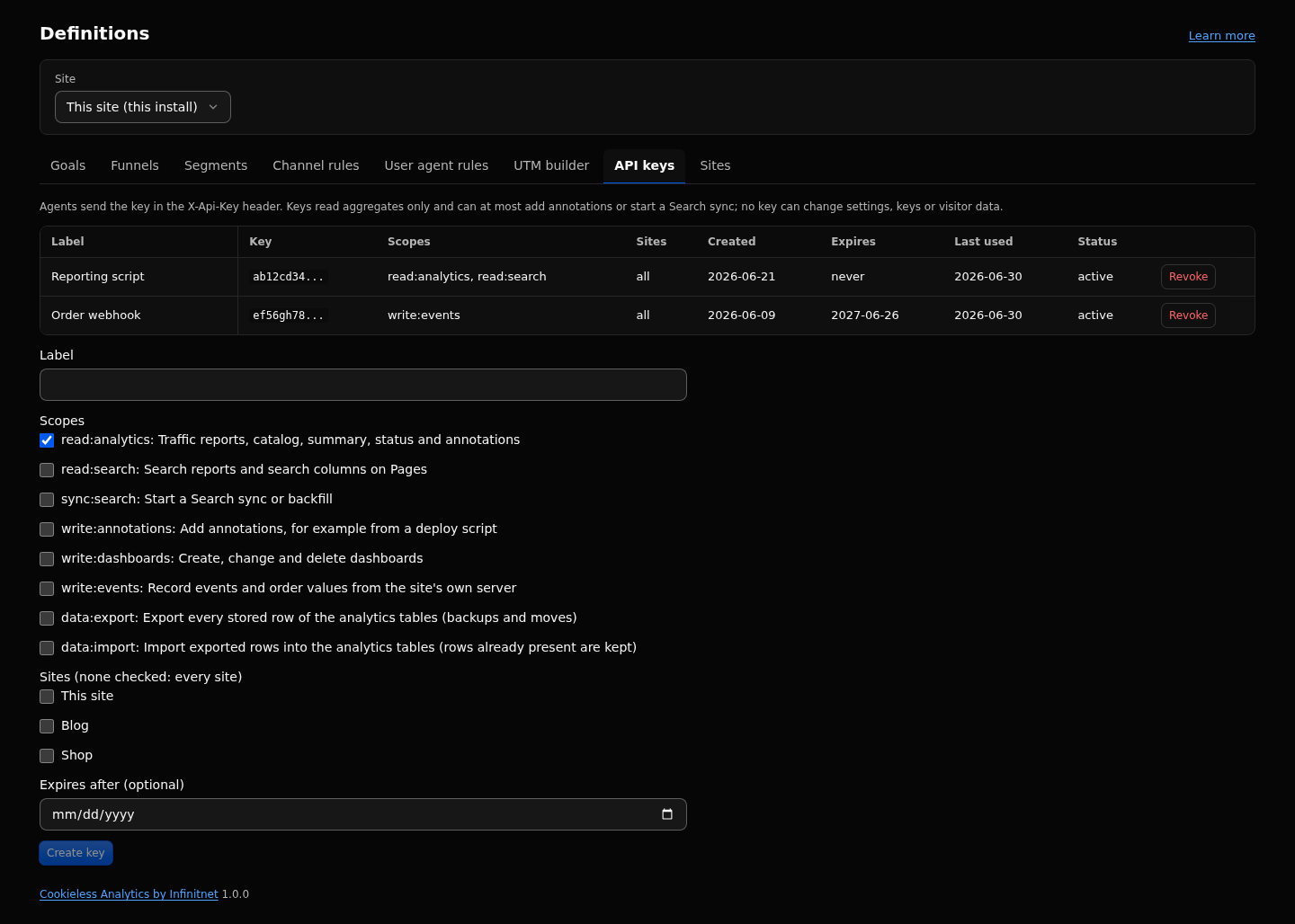
| Scope | Grants |
|---|---|
read:analytics |
Traffic reports through query, the catalog, summary, status, reading annotations and dashboards |
read:search |
The search_* reports; with read:analytics, the search columns on pages
|
sync:search |
search/sync and search/backfill
|
write:annotations |
Adding annotations, for example from a deploy script |
write:dashboards |
Creating, changing and deleting dashboards |
write:events |
Recording events, orders and refunds from your server |
data:export |
Exporting every stored row of the analytics tables, for backups and moves (Move Data) |
data:import |
Importing exported rows (Move Data) |
No scope exists for settings, keys or deletion. A data:export key reads the stored rows, daily visitor keys included: give it an expiry date and revoke it after use.
curl -s "https://example.com/_emdash/api/plugins/cookieless-analytics/agent/v1/summary" \
  -H "X-Api-Key: ab12cd34.EXAMPLESECRET"
Do not send it as Authorization: Bearer: the EmDash host checks every Bearer token on plugin routes first and answers 401. The key is never read from the query string. Browser based clients must add X-EmDash-Request: 1 to POSTs; curl, servers and agents do not need it.
-
GET agent/v1/reports: the catalog of reports, dimensions, operators, parameters, metric definitions, scopes and limits. -
GET agent/v1/summary?from=2026-03-01&to=2026-03-07: the Overview numbers against the previous period (compare=yearorcompare=none), plus revenue, refunds, net revenue and orders per currency. -
POST agent/v1/querywith{ "report", "query", "params"?, "limit"?, "offset"? }. -
GET agent/v1/status: versions, the latest day with traffic, the start of the detailed window, the rollup watermark, drop counters and the Search sync state.
curl -s -X POST "https://example.com/_emdash/api/plugins/cookieless-analytics/agent/v1/query" \
  -H "X-Api-Key: $KEY" -H "content-type: application/json" \
-d '{"report":"pages","query":{"from":"2026-03-01","to":"2026-03-31","compare":"previous","filters":[{"dim":"channel","op":"is","values":["Organic Search"]}]},"limit":50}'| Route | Method | Scope |
|---|---|---|
agent/v1/annotations |
GET | read:analytics |
agent/v1/annotations |
POST | write:annotations |
agent/v1/search/sync, agent/v1/search/backfill
|
POST | sync:search |
agent/v1/dashboards, agent/v1/dashboards/data
|
GET, POST |
read:analytics (plus read:search for search tiles) |
agent/v1/dashboards/save, agent/v1/dashboards/delete
|
POST | write:dashboards |
agent/v1/events |
POST | write:events |
agent/v1/data/dump |
POST | data:export |
agent/v1/data/load |
POST | data:import |
agent/v1/openapi.json |
GET | any valid key |
# Annotation from a deploy script
curl -s -X POST "https://example.com/_emdash/api/plugins/cookieless-analytics/agent/v1/annotations" \
  -H "X-Api-Key: $KEY" -H "content-type: application/json" \
  -d '{"text":"Release 2.1","path":"/pricing"}'

# One order from a payment webhook
curl -s -X POST "https://example.com/_emdash/api/plugins/cookieless-analytics/agent/v1/events" \
  -H "X-Api-Key: $KEY" -H "content-type: application/json" \
  -d '{"events":[{"name":"purchase","val":49.9,"cur":"EUR","oid":"A-1001"}]}'
Client sites: query.site in the query body, ?site= on summary, status and GET annotations, a site body field elsewhere. Absent means the local site.
The OpenAPI 3.1 document is committed as docs/openapi.json in the repository and served at agent/v1/openapi.json (any valid key, any scope).
- Success:
{ "ok": true, "data": ..., "meta": { "site", "from", "to", "generatedAt", "truncated" } }.truncatedis true when more rows exist; page withoffset. -
400 { "ok": false, "error", "message" }for invalid input, for examplerange_too_long,invalid_filter,unknown_site,site_not_allowed. -
404 {}for a missing, wrong, revoked or expired key, a missing scope, or a site outside the key's restriction. All look the same on purpose. -
429 { "ok": false, "error": "rate_limited" }withRetry-After. - Every response is
Cache-Control: private, no-store. There is no CORS.
EmDash serves an MCP endpoint at https://example.com/_emdash/api/mcp. The plugin adds four tools, listed by the host as cookieless-analytics__<name>.
- Open the plugin list in the EmDash admin, open the plugin and enable its MCP tools. After an update that changes a tool, confirm the new list again.
- Give the EmDash API token the scope
mcp:tools:cookieless-analytics(ormcp:tools). Theadmintoken scope does not include it. A signed-in admin session needs no scope. - Call
analytics_catalogfirst, thenanalytics_querywith a report name from it.
| Tool | Permission | What it does |
|---|---|---|
analytics_query |
plugins:read |
One report for a site and range (report, query, params, limit, offset, withAnnotations) |
analytics_catalog |
plugins:read |
The catalog, the same document as agent/v1/reports; takes {}
|
analytics_sites_summary |
plugins:read |
One row per site with sessions, page views, visitors, bounce and engaged rate and revenue per currency; { from, to, compare? }
|
analytics_annotate |
plugins:manage |
Adds an annotation, or replaces one when id is given |
{ "report": "channels", "query": { "from": "2026-03-01", "to": "2026-03-07", "compare": "previous" }, "limit": 10 }Not exposed as tools: event ingestion, deleting data, API keys, share links, settings and dashboards. EmDash writes an audit row for every tool call.
| Key | Default | What it does |
|---|---|---|
agentRateLimitPerMinute |
60 |
Requests per minute per key and Worker isolate (5 to 1200), so approximate across isolates. |
- Range: at most 400 days per query. Rows: at most 1000 per call, offset up to 100,000. Filters: at most 20.
- SEO views: at most 93 days. Journeys: at most 31 days.
-
agent/v1/events: 1 to 20 events per call. - At most 100 keys per install (all sites together), revoked keys included until they are deleted.
last_usedis updated at most once per 10 minutes. - Dashboards: at most 20 per site, 12 tiles each, 16 KB per dashboard.
- For a hard rate limit across isolates, put a WAF rate rule in front.
- A key with
write:eventsalone cannot read reports, andread:analyticsalone cannot send events.write:dashboardsalone cannot read any report. - Responses hold aggregates only: never IP addresses, visitor keys, session ids, user agents or rows per visitor. The exception is
agent/v1/data/dump, which returns the stored rows for backups and moves. - Ranges before the detailed window are answered from daily summaries; check
noticesforsummary,filter_unavailable:<dim>:<reason>anddetail_from:<day>. - Visitors are distinct per day and summed over days; there are no cross-day uniques.
- No agent route deletes data. Deleting is on the Data page only.
- MCP tools see every site the user can open; a key's site restriction does not apply there.
Events, Revenue and refunds, Links report, Dashboards and sharing, Annotations and impact, Multi-site and Sites view, Definitions. Full reference: https://github.com/infinitnet/cookieless-analytics/blob/main/docs/AGENTS.md and https://github.com/infinitnet/cookieless-analytics/blob/main/docs/mcp.md