Repository navigation
Quick Install
This page gets the plugin counting visits: on an EmDash site, and on any other site through a script tag. It ends with the few settings worth checking on day one and a way to confirm that it works.
The target setup is Cloudflare Workers with D1. Peer ranges: emdash >=1.4.0 <2, astro ^7.0.0, react 18 or 19. Node 20 or newer builds it.
The button copies the site template into a new repository on your GitHub or GitLab account and deploys it to your Cloudflare account: the EmDash Cloudflare starter with the plugin installed from npm and steps 1 to 4 below already done, a D1 database, an R2 bucket for media and a Cron Trigger every minute. It asks for EMDASH_ENCRYPTION_KEY (see below; it can stay empty until you connect Search). Afterwards:
- Open
/_emdash/adminon the new site and complete the setup wizard. - On Workers Free, set
capacityProfiletosmall(Settings, Data and capacity). - Continue with Check that it works.
-
Install the package from npm:
npm install @infinitnet/cookieless-analytics # or pnpm add @infinitnet/cookieless-analytics yarn add @infinitnet/cookieless-analytics -
Add the plugin to the
pluginsoption ofemdash()and the Astro integration tointegrations, afteremdash(). Both parts are needed: the plugin owns the settings, admin pages, tables, routes and cron tasks; the integration adds one middleware that serves the page script and the event path from your own origin.// astro.config.mjs import { defineConfig } from "astro/config"; import emdash from "emdash/astro"; import cookielessAnalytics from "@infinitnet/cookieless-analytics"; import cookielessAnalyticsIntegration from "@infinitnet/cookieless-analytics/integration"; export default defineConfig({ integrations: [ emdash({ // database, storage and the rest of your EmDash config plugins: [cookielessAnalytics()], }), cookielessAnalyticsIntegration(), ], });
-
Make sure your layout renders
EmDashHead. The plugin adds its script through thepage:fragmentshook, which EmDash runs only inside that component. Without it, nothing is counted.--- import { EmDashHead } from "emdash/ui"; import { createPublicPageContext } from "emdash/page"; const page = createPublicPageContext({ Astro, kind: "custom", title: Astro.props.title }); --- <html> <head> <EmDashHead page={page} /> </head> <body><slot /></body> </html>
The hook adds exactly one tag, the same for every visitor:
<script defer src="/_/e.js"></script>
-
Add a Cron Trigger to your Wrangler config. The plugin's background tasks (daily summaries, retention, salt cleanup, Search, revenue, mail) run from it. Treat it as required.
-
Redeploy. The plugin creates its tables when it activates.
-
If you plan to connect Google Search Console or Bing, set the encryption key now (see Secrets below).
Any website (a static site, another CMS, WordPress) can send its visits to your install as a client site.
-
In the admin, open Definitions, tab Sites, and add a site: a label, an id, and 1 to 10 exact host names such as
example.comandwww.example.com. -
Copy the script tag the Sites tab shows and put it in the
<head>of every page:<script defer src="https://example.com/_/e.js" data-ec-key="EXAMPLEKEY0123456789"></script>
The key (20 letters and digits) is public. It only means "accept visits for this site from these host names".
-
For a single page app, call this after each client side route change (Astro's ClientRouter needs nothing):
window.__ec && window.__ec.page();
Full steps, Tag Manager and linked hosts: Multi-Site-and-Sites-View.
The page script and the event path are served from your own origin, under neutral paths: scriptPath (default /_/e.js) and collectPath (default /_/e). No third party host is involved, and the paths contain no word that content blockers look for. A path that would contain such a word, or that collides with another path, falls back to its default. The data attribute prefix follows namespace (default __ec, giving data-ec-).
A client site loads the script from your install, which is a third party host from its point of view. If you want first party paths there too, proxy /_/e.js and /_/e on the client's own Cloudflare zone to your install (an operator setup, not a plugin feature).
Open Settings, section General.
| Key | Default | What it does |
|---|---|---|
siteTimezone |
UTC |
IANA timezone for days and hours in reports, for example Europe/Berlin. |
siteOrigin |
empty | Canonical origin such as https://example.com. Used to match Search pages and as the Google sign-in return address. Empty uses the request origin. |
excludeEditors |
true |
Visits of signed-in editors and administrators are not recorded. |
defaultCurrency |
USD |
Currency stored with event values that name none. Changing it later relabels nothing. |
On Workers Free, also set capacityProfile to small (Settings, Data and capacity). See Capacity-Profiles-and-Cloudflare-Plans.
Test in a private window: signed-in editors are not counted, and neither are browsers that send Global Privacy Control.
- The sidebar of the EmDash admin has a folder Analytics.
- View the source of a public page: one
<script defer src="/_/e.js">in<head>. - Open
https://example.com/_/e.js: it answers 200 with JavaScript. - Load a page. The browser's network panel shows one
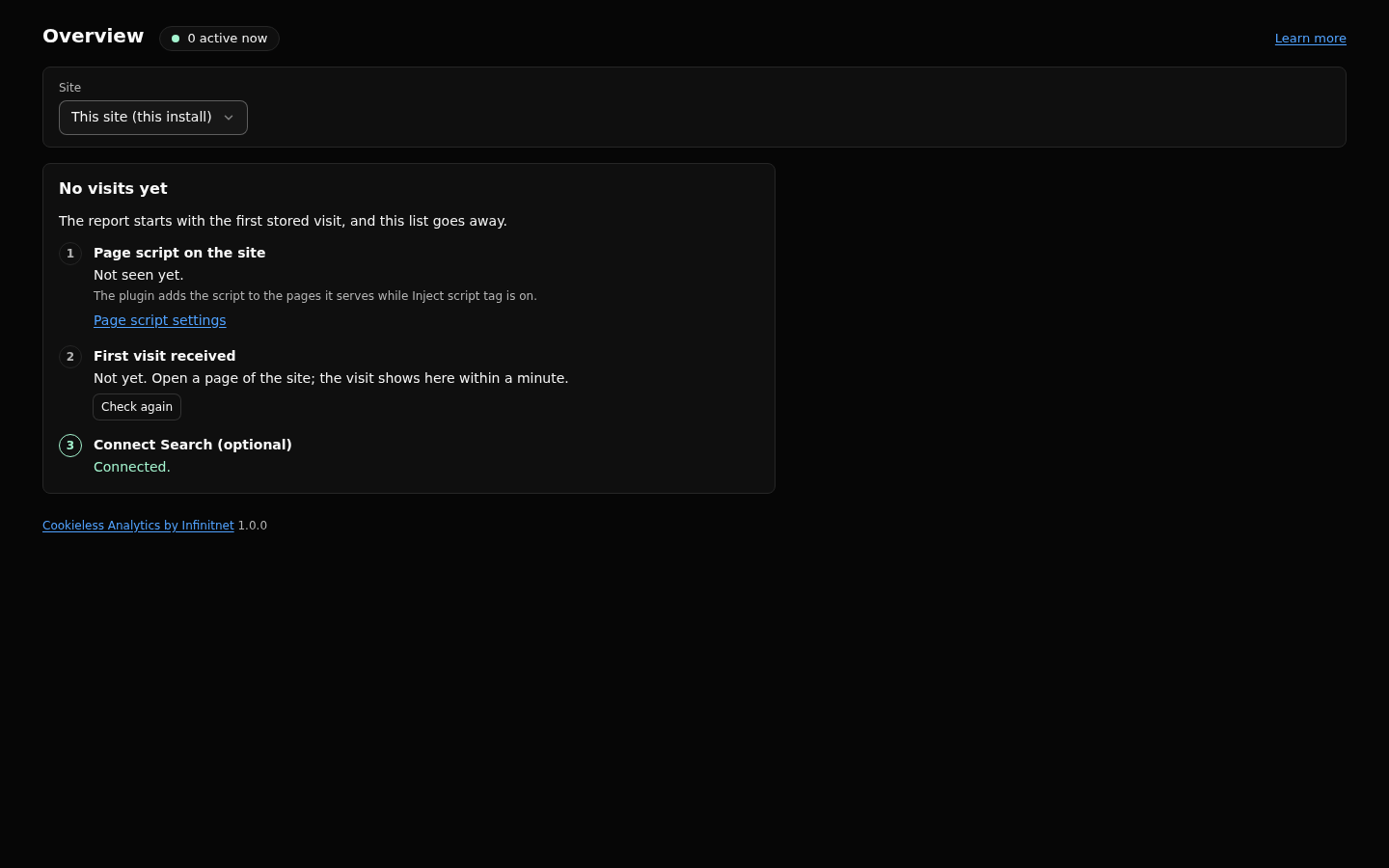
POST /_/eanswered with 204. - Open Overview. Until the first visit is stored, a "No visits yet" panel lists the steps to the first visit (page script seen on a host, and so on). A few seconds after your page view, the report replaces it, and the "Active now" badge in the page head shows the visit.
The Search sign-in values (Google client secret, refresh token, service account key, Bing API key and Bing OAuth secrets) are secret settings. EmDash encrypts them with the key in EMDASH_ENCRYPTION_KEY. Without it, saving a secret fails.
npx emdash secrets generate
wrangler secret put EMDASH_ENCRYPTION_KEY
Keep a backup. A lost key makes the stored secrets unreadable, and you have to connect again.
- Workers Free: 50 D1 queries per invocation, 100,000 rows written and 5 million rows read per day per account, 500 MB per database.
- Every D1 database: at most 10 GB, one query at a time.
- Rows written per page view: about 3.3 with a typical mix.
- The Free plan's daily rows give an estimated 25,000 page views a day across all sites of an account (an estimate, not a measurement).
- The page script retries a refused page view up to 3 times, only while the page stays open.
- The plugin's own caps: 60 events per session per minute, 300 per visitor per minute, 8 KB per body, counted per Worker isolate.
- Without the integration the plugin falls back to an inline script that posts to
/_emdash/api/plugins/cookieless-analytics/in. Counting works, but the neutral paths, error page logging and shared dashboards need the integration. - The integration must come after
emdash()inintegrations. - If your theme adds the script tag itself, turn off
injectScriptand use the path fromscriptPath. - Without the Cron Trigger, older ranges get no summaries, expired rows stay and old salts are not deleted.
- Add a WAF rate limiting rule for
POST /_/e(yourcollectPath). The plugin's caps are approximate across isolates; the rule is the real limit. Change it when you changecollectPath. - Without Cloudflare in front (a local dev server) the country stays empty.
Settings-Reference, Capacity-Profiles-and-Cloudflare-Plans, Queue-Worker, Multi-Site-and-Sites-View, Search-Integrations, Privacy-Model, Troubleshooting, Upgrade.
Full reference: https://github.com/infinitnet/cookieless-analytics/blob/main/docs/install.md