Repository navigation
Retention
Retention decides how long the plugin keeps detailed visits, daily summaries and Search rows. Detailed rows answer every filter and view; once they expire, older days are still answered from daily summaries.
- Open Settings, section Data and capacity.
- Set Detailed data (days) (
rawRetentionDays), Summary retention (months) (rollupRetentionMonths) and, in section Search, Search retention (days) (searchRetentionDays). - Save. The hourly retention task deletes what is now too old, oldest first, over the next runs.
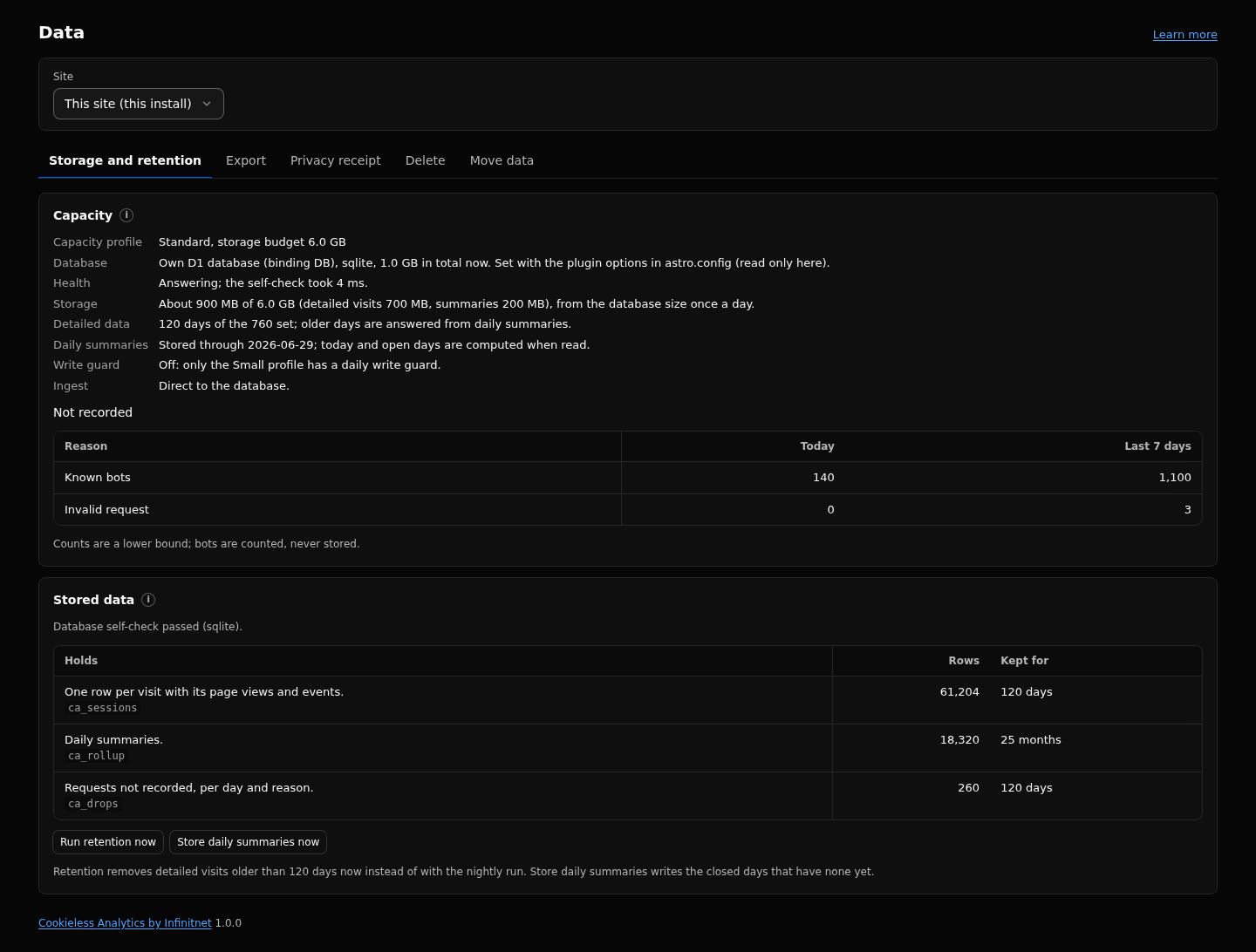
- To run it at once, open Data, tab Storage and retention, and click Run retention now. If it says "Retention deleted a batch of old rows; run it again to continue.", click again until it says "Retention ran; old rows were deleted."
| Key | Default | What it does |
|---|---|---|
rawRetentionDays |
760 (7 to 760) |
Days of detailed rows kept: visits with their page views and events, orders and server events, error page and drop counters. Shortens by itself when the storage budget requires it. |
rollupRetentionMonths |
25 (1 to 120) |
Months of daily summaries kept. |
searchRetentionDays |
800 (90 to 1000) |
Days of Search rows (Google Search Console and Bing) kept. |
capacityProfile |
standard |
Sets the storage budget and the requests one retention run may spend. |
| Data | Kept |
|---|---|
| Visits with their page views and events, orders and server events |
rawRetentionDays; a day is deleted only once the daily summaries hold it |
| Error page and drop counters | the detailed window |
| Daily summaries (per report dimension, pairs, channel x country x device cube, revenue per currency) | rollupRetentionMonths |
| Search rows | searchRetentionDays |
| Second tab aliases | one day after they were written (the longest visit), then they expire |
| Daily salts | 2 days (fixed) |
| Configuration (goals, dashboards, keys and so on) | until you delete it |
Detailed rows hold every visit with its pages, events, timing, source and device. All filters, segments, Search Satisfaction, filtered journeys and per visit views need them.
Daily summaries hold top values per dimension (at most 500 pages and 200 values of every other dimension per day, the rest summed into (other)), pairs of a dimension with channel, country or device, the cube of channel x country x device, the top links and journey steps, and revenue per currency. They hold no visitor keys. Totals stay exact, but filters that the summaries do not keep cannot be applied; reports say so with a notice.
The plugin runs its tasks from the site's Cron Trigger:
| Task | Schedule | What it does |
|---|---|---|
rollup |
minutes 0 and 30 | Stores the daily summaries of closed days not stored yet. |
retention |
minute 17 of every hour | Deletes days older than the retention settings, oldest first, within the request budget of the profile; continues on the next run. Also continues a running filtered delete. |
salts |
00:05 | Deletes daily salts older than two days. |
A Cron Trigger of * * * * * is recommended:
Every 15 minutes also works; tasks then take turns and catch up about once an hour each.
Once a day the plugin estimates the size of its tables without a table scan. When the detailed data would pass its share of the budget (three quarters), the detailed window shortens to the newest days that fit. The Data page then shows a notice, and the Detailed data line reads, for example, "540 days of the 760 set".
- Retention deletes within the request budget of the profile: 40 requests per run on
small, 400 otherwise. - On
small, retention deletes at most 2,000 rows per run and 15,000 per UTC day, so a backlog cannot spend the day's write allowance. A deleted row counts as a written row. - A closed day's summary is stored 15 minutes after the local midnight that starts the day after next.
- Retention applies per database, to every site in it, client sites included. It cannot differ per site.
- Without a Cron Trigger, expired rows are not deleted, summaries for older ranges are not built, and old salts stay in storage.
- Lowering
rawRetentionDaysremoves detail for good. Older days then answer from summaries only, with fewer filters. - Search Satisfaction before the detailed window answers with a notice and a button that moves the range inside the window. Journeys there read the daily summaries, which keep only the top steps and paths of each day and apply no filter.
- Raising
rawRetentionDaysdoes not bring back deleted detail. - Days older than the detailed window cannot be filtered by Delete matching visits; see Data-Page.
Data-Page, Capacity-Profiles-and-Cloudflare-Plans, Privacy-Model, Settings-Reference, Troubleshooting.
Full reference: https://github.com/infinitnet/cookieless-analytics/blob/main/docs/privacy.md