Updating Charts
After a chart has rendered, ChartJsConfig update helpers let the existing chart receive new values, labels, datasets, or options without rebuilding the entire component.
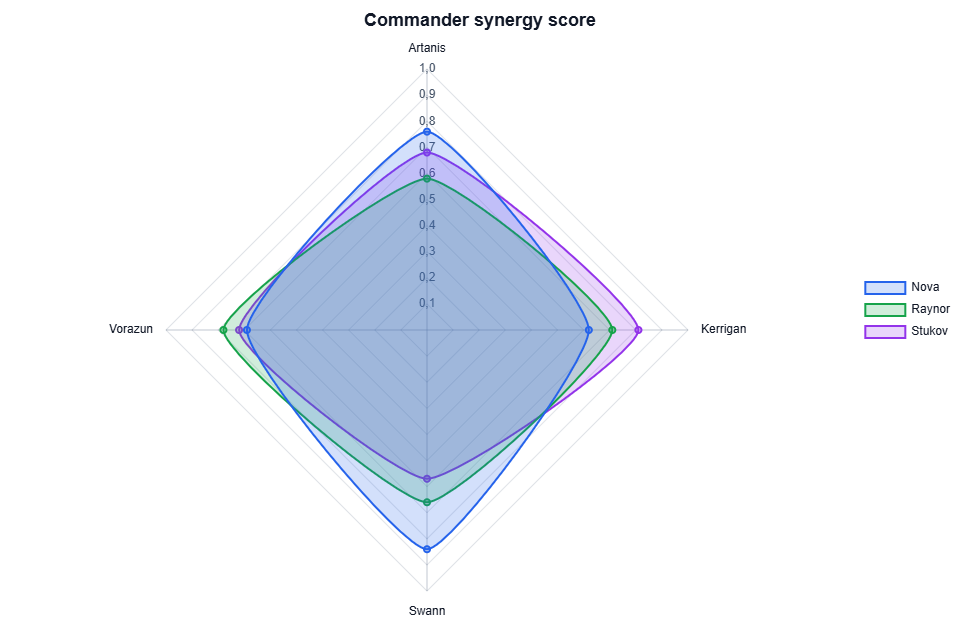
The smooth update sample uses the same ready pattern as the README chart:
<ChartComponent ChartJsConfig="chartJsConfig"
                OnEventTriggered="ChartEventTriggered" />
private bool chartReady;
private void ChartEventTriggered(ChartJsEvent chartJsEvent)
{
if (chartJsEvent is ChartJsInitEvent)
{
chartReady = true;
}
}SetDatasetsSmooth(...) matches datasets by Id. The next dataset list can update an existing dataset, add a new one, remove a missing one, reorder the visible datasets, and replace labels in the same call.
if (chartReady)
{
    chartJsConfig.SetDatasetsSmooth(
        datasets:
        [
            new RadarDataset
            {
                Id = "tychus",
                Label = "Tychus",
                Data = [0.82, 0.73, 0.65, 0.88, 0.70]
            },
            new RadarDataset
            {
                Id = "nova",
                Label = "Nova",
                Data = [0.69, 0.86, 0.74, 0.79, 0.91]
            }
        ],
        labels: ["Artanis", "Dehaka", "Kerrigan", "Stetmann", "Vorazun"]);
}
Give every dataset that participates in this update flow a stable id. Without ids, the library cannot tell which existing Chart.js dataset should be kept and updated.
When dataset identity and styling stay the same, UpdateDatasetsDataSmooth(...) accepts new data keyed by dataset id:
Dictionary<string, IList<object>> dataByDatasetId = new()
{
    ["nova"] = [0.91, 0.67, 0.79, 0.82],
    ["raynor"] = [0.73, 0.77, 0.71, 0.86]
};

chartJsConfig.UpdateDatasetsDataSmooth(dataByDatasetId);
Use UpdateChartOptions() for options-only changes such as titles, scales, interaction settings, or plugin options. Use ReinitializeChart() when Chart.js must be constructed again, for example after registering a new plugin that must be present during construction.