Repository navigation
JaMeter v2.3.0.658

JaMeter v2.3.0.658
한국어
재화·수집 측정과 일일 가계부, 파티 조회를 개선했습니다.
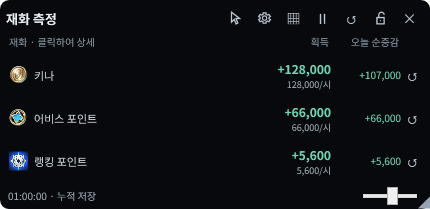
재화 획득 측정
설정 → HUD 표시 → 재화 획득 측정
키나·어비스 포인트·랭킹 포인트의 획득량과 시간당 획득량을 별도 HUD에서 확인하세요.
- 열기 / 닫기: 기본 단축키
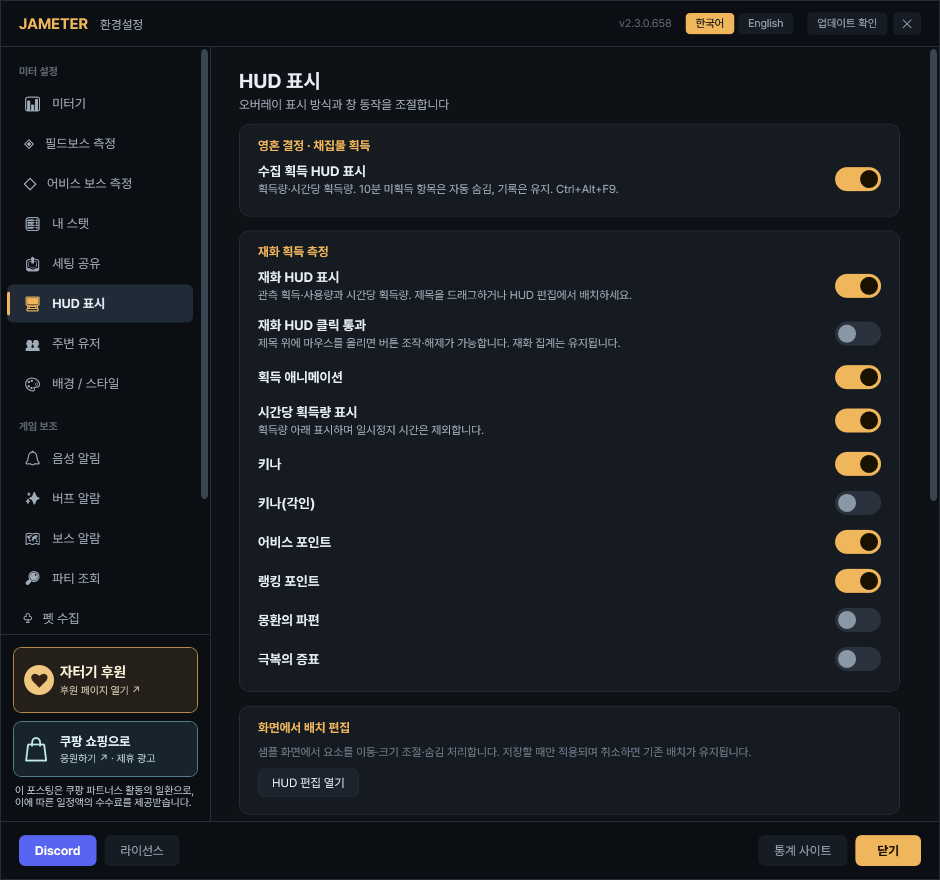
Ctrl+Alt+F2. - 기본 표시: 키나·어비스 포인트·랭킹 포인트. 각인 키나·몽환의 파편·극복의 증표는 같은 설정에서 추가합니다.
- 획득: 이번 측정에서 얻은 양입니다. 아래 작은 숫자는 시간당 획득량입니다.
- 오늘 순증감: 오늘 획득 − 오늘 사용·감소. 사용량이 더 크면 음수로 표시됩니다.
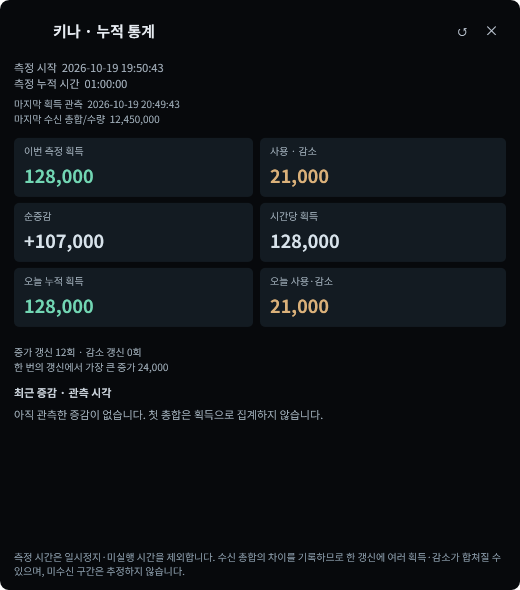
- 행 클릭: 시작 시각·측정 시간, 획득·사용, 시간당 획득, 오늘 누적과 최근 변동 내역을 엽니다.
- 행의 ↺: 해당 재화의 이번 측정만 초기화합니다. 다른 재화·오늘 누적·달력은 유지됩니다.
새 사용자는 기본 켜짐이며 화면 우측 아래에 배치됩니다. 기존 사용자의 표시·위치 설정은 유지합니다.
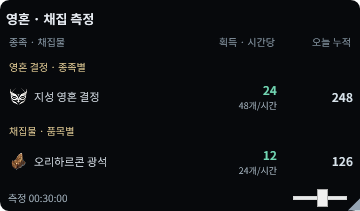
영혼 결정 · 채집물, 한 창에서 측정
설정 → HUD 표시 → 영혼 결정 · 채집물 획득 → 수집 획득 HUD 표시
펫 성장 목록과 별도로, 획득 활동의 성과를 확인하는 창입니다.
- 열기 / 닫기: 기본 단축키
Ctrl+Alt+F9. 처음에는 꺼져 있으니 필요할 때 켜 주세요. - 영혼 결정: 몬스터별이 아닌 종족별로 묶습니다. 지원되는 획득 내역을 측정하며 펫 성장·보유 여부와 별도로 표시합니다.
- 채집물: 품목별 이번 획득량·시간당 획득량·오늘 누적을 표시합니다. 구매·창고 이동은 채집 실적으로 더하지 않습니다.
- 10분 자동 정리: 마지막 획득 후 10분이 지난 종족·품목은 HUD에서 숨깁니다. 다시 획득하면 누적량을 유지한 채 돌아옵니다.
자동 숨김은 표시만 정리합니다. 이번 측정·오늘 누적·달력 기록은 삭제하지 않습니다.
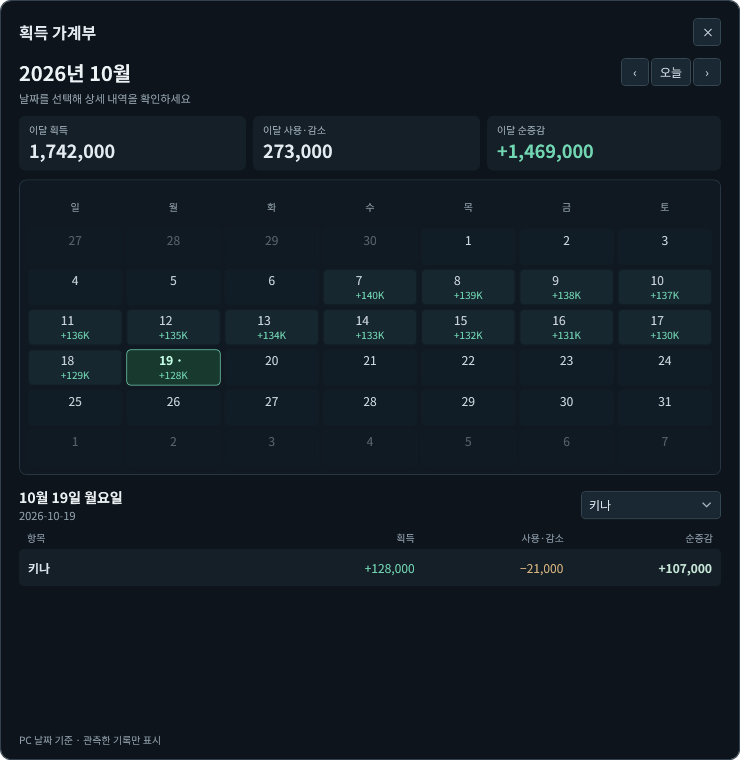
오늘 누적과 획득 가계부
재화 또는 영혼·채집 HUD에 마우스 올리기 → 달력 모양 버튼
이번 측정 / 오늘 누적 / 달력 기록을 구분했습니다.
- 이번 측정: 직접 초기화해 새 측정을 시작할 수 있습니다.
- 오늘 누적: PC 날짜가 바뀌면 0부터 시작합니다. 이번 측정을 수동 초기화해도 오늘 누적은 유지됩니다.
- 달력: 날짜를 눌러 항목별 획득·사용·감소·순증감을 확인합니다. 오늘, 이전 달·다음 달 버튼으로 이동하세요.
- 항목 선택: 오른쪽 필터에서 재화·종족·채집물을 고르면 이달 획득·사용·순증감이 나옵니다. 상단 합계에 마우스를 올리면 저장된 기간의 합계도 확인합니다.
기록은 캐릭터별로 구분해 로컬 PC에 저장합니다. 빈 날짜는 관측 기록 없음이며, 과거 게임 내역을 소급 복원하지 않습니다. 저장 한도에서는 오래된 날짜부터 정리합니다.
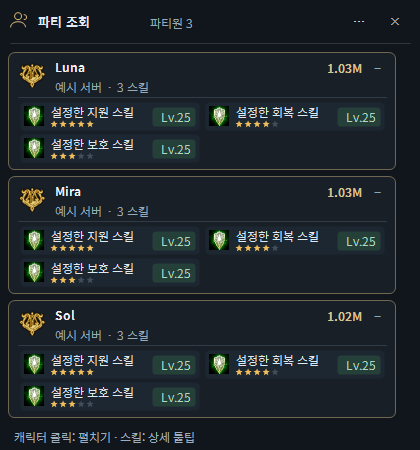
파티원 전체 조회창
미터 메뉴 → 파티 전체 조회 / 기본 단축키 Ctrl+Alt+P
현재 파티원들을 한 창에 모아, 각 파티원의 설정한 스킬·레벨·중요도를 비교할 수 있습니다.
- 직접 열기: 미터 메뉴의 파티 전체 조회를 누르거나
Ctrl+Alt+P를 누르세요. 같은 단축키로 닫습니다. - 자동 표시: 설정 → 파티 조회 → 표시에서 방 입장 시 파티 전체 조회, 정보 보기 시 파티 전체 조회를 각각 켤 수 있습니다.
- 표시 스킬 설정: 같은 설정의 직업 탭에서 조회할 스킬·최소 레벨·중요도(★1~5)를 지정하세요. 설정한 스킬만 표시합니다.
- 카드 정보: 파티원 이름·서버·전투력과 선택 스킬의 아이콘·레벨·중요도 별을 확인합니다. 카드는 기본 펼침이며 이름을 눌러 접고 펼 수 있습니다.
- 스킬 상세: 스킬 위에 마우스를 올리면 상세 툴팁을 봅니다.
- 창 크기·위치: 파티원 카드 수에 맞춰 자동으로 늘거나 줄고, 많아지면 스크롤합니다. 빈 곳 드래그와 HUD 편집의 파티 전체 조회 항목으로 배치합니다.
- 명단 정리: 방에서 나오거나 현재 파티 명단이 바뀌면 오래된 카드를 정리합니다.
아래 사진은 신청자 팝업이 아니라, 파티원 전체를 함께 보는 조회창입니다. 실시간 확인된 파티 명단을 사용하며 지원되지 않는 캐릭터 정보는 미확인으로 표시될 수 있습니다.
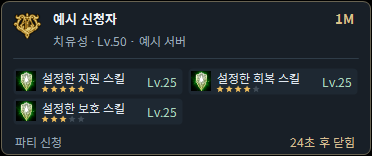
파티 신청자 카드
설정 → 파티 조회 → 표시 → 파티 신청 / 정보 보기 카드 표시
신청자나 정보 보기 대상의 스킬을 빠르게 확인하는 별도 팝업입니다.
- 표시 내용: 설정한 스킬·레벨·중요도 별과 닫힘까지 남은 시간을 확인합니다.
- 읽는 중: 카드 위에 마우스를 올리면 자동 닫힘을 잠시 멈춥니다.
- 자동 정리: 수락·거절·신청 취소가 확인되면 해당 신청 카드를 정리합니다.
현재 파티원들을 함께 비교하려면 위의 파티원 전체 조회창을 사용하세요.
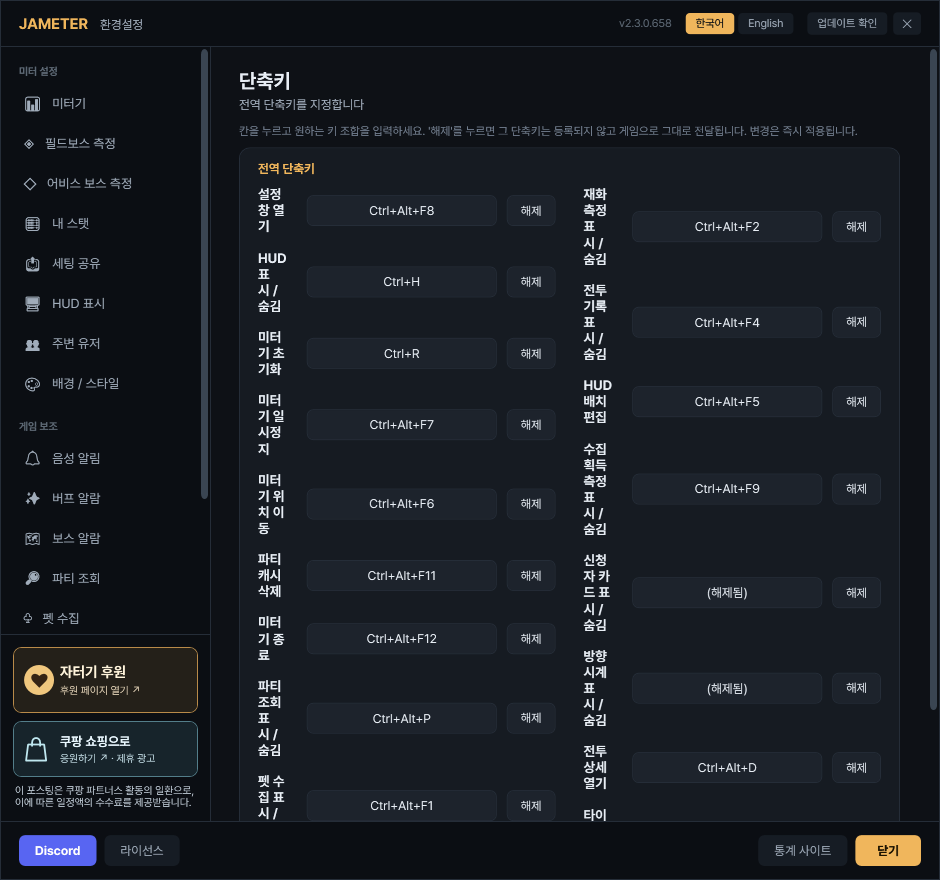
단축키 · 자유 배치 · 표시 조절
설정 → 단축키 / 설정 → HUD 표시 → HUD 편집 열기
키 입력 칸을 누르고 원하는 조합을 입력하세요.
- 펫 수집
Ctrl+Alt+F1/ 재화Ctrl+Alt+F2 - 영혼·채집
Ctrl+Alt+F9/ 파티 조회Ctrl+Alt+P - HUD 배치
Ctrl+Alt+F5/ 전투 기록Ctrl+Alt+F4
창의 빈 곳을 드래그해 이동하고, 크기 조절 손잡이와 자물쇠를 이용하세요. HUD 편집에서도 배치할 수 있습니다.
재화 창의 클릭 통과·설정·일시정지·초기화 버튼은 호버 시 표시됩니다. 클릭 통과 중에는 제목에 마우스를 올려 조작합니다.
펫·재화·영혼·채집 HUD의 새 기본 배경 불투명도는 **60%**입니다. 직접 저장한 기존 값은 유지됩니다.
버그 수정 · 안정성 개선
- 펫 단계 상승·영혼 소모 후 수량 표시 처리를 보강했습니다.
- 보스 중요도 색상이 설정창 재진입·재시작 후 유지되지 않던 문제를 수정했습니다.
- 미터 데모와 실제 전투 표시가 번갈아 나타나던 문제를 수정했습니다.
- 파티 카드의 긴 스킬 이름 넘침, 툴팁 가림, HUD 배치 미리보기 찌그러짐을 수정했습니다.
- 파티 조회의 설정 스킬 필터·중요도 표시·조회 대기 및 재시도 처리를 개선했습니다.
- 순간이동 전후 재화 측정 유지와 화면 가장자리에서의 창 이동을 보강했습니다. 작업표시줄 영역까지 배치할 수 있습니다.
- 재화·영혼·채집의 중복·누락 방지와 저장 복원 처리를 보강했습니다.
집계 안내: 정보가 부족한 첫 획득은 임의로 채우지 않습니다. 랭킹 포인트는 게임의 정보 갱신 시점에 반영될 수 있습니다. 모든 보상 경로의 완전한 집계를 보장하는 업데이트는 아닙니다.
English
Currency and collection trackers, daily ledgers and improved party lookup.
Currency tracker
Settings → HUD display → Currency tracker
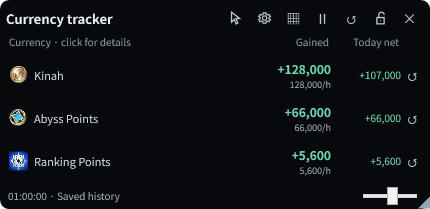
Track Kinah, Abyss Points and Ranking Points in a separate HUD.
- Toggle:
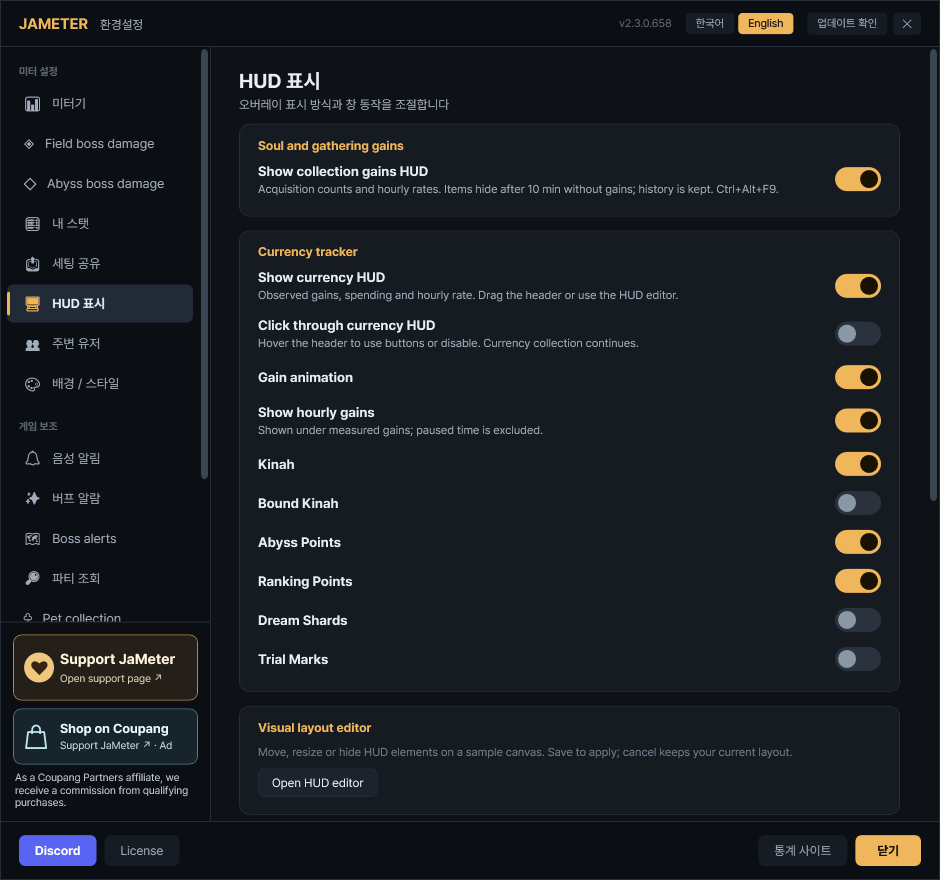
Ctrl+Alt+F2by default. - Default rows: Kinah, AP and Ranking Points. Enable Bound Kinah, Dream Shards and Trial Marks in the same settings.
- Gained: Your current measurement; the smaller number below is the hourly gain rate.
- Today net: Today’s gains minus spending/decreases. It can be negative.
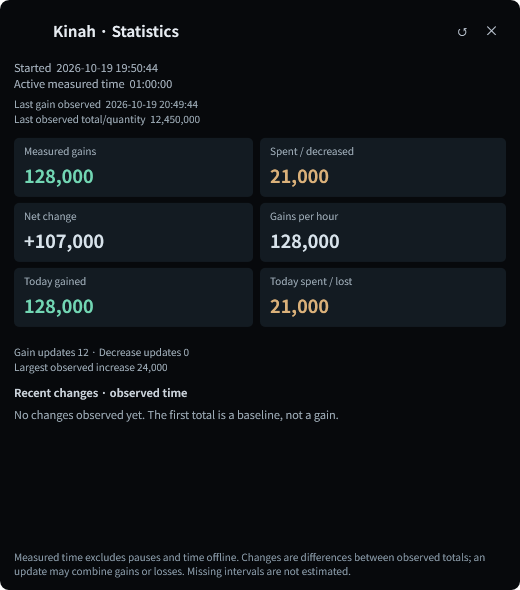
- Click a row: View start time, active duration, gains, spending, hourly rate, today’s totals and recent changes.
- Row ↺: Reset only that currency’s current measurement. Other currencies, today’s totals and calendar history stay intact.
New installations show the HUD near the bottom right. Existing visibility and placement settings are kept.
Soul and gathering gains
Settings → HUD display → Soul and gathering gains → Show collection gains HUD
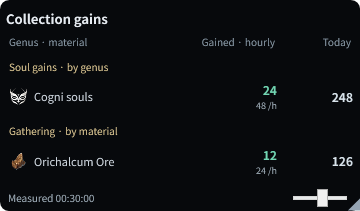
A separate activity tracker, alongside the pet growth list.
- Toggle:
Ctrl+Alt+F9. This HUD starts off; enable it when needed. - Souls: Group supported observed acquisitions by genus, separately from pet growth/ownership status.
- Gathering: Each material shows measured gains, hourly rate and today’s accumulated gains. Purchases and storage transfers are not counted as gathering.
- 10-minute cleanup: A genus/material hides after ten minutes without a new gain. A new gain brings it back with its totals preserved.
Auto-hide only cleans up the display. Measured totals, today’s totals and dated history are kept.
Today totals and daily ledger
Hover the currency or collection HUD → calendar button
Current measurement, today’s total and calendar history have separate roles.
- Current measurement: Reset it manually to begin a new measurement.
- Today total: Starts over when your PC’s local date changes. A manual measurement reset does not clear it.
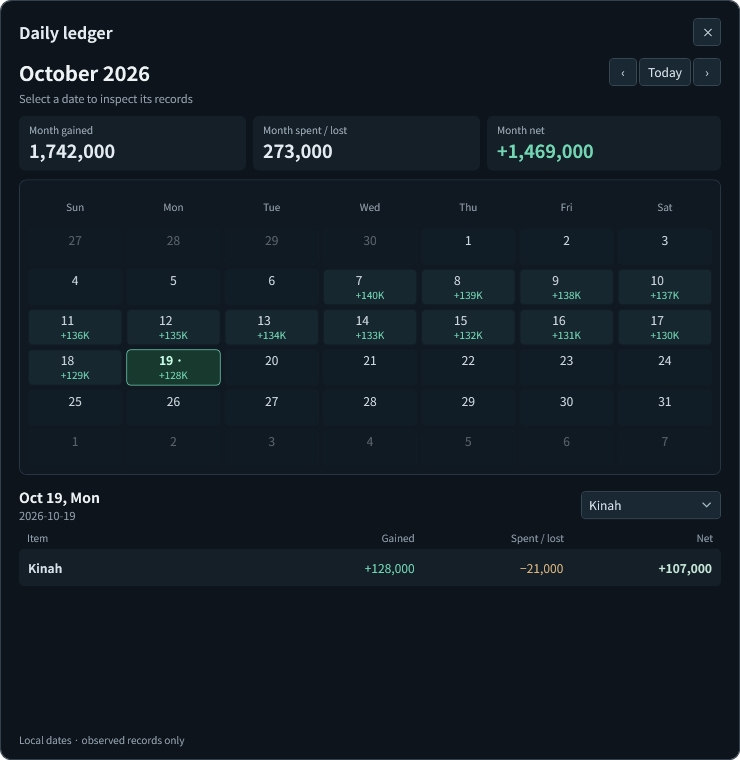
- Calendar: Select a date for per-item gains, spending/decreases and net. Navigate with Today and the month arrows.
- Item filter: Select a currency, genus or material for its monthly gains, decreases and net. Hover the summary values for totals across all retained dates.
History is saved locally per character. Empty dates mean no observed records, not zero earnings. Previous gameplay is not reconstructed; oldest days roll off at the storage limit.
Whole-party skill lookup window
Meter menu → Party skill lookup / Default shortcut Ctrl+Alt+P
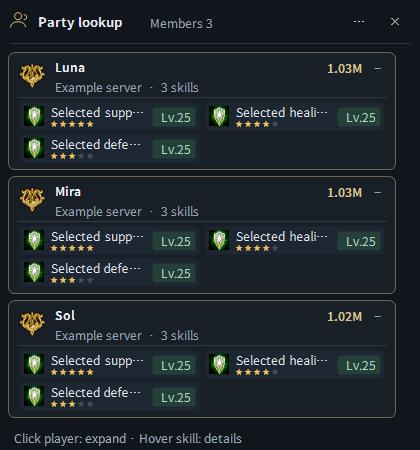
View your current party members together and compare their configured skills, levels and importance.
- Open manually: Select Party skill lookup in the meter menu or press
Ctrl+Alt+P. Press it again to close. - Open automatically: In Settings → Party lookup → Display, enable party lookup when joining a room and/or party lookup when viewing character information.
- Choose skills: In the class tabs of the same settings page, select skills, minimum levels and importance (1–5 stars). Only configured skills are displayed.
- Member cards: See each member’s name, server, combat power, selected skill icons, levels and importance stars. Cards start expanded; click a name to collapse or expand.
- Skill details: Hover a skill for its detailed tooltip.
- Size and placement: The window grows or shrinks with its member cards and scrolls for larger lists. Drag empty space or use its separate Party lookup element in the HUD editor.
- Roster cleanup: Stale cards clear when leaving the room or when the current party roster changes.
The image below is the whole-party window, separate from applicant popups. It uses confirmed live party membership; unsupported character information may remain unconfirmed.
Party applicant cards
Settings → Party lookup → Display → Applicant / character information cards
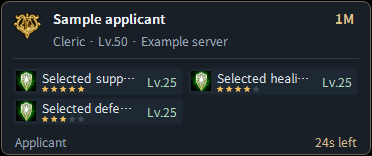
A separate popup for quickly checking an applicant or inspected character.
- Contents: Configured skills, levels, importance stars and time remaining until closing.
- While reading: Hovering the card pauses its closing timer.
- Cleanup: Confirmed acceptance, rejection or cancellation removes the matching applicant card.
Use the whole-party window above to compare your current party members together.
Shortcuts, placement and appearance
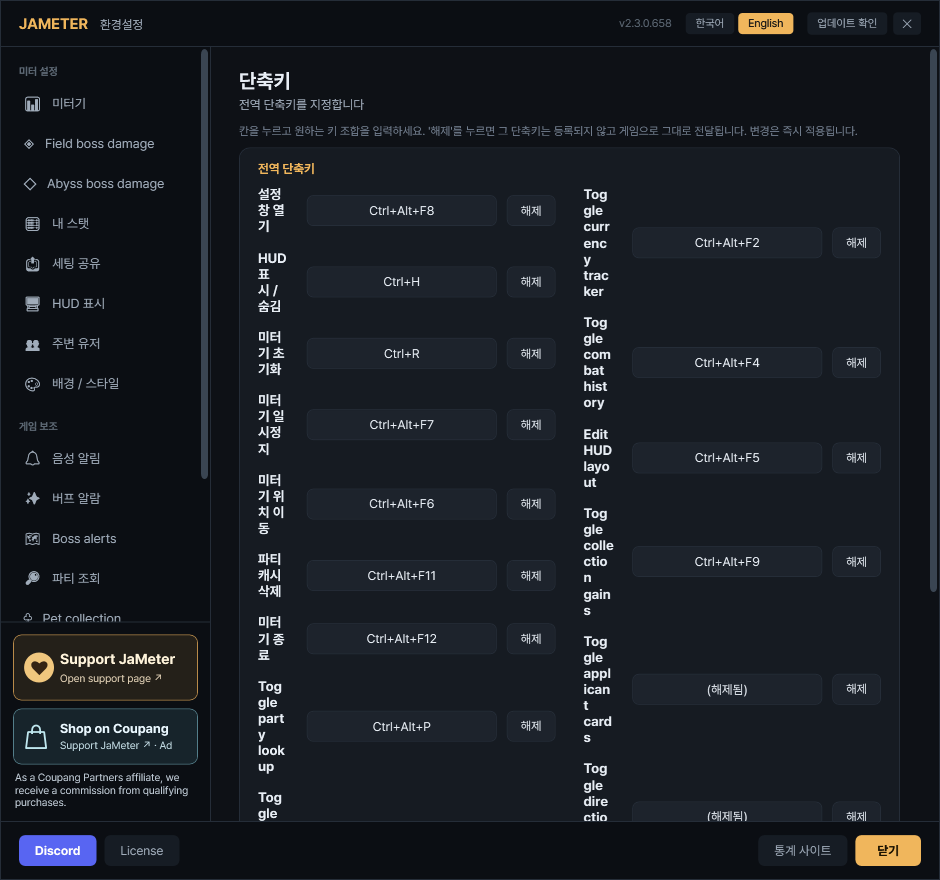
Settings → Hotkeys / Settings → HUD display → Open HUD editor
Click a shortcut field and press your preferred key combination.
- Pets
Ctrl+Alt+F1/ CurrencyCtrl+Alt+F2 - Collection gains
Ctrl+Alt+F9/ Party lookupCtrl+Alt+P - HUD layout
Ctrl+Alt+F5/ Combat historyCtrl+Alt+F4
Drag unused HUD space to move it, use its resize handle and position lock, or arrange supported elements in the HUD editor.
Currency controls appear on hover: click-through, settings, pause and reset. Hover its title to operate controls while click-through is enabled.
New default background opacity for pet, currency and collection HUDs is 60%. Existing saved values are preserved.
Fixes and reliability
- Improved pet soul quantities after stage advancement and consumption.
- Fixed boss importance colors not persisting after reopening settings or restarting.
- Fixed alternating demo and live combat overlays.
- Fixed overflowing skill names, tooltips hidden behind cards and distorted layout previews.
- Improved configured-skill filtering, importance display and lookup waiting/retry behavior.
- Improved tracking continuity through travel and dragging after edge snapping. Placement can extend into the taskbar area.
- Improved duplicate/missed acquisition handling and saved-history restoration.
Tracking note: An unconfirmed first gain is not invented. Ranking Points may follow the game’s own update timing. Complete coverage of every reward source is not guaranteed.
Images use illustrative data in the actual application UI.