Repository navigation
Releases: jetomev/forgekit
Release list
forgekit v0.6.0 — a tool's run and its password, inside the app


Javier, about nogForge handing the terminal to nog: "it is not beautiful, it is disrupting", and a
desktop password window "doesn't make sense" for a terminal app. He chose three of five researched
options (nogForge docs/research/2026-10-04-nog-inside-the-ui.md); this is the shared part.
RunWindow/ForgeApp.run_in_app(): a program's steps (JSON lines in an events file) with a
progress bar; its own screen folded until a question, a failure or F12; Yes/No for yes/no
questions; menus like yay's typed in the screen; no question bar while an editor or pager runs.TerminalPane: a pseudo-terminal drawn with pyte, plus what pyte lacks: the alternate screen
(an editor or pager gives the earlier output back) and a capped scrollback; a shrinking screen
keeps its bottom; keys and Ctrl+C go to the program.PasswordBridge/PasswordDialog: sudo's password asked in the app (SUDO_ASKPASS→ a
helper → a 0700 folder, a 0600 socket, a one-time token); "try again" after a wrong one; closing
the app never hangs on an open question.InAppPolkitAgent/ForgeApp.polkit_agent(): polkit's password asked in the app, for the
app's own process (D-Bus AuthenticationAgent + PolkitAgent.Session). The PyGObject Listener route
crashed (SIGSEGV) in the spike and is not used.- Found on the way:
ReviewDialoglabels like "Install (i)" now answer to their key; the progress
bar's half lines have console fallbacks (they showed "?");literal()keeps outside text's
brackets ("[N]one [A]ll" was eaten by markup).
Proven in the KognogOS VM on a real text console and by Javier on his desktop and tty3 (nogForge
and grubForge: "works wonders"). Tests 52 → 67. alacrittyForge 80, bitlaForge 64, grubForge 53,
nogForge 37 pass on it. New dependency: pyte; optional: python-gobject + polkit.
Install
nog install python-forgekit # or: yay -S python-forgekit
Verifying this release
curl -s https://github.com/jetomev.gpg | gpg --import
# fingerprint: 32E1 D2AB 9380 BFD6 BFE3  BC1E AC2A 3407 CC07 0F9E
gpg --verify forgekit-0.6.0.tar.gz.asc forgekit-0.6.0.tar.gz
Javier (@jetomev) — idea, direction, testing
Claude (Anthropic) — co-developer, architecture, implementation
forgekit 0.5.2 — the bottom bar follows the screen shown
forgekit 0.5.2 — the bottom bar follows the screen shown
A small fix, found by Javier in nogForge and present in every Forge app.
- The bottom bar shows the keys of the screen you're on. Going from one screen back to a screen with nothing to select (a Dashboard, an Overview) kept the last screen's keys, because the selection stayed in the screen just hidden. Now the bar uses the screen on show, and reads again once that screen has chosen what to select.
Checked by switching through every screen of grubForge, alacrittyForge, bitlaForge and nogForge in both directions: with 0.5.1 all four showed it on their first screen; with 0.5.2 all four are consistent. The apps need no change of their own.
Tests: 52 (51 → 52; the new one fails without the fix). On 0.5.2: grubForge 53, alacrittyForge 80, bitlaForge 64, nogForge 33, all pass. Text-console check clean. Details: testing/20261003 - Test Results for forgekit v0-5-2.md.
Install: python-forgekit on the AUR (nog install python-forgekit).
Built by Javier (@jetomev) and Claude (Anthropic), a human + AI collaboration.
forgekit v0.5.1 — number fields for alacrittyForge
forgekit 0.5.1 — number fields for alacrittyForge
A small release. Both changes were found while building alacrittyForge 1.0, and alacrittyForge needs them.
- Number fields take decimals when asked (
NumberPresets(decimals=True)): Alacritty's own font size is 11.25 points, and 12.0 shows as 12. - Number fields are as wide as the longest number they hold, plus room for the cursor. They were a fixed width that left space for only three digits, so "150 columns" filled the field and "100000 lines" would have been cut off.
- The example app now carries the house name, bitlaForge, and the README pictures were regenerated.
Tests: 48 → 51, all passing; warnings 0. grubForge 2.0's 53 tests pass on it unchanged.
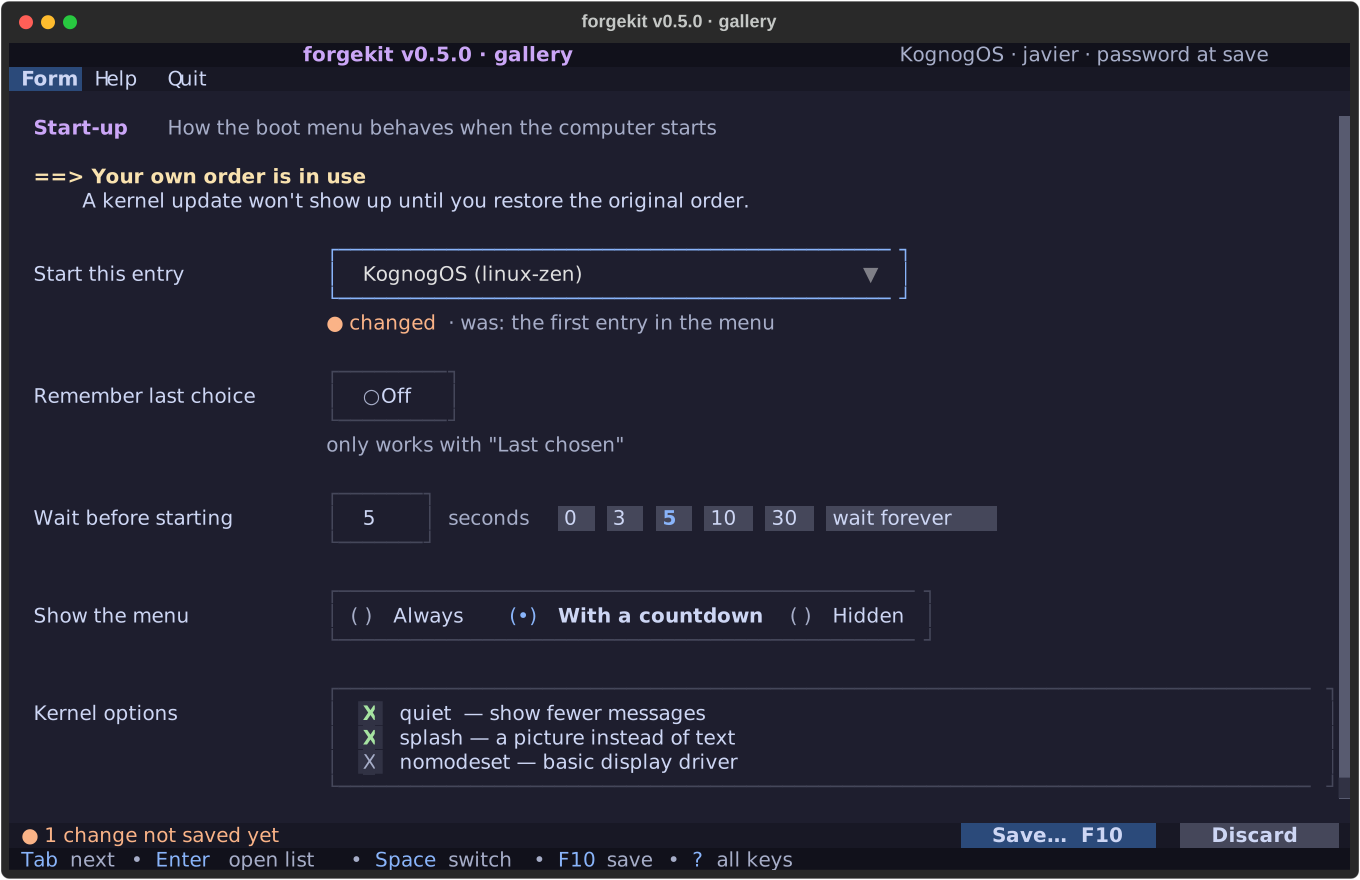
Built by Javier (@jetomev) and Claude (Anthropic), a human and AI collaboration.
Contributors
Assets 6
forgekit v0.5.0 — forms and flows
forgekit 0.5.0 — forms and flows
forgekit is the shared base the Forge apps are built on. 0.5.0 adds everything a settings screen needs, so people pick known values instead of typing them, and see every change before it is written.
These pieces weren't designed in the abstract. Each one was built for grubForge 2.0 and changed while grubForge used it for real, including on four Linux distributions and in Javier's own test run.
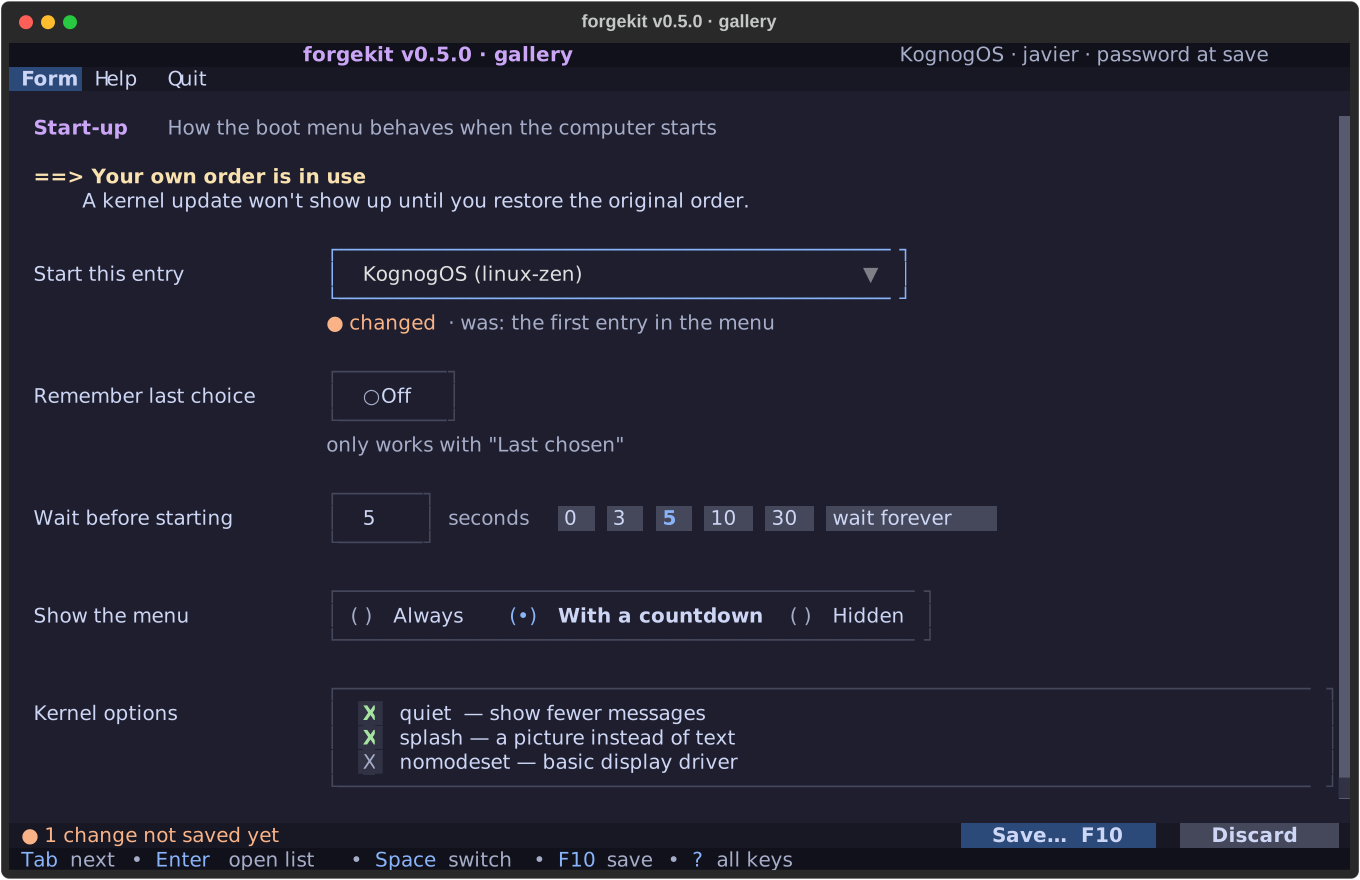
New
- Setting rows: a label, a control, and a line underneath with a hint. Once you change something, that line says "● changed · was: …", and it fits at any window width.
- Controls: a worded On/Off switch, choices in one box, a ticklist, a number with one-key presets, and a list you narrow by typing.
- The changes bar ("3 changes not saved yet") and a hint line with the keys that work right now.
- Designed notices: a heading and indented text that wraps under its own indent.
- A review before saving: every change as old → new. A progress window for saves that take a while. A yes/no that starts on Cancel for risky steps.
- A manual inside the app, written as Markdown pages; F1 can open the right page.
- The same start and end on every run: a banner, a closing note in the terminal, and one line per run in a log.
Fixed before release
Checked at 100 columns (a common text-console size): the changed mark was cut off beside wide controls, notices wrapped back to the edge, and presets took twice the room they needed. All three are fixed.
Numbers
Tests: 23 → 48, all passing. Warnings: 0. Works on a plain text console as before (0.4).
Dependency note: grubForge 2.0 needs this version, so it reaches the AUR first.
Built by Javier (@jetomev) and Claude (Anthropic), a human and AI collaboration.
Contributors
Assets 6
v0.4.1 — Help F1 and visible focus on a text console
Help F1 and visible focus on a text console
Two fixes to 0.4.0's console mode, both found by Javier testing it himself in bitlaForge and alacrittyForge on a real text console (a KognogOS VM), and both re-tested by him before this release.
- F-12 (#4) — the menu says where Help is. A text console sends Ctrl+H as Backspace, so Help there is on F1 (since 0.4.0), but nothing on screen said so and the underlined H promised Ctrl+H. On a console the menu bar now reads
… Help F1 Quit. In a terminal window nothing changes. - F-13 (#5) — Tab visibly moves the focus. Textual marks the focused button with a tint and bold, which a console cannot show, while the primary button is coloured all the time, so focus seemed to stay behind. On a console every button now follows one rule: normal grey, primary cyan, error red, focused blue with white text, a colour no other state uses.
Tested: 26 tests (3 new), 0 warnings; the window look is unchanged (README screenshots regenerate identical); both fixes checked on the VM's real console by Claude and then by Javier: "all tested and good!"
Also found in the same test and filed elsewhere: jetomev/bitlaforge#3 (Esc does not leave a Config field), jetomev/KognogOS#8 (the shell greeting on a text console).
Assets are signed with 32E1D2AB9380BFD6BFE3BC1EAC2A3407CC070F9E.
🤖 Generated with Claude Code
v0.4.0 — readable on a plain text console
Readable on a plain text console
The plain Linux text screen (Ctrl+Alt+F3) is where you end up when the desktop is broken, which is exactly when you want a bootloader manager or a package manager. Until now every Forge app turned into black-on-black there, with broken corners and missing characters. This release makes a promise and keeps it:
Every Forge app is readable and usable on a plain text console (
TERM=linux). It does not have to look the same as in a terminal window.
When an app starts on a text console, forgekit switches by itself:
- Colours by role. Styling asks for a role (
$forge-accent,$forge-muted,$forge-border…), which is Catppuccin in a terminal window and a console colour on a text console, chosen so the roles stay apart. Only the 8 basic colours are used as backgrounds there. - Characters. Every character the console font lacks is swapped for one it has, at the same width so columns stay lined up:
╭→┌,✓→+,—→-,Á→A. The font's character list was read from the font file, not assumed. - Scrollbars in whole cells, no italic, no bold on coloured blocks (the console shows those as colours of their own).
- F1 opens Help in every app (F-10, #2): a text console sends
Ctrl+Has Backspace.
FORGE_ASCII=1 forces console mode on, FORGE_ASCII=0 forces it off. In a terminal window nothing changes: the README screenshots regenerate identical to 0.3.0.
For app authors: use the $forge-* roles in your CSS and markup, glyph("ok") for marks, and read self.forge_console. See the README section On a plain text console.
Tested
- 23 tests, 0 warnings (the repo had none before): detection, the character swap, the colour roles, layout positions identical in both modes, F1, and the demo run as if on a console.
- New tools:
tools/console-preview.pyshows any app as a text console would and fails on undrawable characters or invisible letters;tools/vcsa-shot.pyredraws a real console's screen exactly. - On a real console in a KognogOS virtual machine. That run found F-11 (#3): the console shows underline as cyan and italic as green, which hid the active menu item's letter. Fixed and re-checked.
Closes #1. The apps adopt it as they upgrade: grubForge first, with its v2.0.0.
Assets are signed with 32E1D2AB9380BFD6BFE3BC1EAC2A3407CC070F9E.
🤖 Generated with Claude Code
v0.3.0 — forms into the kit + declarative close-keys
F-9: Input/Select/Checkbox/DataTable styling promoted into FORGE_CSS. Finding #5 resolved: ForgePanelScreen.CLOSE_KEYS. Driven by the alacrittyForge migration.
🤖 Generated with Claude Code
v0.2.1 — panel anatomy batch (F-6/F-7/F-8)
Content-hugging panels, fixed thin button footers, auto-sizing shortcut columns — the full BitlaForge field-review batch. See CHANGELOG in README.
🤖 Generated with Claude Code
v0.1.0 — first public release
First public, alpha release of forgekit — the shared Textual TUI shell for the Forge Suite.
In this release
ForgeAppbase class: title + menu bar, full-width section switcher, menu dispatch, and built-in Help windows.- Top menu bar with first-letter (
Ctrl+<letter>) accelerators; dropdown submenus with per-item letter selection. - Floating dialogs:
ConfirmDialog,ForgePanelScreen, and theAbout/License/Shortcutshelp windows. Panels scale with the terminal; buttons scroll with the content. - Catppuccin-Mocha theme (
FORGE_CSS,COLORS) + a readyGPL3_NOTICE. examples/demo.py— a BitlaForge-shaped reference app.
Status: alpha — the API may shift as the Forge Suite apps (grubForge, alacrittyForge, BitlaForge, nogForge) migrate onto it. BitlaForge is the first planned adopter.
Built by Javier (@jetomev) with Claude (Anthropic) as co-developer.