1.4.0-gcm.0

To install this version, please follow the instructions on the README.md (1.4).
Changelog
In this release, we updated the following versions:
| Project | Previous version | New version |
|---|---|---|
| cert-manager | v1.3.1 | v1.4.0 |
| cert-manager-google-cas-issuer | v0.3.0 | v0.5.2 |
| preflight | v0.1.29 | v0.1.31 |
Upgrade instructions
BREAKING CHANGE: the semantics of the Google Private Certificate Authorities have changed, the GoogleGoogleCASIssuer and GoogleCASClusterIssuer have been bumped from v1alpha1 (which represents the old semantics) to v1beta1 (which represents the current Private Certificate Authorities semantics).
The Private Certificate Authorities created during the beta phase of the Google Certificate Authority Service will be unavailable for use when CAS reaches general availability. The v1alpha1 version of GoogleCASIssuer and GoogleCASClusterIssuer are only valid during the beta phase and have been removed. To upgrade to 1.4, you will need to create a new Certificate Pool that replaces the Private Certificate Authorities from the beta. The version v1beta1 of the GoogleCASIssuer and GoogleCASClusterIssuer are able to handle the Certificate Pools.
Upgrade instructions:
- Before proceeding with the 1.4 upgrade, follow the instructions given in the cert-manager 1.4 upgrade notes.
- If you are using Google CAS, recreate your Private Certificate Authorities using Certificate Pools.
- Remove all your existing
v1alpha1issuers. - Create new GoogleCASIssuer and GoogleCASClusterIssuer using the
v1beta1. - Finally, proceed with the upgrade to 1.4 by running the command-line installation instructions.
Example of change between v1alpha1 and v1beta1:
-apiVersion: cas-issuer.jetstack.io/v1alpha1
+apiVersion: cas-issuer.jetstack.io/v1beta1
 kind: GoogleCASIssuer
 metadata:
   name: googlecasissuer-sample
 spec:
   project: my-gcp-project
   location: us-east1
-  certificateAuthorityID: my-ca
+  caPoolId: my-pool
Notes
📦 Recording of the manual steps of the release process
Since we do not have yet a CD pipeline that would do the work, we prefer documenting every step of the manual process on every single release in order to (1) have a record of what has been done, and (2) be able to remember how to release for the next time.
Information about this release:
(fill this table after you are done with the below steps)
| README.md | https://github.com/jetstack/jetstack-secure-gcm/blob/release-1.4/README.md |
| deployer image | gcr.io/jetstack-public/jetstack-secure-for-cert-manager/deployer:1.4.0-gcm.0 |
| deployer digest | f5e2bc67ac37 |
| git tag | 1.4.0-gcm.0 |
| git commit | f76a8c0 |
| retag logs | https://console.cloud.google.com/cloud-build/builds/cab0ffb7-5877-447e-a77b-be98edb98e71?project=885059085598 |
| deployer logs | https://console.cloud.google.com/cloud-build/builds/9ecf7b25-c701-405b-94a3-8fce942d4aee?project=885059085598 |
Step-by-step process followed:
-
Set the following variables in your shell session. The
APP_VERSIONcorresponds to the release of GCM that you plan on doing. For the other_TAGvariables, pick the latest git tag of each project.APP_VERSION="1.4.0-gcm.0" BRANCH=release-1.4 CERT_MANAGER_TAG="v1.4.0" JETSTACK_AGENT_TAG="v0.1.31" GOOGLE_CAS_ISSUER_TAG="v0.5.2" GOOGLE_CAS_ISSUER_TAG_DOCKER="0.5.2" # same as above, but without the 'v'
-
Update the above table with the
README.mdlink. -
⚠️ Copy any "new"RoleorClusterRoleinto theschema.yaml:# From the cert-manager repo: git fetch --tags git diff v1.3.1 v1.4.0 -- deploy/charts/cert-manager/templates # From google-cas-issuer repo: git fetch --tags git diff v0.3.0 v0.5.2 -- config/
-
Make sure to be logged in with
gcloudand to have the "Editor" role on
the jetstack-public repo:gcloud config set project jetstack-public -
Create the
smoke-testcluster. When not using it, we remove the cluster.gcloud container clusters create smoke-test --project=jetstack-public --zone=europe-west2-b --workload-pool=jetstack-public.svc.id.goog --num-nodes=2 --async
-
Retag the images with the correct licenses using Cloud Build:
gcloud builds submit --project jetstack-public --config cloudbuild-retag-with-licenses.yaml --substitutions \ _APP_VERSION=$APP_VERSION,_CERT_MANAGER_TAG=$CERT_MANAGER_TAG,_JETSTACK_AGENT_TAG=$JETSTACK_AGENT_TAG,_GOOGLE_CAS_ISSUER_TAG=$GOOGLE_CAS_ISSUER_TAG,_GOOGLE_CAS_ISSUER_TAG_DOCKER=$GOOGLE_CAS_ISSUER_TAG_DOCKER -
Copy the link to the Cloud Build logs into the table above (row "retag logs").
-
Run the following command that will update the app version in schema.yaml:
# You must be in the jetstack/jetstack-secure-gcm repo folder.
sed -i~ "s/publishedVersion: .*/publishedVersion: $APP_VERSION/" schema.yaml
git add schema.yaml
git commit -m "bump version to $APP_VERSION" --edit
-
Copy and paste that commit hash into the above table. You will create the tag later on.
-
Build the deployer image:
gcloud builds submit --project jetstack-public --timeout 1800s --config cloudbuild.yaml \
  --substitutions _CLUSTER_NAME=smoke-test,_CLUSTER_LOCATION=europe-west2-b,_APP_MINOR_VERSION=$(awk 'BEGIN {FS="."}; {print $1 "." $2}' <<<$APP_VERSION),_APP_VERSION=$APP_VERSION
-
Copy the link to the Cloud Build logs into the table above (row "deployer logs").
-
Tag the commit you created above:
COMMIT=f76a8c05883360d0b24a698a65d4c3cade12e0fb
git tag $APP_VERSION $COMMIT
git push --tags
-
Delete the
smoke-testcluster.gcloud container clusters delete smoke-test --zone=europe-west2-b --async
-
Add the image digest to the table above by running:
gcloud container images list-tags gcr.io/jetstack-public/jetstack-secure-for-cert-manager/deployer --limit=1
-
Go to the GitHub Releases and click "Edit tag", and then:
- Set the "Release title" to the name of the tag,
- Add this current Markdown
<details>block _+ the release notes to the release description, - Click "Save Draft"
- Don't forget to update the
<details>block with any change or addition to the release process.
-
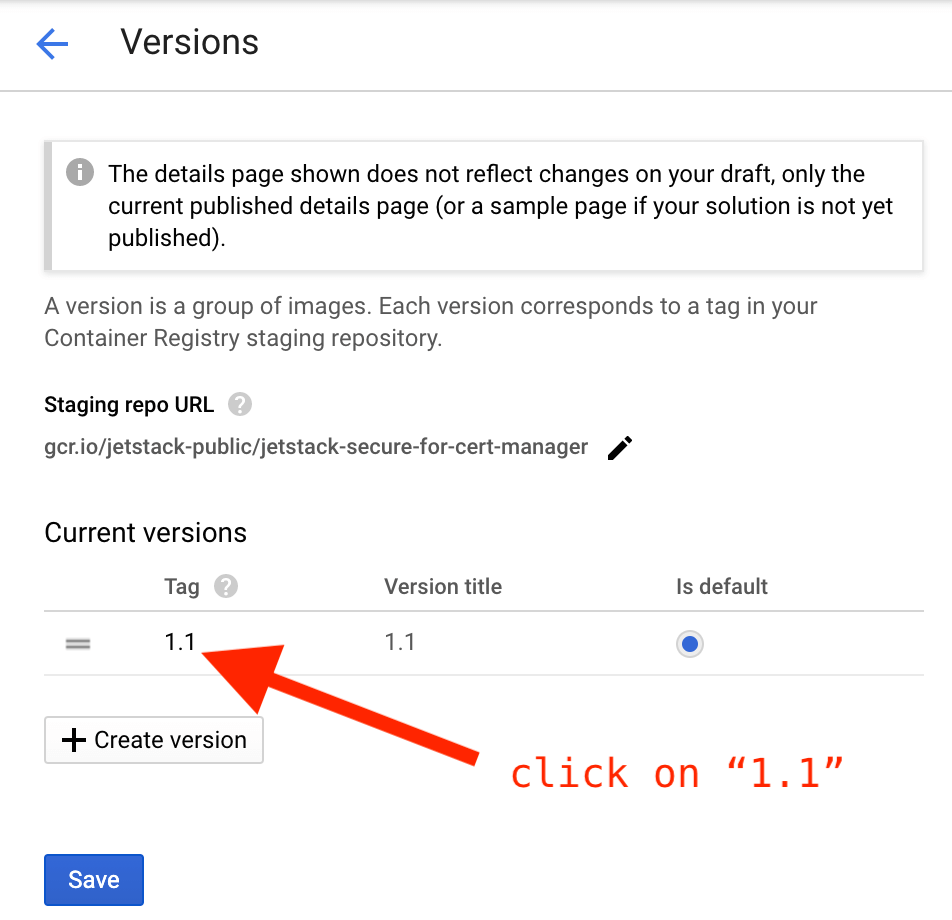
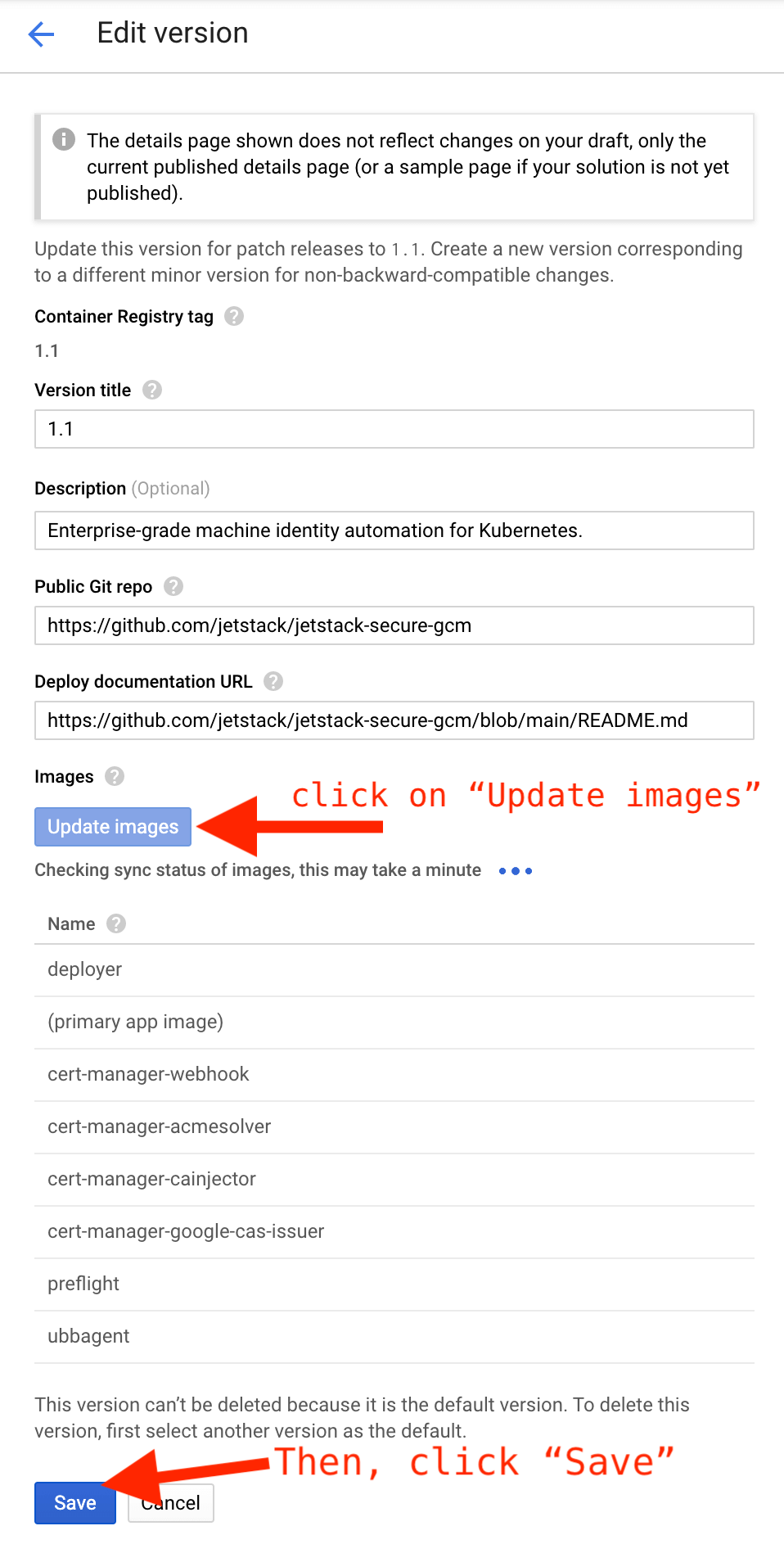
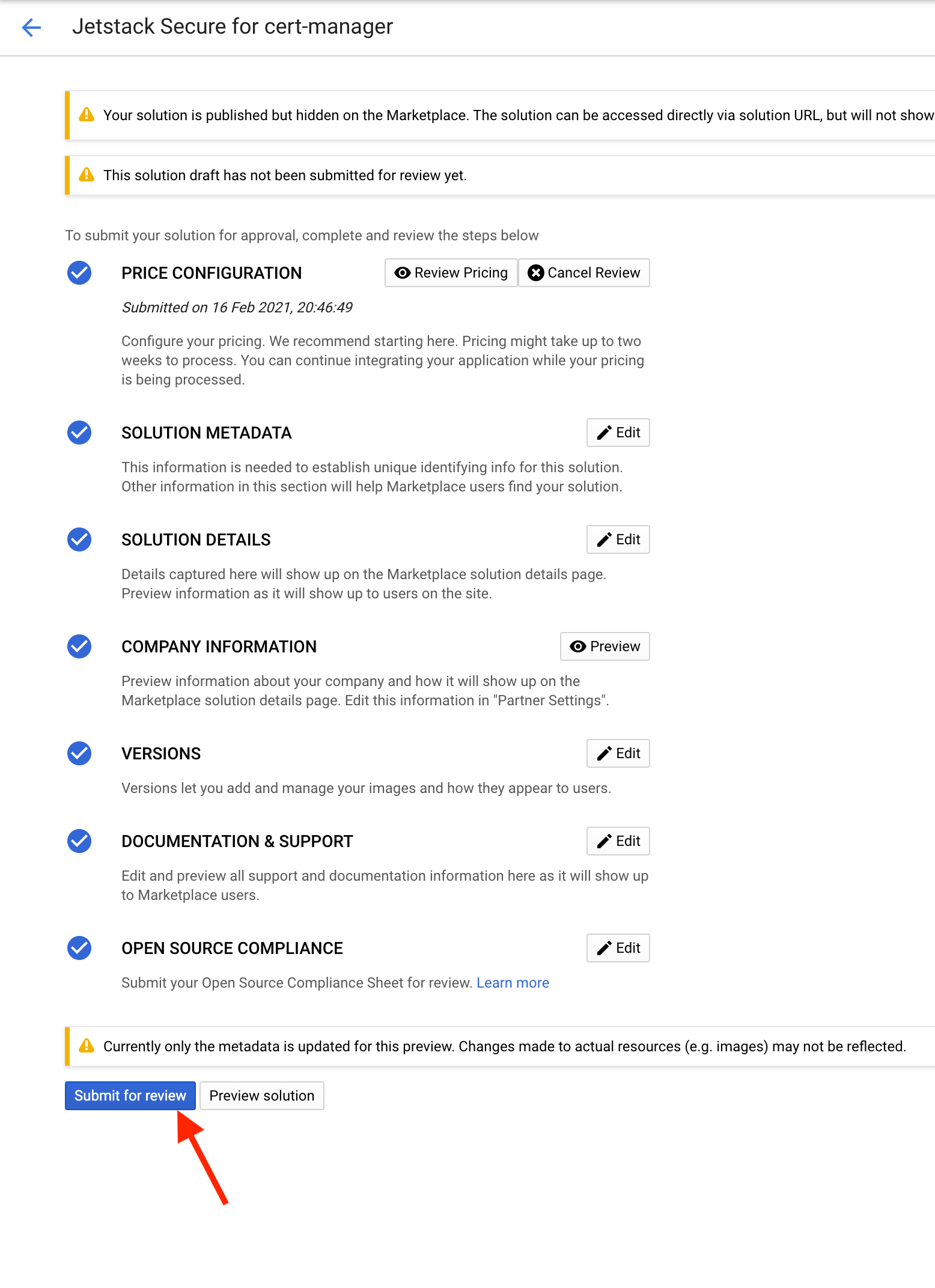
Go to the solution admin UI, click "Update the image" and "Save". After saving, go to the solution page and click "Submit for review" (you must be "Editor" of the jetstack-public project):
-
Finally, when the solution is reviewed, open the GitHub release and click
"Publish".