Repository navigation
Recitation 01 Vector Class and Orthonormal Bases
By the end of this recitation you will have:
- Practised the three ways C++ passes arguments to a function: by value, by reference, and by pointer.
- Written a
Vectorclass for 3D vector arithmetic, using classes, constructors,this, and operator overloading. - Built an orthonormal basis two different ways, using the cross product and using Gram-Schmidt.
3D vectors are the most used object in computer graphics. Ray tracing, shading, camera setup, all of it rests on the class you write today, so it is worth getting right.
You already have the repository from Recitation 0. Do not clone it again. Cloning a second time gives you a second folder, and your hello work stays behind in the first one. You update the copy you already have instead.
Open Git Bash inside your GraphicsLab2026 folder and run these four commands in order:
git add hello
git commit -m "my hello work"
git checkout -- CMakeLists.txt
git pull
What each one does:
-
git add helloandgit commitsave last week's work into your own local history. This stays on your machine and nothing is sent anywhere. It means that if something goes wrong later, your work is recoverable. -
git checkout -- CMakeLists.txtdiscards your changes to the top-levelCMakeLists.txtand restores my version. That file is mine. Your copy gets replaced every week, and that is fine, because my version already has the line you added last week plus the new one for this week. Your own work lives in the exercise folders and is never touched. -
git pulldownloads this week's exercise.
Be careful with the third command. Typing git checkout -- . with a dot instead of a filename discards your changes to every file, not just that one.
If you did not finish Recitation 0, or your copy is in a state you cannot fix, clone a fresh one into a new folder:
git clone https://github.com/jijup/GraphicsLab2026.gitThe pull brought in a new folder, so CMake has to be told about it. Editing code does not need this. Changing the structure of the project does.
- Open the CMake GUI. The source and build paths are the same as last week.
- Click Configure, then Generate.
- Open
build\GraphicsLab2026.sln. If it is already open, Visual Studio will ask to reload it. Say yes. - In the Solution Explorer you now see a second project alongside
hello. Right-click it and choose Set as Startup Project.
If anything looks wrong, delete the whole build folder and redo steps 1 and 2. That is the universal fix and it costs you nothing but a rebuild.
Screenshots are in Recitation 0 if you need them again.
C++ gives you three ways to pass an argument to a function, and they behave differently. This task is about seeing that difference yourself.
If you have written Java, note the difference now. In Java, objects are passed by reference and primitives by value, and you have no say in it. In C++ you choose, every time, and the choice is part of the function signature.
All three parts are already stubbed in main.cpp. You are writing one program, not three.
/// Takes a COPY of the caller's value. Changes here do not reach the caller.
int myFunction(int value) {
    //TODO: increment 'value' by 1 using the ++ operator
    return value;
}

/// Takes a REFERENCE: another name for the caller's variable.
void myfunction_reference(int& val) {
    //TODO: increment the referenced variable by 1
}

/// Takes a POINTER: the address of the caller's variable.
void myfunction_pointer(int* val) {
    //TODO: increment the pointed-to variable by 1
    // NOTE: val++ does not do this. What does val++ actually increment?
}
Hints.
In myfunction_reference, val is the caller's variable. Just write val++.
In myfunction_pointer, val holds an address. To reach the value at that address you dereference it with *. So val++ moves the pointer, and (*val)++ changes the value. The brackets matter, because * and ++ bind in an order that will surprise you.
To call it, you need an address to pass, which is what & gives you: myfunction_pointer(&d);.
Two questions to think about, and be ready to answer:
- What happens if you declare
int a;without initialising it, then print it? Try it. The answer is not "zero", and understanding why will save you hours later in this course. - What happens if you write
int atwice in the same scope?
Pointers are the part most people find slippery. This tutorial is a good short read if you want more.
This is the bulk of the recitation. Before you start writing code, read Sections 4.1 to 4.5. They are short, and they cover the C++ you need.
The exercise folder has three files:
| File | What it holds |
|---|---|
vector.h |
The header. Declares what the class has: its data and the names and signatures of its functions. Already written for you. |
vector.cpp |
The source. Defines how each function actually works. This is where you write your code. |
main.cpp |
Test code that uses the class. You edit this for Tasks 1, 3 and 4, not for Task 2. |
The split exists because other files need to know what your class offers without needing to know how it works. main.cpp has #include "vector.h" at the top, which literally pastes the header in before compiling. It gets the declarations, and the compiler is satisfied. The implementations get attached later, at link time.
The two guard lines at the top and bottom of the header:
#ifndef VECTOR_H
#define VECTOR_H
...
#endif
are an include guard. If vector.h ends up included twice in the same file, for example once directly and once through another header like ray.h, the class would be declared twice and the compiler would report a redefinition error. The guard makes every include after the first do nothing.
Open vector.h and look at the shape of it:
class Vector
{
public:
    Vector(){}                                        // default constructor
    Vector(float nx, float ny, float nz)              // constructor with values
        : x(nx), y(ny), z(nz) {}
    Vector(const Vector &v) : x(v.x), y(v.y), z(v.z) {}  // copy constructor

    // ... operations ...

public:
    float x, y, z;                                    // the data
};
Constructors are functions that run when an object is created. They have the same name as the class and no return type. There are three here, all called Vector, differing only in what arguments they take. That is overloading: the compiler picks the right one by looking at how you called it.
Vector vec1;                          // calls Vector()
Vector vec2 = Vector(5.0f, 0, 0);     // calls Vector(float, float, float)
Vector vec3 = vec2;                   // calls Vector(const Vector&)
The : x(nx), y(ny), z(nz) part is an initialiser list. It sets the members before the constructor body runs. It is the normal way to initialise members in C++.
Notice the default constructor Vector(){} does nothing at all. So Vector vec1; leaves x, y and z holding whatever was in that memory already. That is why main.cpp warns you will see garbage when it prints vec1. This is not a bug in the skeleton. It is C++ showing you that it does not initialise things for you.
public: means anything outside the class can reach these. A real vector class would usually keep x, y, z public too, since hiding them buys you nothing here.
Inside any member function, this is a pointer to the object the function was called on. If you write vec2.Zero(), then inside Zero() the pointer this points at vec2.
Most of the time you do not need to write it. These two are the same:
void Vector::Zero() {
    x = 0.0f;              // x means this->x
    this->x = 0.0f;        // the explicit form
}
You do need it in one place in this exercise. operator= has to return the object itself, and this is a pointer, so you dereference it:
return *this; // returns the object, not the pointerRead *this as "the thing this points at".
Take one line from vector.cpp:
Vector Vector::operator+(const Vector &v) const {Four parts, left to right:
-
Vectorat the start is the return type. This returns a newVectorby value, a fresh object, leaving both operands alone. -
Vector::says this function belongs to theVectorclass. Without it you would be defining a free function that happens to share a name. -
const Vector &vis the parameter. The&means pass by reference, so no copy is made. Theconstpromises you will not modifyv. You saw pass-by-reference in Task 1, and this is the same mechanism used for efficiency rather than for output. - The
constafter the brackets is a promise that the function does not modify the object it is called on.a + bshould not changea.
Contrast with void Vector::Normalize(). It returns nothing and has no trailing const, because normalising is defined here as changing the vector in place.
This tells you what to write. A trailing const means build and return a new vector. No trailing const and a void return means modify x, y, z directly.
C++ lets you define what +, -, * and << mean for your own types. That is why main.cpp can say vec1 + vec2 instead of vec1.Add(vec2).
Two things to be aware of in this class.
* is overloaded twice. With another vector it is the dot product and returns a float. With a number it is scalar multiplication and returns a Vector.
float d = vec1 * vec2;      // calls operator*(const Vector&) -> dot product
Vector s = vec2 * 2.0f;     // calls operator*(float)        -> scaling
The compiler chooses by looking at the right-hand operand. You will use both in Task 4, in the same line.
operator<< is a friend, and it is already written. It is not a member function, because the left operand is a std::ostream, not a Vector. friend grants it access to the private parts of the class. You do not need to touch it, but it is why cout << vec1 works.
Twelve functions in vector.cpp. Every one is already declared in vector.h, so you are only writing bodies. Work down the table in order and build after every two or three.
| Function | What it does | Hint |
|---|---|---|
operator= |
Copy v's components into this vector |
Assign all three, then return *this;. Returning a reference is what lets you write a = b = c. |
operator== |
True if all three components match | return x == v.x && y == v.y && z == v.z; |
Zero() |
Set this vector to (0,0,0) | Three assignments. Returns nothing. |
operator-() (unary) |
Return the negated vector |
return Vector(-x, -y, -z); Note it takes no argument. This is -a, not a - b. |
operator+ |
Add two vectors | Build and return a new Vector from the summed components. Do not modify this vector. |
operator- (binary) |
Subtract v from this |
Same shape as +. Mind the order: a - b means this minus v. |
operator*(float) |
Scale by a number | Multiply each component by s. |
operator/(float) |
Divide by a number | Multiply by 1.0f / s. |
VectorNorm() |
Length of the vector |
sqrt of the sum of the squared components. <cmath> is already included. |
Normalize() |
Make this vector unit length | Get the norm, then divide each component by it. Check the norm is not zero first, or you get NaN. Modifies in place, returns nothing. |
operator*(const Vector&) |
Dot product | Sum of the three component-wise products. Returns a float, not a Vector. |
Cross() |
Cross product | Formula is on the slides. The middle component is the one people get wrong, so check its sign carefully. |
Order I would suggest. Do Zero, operator= and operator+ first, then build and run. Most of main.cpp will start producing output, and getting that first correct line on screen makes the rest much faster. Then the remaining arithmetic, then VectorNorm and Normalize, then dot and cross.
A function that is declared to return something but has an empty body is an error in Visual Studio, not a warning. So the skeleton will not build until the bodies are filled in.
If you want to build as you go, put a temporary placeholder in the ones you have not done yet, for example return Vector(0,0,0); or return 0.0f;, and replace them as you work. This lets you test one function at a time instead of writing all twelve and hoping.
An orthonormal basis is a set of vectors that are each of length 1 and mutually perpendicular. Building one is fundamental in graphics: it is how you set up a camera coordinate frame, among other things.
Given two vectors x and y, the cross product method goes in three steps:
-
wisx, normalised. -
uis the cross product ofwandy, normalised. -
vis the cross product ofwandu.
Each new vector is perpendicular to the ones before it, which is exactly what the cross product gives you.
In main.cpp this section is stubbed with a dummy:
    //TODO: set the first basis vector w
    Vector w = Vector(0.0f, 0.0f, 0.0f);   // dummy, replace this
    cout << "w:" << w;

    //TODO: create the second basis vector
    cout << "u:" << w;

    //TODO: create the third basis vector
    cout << "v:" << w;
You need to do three things: give w its real value, declare u and v yourself, and change the last two cout lines to print u and v instead of w. As written they all print w, which will look like your code is broken when it is not.
Hint on normalising. Normalize() changes the vector in place and returns nothing, so this does not compile:
Vector w = x.Normalize(); // wrong: Normalize returns voidDo this instead:
Vector w = x;                  // copy
w.Normalize();                 // then normalise the copy
Copying first also leaves x unchanged, which matters if you need it again.
Check your work. The dot product of any two of w, u and v should be 0, and VectorNorm() of each should be 1. Print them if you are unsure.
Gram-Schmidt reaches the same goal a different way. Instead of using the cross product, it takes the second vector and subtracts off the part that points along the first. What is left is perpendicular to the first by construction.
    //TODO: Construct the vector e1
    Vector e1 = Vector(0.0f, 0.0f, 0.0f);   // dummy, replace this
    cout << "e1:" << e1;

    //TODO: Construct the vector u_tilde
    Vector u2_proj = e1 * (u2 * e1);
    //Vector u_tilde = ...

    //TODO: Construct e2
    cout << "e2:" << e1;
Same pattern as Task 3. Replace the dummy e1, declare u_tilde and e2, and fix the last cout to print e2.
Read the projection line carefully, because it uses both meanings of *:
Vector u2_proj = e1 * (u2 * e1);The inner u2 * e1 is a dot product and gives a number: how much of u2 points along e1. Then e1 * (that number) is scalar multiplication and gives a vector: the component of u2 along e1. Subtract that from u2 and what remains is perpendicular to e1. Normalise it and you have e2.
This method gives you a 2D basis, e1 and e2. Task 3 gave you all three. Both are worth knowing, and they generalise differently: Gram-Schmidt works in any number of dimensions, the cross product method only in three.
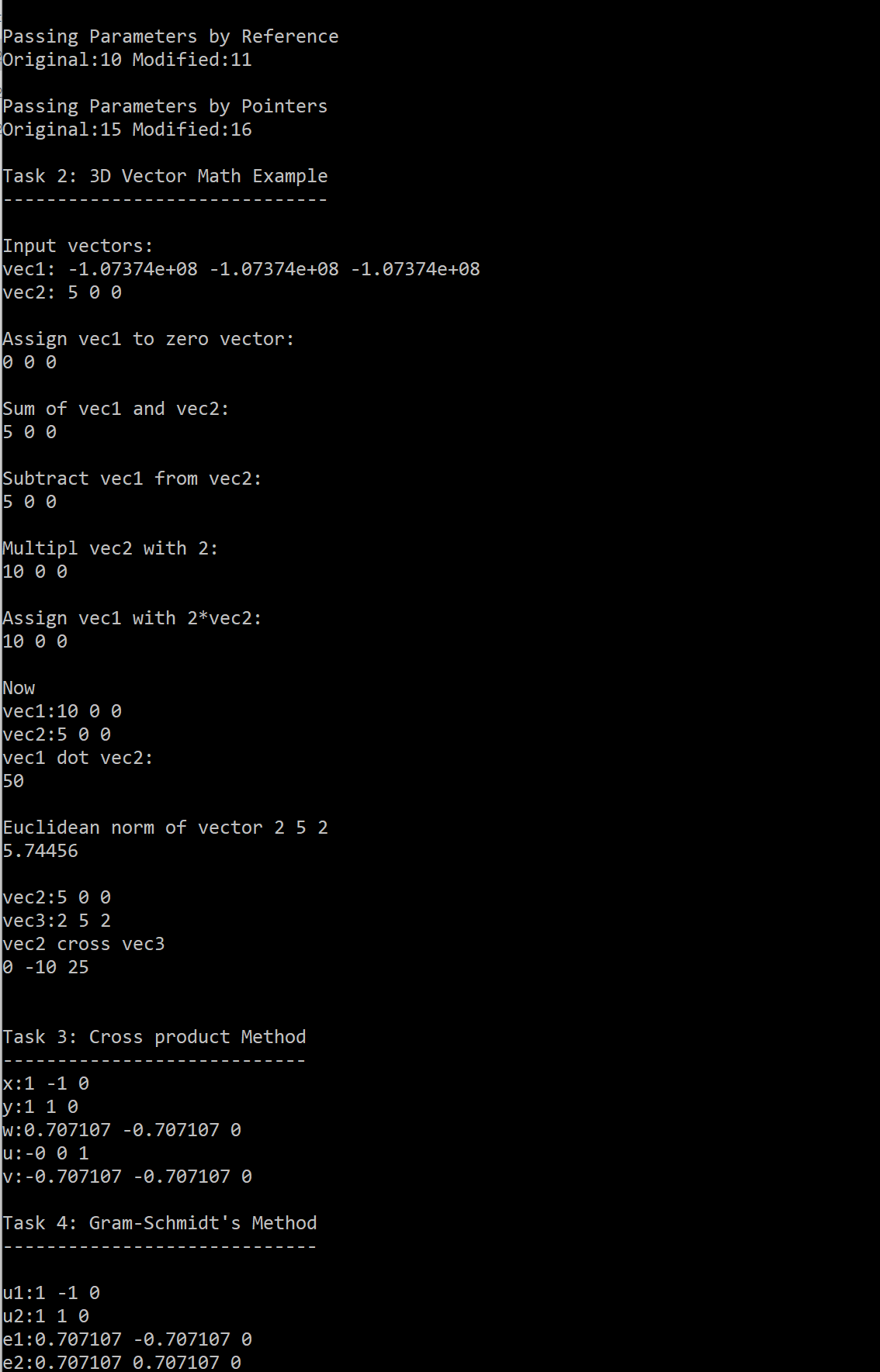
Your program should produce this:
- The new project appears in your solution and builds with no errors.
- All three parts of Task 1 print, and you can explain why the by-value case behaves differently from the other two.
- Every function in
vector.cppis implemented, with no placeholders left. -
w,uandvfrom Task 3 are each unit length and mutually perpendicular. - Your output matches the expected output above.
Submit through the Recitation 1 assignment in MS Teams by Monnday 28 September, 11:59pm.
Upload a single zip named lastname_rec1.zip containing two folders:
lastname_rec1/
├── code/      the .cpp and .h files you edited
└── output/    a screenshot of your console output
Do not include the build or external folders. They are large, they are not your work, and a zip containing them may fail to upload at all.
Marks for this recitation are based on attendance and a completed submission. The TA reviews a sample of submissions in detail each week and returns feedback. The weightings marked on each task show how the work is distributed and what the TA looks at.
Discuss the concepts with each other freely. Write your own code.
error C4716: must return a value
A function in vector.cpp has an empty body but is declared to return something. See Section 4.7.
error LNK2019: unresolved external symbol
The linker found a declaration in vector.h but no definition in vector.cpp. Usually a typo in the function name, or a missing Vector:: in front of it.
cannot convert from 'void' to 'Vector'
You wrote something like Vector w = x.Normalize();. Normalize() returns nothing. Copy first, then normalise.
Output shows garbage numbers for vec1
That is expected at that point in the program. The default constructor does not initialise anything. See Section 4.2.
Output shows nan or -nan
You normalised a zero-length vector. Add the divide-by-zero check in Normalize().
The pull refused, saying local changes would be overwritten
If it is the top-level CMakeLists.txt, run git checkout -- CMakeLists.txt and pull again. If it is something else, come and find me rather than guessing.
The new project is not in the Solution Explorer You have not rerun Configure and Generate since pulling. Go back to Section 2.
The console window flashes and disappears
Use Ctrl+F5, not F5.