Repository navigation
Releases: jondevarthur/feraltrainer
Release list
Universal HM/TMs 1.0

For Pokemon Essentials v21.1.
Small tweak to the Tutor Moves script that means any entry in Moves.txt PBS with the flag "Universal" ( e.g. Flags = CanMirrorMove,Universal ) can be learned by any Pokemon when given the option via e.g. TM / Move Tutor etc.
Triple Triad Menu Plus 1.2
A simple change to the Triple Triad Display screen. Does not affect Sell or Buy Triads menu. Drop the \Graphics and \Plugins folders into your project folder. You should not need to overwrite any files on a fresh install; if you have previously installed the Feral Camera demonstration files or any other plugin that uses Feral Camera, there may be some overwrites in those default files.
Version 1.2
CAMERA_USESUBFOLDER has been adjusted from true/false to an integer:
- If 0, then only \pluginFeralCamera\ will be checked.
- If 1, it will only check \pluginFeralCamera\tripletriadmenuplus.
- If 2, it will check \pluginFeralCamera\tripletriadmenuplus\ first and \pluginFeralCamera\ second if no image can be found (i.e. it will 'dig' for an image in both folders, preferencing the \tripletriadmenuplus\ folder).
DEXART_USECUSTOMPOKEMON - New setting. Format is [state, "folder"]. If using my plugin DexArt, you can use custom art instead of the Pokemon graphics. It will check this folder, and use the standard Pokemon graphics if nothing is found.
DEXART_USECUSTOMICONS - New setting. Format is [state, "folder"]. If using my plugin DexArt, you can use custom art instead of the Pokemon graphics. It will check this folder, and use the standard Pokemon graphics if nothing is found.
Adds new adjustments to the Triad Card definition - to make the icon change work.
Version 1.1
Edited to use the FeralCamera folder setup to reduce filebloat.
Transfer Plus v1.1
You know the default Pokemon Fire Red / Leaf Green transfer splashes? You can make those happen in Essentials with the Show Picture functions already, but this lets you simplify things down to the bare minimum number of calls.
VERSIONS:
- Version 1.1: adds support for CaveEntrance calls.
- Version 1.0.1: bugfixes and Feral Camera updates.
- Version 1.0: release version.
COMPATIBILITY:
Overwrites class Scene_Map > transfer_player; will not be compatible with plugins that also change this, however it is almost entirely additive so as long as another plugin does not totally restructure this section, it should be easy for a confident user to merge the two.
FUNCTIONS:
tPlusImage("filename")- an image to show the next time you transfer. It's as simple as adding tPlusImage("cave") just before your in-game teleport at your cave entrance!tPlusMapName(true/false)- turns showing location name badges over the top of the transfer image on and off.transferPlusCaveEntrance("filename")- runs thepbCaveEntrancescript, slightly adjusted to seamlessly blend into your transfer image. You can pass the filename of the transfer image directly in this script; this is optional, you can just passtransferPlusCaveEntranceif you have already defined it.- Just use
pbCaveEntranceif your event isn't showing transfer images.
- Just use
transferPlusCaveExit("filename")- same astransferPlusCaveEntrance.- Just use
pbCaveExitif your event isn't showing transfer images. - Note: it is totally safe to mix and match events.
transferPlusCaveEntrance("cave")on one side andpbCaveExiton another is perfectly kosher, for example.
- Just use
SETTINGS:
TRANSFERIMAGE_WAITTIME- Time in seconds to show the default transfer image splash.TRANSFERIMAGE_SHOWNAME- Shows the location name badge if true. This is the default setting - you can turn it on and off withtPlusMapName(true/false).TRANSFERIMAGE_WAITTIME_NAMEBADGE- Alternate length to use if showing the location name badge; if this is shorter than the name badge show time (which by default is 0.4 + 1.6 + 0.4 = 2.4 seconds) then the fade in/out will play over the top of it before it disappears. TL;DR make sure to set this to the length of your location name badges.FERALCAMERA_USESUBFOLDER- this plugin uses the Feral Camera File Structure to avoid repeated and redundant images. If 0, then only \pluginFeralCamera\ will be checked. If 1, it will only check \pluginFeralCamera\TransferPlus. If 2, it will check \pluginFeralCamera\TransferPlus\ first and \pluginFeralCamera\ second if no image can be found (i.e. it will 'dig' for an image in both folders, preferencing the \transferplus\ folder).
HOW TO USE:
- Put your images into the Feral Camera File Structure.
- Set your image with
tPlusImage("filename")or set it at the same time you call the cave animation withtransferPlusCaveEntrance("filename")/transferPlusCaveExit("filename").
a. Your transfer image will only display when this is set. After it is shown once, it resets to blank. - Make sure to turn on
'Fading'in your Teleport option settings.
a. The Screen Tone fade in / out that many demo essentials teleport events use is perfectly compatible and can still be safely used.'Fading'must be on, however, as to ensure smooth display, the transfer images are built into the fading version of the transfer event. - Operate your teleport event as normal.
a. If using e.g.transferPlusCaveEntrance("filename"), make sure it and the teleport command directly follow one another.
b. You can add simple screen tone fades at either end of the the image and teleport calls for the smoothest possible transition.
Example of how to set up a transfer event to show an image. "camera_ROCK" is the name of the image in the \pluginFeralCamera\TransferPlus\ folder. This is the exact event as used in this example video.


LoadScreenPlus v1.1
Adds a number of visual changes to the load screen - including backgrounds using the Feral Camera structure, the addition of themes and music, and easy ways to adjust look and feel of certain values.
Full documentation available here.

Version 1.1
- Adds support for my DexArt plugin to adjust PokemonIcons appropriately based on your settings. This is optional, and a new setting called
DEXART_USECUSTOMICONS - Adds 'staggering' for Feral Camera.
- No longer a true or false, the setting
CAMERA_USESUBFOLDERis no longer true/false but rather either 0, 1 or 2.- If 2, will check \UI\pluginFeralCamera\UI_LoadPlus\ first and then \UI\pluginFeralCamera\ if no valid image can be found.
- If 1, will check \UI\pluginFeralCamera\UI_LoadPlus.
- If 0, will check \UI\pluginFeralCamera\
- No longer a true or false, the setting
- To upgrade your settings file, add the following line:
DEXART_USECUSTOMICONS = [false,"art"]
- To upgrade your settings file, change the setting of
CAMERA_USESUBFOLDERto 1
Important Note: This is fundamentally incompatible with anything that adjusts the load screen, including multi-save plugins. Please be aware of this conflict.
Keyring 1.1.1
A simple but powerful plugin that adds a "keyring" object to your game - store your keys (or any similar object you only need to check simple "owned/not owned" logic on!) in a simple method rather than having to define them all. Includes visual imagery, updates and quick removal alongside simple methods to check if they are owned, or have ever been owned.
Updates
v1.1.1 - Small bugfix to overlooked screen close lag and description display lag.
v1.1 - Adds Descriptions for keys.
- All definitions (e.g.
keyringAdd()andPREDEFINED_KEYS = []) now have a fourth value("description"). The updated key add call iskeyringAdd("identifier","Display Name","image","description"). - NEW SETTINGS:
MESSAGESKIN,DEFAULT_DESCRIPTION - BUGFIX: Menu close lag resolved.
Installation
Unzip and copy the contents of [JDA]Keyring\ into your project folder. The subfolders \Graphics, \Plugins\ and \PBS\ should merge with no overwrites on a fresh install.
Full Documentation is available here.

Colour-Matched Icons v2.0
The default Essentials v21.1 \Icons\ set uses the rips from the games, which are on a colour-limited pallette. This has always frustrated me, as those pallettes are one large, shared one across all Icons and does not reflect the actual colours of many of the associated 'mons. This is, simply, my take at colour matching the icons to the front sprites. It also removes the 'fade' effect present, this is a personal choice.
Note - Gen VI onwards uses 'better' icons overall with fixes and non-limited palettes, at least in the 3DS era - I would recommend using those if you want the most true-to-games experience or are using Gen VI+ assets; this is just about adjusting the Gen V supplied with Essentials icons to match their more 'correct' colours. I believe the Gen 9 pack uses the 3DS variants already.
Version 2.0: contains all Pokemon through Gen 5, including forms.
- Includes the two default Essentials eggs (standard and Manaphy)
- Unowns have been retouched from previous versions.
Roadmap: Ends here. I may come back and do touch-ups, but I have no plans to.
Installation: just copy the contents of the file into your \Graphics\Pokemon\Icons folder. You will have to overwrite them, so consider backing them up in case you don't actually like them.
Credits: Unnecessary but appreciated.
Feedback: This is a 'personal tastes' fix that I'm relatively happy with, so if I've missed anything please let me know, but if you'd prefer it to be more X or aren't a fan of Y, let us part silently as friends. I'm sure I'm not the first to do this.


Hall Of Fame Plus 1.0
Based on a reddit request, adds additional Halls of Fame. Documentation here.
Feral Tank 1.1.9 (Sword.2026-Sept-30)
Feral Tank introduces simple new properties to the behind-the-scenes definitions of Pokemon to allow storage of 'equipment'. To make life simple, it also lets you handle Held Items!


VERSION 1.1.x SERIES - SWORD.x
Version 1.1.9 (SWORD.2026-Sept-30)
- Feral Camera has been changed from true/false to an integer of value 0, 1 or 2.
- If 2, will check \UI\pluginFeralCamera\FeralTank\ first and then \UI\pluginFeralCamera\ if no valid image can be found (as per the below, the theme background will show if neither find a valid background).
- If 1, will check \UI\pluginFeralCamera\FeralTank.
- If 0, will check \UI\pluginFeralCamera\
- Compatibility has been added for my plugin DexArt
- New settings:
DEXART_USECUSTOMPOKEMONandDEXART_USECUSTOMICONS, both in format [true/false,"folder"]
- New settings:
- All updates are to
03_menuand added or altered settings in01_setup
Version 1.1.8 (SWORD.2026-Sept-24)
- Bugfix for ftEquipped?
Version 1.1.7 (SWORD.2026-Sept-24)
- Bugfixes for setting
COLLAPSE_UNUSABLE - Improved handling for banned slots.
- Specific description text can now be shown for empty banned and locked slots, to indicate what is happening.
- Graphics can now be used to denote when a slot is 'banned' - if unique equipment is placed in this slot (e.g. if Farfetch'd is banned from swords but is allowed Leek as a unique sword) then standard, non-banned/locked graphics will show.
- NEW SETTINGS:
DESCRIPTION_BANTEXT,DESCRIPTION_LOCKTEXT,BAN_SLOTS_SHOWLOCKED - NEW GRAPHICS
selectbox_banned,selectbox_select_banned - Changes to:
03_menu

Version 1.1.6 (SWORD.2026-Sept-23)
- Bugfix for forgetting moves - under previous setup, items that granted identical moves on equip to each other would still forget / learn in quick succession. The forget stage is now skipped if the equipment pieces teach the same moves.
- Equipment pieces that teach 2+ moves that share only 1 move in common will still undergo the 'forgetting' stage.
- Changes to:
02_main03_menu
Version 1.1.5 (SWORD.2026-Sept-22)
- Quick version that adds the option to use a message box instead of a single line description for compatible displays.
- Please note the single line description is the only version natively compatible with a full six slots at default dimensions. A 3-line message box is only compatible with 3-4 slots at most.
- NEW SETTINGS:
SHOW_POKEMON,DESCRIPTIONLINES,DESCRIPTION_SHOWWINDOW - Changes to:
03_menu(introduction of messsage handling).

Version 1.1 (SWORD.2026-Sept-21.1)
- Adds the ability to learn a move (or moves, plural) when equipping gear. Includes settings for:
- Universal or default tutor move restrictions.
- Forgetting moves on unequip.
- Letting a Pokemon only learn moves from a piece of equipment once.
- NEW SETTINGS:
UNIVERSALMOVES,FORGETMOVES,FORGETMESSAGE,FORGETMESSAGE_SHOW,LEARNONCE - Changes to:
01_setup_equipment(addition ofdef ftGetMoveFromEquipment).02_main(addition offtEquipmentMoves; added to multiple methods).03_menu(ftEquipmentMovesadded to multiple methods).

VERSION 1.0 - SWORD (SWORD.2026-Sept-21)
- Fully implemented Equipment system
- Fully implemented Equipment menu
- Auto-Equip system for Held Items
POTENTIAL FUTURE UPDATES
All items listed are pending the practicalities of implementation and are noted purely for reference.
- Multi-slot items?
- 'Easy' equipment set bonuses? (Already possible the long way, it's just checks before applying the bonus)
- Feral Tamer integration / evolution methods in general?
- Level up bonus growth? (e.g. +1 to base stat every level while equipped, FFVI magicite-style)
- Custom bag screen to integrate visible bonuses?
- Trainer equipment support (this would change too much and increase the incompatibility of plugins dramatically, from my current perspective).
- Items.txt PBS effect and short description support (this would change too much and increase the incompatibility of plugins dramatically, from my current perspective).
- Default Essentials Item_Effect and Move integration (this affects a lot and would have big, echoing effects to other plugins - it's unlikely).
- Possible implementation of rudimentary job system for managing access to certain equipment in bulk.
Full Documentation available here. | Readme Available Here. | Full Breakdown of Included FIles.
Some functions compatible with Feral Camera.
Some example graphics taken from Star Ocean for the Super Nintendo Entertainment System.
Feral Camera (Demonstration Files) - 1.1
Demonstration files for FeralCamera plugins.
Just adds the default folder structure for FeralCamera. Adds a full suite of example images for the 'standard' uses (i.e. 1 for every type, a few Species and a few Species_Form).
To do this yourself without using this file,
- create a folder called Graphics\UI\pluginFeralCamera
- include at least one image called 'camera'
- create sub-folders for your relevant plugins if you want to use these (see those plugins for more information)
Current plugins supporting Feral Camera:
- Feral Tamer
- Feral Tank
- Transfer Plus
- Triple Triad Menu Plus
- Load Screen Plus
Expanded Eggs
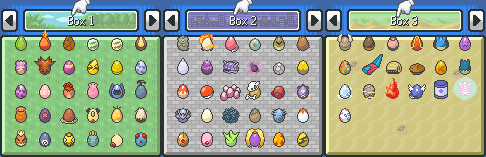
Essentials v21.1 Eggs - there's only two! That's because that's how the game treats them, despite a few... conspicuous reasons not to. It's been a while since I did any real spritework, and the colour-matched icons pack gave me the itch.
What's in this pack: Egg graphics for all Kanto evolution lines. These are graphics for the first 'mon in each line (i.e. Bulbasaur, Happiny and Tyrogue, not Chansey or Hitmonchan). Miltank is included because it's technically the female Tauros, and Togepi is included because like, truly, what are we even doing here not having a unique Togepi egg graphic.
Cracks are not included currently - 90% will work with the normal cracks, some will need custom ones that I'll make eventually.
I am an amateur sprite artist and am not totally happy with all of them, so I reserve the right to redo as many as I like in future.
Roadmap: While this has been fun, getting through all 1000+ 'mons, adding more is not my priority. Check out Eggs Plus if you want to fill in those gaps quickly with 'generic' graphics.
Want more eggs? I have custom eggs available here. LMicolash has a great pack of generic-ish eggs through Gen 8 availabe here.