Refactor schema validation errors presentation#560
Conversation


|
This is really an awesome improvement @meirotstein, thanks a lot! I like the issue counter bottom right, that can really help if you have a large document and don't see an issue right away. I've tested the new functionality and it works very smoothly, will merge it now :) Just some ideas for further improvement:
|


|
@josdejong - thanks for merging! |
|
👍 |


|
The editor looks better! Is there an option to preserve the physical error lines for code mode? The error lines are much clearer and enable to get an instant overview of the errors affecting an input. With a larger JSON document, it could save a lot of time when the editor is restricted to code (+ tree) mode. |
|
@optimalisatie |
|
@meirotstein Yes, for some editor usages it could be of value. It provides an instant insight of what is wrong with an input (without having to move the mouse). An expert JSON editor may be happy with the more subtle error notices, however, a first time (non-technical) user could be better served with the text-messages.
|
|
@josdejong - this can be related to the discussion on #606 What do you think? |
|
I am not certain how it is perceived in other usage scenarios, however, from a 'first user' perspective the ability to have errors presented as text may improve user experience. With textual errors, if a user would enter a faulty input, it would become clear instantly what the problem is, so that he/she isn't scared away as quickly. This is just a perspective from our specific usage case (many types of users who sometimes would need to learn JSON for the first time). To be honest, the JSON editor has occurred to me as a 'perfect' solution but from a technical perspective, error reporting was an aspect that didn't seem to be as good yet as it could be. While in code/text mode the textual errors were available, it was more difficult to know what was wrong in tree mode. The new feature to add a clickable "line/col" link to instantly scroll to the faulty input is a great improvement. Maybe the recent gutter line mark + textual errors + line/col link could make it perfect from a first user perspective. What's missing further maybe a |
|
@optimalisatie not sure I'm following.. :) On tree mode - the errors are presented next to the relevant node - IMHO it is very convenient. On code mode - you get the errors on the gutter only, this can be not so convenient on large documents because it force you to scroll up and down. On text mode - you get a list of errors on the bottom with an option for a quick navigation by clicking the error line. My idea was to give an option to show the list of errors also for code mode - is that answer your requirement? BTW - currently the editor offers |
|
I am certain that the chosen format serves your users well. I was just providing a perspective from a use case in which the users of the editor could be first time users and people without basic knowledge of JSON. A look at JSON code for the first time and textual errors may be helpful to understand how the editor could serve them. If people who do not yet understand JSON would need to use their mouse (and scroll a large document) to get information about an error, they would need to do yet another complex time consuming task and thus may be scared away. It would also cost more time for regular users to use the mouse when for example inserting a large deep structure JSON document that contains 10 errors on several nodes. How would a user efficiently find and resolve the issues with just an icon next to the relevant (collapsed) node or on the gutter? The text errors may also be valuable for tree mode. It is not a request, we could modify the source code ourselves to meet our specific use case. It is simply a perspective that may be of value. In regards to the display of errors for code mode. I think that some users may be very happy to have the text-errors available on other modes, e.g. tree mode. Maybe an option would be to control the display of textual errors via the settings. Then it would also be possible to hide the errors for text and code mode which could also be something that some users may require. We required this ourselves recently and were obligated to use CSS to hide the errors. In regards to the If you would consider such an enhancement. The icon on the bottom right could open a slide-out overlay within the editor (right side) that provides a scrollable and search able list with errors. It could make the errors less invasive when the editor is implemented in an UI. The errors would remain in the original editor container that is provided for by the UI design. An other tip would be to replace the Ace editor link on the top right to your name. We currently modify this ourselves to promote your editor. While it is certainly nice to know that under the hood Ace Editor is being used, it may be sufficient to inform developers via Github and the documentation while public users (e.g. app users) would know that they are using JSON editor.
|

|
Thanks for your inputs @optimalisatie, I appreciate the discussion. It's important that the error reporting works intuitive. I'm personally very happy with the inline errors/warnings we now have in all modes except the text mode (thanks to Meir). I would love to have inline warnings in the text mode have too but that's not so trivial to implement. In general I would say that warnings popping up exactly at the place where the issue is is more natural and easy to understand than having a list at the bottom and having to make the connection in your head. I think it's best if the editor offers a single way to report errors/warnings, and be opinionated in this respect. I want to keep the amount of configuration options as limited as possible. So I don't prefer to go into the direction of offering various options to render warnings. It's indeed an issue that with large documents having a warning somewhere, you don't see the warning very prominently. It would be nice if the warning bottom right would allow you to jump to the first issue for example. And maybe we could introduce a method |
|
Hi @josdejong, First of all, thanks a lot for providing and maintaining the editor. It has been a very valuable solution for some of our projects! I understand your arguments regarding error reporting. I want to add one more perspective: when using |
Yes that is true, that's quite similar to the issue raised in #611. However both inline errors as well as errors grouped at the bottom would have an issue. So I guess in that case the developer that creates this auto-height instance has to somehow render these issues on some other absolute positioned area header/footer of this application in order to keep the issue visible, that's simply a consequence of the decision to not let the editor have a fixed height. |
|
I agree. However, currently it's quite difficult + involves a performance hit (2x schema parsing + validation). It requires from developers to discover how to parse schema's via AJV and how to load JSON editor without AJV bundled etc. An |
|
@optimalisatie good idea to implement a callback I've created a new issue for this: #612 |
3 participants


This change is a related to #556
In this PR I have made the following changes:
Code mode
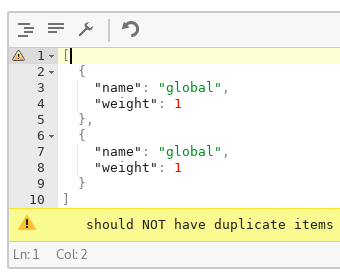
Validation errors indication were moved to the gutter, showing the error on the specific line according to the json path that is given in the error
Text Mode
Validation errors are showed in the bottom of the editor (as it was before) however the errors container is scrollable if needed and an indication is given when the scroll is available
Both Modes
A count indication was added to the status bar for schema validation errors
A bit in regard to the current implementation:
ace/mode/json) is also using that mechanism to show json parsing errors in the gutter - so there were some collisions between both scenarios (when json was ok it resets the annotations and by that removed also the validation indications).In order to deal with that I have manipulated a bit the
aceEditor.session.setAnnotationsmethod for this editor.Please let me know what you think - Thanks!