天将 TianJiang 提供生产级 LLM 推理成本控制、Token 节省、自动策略治理与可复现实验报告。
TianJiang is an LLM inference cost optimization and token governance engine (Token Governor) for AI Agents.
关键词 / Keywords:
LLM 成本优化、Token 节省、推理成本、智能体(Agent)、上下文压缩、语义缓存、工具 Top-K、预算守卫、自动策略(Auto)、模型画像(Model Profile)、推理路由(Model Routing)
LLM cost optimization, token savings, inference cost, AI agents, context compression, semantic cache, tool top-k, budget guard, auto strategy, model profiling, model routing


中文说明:
天将 TianJiang(Token Governor)是一套面向生产级 LLM 推理阶段的成本与策略治理框架,支持 Token 节省、动态策略推荐、模型路由、缓存与压缩等多种优化策略组合。
English Description:
TianJiang (Token Governor) helps reduce inference cost and improve runtime stability by combining strategy profiles, drive modes, caching/compression controls, and automated benchmark reporting.
git clone https://github.com/joy7758/token-governor.git
cd token-governor

python3 -m venv venv
source venv/bin/activate
pip install -r requirements.txt
配置环境变量(任选其一):
export OPENAI_API_KEY="your_openai_key"
# 或
export GOOGLE_API_KEY="your_google_key"python main.py --mode baseline --limit 20 --out-file metrics/data/baseline.jsonlpython main.py --mode governor --drive-mode eco \
--policy-file policy.yaml \
--tasks-file metrics/benchmarks/benchmark_v02_60_tasks.json \
--limit 20 \
--out-file metrics/data/governor.jsonlpython -m metrics.report \
--baseline metrics/data/baseline.jsonl \
--governor metrics/data/governor.jsonl \
--outdir metrics/reports/compare-real \
--interactive- 在仓库
Settings -> Secrets and variables -> Actions配置至少一个密钥:OPENAI_API_KEY或GOOGLE_API_KEY - 打开
Actions,运行工作流Benchmark And Update README Metrics - 默认会执行完整 benchmark,然后自动更新 README 图表与指标并提交
| Feature | 说明 | Description |
|---|---|---|
| 多驱动模式 | Eco / Auto / Comfort / Sport / Rocket | Drive modes for different cost-vs-quality trade-offs |
| 自动策略推荐 | 自动分析任务并推荐最优策略 | Adaptive strategy recommendation |
| 多策略组合 | 缓存、压缩、路由、RAG 等 | Semantic cache, prompt compression, model routing, RAG |
| 自动报告生成 | JSON / Markdown / 可视化图表 | Automated comparative reporting |
| CLI 参数控制 | 丰富的命令行配置选项 | Command-line interface with rich options |
| 模型画像支持 | 支持 --model-profile 驱动推荐偏置 |
Profile-guided auto strategy hints |
python main.py --mode governor --drive-mode eco --limit 20python main.py --mode governor --drive-mode auto --auto-strategy --limit 20python main.py --mode governor --drive-mode rocket --enable-agentic-plan-cache --limit 20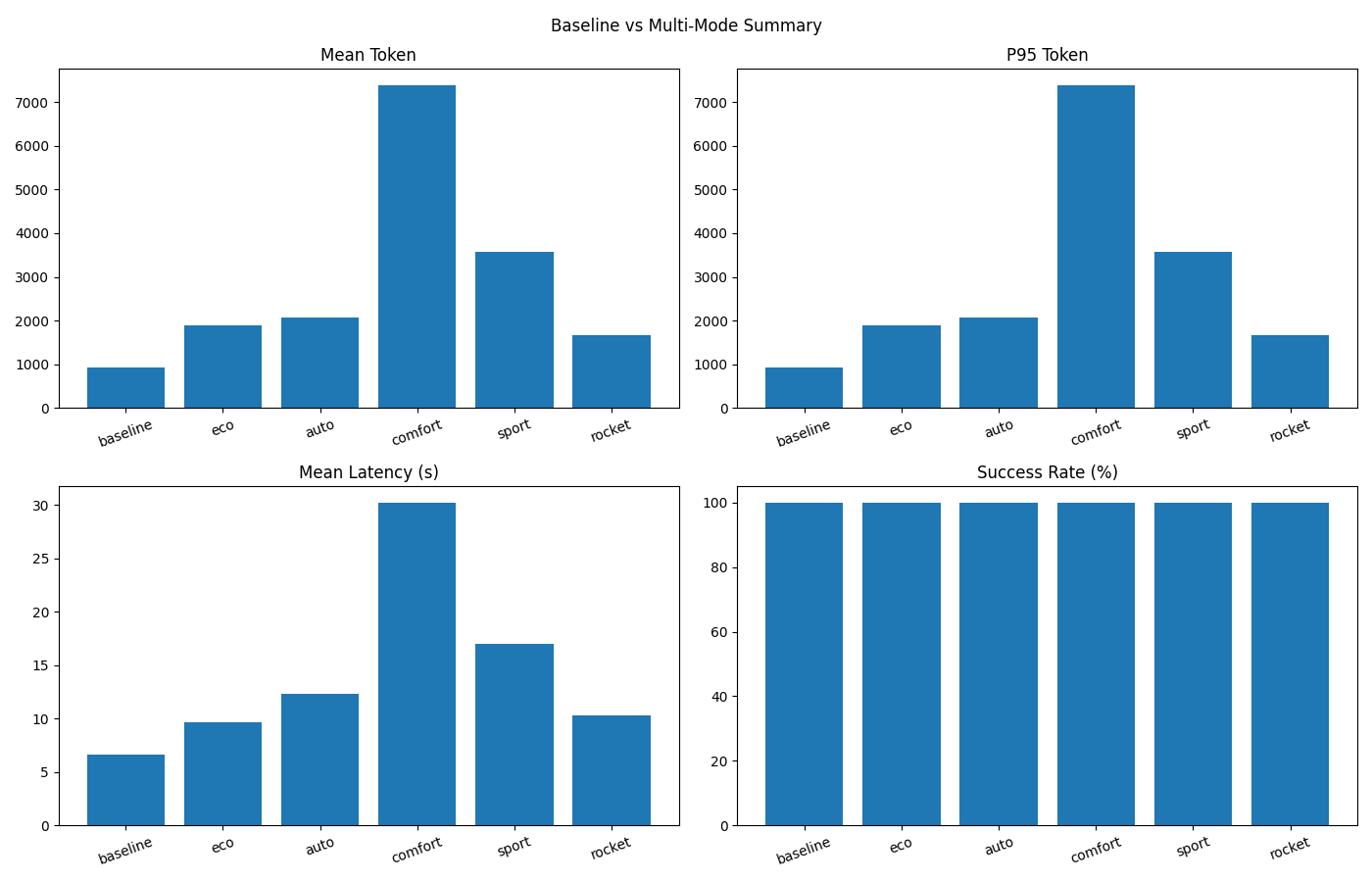
- Token 变化 / Token Change:+77.65%(Token Increase)
- 成功率 / Success Rate:Baseline 100.00% → TianJiang (rocket) 100.00%
- 延迟 / Latency:Baseline 6.63s → TianJiang (rocket) 10.26s (+54.62%)
- 总 Token / Total Tokens:Baseline 935 → TianJiang (rocket) 1,661 (+77.65%)
- 统计口径 / Method:Total Tokens = count × mean_token(input+output)
数据源 / Data source:
metrics/reports/compare-real-check/comparison.json| Generated (UTC):2026-03-03T13:55:47.575675+00:00| ΔSuccess: +0.00pp
关键词 / Keywords:天将, TianJiang, Token Governor, LLM 成本优化, Token 节省, 推理成本, 智能体, 上下文压缩, 语义缓存, 工具 Top-K, 预算守卫, 自动策略, 模型画像, 推理路由, LLM cost optimization, token savings, inference cost, AI agents, context compression, semantic cache, tool top-k, budget guard, auto strategy, model profiling, model routing
| 参数 / Parameter | 说明 / Description | 默认值 / Default |
|---|---|---|
--mode |
运行模式:baseline / governor |
baseline |
--drive-mode |
驾驶模式:auto/eco/comfort/sport/rocket |
None |
--opt-strategy |
手动策略:light/balanced/knowledge/enterprise |
balanced |
--auto-strategy |
启用自动策略推荐 | False |
--limit |
任务数量限制 | None(全部默认任务) |
--model |
模型选择(如 auto, openai:gpt-4o-mini) |
auto |
--max-tokens |
Governor 每任务累计 token 预算 | 12000 |
--max-fallback |
Governor 最大 fallback 次数 | 2 |
--out-file |
结果 JSONL 输出路径 | None |
--model-profile |
模型画像 JSON 路径 | None |
--policy-file |
Policy YAML 路径(v0.2 gate/fallback/risk 配置) | policy.yaml |
--tasks-file |
任务集文件(.json / .jsonl) |
None(使用内置任务) |
- 任务集(60 条):
metrics/benchmarks/benchmark_v02_60_tasks.json - JSONL 版本:
metrics/benchmarks/benchmark_v02_60_tasks.jsonl - 类别分布:5 类 × 12 条(单轮无工具 / 单工具敏感 / 多工具串联 / 长历史 / 对抗安全)
运行示例:
python main.py --mode governor \
  --policy-file policy.yaml \
  --tasks-file metrics/benchmarks/benchmark_v02_60_tasks.json \
  --out-file metrics/data/governor-v02.jsonl
自动判定示例:
python -m metrics.validator \
  --tasks metrics/benchmarks/benchmark_v02_60_tasks.json \
  --records metrics/data/governor-v02.jsonl \
--out metrics/reports/validator-v02.json生成可视化 Dashboard(帕累托、分类柱状、失败分布、压缩率关系):
python -m metrics.dashboard.benchmark_dashboard \
  --governor metrics/data/governor-v02.jsonl \
  --baseline metrics/data/baseline-v02.jsonl \
  --outdir metrics/reports/v02-dashboard
输出目录默认包含:
pareto_scatter.html/pngcategory_bars.html/pngfailure_pie.html/pngcompression_success.html/pngsummary_panel.pngcategory_summary.csvoverall_summary.csvdashboard_summary.json
新增工作流:.github/workflows/benchmark-v02-dashboard-auto.yml
- 触发:
push main+workflow_dispatch - 自动执行:baseline benchmark → governor benchmark → validator → dashboard → comparison report → README metrics 更新 → 自动提交
新增轻量定时工作流:.github/workflows/benchmark-v02-daily-light.yml
- 触发:daily
cron+workflow_dispatch - 默认只跑
limit=20轻量任务 - 自动执行 guardrail 检查(成功率跌幅 / token 增幅 / 延迟增幅阈值)
- guardrail 失败时自动创建(同日去重)issue,并可 @维护者,最终标记 job failed
- 自动生成
docs/trends/*.json、docs/badges/*.svg、docs/trends/kpi_summary.md - 可选通知脚本:
scripts/notify_slack.py、scripts/notify_dingtalk.py、scripts/notify_email.py - 趋势页面发布工作流:
.github/workflows/publish-trends-pages.yml
本地一键执行同等流程:
bash scripts/run-benchmark-v02-dashboard.sh中文:
- 企业级 LLM 推理成本优化
- 多模型推理策略治理
- Agent 智能体推理优化
- 自动化对比实验与报告
English:
- Enterprise LLM inference cost control
- Multi-model strategy governance
- Agent runtime optimization
- Automated benchmarking and reporting
Q1: 什么是 Drive Mode?
A: Drive Mode 用于在成本与质量之间做权衡,例如 Eco 模式优先节省 Token,而 Rocket 模式优先输出质量。
Q2: Auto 和 Comfort 有何区别?
A: Auto 是任务特征驱动的动态推荐路径;Comfort 是固定平衡型档位。
Q3: 自动模式会覆盖手动参数吗?
A: 不会。显式传入的 CLI 参数优先级更高。
Q4: Auto 模式一定会进入 Rocket 吗?
A: 不会。Auto 会根据任务特征与预算约束动态选档,可能停在 Eco/Comfort/Sport。
Q5: Rocket 模式一定更省钱吗?
A: 不一定。Rocket 优先保证输出能力,不承诺 Token 成本最低;请以实测对比区块为准。
Q6: 如何一键复现实验并更新 README?
A: 多模式对比可执行 bash scripts/run-all-and-update.sh;v0.2 benchmark + dashboard 可执行 bash scripts/run-benchmark-v02-dashboard.sh;远端可运行 Benchmark v0.2 Dashboard Auto 或 Benchmark And Update README Metrics。
欢迎提交 Issue 和 Pull Request,细则见 CONTRIBUTING.md。
本项目使用 TianJiang Non-Commercial License v1.0:
- 非商用可免费使用
- 商用需要先购买授权或建立合作协议
详见 LICENSE。