Releases: kfattic/cupsadmin
Release list
cupsadmin 1.4.1

cupsadmin 1.4.0
Xerox and Konica Minolta driver profiles
Quick actions now know the Xerox and Konica Minolta driver keywords, in both the app and cupsadmin quick:
| Driver | Color / black & white | Duplex / single-sided | Letter paper | User code |
|---|---|---|---|---|
| Xerox (AltaLink, VersaLink and the rest of the 5.19 driver) | XROutputColor=PrintAsColor / PrintAsGrayscale, falling back to XRColorCorrection=Auto / Gray |
Duplex (generic) |
PageSize=Letter (generic) |
Xerox Standard Accounting: XRAccountingSystem=XSA + AcctUserID, plus an optional AcctAccountID |
| Konica Minolta bizhub C-series i / xi (PS drivers 5.2 and 5.3) | ColorModel=CMYK / Gray (generic) |
KMDuplex=Double / Single |
PageSize=8.5x11 |
Unavailable: Konica Minolta Account Track codes are set by the driver, not the PPD |
- Optional second value. A driver profile can now declare a second input for an action. For Xerox, Set User Code asks for a User ID and an Account ID (optional), and the account ID is written only when you fill it in. From the CLI:
cupsadmin quick usercode <queue> <user> [account].--clearresets all three settings. - User IDs for Xerox can be letters as well as digits, up to the driver's limit of 32 characters. Ricoh user codes are still digits only.
- Neither driver has a fit-to-page option, so on these queues the action is titled Use Letter Paper and sets only the page size.
- The profiles were checked against every PPD in Xerox Drivers 5.19.3 (178) and the Konica Minolta bizhub C-series PS drivers 5.2.14A and 5.3.6A (including the 1-sided "S" variants).
Xerox and Konica Minolta profiles are tested against the vendor PPDs, not yet against a printer — reports welcome.
Install: download cupsadmin-1.4.0.pkg (signed and notarized); it upgrades earlier versions in place.
cupsadmin 1.3.0
Canon and HP driver profiles
Quick actions now know the Canon and HP driver keywords, in both the app and cupsadmin quick:
| Driver | Color / black & white | Duplex / single-sided | Letter paper | User code |
|---|---|---|---|---|
| Canon UFR II / LIPSLX / CARPS2 | CNColorMode=color / mono (color models) |
CNDuplex=DuplexFront / None |
PageSize=Letter |
Unavailable: Canon department IDs are set by the Canon driver, not the PPD |
| HP | HPColorAsGray=False / True, or HPColorMode=colorsmart / grayscale (OfficeJet and other inkjets) |
Duplex (generic) |
PageSize=Letter (generic) |
Unavailable: HP drivers have no accounting code option |
- Neither driver has a fit-to-page option, so on these queues the action is titled Use Letter Paper and sets only the page size. Ricoh PS queues keep Use Letter Paper, Fit to Nearest Size.
- Driver profiles can now mark an action unavailable and give the reason, which shows in the app's tooltip and in the CLI error.
- The profiles were checked against every PPD in Canon's UFR II/UFRII LT/LIPSLX/CARPS2 driver package (516) and HP's printer driver package (654).
cupsadmin ppdreport <file>
ppdreport takes a PPD file path (plain or .gz) as well as a queue name, so you can look at a driver's keywords without installing it or creating a queue:
pkgutil --expand-full Driver.pkg /tmp/driver
cupsadmin ppdreport "/tmp/driver/…/Resources/CNPZUIRAC3530IIIZU.ppd.gz"
Install: download cupsadmin-1.3.0.pkg (signed and notarized); it upgrades 1.2.0 in place.
CUPS Admin 1.2.0
Intel-only driver check
CUPS Admin now checks the filter programs each queue's PPD names (*cupsFilter / *cupsFilter2) and flags queues whose driver can't run natively on Apple silicon.
- App — the printer header shows Driver needs Rosetta when a filter has no arm64 slice, or Driver filter missing when a filter the PPD names doesn't exist. The sidebar tooltip says the same.
cupsadmin printer <queue>andcupsadmin ppdreport <queue>print aWARNINGline naming the Intel-only or missing filters;ppdreportalso lists every filter with its architectures.cupsadmin printers --rosettalists only the affected queues, with each filter's architecture and path, plus whether the Mac is Apple silicon and has Rosetta installed — for fleet reporting through an MDM.
Architectures are read from each filter's Mach-O header, so arm64 subtypes that lipo can't name still count as native; shell-script filters and pass-through (-) entries are never flagged.
The Intel-only driver check was inspired by Willem Groenewald's opencups.
Installing
Installs /Applications/CUPS Admin.app (payload, with a receipt) and /usr/local/bin/cupsadmin (postinstall). Universal, macOS 14 or later. Installs as an upgrade over earlier releases. For Munki, only the CLI needs an installs entry.
SHA-256: 520be5d1107ee8ec8789fc9014c40dc0f3d1487b4849641268d50a81d08be173
CUPS Admin 1.1.1
Packaging fix: the app is now a normal payload install. The package installs /Applications/CUPS Admin.app as a payload with a receipt (pkgutil --files edu.wku.cupsadmin) and records /Applications with its system ownership (root:admin), and installs /usr/local/bin/cupsadmin with a postinstall script as before. For Munki, only the CLI needs an installs entry. Installs cleanly as an upgrade over 1.1.0.
CUPS Admin 1.1.0
First release with CUPS Admin.app, the native macOS replacement for the CUPS web interface Apple removed in macOS 27. One signed, notarized PKG installs both the app and the cupsadmin CLI.
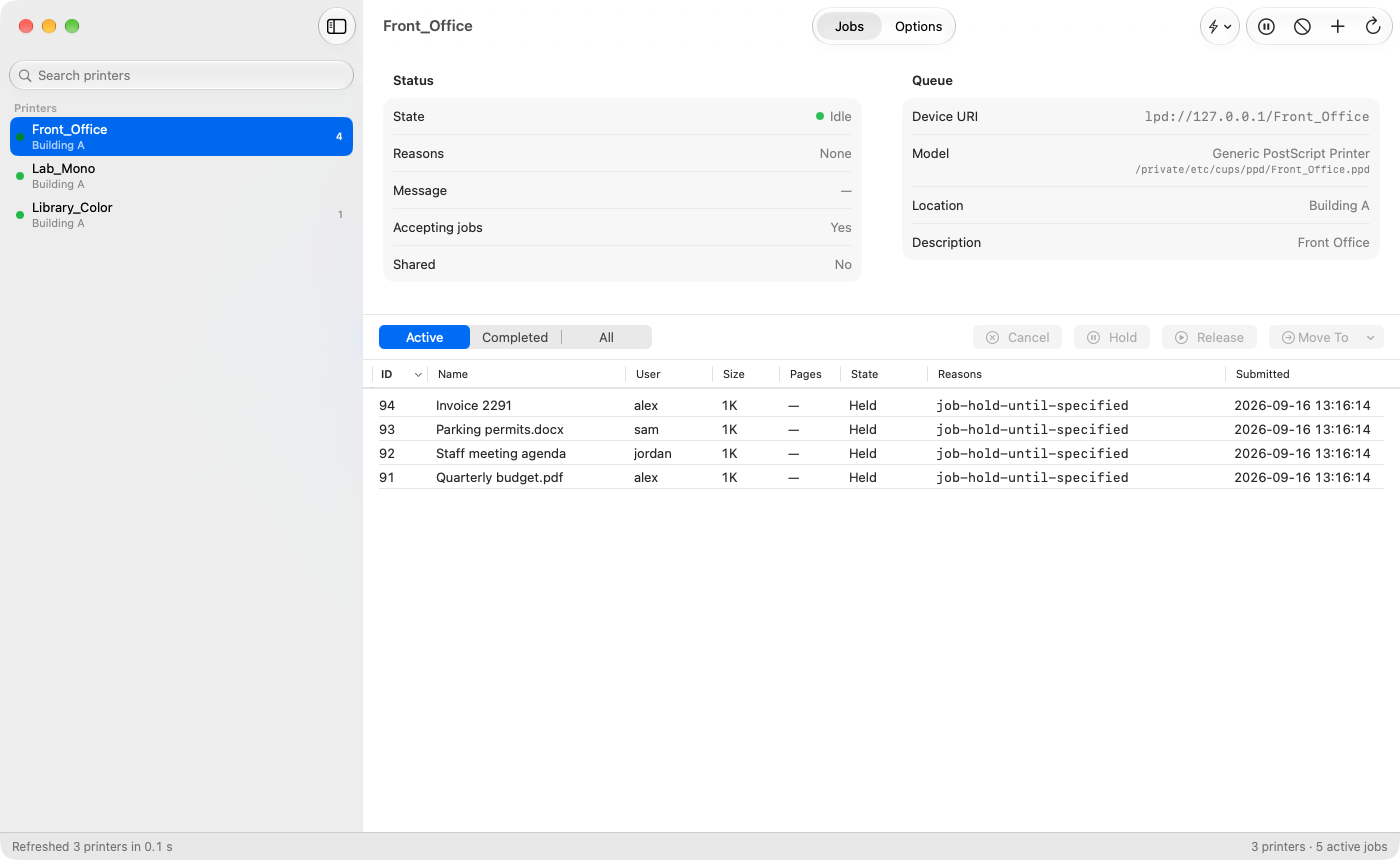
What the app does today
- Sidebar — every queue with a state dot (idle, printing, stopped or rejecting), location, active-job badge and a star on the server default. Searchable.
- Status header — state, reasons, message, accepting jobs, shared, device URI, model and PPD file, location, description.
- Jobs — sortable table (ID, name, user, size, pages, state, reasons, submitted); Active / Completed / All; Hold, Release, Move To and Cancel on one or many jobs; copy rows as tab-separated text.
- Options — the old "Set Default Options" page: every PPD option grouped as the driver groups it (pickers, toggles, and text/number fields for typed values like Ricoh user codes), IPP defaults and queue policies. Edits are applied with one
lpadmincall and read back per row (green check or red X with the reason). Warns before saving a password-type option into the world-readable PPD. - Quick Actions — Always Print in Color / Black & White, Set User Code, Default to Duplex / Single-Sided, Use Letter Paper (fit to nearest size where the driver can), Make Default Printer. Driver-neutral: keywords come from driver profiles (Ricoh built in, generic PPD and IPP Everywhere fallback); actions a driver can't do are disabled with the reason.
- Right-click a printer — Pause/Resume, Accept/Reject, Print Test Page, Cancel All Jobs, Set as Default Printer, Modify Printer, Delete Printer, Quick Actions, Copy Device URI, Show PPD in Finder. Add Printer (manual: device URI plus IPP Everywhere, a driver from the installed list, or a PPD file).
- Every action shows the exact command, is verified against cupsd afterwards, and reports its result and timing in the status bar.
CLI
Everything in 1.0.1, plus:
cupsadmin quick <action> <queue> [code | --clear]— the Quick Actions above, for scripts and MDM commands.cupsadmin ppdreport <queue>(or--file <path.ppd>) — every PPD group and option with keyword, label, type, default, choices and custom-value types, plus which driver profile and quick actions apply. Use it to add a profile for your driver.
Installing
Installs /usr/local/bin/cupsadmin and /Applications/CUPS Admin.app. Universal, macOS 14 or later. The PKG is payload-free: its postinstall copies both, so it never changes the ownership of an existing /usr/local/bin or of /Applications. For Munki, use an installs array with both paths.
SHA-256: aaec01934404a56d57458d94d58c9e5f73525c47f589ce607a5452be54fe710f
cupsadmin 1.0.1
First public release of cupsadmin, a command-line replacement for the CUPS web interface Apple removed in macOS 27.
This package contains the CLI only. CUPS Admin.app is in the v1.1.0 package.
What's in the package
cupsadmin-1.0.1.pkg installs the CLI at /usr/local/bin/cupsadmin. Universal (Apple silicon and Intel), macOS 14 or later, signed with a Developer ID and notarized.
cupsadmin printers               # every queue: state, reasons, accepting, shared, device URI
cupsadmin printer <queue>        # one queue in detail (--all for every IPP attribute)
cupsadmin jobs [queue]           # active jobs (--completed, --all-jobs)
cupsadmin cancel <job-id>        # cancel one job (123 or Queue-123)
cupsadmin options <queue>        # PPD options and IPP *-default values, like lpoptions -l
cupsadmin add <queue> -v <uri> [-m model | -P ppd] [-D desc] [-L location] [--shared] [-o k=v ...]
cupsadmin set <queue> -o k=v ... # change queue defaults, then read them back
- Reads go straight to cupsd over IPP on the
/private/var/run/cupsdsocket, so they work even when cupsd is idle and port 631 is closed. addandsetread every setting back afterlpadminruns and exit non-zero withNOT APPLIEDwhen something didn't take (for example a misspelled option thatlpadminsilently accepts).- New queues default to not shared; pass
--sharedto opt in. - Every run prints
started, oneOK:/ERROR:status line andfinishedon stderr, so table output pipes cleanly.
Installing
The PKG is payload-free: a postinstall script copies the binary and creates /usr/local/bin only if it's missing, so it never changes the ownership of an existing /usr/local/bin (Homebrew on Intel Macs is safe). For Munki, use an installs array pointing at /usr/local/bin/cupsadmin.
SHA-256: 3fdd4bcc490933154666711b51adf8b36ba161788d97fec0645ff79fd2cdde0c