Repository navigation
Releases: knutwurst/ps5-patchdl
Release list
PatchDL 0.2.1: Clear answers when a download fails

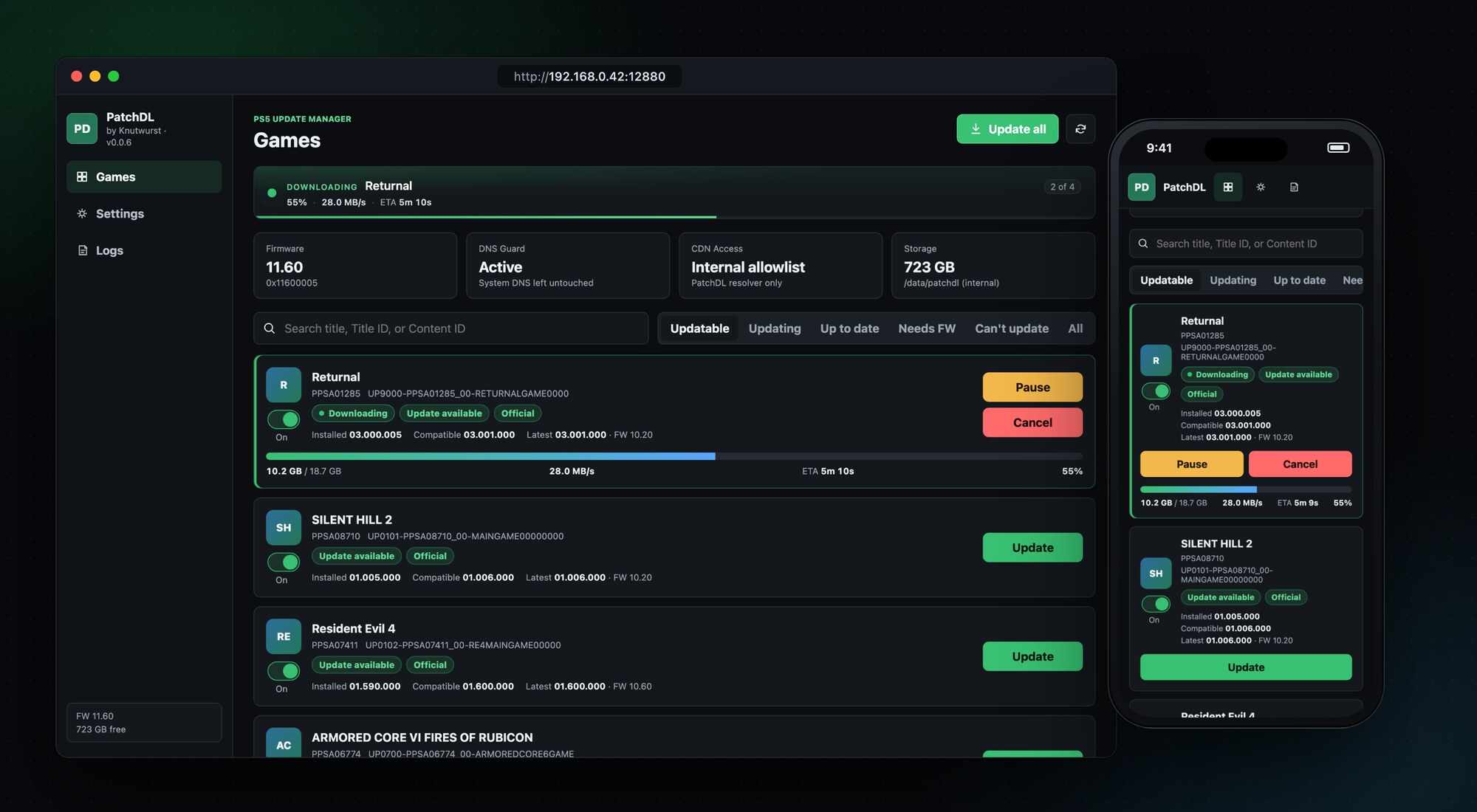
PatchDL 0.2.1
Clear answers when a download fails
When PatchDL can't get a download going, the game card now says why: the server couldn't be found, the connection failed, Sony's server answered with an error, and so on. Next to it is a Details link. It checks the connection to Sony's servers for that game on the spot and shows the result as a short checklist. Below that is a report you can copy straight into a GitHub issue. On the PS5 itself, scan the QR code with your phone and the same report opens there, ready to copy. No typing addresses on the console.
Sideloaded apps stay as they are
Some apps are Sony-signed but were installed outside the Store, often to keep one exact version. PatchDL now marks them Sideloaded and starts with their updates switched off, so Update all leaves them alone. Switch updates on for such an app if you really want the new version. Thanks to @yaredcf for spotting this in #11.
Runs on firmware 1.00 to 13.60. Tested on 11.60.
Install
Download patchdl_0.2.1.elf below, send it to your PS5 with the ELF loader you already use, and open the address from the notification on your TV.
PatchDL downloads official, unmodified updates for games already installed on your console. Not affiliated with Sony Interactive Entertainment.
Full Changelog: v0.2.0...v0.2.1
Contributors

Assets 4
PatchDL 0.2.0: PS4 games too
PatchDL 0.2.0
PS4 games
PatchDL now updates PS4 games as well. It finds their updates on Sony's servers, downloads them and installs them through the console's own installer, like PS5 updates. The PS5 keeps a PS4 update next to the game, and PatchDL checks after the install that it's really there before it cleans up. I tested it with Bloodborne on firmware 11.60, from 1.00 to 1.09.
Also new
- A card no longer jumps back to "done" for a moment while the console finishes an install.
- A "Buy me a coffee" link in the sidebar and in Settings, with a QR code to scan from the TV.
Runs on firmware 1.00 to 13.60. Tested on 11.60, and 0.1.0 has been confirmed on 13.60 (thanks @oacostumado).
Install
Download patchdl_0.2.0.elf below, send it to your PS5 with the ELF loader you already use, and open the address from the notification on your TV.
PatchDL downloads official, unmodified updates for games already installed on your console. Not affiliated with Sony Interactive Entertainment.
Full Changelog: v0.1.0...v0.2.0
Contributors

Assets 4
PatchDL 0.1.0: A new installer
PatchDL 0.1.0
A new installer
Some of you saw a game report the new version after an install while it kept running the old one, with the progress stuck at 0%. Thanks to @oacostumado (#9) and @yaredcf (#11) for the detailed reports.
I rebuilt the install from the ground up for this release. The PS5 now pulls the update straight from PatchDL and its own installer applies it, with live progress on the game card. I tested it with Dead Island 2, Ghostwire: Tokyo and Atlas Fallen on firmware 11.60, and all three start on the new version.
If a game still shows a newer version than it runs, delete it, install it again and update it with 0.1.0. A package that's still on the console gets checked and reused, so you won't have to download it again.
Also new
- Games you install or remove show up in the list within seconds. Refresh checks Sony for new updates too.
- Packages already on the console are checked against Sony's SHA-256 checksums. Only broken pieces get downloaded again.
- After an install, PatchDL makes sure the game runs the new version before it deletes the package. Prefer to keep packages? Switch off Delete PKG after install. Settings lists every package on the console with size and version.
- A finished download is never removed early anymore.
- Clicking Install twice, or in two browser tabs, starts one install, not two.
- The first Install click no longer fails with "install backend not ready".
- PS4 games are listed as not supported.
- Bigger game covers on large screens.
Runs on firmware 1.00 to 13.60. I tested this release on 11.60 with disc games. Reports from 12.x, 13.x and Store games help a lot.
Install
Download patchdl_0.1.0.elf below, send it to your PS5 with the ELF loader you already use, and open the address from the notification on your TV.
PatchDL downloads official, unmodified updates for games already installed on your console. Not affiliated with Sony Interactive Entertainment.
Full Changelog: v0.0.9...v0.1.0
Contributors
Assets 4
PatchDL 0.0.9: Patches for your firmware and a clearer game list
PatchDL 0.0.9
Highlights
- Patches for your firmware. When Sony's newest patch needs a newer firmware, PatchDL now finds the newest one that still runs on your console. The version history comes from Prospero Patches. This works for games installed from disc or the PlayStation Store. Thanks to @yaredcf for the request in #11.
- From the TV to your phone. Tap Old FW patch and the TV shows a QR code. Scan it, open the game on Prospero, copy the SC link and paste it on your phone. The PS5 then downloads the patch straight from Sony, using Sony's own piece list, and installs it like any other update.
- A clearer game list. Three groups instead of six: Updates (something to get for this console), Up to date and Not supported, each with the number of games in it.
- Free space check. Before a download starts, PatchDL checks that the package fits and keeps 2 GB free. If it doesn't fit, the card tells you how much space it needs.
Also new
- Update all finally works. Since it arrived in 0.0.4, a typo kept the button from doing anything.
- Games whose update Sony serves from another region's package, such as an EU disc copy with a US master patch, can be installed again. The interface hid the Install button for them, even though the install works (tested with Dead Island 2). See #9.
- Shadowmount titles are now treated like fake packages: they're listed under Not supported, and PatchDL no longer downloads patches for them, since it can't install them.
- The README now says that PatchDL also contacts prosperopatches.com, and that the lookup only sends the game's title ID.
Runs on firmware 1.00 to 13.60. I tested this release on 11.60.
Install
Download patchdl_0.0.9.elf below, send it to your PS5 with the ELF loader you already use, and open the address from the notification on your TV.
PatchDL downloads official, unmodified updates for games already installed on your console. Not affiliated with Sony Interactive Entertainment.
Full Changelog: v0.0.8...v0.0.9
Contributors
Assets 4
PatchDL 0.0.8: Game icons and smarter game detection
PatchDL 0.0.8
Highlights
- Game icons. Every game shows its icon from the home screen, so you spot it at a glance.
- Disc and store games are recognized correctly. PatchDL now reads each game's package to tell where it came from. Games installed from disc or from the PlayStation Store no longer end up as Unknown, so their updates show up again.
- Honest "Needs FW" label. When the newest update needs a newer firmware than yours, the game now says Needs FW 13.20 (for example) instead of Up to date. Thanks to @yaredcf for the detailed report in #4.
- Packages not signed by Sony are marked. Games installed from such packages appear as Fake package · Not supported. PatchDL shows the newest official version and the firmware it needs, but never downloads or installs anything for them.
Also new
- The game list is sorted by name, so you find a game fast under All.
- Only games show up. Homebrew apps (loaders, file managers, the PatchDL tile itself) no longer appear in the list.
- The version line says needs FW 11.40 instead of FW 11.40, so it no longer reads like your console's firmware.
- Updatable only holds games PatchDL can install. Download-only titles with an update move to Can't update and show Update · download only.
Runs on firmware 1.00 to 13.60. I tested this release on 11.60.
Install
Download patchdl_0.0.8.elf below, send it to your PS5 with the ELF loader you already use, and open the address from the notification on your TV.
PatchDL downloads official, unmodified updates for games already installed on your console. Not affiliated with Sony Interactive Entertainment.
Full Changelog: v0.0.7...v0.0.8
Contributors
Assets 4
PatchDL 0.0.7: Firmware 13.60

PatchDL 0.0.7
Highlights
- Runs on firmware 1.00 to 13.60. 0.0.7 builds on the newest PS5 payload SDK (0.44), which supports every firmware from 1.00 to 13.60. I tested it on 11.60 and 13.60.
- Firmware 13.60 confirmed. PatchDL starts on 13.60, finds your games, reaches the update servers and puts its tile on the home screen. 0.0.6 did not start on 13.xx at all.
- Home-screen tile on 13.xx. Firmware 13.xx dropped the call PatchDL used to register the tile. It now uses a fallback that works there.
- Tile retries after a failed attempt. PatchDL only treats the tile as installed once the console has accepted it, so a failed registration gets another try on the next start.
Also new
- Updates waiting in the queue show a Queued label instead of Downloading.
- Clearer wording in the header and in the DNS status tile.
- Every request goes to Sony's update servers only. I removed an unused entry for a third-party host.
Still tested on 11.60 as well: game scan, downloads and the tile behave as in 0.0.6.
Install
Download patchdl_0.0.7.elf below, send it to your PS5 with the ELF loader you already use, and open the address from the notification on your TV.
PatchDL downloads official, unmodified updates for games already installed on your console. Not affiliated with Sony Interactive Entertainment.
Full Changelog: v0.0.6...v0.0.7
PatchDL 0.0.6: Lighter on memory
PatchDL 0.0.6
Highlights
- Lighter on memory. The built-in web server now limits itself to 8 connections with small stacks, so PatchDL keeps a small footprint during long sessions.
- Two leaks fixed in rare error paths of the web server.
- Everything else works as in 0.0.5.
Install
Download patchdl_0.0.6.elf below, send it to your PS5 with the ELF loader you already use, and open the address from the notification on your TV.
PatchDL downloads official, unmodified updates for games already installed on your console. Not affiliated with Sony Interactive Entertainment.
PatchDL 0.0.5: Home-screen tile and live download banner
PatchDL 0.0.5
Highlights
- Home-screen tile. Switch on Home-screen shortcut in Settings and PatchDL appears on the PS5 home screen. Tap it to open the UI in the console's browser.
- Live download banner. The current game, its speed, time left and its place in the queue, at the top of the Games view.
- Downloads run to the end again. 0.0.4 stopped large updates after 70 to 130 MB. Fixed.
- Updating shows the queue. The game that's downloading stays under Updatable, so you keep it in sight.
Also new
- The sidebar shows the version that's running.
- PatchDL now records the network error behind a failed download, which makes trouble easier to track down.
Install
Download patchdl_0.0.5.elf below, send it to your PS5 with the ELF loader you already use, and open the address from the notification on your TV.
PatchDL downloads official, unmodified updates for games already installed on your console. Not affiliated with Sony Interactive Entertainment.
PatchDL 0.0.4: Update all
PatchDL 0.0.4
Highlights
- Update all. One click queues every game with an update you can install.
- Updates shared across regions install. Some games get one update for several regions. PatchDL now installs it on the right game. Tested end to end with Dead Island 2, 01.000.001 to 01.000.011.
- Updatable first. The list opens on games with an update, and a separate Updating filter collects running and queued downloads.
- Security pass. Input checks, request limits and safer file writes guard against misbehaving devices on your network.
Install
Download patchdl_0.0.4.elf below, send it to your PS5 with the ELF loader you already use, and open the address from the notification on your TV.
PatchDL downloads official, unmodified updates for games already installed on your console. Not affiliated with Sony Interactive Entertainment.
PatchDL 0.0.3: Parallel downloads and resume
PatchDL 0.0.3
Highlights
- Parallel downloads. 1 to 16 connections per update, adjustable in Settings while a download runs.
- Queue. One update downloads at a time, the rest wait their turn.
- Resume after a reboot. PatchDL saves progress after every finished piece. Pause, Resume and Cancel work at any time.
- Integrity check. Verify each piece against Sony's checksums while it downloads, or check a finished package on the console.
- Tested with a 61.6 GB update across several reboots.
Known limitation
Some updates are published once for several regions. 0.0.3 downloads and verifies them but can't install them yet (fixed in 0.0.4). Disc games need the disc inserted.
Install
Download patchdl_0.0.3.elf below, send it to your PS5 with the ELF loader you already use, and open the address from the notification on your TV.
PatchDL downloads official, unmodified updates for games already installed on your console. Not affiliated with Sony Interactive Entertainment.