Local-first visual debugger for Python agents.
One HTML file. No cloud, no account. See LLM calls, tool calls, branches, errors, tokens, and cost.


from flow_xray import trace

@trace
def call_llm(prompt):
    return openai.chat(prompt)

@trace
def agent(query):
    plan = call_llm(f"plan: {query}")
    return call_llm(f"answer based on: {plan}")

result = trace.run(agent, "weather in Tokyo?")
result.to_html("trace.html")
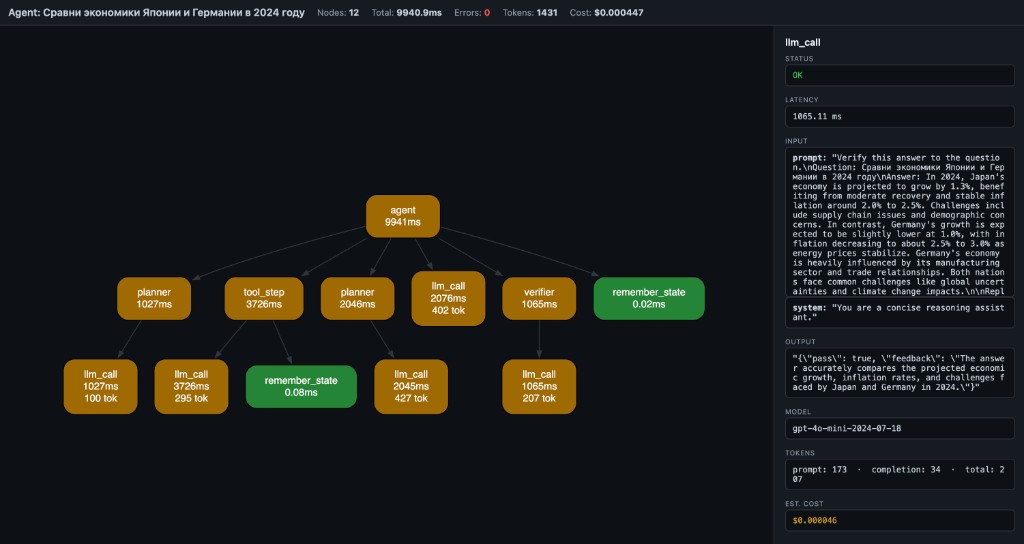
Open trace.html — you get a local debug artifact with:
- LLM calls
- tool calls
- branches and nested steps
- errors and retries
- tokens and estimated cost
- graph, timeline, overview, and raw trace views
No server, no account, no log viewer — one local HTML file.
Your agent's final answer looks fine, but you do not trust the middle.
You want to see:
- which LLM calls happened
- which tool calls ran
- where the run branched or nested
- where an error or retry happened
- where tokens and cost accumulated
flow-xray is built for that exact debugging job.
flow-xray is most useful for:
- LangGraph users who want local tracing without hosted tooling
- LangChain users debugging tool calls and intermediate steps
- developers building Python tool-calling agents
- people who want one local trace artifact they can inspect or share after redaction
pip install flow-xrayCreate demo_trace.py:
from flow_xray import trace

@trace
def fetch_profile(user_id):
    return {"id": user_id, "plan": "pro"}

@trace
def answer_question(user_id):
    profile = fetch_profile(user_id)
    return f"user {profile['id']} is on {profile['plan']}"

result = trace.run(answer_question, 42)
result.to_html("demo_trace.html")
Run it:
python demo_trace.pyOpen demo_trace.html in your browser. You should see one root node (answer_question) and one child node (fetch_profile).
- you control the function call directly
- you want the clearest Python API
- you want full control over arguments and return values
- you are tracing inside tests, scripts, notebooks, or app code
from flow_xray import trace

@trace
def pipeline(x):
    return x * 2

result = trace.run(pipeline, 5)
result.to_html("pipeline.html")- you already have a Python script on disk
- you want a quick local trace without editing much code
- the traced calls already happen at module scope when the file is executed
flow-xray run my_agent.py --html trace.htmlfrom flow_xray import trace
@trace
def step_a(x):
return x + 1
@trace
def pipeline(x):
return step_a(x) * 2
result = trace.run(pipeline, 5)
result.to_html("pipeline.html")flow-xray run my_agent.py --html trace.htmlThe script must use @trace on the functions you want captured.
flow-xray run executes the file inside a trace session, but it does not enter if __name__ == "__main__" blocks.
That means:
- if your traced function call happens at module scope,
flow-xray runcan capture it directly - if your traced function call only happens inside
main()guarded byif __name__ == "__main__", the CLI may produce0 nodes
If you hit 0 nodes, use one of these fixes:
- Move a traced demo call to module scope for local debugging.
- Call
trace.run(...)inside the script instead. - Keep using the Python API directly from a small wrapper script.
Example that works with flow-xray run:
from flow_xray import trace

@trace
def step():
    return 1

step()
Example that will usually show 0 nodes with flow-xray run:
from flow_xray import trace

@trace
def step():
    return 1

if __name__ == "__main__":
step()@trace works with async def out of the box — no extra config:
from flow_xray import trace
import asyncio

@trace
async def call_api(query):
    await asyncio.sleep(0.1)  # simulate async I/O
    return {"answer": query}

@trace
async def agent(query):
    result = await call_api(query)
    return result["answer"]

result = trace.run(lambda: asyncio.run(agent("hello")))
result.to_html("async_trace.html")
Token usage and estimated cost are auto-extracted from OpenAI response objects, or you can set them manually:
@trace
def call_llm(prompt):
    resp = openai.chat.completions.create(...)
    trace.meta(model=resp.model,
               prompt_tokens=resp.usage.prompt_tokens,
               completion_tokens=resp.usage.completion_tokens)
return resp.choices[0].message.contentUse decorator options when a trace may contain secrets or bulky payloads:
from flow_xray import trace

@trace(redact={"api_key", "authorization"}, capture_output=False)
def call_service(api_key, payload):
...redact={...}masks matching argument names and nested dict keys as[redacted]capture_output=Falsekeeps the real return value in Python, but stores[redacted]in the HTML trace
flow-xray serializes trace data into the generated HTML file.
By default, that can include:
- function names
- bound inputs
- outputs
- exceptions
- attached
trace.meta(...)fields - token and cost metadata
Use the privacy controls when you want a trace that is safer to share:
redact={...}hides matching input names and nested dict keys as[redacted]capture_output=Falsekeeps the real Python return value, but writes[redacted]into the HTML trace
Treat trace files as local debugging artifacts unless you have explicitly reviewed or redacted their contents. A trace is generally safer to share when you have:
- redacted secrets, auth headers, API keys, or user data
- hidden sensitive outputs with
capture_output=False - checked the generated HTML once before posting it publicly
- local-first debugging
- one HTML file you can open immediately
- graph and timeline views, not only logs
- no account and no hosted tracing requirement
- quick event-level debugging
- a tiny amount of output
- no structured trace at all
- team dashboards
- long-term trace storage
- production monitoring
- centralized evaluation workflows
flow-xray is best when your question is:
What actually happened inside this Python agent run, locally, right now?
- Nodes = function calls (name + latency + tokens)
- Edges = caller → callee
- Green = OK, Red = error, Yellow = slow (>1s)
- Header = total nodes, latency, tokens, estimated cost
- Click a node → side panel shows inputs, output, error, timing, model, tokens, cost
Langfuse, Helicone, LangSmith — they give you timelines and logs.
But when your agent pipeline branches, retries, or chains 6 tools — you don't need another table. You need a graph.
flow-xray is not an agent framework. It's the layer below them — like Chrome DevTools is to browsers.
- Python 3.10, 3.11, 3.12, 3.13, 3.14 — tested
- Sync and async functions — both supported
- Any Python code — not limited to LLM calls; works with any function you decorate
- Frameworks — works alongside LangGraph, CrewAI, OpenAI SDK, or plain Python
@trace wraps functions (sync and async). When called inside a trace.run() session (or flow-xray run CLI), it records:
- function name
- bound arguments
- return value or exception
- wall-clock latency
- token usage and estimated cost (auto or manual)
- parent/child relationships (call stack → DAG)
result.to_html() embeds the trace as JSON in a self-contained HTML page that renders via WASM Graphviz (CDN, works offline after first load).
The trace viewer also includes search, zoom/reset controls, and copy-details for the currently selected node.
Scalar autodiff core (micrograd-style Value graph with DOT/JSON export and stepping debugger) lives under flow-xray dot CLI and from flow_xray import Value. See examples/ and plan.md.
MIT