Releases: kterfan/KeyMagic
Release list
KeyMagic 1.0.3 — single-instance fix

🐛 Bug fix — recommended upgrade
A second launch no longer leaves a dead second instance running.
KeyMagic claims F10 / Ctrl+G / Ctrl+T through Windows' RegisterHotKey, which is exclusive — only one process can own each combination. So if the app was already running (the usual way: the logon task started it, then you clicked the Start-menu shortcut) a second copy would start, silently fail to register any hotkey, and sit in the tray as a second icon whose shortcuts did nothing — with nothing in the log to explain why.
Now a launch detects the running instance, tells it to open its control panel, and exits. One instance, always.
Verified against the installed build: launching twice leaves exactly one instance, and the second launch records the hand-off in the log.
No other changes. Same icon as 1.0.2.
🐛 رفع باگ — ارتقا توصیه میشود
دیگر اجرای دوم، یک نمونهٔ مردهٔ اضافی باقی نمیگذارد.
KeyMagic کلیدهای F10 / Ctrl+G / Ctrl+T را از طریق RegisterHotKey ویندوز میگیرد که انحصاری است — فقط یک پروسه میتواند هر ترکیب را داشته باشد. پس اگر برنامه از قبل در حال اجرا بود (روش معمول: تسک ورود آن را بالا میآورد، بعد شما روی میانبر منوی استارت کلیک میکنید) یک نسخهٔ دوم بالا میآمد، بیصدا در ثبت هاتکیها شکست میخورد، و بهصورت یک آیکون دوم در سینی سیستم مینشست که میانبرهایش کار نمیکرد — بدون هیچ توضیحی در لاگ.
حالا هر اجرا نمونهٔ در حال اجرا را تشخیص میدهد، به آن میگوید پنل کنترل را باز کند، و خارج میشود. همیشه یک نمونه.
روی نسخهٔ نصبشده تست شد: دو بار اجرا فقط یک نمونه باقی میگذارد و اجرای دوم هندآف را در لاگ ثبت میکند.
هیچ تغییر دیگری ندارد. همان آیکون نسخهٔ ۱.۰.۲.
KeyMagic 1.0.2 — new icon
✨ New icon
KeyMagic gets a proper piece of artwork — keycaps on a brass rail with an orange slider, rendered in 3D.
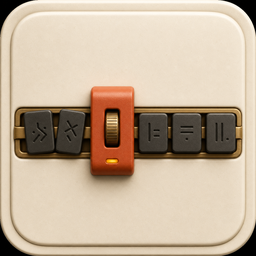
It appears on your desktop and Start-menu shortcuts, in Programs & Features, on the installer banner, and across the README.
The tray keeps a simpler mark — on purpose
The new artwork was tested at the sizes Windows actually renders it. From 48px up it looks great. At the 16px the notification area uses, the row of keycaps blurs into a single indistinct shape, and its cream body loses contrast against a light taskbar.
So the tray keeps the swap-arrow glyph, recoloured to the artwork's rust palette so the two read as one family. Slack, Dropbox and Discord ship the same split, for the same reason: a 16px tray icon is a different design problem from a 256px app icon.
The control panel accent moves from indigo to rust to match.
No functional changes. If 1.0.1 works for you, this is purely cosmetic.
✨ آیکون جدید
KeyMagic حالا یک اثر گرافیکی واقعی دارد — کیکپهایی روی ریل برنجی با یک اسلایدر نارنجی، رندرشده بهصورت سهبعدی.
این آیکون روی میانبر میزکار و منوی استارت، در Programs & Features، روی بنر نصبکننده و در سراسر README دیده میشود.
آیکون سینی سیستم عمداً سادهتر مانده
اثر جدید در همان اندازههایی که ویندوز واقعاً رندر میکند تست شد. از ۴۸ پیکسل به بالا عالی است. اما در ۱۶ پیکسلی که سینی سیستم استفاده میکند، ردیف کیکپها به یک لکهٔ نامفهوم تبدیل میشود و بدنهٔ کرمرنگش روی نوار وظیفهٔ روشن کنتراست خود را از دست میدهد.
بنابراین سینی سیستم همان نشان فلش تبادل را نگه میدارد، اما با پالت زنگاری همان اثر تا هر دو یک خانواده به نظر برسند. Slack و Dropbox و Discord هم دقیقاً همین کار را میکنند: آیکون ۱۶ پیکسلی سینی، مسئلهٔ طراحی متفاوتی از آیکون ۲۵۶ پیکسلی برنامه است.
رنگ تاکیدی پنل کنترل هم از بنفش به زنگاری تغییر کرد تا هماهنگ باشد.
هیچ تغییر عملکردی ندارد. اگر نسخهٔ ۱.۰.۱ برایتان کار میکند، این فقط ظاهری است.
KeyMagic 1.0.1 — installer and autostart fixes
🐛 Bug fixes — please upgrade from 1.0.0
Two bugs in 1.0.0, both caused by the app requiring administrator rights.
Setup failed at the end
Installing 1.0.0 ended with:
Unable to execute file: C:\Program Files\KeyMagic\KeyMagic.exe
CreateProcess failed; code 740
The requested operation requires elevation
Inno Setup's launch step used CreateProcess, which cannot satisfy a requireAdministrator manifest. It now goes through ShellExecute, which can.
"Start with Windows" silently did nothing
This one was worse because it looked like it worked. The setting wrote a HKCU\...\Run entry — but Windows silently skips Run-key entries that need an elevation prompt at logon. No error, no prompt, no app. The checkbox was on, the registry value was there, and KeyMagic simply never started with Windows.
Replaced with a Task Scheduler entry at RunLevel: HIGHEST, which is the supported way to start an elevated program at logon. Old Run-key values are cleaned up automatically on upgrade and on uninstall.
Verified
Silent install exits 0 · launching the installed build creates the task at Highest pointing at Program Files · legacy Run value removed · all three hotkeys register.
🐛 رفع باگ — لطفاً از ۱.۰.۰ ارتقا دهید
دو باگ در نسخهٔ ۱.۰.۰، هر دو ناشی از نیاز برنامه به دسترسی ادمین.
نصب در انتها شکست میخورد
نصب نسخهٔ ۱.۰.۰ با این خطا تمام میشد:
Unable to execute file: C:\Program Files\KeyMagic\KeyMagic.exe
CreateProcess failed; code 740
The requested operation requires elevation
مرحلهٔ اجرای Inno Setup از CreateProcess استفاده میکرد که نمیتواند درخواست دسترسی ادمین را برآورده کند. حالا از ShellExecute استفاده میشود.
«اجرا با ویندوز» اصلاً کار نمیکرد
این یکی بدتر بود، چون ظاهرش درست به نظر میرسید. این تنظیم یک ورودی در HKCU\...\Run مینوشت — اما ویندوز ورودیهایی را که هنگام ورود نیاز به ارتقای دسترسی دارند بیصدا نادیده میگیرد. نه خطایی، نه پیامی، نه اجرایی. تیک روشن بود، مقدار رجیستری هم بود، و KeyMagic هرگز با ویندوز اجرا نمیشد.
جایگزین شد با یک تسک در Task Scheduler با سطح اجرای HIGHEST که روش پشتیبانیشدهٔ ویندوز برای اجرای برنامههای نیازمند ادمین هنگام ورود است. مقادیر قدیمی رجیستری هنگام ارتقا و حذف نصب، خودکار پاک میشوند.
تأیید شد
نصب سایلنت با کد ۰ · اجرای نسخهٔ نصبشده تسک را با سطح Highest میسازد · مقدار قدیمی رجیستری پاک شد · هر سه میانبر ثبت شدند.
KeyMagic 1.0.0
Download
| File | For |
|---|---|
| KeyMagic-1.0.0-Setup.exe | Most people. Bilingual wizard — pick English or Persian on the first screen. |
| KeyMagic-1.0.0.msi | Group Policy / Intune / SCCM deployment. |
Windows will warn that the publisher is unknown — the installer isn't code-signed. Click More info → Run anyway, or build it yourself with python build.py.
Requires: Windows 10 or 11 (64-bit). Python is bundled.
What it does
You type a Persian message while the keyboard is still on English:
سلام چطوری → sghl ]xdvd
Press F10. No selecting, no retyping — the text is rewritten in place, in whatever app you're in.
sghl ]xdvd   →   سلام چطوری
lk kld n,kl  →   من نمی دونم
Works in both directions, in Word, Chrome, Telegram, VS Code, terminals, and elevated apps.
| Shortcut | Action |
|---|---|
| F10 | Fix keyboard layout (selection, or current line) |
| Ctrl+G | Google-search the selected text |
| Ctrl+T | Open Google Translate with the selected text |
- Restores your clipboard afterwards — nothing is lost
- Tray control panel, English/Persian with full RTL
- Mute the notification sound, or hide notifications entirely
- Starts with Windows by default; one click to disable, always quittable
Notes on this build
Hotkeys are claimed through the native Win32 RegisterHotKey API rather than a keyboard-hook library. The hook approach broke in a subtle way: to suppress combinations it must buffer every Ctrl press, which also caught the app's own synthetic Ctrl+C and released the pieces out of order — the target window received a bare c and typed a stray character. It surfaced as sghl + F10 producing سلامز, that trailing ز being exactly c run through the layout map.
Clipboard reads synchronise on the OS clipboard sequence number instead of a fixed sleep, and key events carry real hardware scan codes via SendInput so hardened apps accept them.
دانلود
| فایل | برای چه کسی |
|---|---|
| KeyMagic-1.0.0-Setup.exe | انتخاب معمول. ویزارد دوزبانه — در صفحهٔ اول زبان را میپرسد. |
| KeyMagic-1.0.0.msi | استقرار سازمانی از طریق Group Policy یا Intune. |
ویندوز هشدار میدهد که ناشر ناشناس است — فایل امضای دیجیتال ندارد. روی More info ← Run anyway بزنید، یا خودتان با python build.py بسازیدش.
پیشنیاز: ویندوز ۱۰ یا ۱۱ (۶۴ بیتی). پایتون داخل فایل قرار دارد.
چه کار میکند؟
یک پیام فارسی مینویسید در حالی که کیبورد هنوز روی انگلیسی است:
سلام چطوری → sghl ]xdvd
کلید F10 را بزنید. بدون انتخاب کردن، بدون تایپ دوباره — متن همانجا و در همان برنامه بازنویسی میشود.
sghl ]xdvd   →   سلام چطوری
lk kld n,kl  →   من نمی دونم
در هر دو جهت کار میکند: در ورد، کروم، تلگرام، VS Code، ترمینال و حتی برنامههای با دسترسی ادمین.
| میانبر | کار |
|---|---|
| F10 | اصلاح چیدمان کیبورد (متن انتخابشده، یا خط جاری) |
| Ctrl+G | جستوجوی متن انتخابشده در گوگل |
| Ctrl+T | باز کردن گوگل ترنسلیت با متن انتخابشده |
- کلیپبورد شما را بعد از عملیات برمیگرداند — چیزی از دست نمیرود
- پنل کنترل در سینی سیستم، انگلیسی/فارسی با راستچینی کامل
- صدای اعلان را بیصدا کنید، یا اعلانها را کامل مخفی کنید
- پیشفرض با ویندوز اجرا میشود؛ با یک کلیک خاموش میشود و همیشه قابل خروج است