Repository navigation
Releases: kyannon/gba-ds
Release list
GBA DS 1.1.3: We Have Mario Kart DS at Home


What's new
Mario Kart: Super Circuit
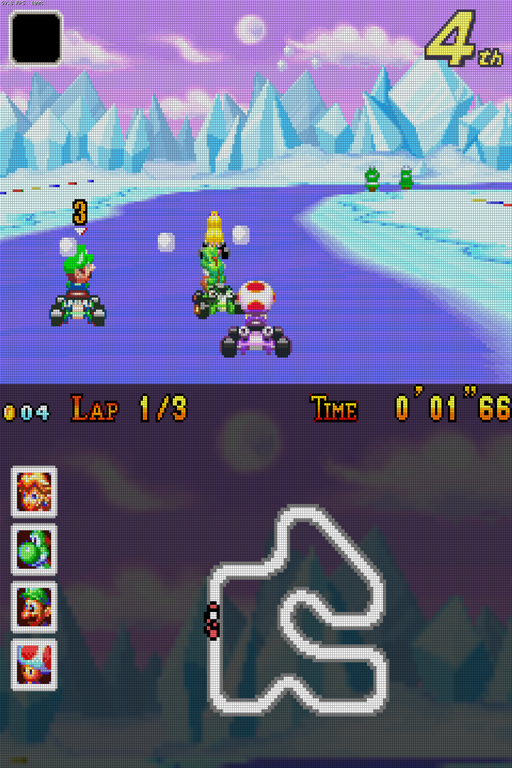
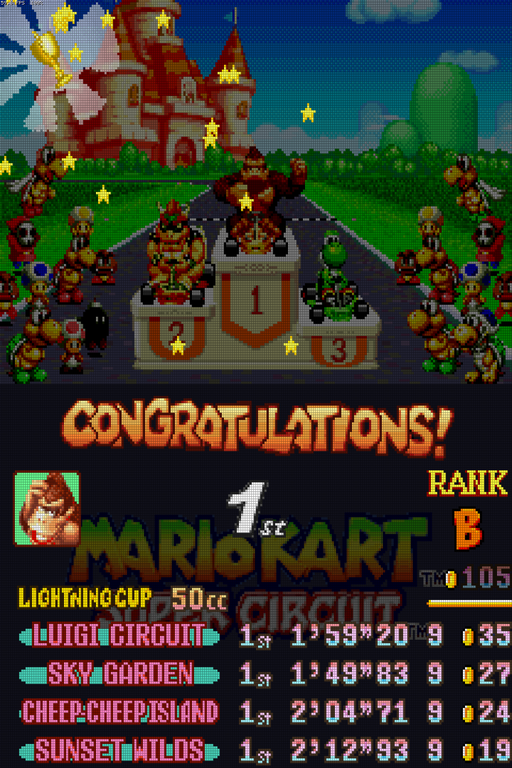
Mario Kart: Super Circuit (USA, Europe; Mario Kart Advance in Japan) now uses the second screen for its HUD.
- Racing: the whole HUD moves off the game screen, leaving it to the track and the karts.
- The item box sits in the game screen's top-left corner and your place in its top-right. The "turn ahead" signs stay where the game puts them.
- The second screen has the coins, lap and time along the top and the top-four faces centred down the left.
- In the middle is the course map with every racer's dot, twice as big (1.5× where a course's map wouldn't fit).
- Behind it all is a dimmed picture of the course's own sky and scenery.
- After the finish, the lap times and results show on the second screen.
- After a cup, CONGRATULATIONS!, the cup name, your portrait, place and the cup table move to the second screen over the game's dimmed logo. The podium and trophy stay on the game screen.
- In the menus, the second screen shows the game's logo. The game's pause menu stays on the game screen, with the last HUD below it.
Nothing behind the HUD is lost: each frame is drawn twice, once without the HUD for the game screen and once with only the HUD for the second screen.
Also new
- LCD grid on both screens: it now covers the second screen too, with the same cell size as the game screen.
- New wiki: the documentation has moved to the wiki, and has been expanded. It adds:
- a full [settings reference](https://github.com/kyannon/gba-ds/wiki/Settings);
- a [troubleshooting](https://github.com/kyannon/gba-ds/wiki/Troubleshooting) page;
- [setting up Android frontends](https://github.com/kyannon/gba-ds/wiki/Launching-from-Android-frontends) (GammaOS, Daijisho, ES-DE, with the intent arguments);
- the [ROCKNIX Ports icon](https://github.com/kyannon/gba-ds/wiki/Install-on-ROCKNIX#the-ports-icon);
- a guide to [adding second-screen support for a game](https://github.com/kyannon/gba-ds/wiki/Adding-second-screen-compatibility-for-a-game).
Install / upgrade
ROCKNIX: unzip gba-ds-v1.1.3-rocknix-aarch64.zip into /storage/roms/ports/, replacing the old files. Your save states, resume points, settings from the menu and RetroAchievements sign-in (all in gba-ds/states/) are kept. If you've edited gba-ds.cfg, keep a copy and put your changes back. Full guide: [Install on ROCKNIX](https://github.com/kyannon/gba-ds/wiki/Install-on-ROCKNIX).
Android: install gba-ds-v1.1.3-android.apk over the previous version; everything is kept. Full guide: [Install on Android](https://github.com/kyannon/gba-ds/wiki/Install-on-Android).
Checksums (SHA-256)
7b7356103012960704024dcbf8c3796371a6813604647409cecb8fc999dc0032  gba-ds-v1.1.3-rocknix-aarch64.zip
abda9d76ecf552c05f56d0f60290894ef6cf0d4d3bbd7f86ad48fe279a929f74  gba-ds-v1.1.3-android.apk
GBA DS 1.1.2
GBA DS v1.1.2: Improving GammaOS/Android performance
RetroAchievements on Android, a Frame Buffer option on both platforms, and smoother play.
What's new
-
RetroAchievements on Android (casual mode), as on ROCKNIX:
- Your progress and unlocks pop up on the second screen.
- The pause menu's Extras page has the Achievements list.
- To sign in, go to the game list's Settings → RetroAchievements: Sign In and enter your retroachievements.org username and password. GBA DS keeps a sign-in token, not your password.
-
Frame Buffer (pause menu → Game; both platforms, off by default). When it's on, GBA DS prepares the next frame while the current one is on screen. That smooths out the odd stutter, at the cost of one frame (about 17 ms) of input delay. GBA DS remembers the setting.
-
Android: start games from GammaOS's own launcher. Go to Game Systems → Game Boy Advance and set:
- Launch Type: Custom Package
- Package:
io.github.kyannon.gbads - Intent Template:
-n io.github.kyannon.gbads/.LauncherActivity -a android.intent.action.VIEW -d {file.uri}
GammaOS's default template doesn't pass the game along, so use this one.
-
Smoother play:
- Achievement popups no longer slow the game down.
- Text everywhere costs less to draw.
- On Android, the game no longer freezes for a moment when it saves, and frame times are steadier.
Install / upgrade
ROCKNIX: unzip gba-ds-v1.1.2-rocknix-aarch64.zip into /storage/roms/ports/, over the old gba-ds/ folder. Everything in gba-ds/states/ is kept:
- save states and resume points
- cheat choices and display settings
- your RetroAchievements sign-in
Battery saves stay next to your ROMs. Unzipping replaces gba-ds/gba-ds.cfg, so keep a copy first if you've edited it.
Android: install gba-ds-v1.1.2-android.apk over the previous version. Everything is kept.
Checksums (SHA-256)
6812a1ae2c06b37e88734f798862f27c30edd0d0223951221a56b89b580a22c9  gba-ds-v1.1.2-rocknix-aarch64.zip
36c583b0b6108273d7dcc96c09d744eca26eecc23d4ba139b68f891782e9c72b  gba-ds-v1.1.2-android.apk
GBA DS 1.1.1
GBA DS v1.1.1
RetroAchievements on ROCKNIX, a tidier pause menu and game list, two more scaling options, and all text in a new font.
What's new
- RetroAchievements (ROCKNIX, casual mode). GBA DS uses the account you signed in with in EmulationStation's RetroAchievements settings. When RetroAchievements is switched on there, GBA DS signs in by itself.
- Starting a game shows your progress for it on the second screen ("2 of 30 achievements unlocked").
- Unlocks pop up on the second screen too, with the badge and points, out of the game's way.
- Achievements in the pause menu (Extras page) lists the game's achievements. They're grouped as recently unlocked, almost there, locked and unlocked. Each has its badge, description and points, plus a progress bar for those that count something.
- Save states keep the achievements' progress with them, so loading an old state doesn't unlock anything by mistake.
- If the connection drops, the game plays on, and unlocks are sent once it's back.
- Hardcore mode isn't available yet. With hardcore on in EmulationStation, GBA DS still plays in casual mode.
retroachievements = 0ingba-ds.cfgturns it off.ra_usernameandra_passworduse a different account than EmulationStation's.- Not in the Android version yet.
- Game list as a list again. The game list shows one game per row, by name, as in earlier versions.
- The logo grid is still there. Tap the new button left of Settings, or press X, to switch. GBA DS remembers your choice.
- Names leave out tags like "(USA)" and "(En,Fr,De,Es,It)". When you have more than one regional copy of a game, its flag tells them apart.
name_tags = 1ingba-ds.cfgkeeps the tags.
- Pause menu: new Extras page. Cheats, Achievements and Take Screenshot move there. The Game page is now just playing, saving and closing.
- Two more scaling options (pause menu → Display → Scale):
- Zoom fills the screen height and keeps the picture's shape, cutting off its left and right edges.
- Stretch fills the whole screen.
- Map Refresh (pause menu → Display) sets how often the map updates: every 3, 1.5 (the default), 1 or 0.5 seconds. Faster keeps the map more up to date on devices with power to spare. It's also
map_intervalingba-ds.cfg. - New interface font. All text is drawn in Jost, an open-source font in the style of the old Futura menus. This includes the parts that used the small blocky font before: cheat names, game names, Settings help and on-screen messages.
Install / upgrade
ROCKNIX: unzip gba-ds-v1.1.1-rocknix-aarch64.zip into /storage/roms/ports/, over the old gba-ds/ folder.
- Kept: everything in
gba-ds/states/(save states, resume points, cheat choices and display settings), and the battery saves next to your ROMs. - Unzipping replaces
gba-ds/gba-ds.cfg, so keep a copy first if you've edited it. The new file includes theretroachievementsandname_tagsoptions. - For achievements, switch RetroAchievements on and sign in under EmulationStation's RetroAchievements settings.
Android: install gba-ds-v1.1.1-android.apk over v1.1. Everything is kept.
Checksums (SHA-256)
f591b5e356322c18cc0730e1197bf9ef9be5cc0c4dc053a39f6a4acb08fcba6b  gba-ds-v1.1.1-rocknix-aarch64.zip
57aded16b302e8f9c966bf7f2a6c5a495d5e9dcc3d2a4dce3f82564a11a4d95e  gba-ds-v1.1.1-android.apk
GBA DS 1.1
GBA DS v1.1
GBA DS now runs on Android too, and works on stock ROCKNIX as well as ROCKNIXDS.
What's new
- Android version (
gba-ds-v1.1-android.apk), first tested on the RG DS Plus with GammaOS. It works as on ROCKNIX:- The game plays on the top screen. The map or logo, the pause menu and the game list are on the bottom touchscreen.
- Map capture, cheats and the Tony Hawk goal sheet and Controls picker all work.
- Android keeps HOME for itself, so SELECT + START (pressed together) or BACK opens the pause menu.
- The game list reads
ROMs/gbaon the internal storage. Its Settings has ROM Folder to pick another folder. - Save states, cheats (
.cht), overlays, your own logos and screenshots live in aGBA DSfolder on the internal storage, laid out like the ROCKNIX install folder. - The resume point is saved whenever you leave GBA DS for another app, since Android may close apps in the background.
- Experimental, not yet tested on a device: starting games from frontends (ES-DE, Daijisho; setup in the README), and the pause menu opening when you come back to GBA DS from the home screen or the app switcher.
- Works on stock ROCKNIX. Stock ROCKNIX keeps the second screen switched off and the touchscreen tied to the top one, so the bottom screen stayed dark (taps still reached the hidden menus). GBA DS now switches the bottom screen on and lines up the screens and touchscreen while it runs. It puts everything back the way it was when it closes. This covers games started from EmulationStation's Game Boy Advance list too (game list → Settings → GBA DS in EmulationStation, added in v1.0.3). ROCKNIXDS keeps working as before.
- New option
menu_combo = select+startingba-ds.cfg: pressing SELECT and START together opens the pause menu, and the game doesn't see either button. It's off by default on ROCKNIX.
Fixes
- Game list: a folder that appears twice in
rom_dir(or through a link) is only listed once.
Install / upgrade
ROCKNIX: unzip gba-ds-v1.1-rocknix-aarch64.zip into /storage/roms/ports/, over the old gba-ds/ folder. Save states, resume points, cheat choices and pause-menu display settings (all in gba-ds/states/) are kept, and battery saves stay next to your ROMs. Unzipping replaces gba-ds/gba-ds.cfg, so keep a copy first if you've edited it. If you switched on GBA DS in EmulationStation, it stays on; nothing to redo.
Android: install gba-ds-v1.1-android.apk (allow installing from your browser or file manager when Android asks). On first start, switch on All files access when GBA DS asks, then go back. Put your ROMs in ROMs/gba on the internal storage, or pick a folder in the game list's Settings → ROM Folder. Later versions install over this one and keep everything.
Checksums (SHA-256)
153bb2369fe9f66cfb0db0434e042c233fcfc49cb333e9cfc2a62fabc4c69d32  gba-ds-v1.1-rocknix-aarch64.zip
60cd33783248b7f8d9ffe9781967465fdd51409b3cb273377b6f5f5368a0a94c  gba-ds-v1.1-android.apk
GBA DS 1.0.3
What's new
-
Tony Hawk's Pro Skater 2 joins the game list: USA/Europe, France, Germany, and SK8 for Japan. The goal sheet shown before a run (Free Skate or Single Session rules, or the career level's checklist with its scratch-outs and ticks) is copied to the second screen. The CAREER / CASH counters and button prompts are left off it. The sheet stays up for the whole run, through pauses and Retry. At the menus the second screen shows the game's logo.
-
Four-button controls for Tony Hawk's Pro Skater 2. A Controls picker on the second screen (touch) chooses between three layouts:
- GBA: the game's own buttons.
- Four buttons, like the console games: top grind, bottom ollie, left flip, right grab.
- Auto: four buttons while you're skating, and the GBA layout in menus, pause and results, so A and B work as the game expects there.
The choice is remembered per game.
-
Launch games straight from EmulationStation. The game list has a new Settings screen (press SELECT, or tap Settings at the top right). Its GBA DS in EmulationStation setting adds GBA DS to EmulationStation's emulators for Game Boy Advance. After restarting EmulationStation, you can pick GBA DS for one game (Advanced game options → Emulator) or for the whole system. Your other GBA emulators keep working as before. Switching the setting off removes the change. The README's "Launching games from EmulationStation" section has the details.
-
Zipped ROMs:
.zipand.7zfiles work, both in the game list and when launched directly. The first GBA ROM inside the archive is used. Saves and states are named after the file, soGame.zipand an unzippedGame.gbashare them. -
Game list: French and German flags, shown when you have more than one region of a game.
Install / upgrade
Unzip gba-ds-v1.0.3-rocknix-aarch64.zip into /storage/roms/ports/ (over an older version is fine) and launch GBA DS from Ports. Saves, states, cheat choices and pause-menu display settings are kept. Unzipping replaces gba-ds/gba-ds.cfg, so keep a copy first if you've edited it.
The first time the game list opens after upgrading, Tony Hawk's Pro Skater 2's logo is extracted in the background, like other games' logos on first run.
SHA-256: 7148bdfbd5f6d9dd34bd10f238ecec7a60766f3966439baec59f03ec5ba058c5
GBA DS 1.0.2
What's new
- Take Screenshot on the pause menu's Game page. It saves both screens exactly as displayed (scaling, LCD grid, overlays, screen order), stacked top to bottom in one PNG, to
/storage/roms/screenshots. - Tidier Metroid maps. The scroll arrows and play-time clock are left out of both games' map screens. In Zero Mission, the corner minimap and its A button give way to the map underneath, and the "SELECT / CHANGE AREAS" prompt is covered by a raised piece of the bezel. In Fusion, the "A OBJECTIVE" prompt and the row of ticked item icons along the top are left out, so the rooms underneath show.
- Both Metroid games are now marked working.
Fixes
- The map no longer dims in the Metroid and Castlevania games when a map refresh misses, for example while running through rooms quickly. Only A Link to the Past still dims it, where L really has no map to show.
- Fusion: on a well-explored map, the area under the "A OBJECTIVE" prompt no longer shows scraps of other rooms.
Install / upgrade
Unzip gba-ds-v1.0.2-rocknix-aarch64.zip into /storage/roms/ports/ (over an older version is fine) and launch GBA DS from Ports. Saves, states, cheat choices and pause-menu display settings are kept. Unzipping replaces gba-ds/gba-ds.cfg, so keep a copy first if you've edited it.
SHA-256: bac546a42e2ec09a99b09c6f4008b88b332506da7f99dbcd8436bec47851f68a
GBA DS 1.0.1
What's new
- Cheats. GBA DS now reads RetroArch
.chtcheat files (Code Breaker, GameShark, Action Replay) from RetroArch's cheats folder. A new Cheats screen on the pause menu's Game page lists them with an On/Off switch each, and your choices are remembered per game. Cheat files for another region aren't offered. See the README's Cheats section. - European and Japanese releases of all six supported games now work: the live map, the title logo and the Castlevania borders.
- Region flags in the game list, shown only when you have the same game from more than one region.
- Map Animations option (pause menu → Display). Off shows a still map instead of blinking or pulsing markers. Each marker is frozen where it's most visible, and the still map only changes when the map itself does.
Fixes
- Title logos are extracted correctly for games that don't rewrite their display settings every frame (Circle of the Moon JP was blank).
Install / upgrade
Unzip gba-ds-v1.0.1-rocknix-aarch64.zip into /storage/roms/ports/ (over v1.0 is fine) and launch GBA DS from Ports. Saves, states and your pause-menu display choices are kept. Unzipping replaces gba-ds/gba-ds.cfg, so if you edited it, keep a copy first.
SHA-256: a0732e13c549279cc9cf38d84373e2d7b59fa37e9185ee8a54f0466952d7b9e8
GBA DS 1.0
First release. GBA DS is a Game Boy Advance emulator for dual-screen handhelds (built for the Anbernic RG DS Plus on ROCKNIX) that keeps the game's own map on the second screen, the way the DS Castlevanias do.
Games with a live map
- Castlevania: Aria of Sorrow, Harmony of Dissonance, Circle of the Moon (USA). Circle of the Moon also shows its completion rate, copied from the pause screen.
- Metroid: Zero Mission and Metroid Fusion (USA): the whole pause screen with its frame, lettering and button prompts erased, and the HUD mini-map hidden.
- The Legend of Zelda: A Link to the Past (USA): the zoomed-out world map outdoors, dungeon maps once you have them; dimmed where no map is available. Four Swords is left off the list (it needs linked GBAs).
- Every other GBA game plays normally on one screen.
App
- Game list of logo tiles pulled from each ROM; touch or D-pad.
- Pause menu (tap the screen or HOME): save / load state, restart, swap screens, scaling (pixel perfect / full width / stretch), LCD grid, overlays, FPS counter.
- Automatic resume: leaving a game saves where you were.
- Overlays: generated map surrounds, plus your own PNGs for the primary (game) and secondary (map) screens, per game or for every game.
- Everything game-specific (logos, map borders) is extracted from your ROMs; no game art is shipped.
Install: unzip gba-ds-v1.0-rocknix-aarch64.zip into /storage/roms/ports/, keep unzipped .gba ROMs in /storage/roms/gba/, and launch GBA DS from Ports. See the README for details and for upgrading from the old gbadual builds.
SHA-256 fc22e79dbcc0b9672b8cc381e8c13099a371286e149a2c16a65419edbcb02ffb