3. Moderation Commands
Do keep your server properly moderated with Forseti you can add individual strike rules for your server
Use /add-strike-rule [strike-number] (OPT: [time] [result=mute] [result=ban] [result=permanent-ban]) to add a single strike rule to your server
-
[strike-number]specifies the punishment at the given amount of strikes -
[time]specifies the time of a user being muted or banned in the format of[t] min/h/d/w/mo/ywith minutes(min), hours(h), days(d), weeks(w), months(mo) and years(y). This can be left empty, the default is0 -
[result=mute]specifies if the strike results in a mute. This can be left empty, the default isfalse -
[result=ban]specifies if the strike results in a temporary ban. This can be left empty, the default isfalse -
[result=permanent-ban]specifies if the strike results in a permanent ban. This can be left empty, the default isfalse
IMPORTANT RULES
- You cannot jump the number of strikes, each next strike punishment has to be one higher than the before.
- You can add a strike without a time, once you have entered a rule with a time this option is disabled.
- With increasing strikes, the time has to be higher than in the rule before.
- If you enter a time you have to choose mute, ban, or permanent ban to be true.
- You can only choose either mute, ban, or permanent ban to be true.
- If you select permanent ban to be true, you cannot set any time.
A collection of allowed strike rules:
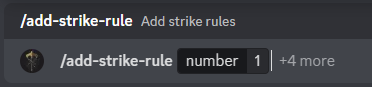



Strikes 3 & 4 are missing, but have the same look as in the 2nd screenshot
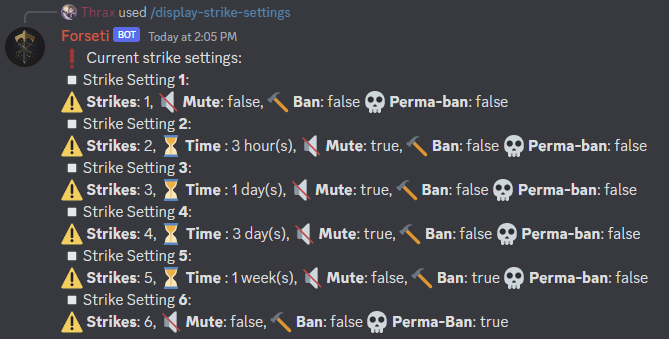
If you are not sure which settings you have already added, you can simply get a list of your current settings.
Sometimes it can happen that you have set the wrong time, or a strike should results in a mute instead of a ban even though you wanted the opposite. In this case, you sadly have to delete all strike settings for now. A feature deleting a specific rule might be added in the future!
If you want to check again which settings you currently have for your server, simply type /display-strike-rules and you will get a handy list with information about each setting with strike amount, mute or ban time, and permanent ban status.
Example:
Mistakes happen, or you maybe even want to change your strike rules. If that's the case you can start anew by deleting your settings with /delete-strike-settings
Keep in mind that this will delete ALL of your settings, not just a single rule.
It happens that a user misbehaves, intentionally or not, but some actions have consequences, especially when they are harmful to your hard-built-up server, community, and other users.
Once you have set strike rules you can strike up to 5 users with /strike [reason] [@user1] (OPT: [@user 4x] [strike number]).
You can strike from any possible text channel, forum post, or thread.
-
[reason]State your reason here why the user is getting banned. This is the reason Forseti will log into your log channel and DM it to the struck user -
[@user]Select up to 5 users you want to strike here, you can either @ them or simply use their Discord IDs -
[strike number]Optionally you can select the number of strikes you want to hand out. If not stated, Forseti will deal out one single strike by default
Example:

You cannot strike any users with Discord admin rights, that you have specified to use the moderation tools of Forseti, and Forseti itself You are also not allowed to mention a user twice.
Sometimes you just don't want to hand out a strike, maybe another person's account got compromised and they have temporarily no access.
In those situations, you can use /mute [reason] [@user] to mute them for an indefinite time until they get in contact with you that they have recovered access to the account.
-
[reason]State your reason for the mute here. This is the reason Forseti will log into your log channel and DM it to the muted user -
[@user]The user you want to mute. As with /strike, you can simply @ them or just use the Discord ID.
Example:

For now only a single user can be muted at a time. Since this is a fairly rare command to be executed I left away more extensive coding for muting more than one user at a time. The mute is indefinite, the bot will NEVER automatically unmute a user. Use /unmute for that
If the time is ready and you want to unmute the user, use /unmute [reason] [@user].
The additional fields are identical to /mute.
If you have struck a user falsely and they got muted and you decided to use /pardon, don't forget to use /unmute so they can talk in your server again!
Sometimes you directly want to ban a user without handing out strikes first.
In this case, you want to use /ban [reason] [@user] to ban a user infinitely from your server with the given reason.
-
[reason]State your reason for the ban here. This is the reason Forseti will log into your log channel and DM it to the banned user -
[@user]The user you want to ban. As with /strike, you can simply @ them or just use the Discord ID.
Example:
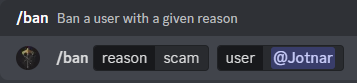
As with /mute, this is a rare-used command and therefore you can only ban one user at a time. If you want to ban multiple users at once, use /strike and give them the number of strikes that would lead to a permanent ban.
A more rarely used command is /silentban [reason] [@user].
You can use this one to ban a user without Forseti sending them the ban reason.
If a user has appealed to you with good reason, they have been banned for a false reason, or they have changed and you want to give them another chance, you can use /unban [reason] [@user] to unban them from your server so they can join again.
The optional fields are the same as for /ban.
If you have struck a user falsely and they got banned and you decided to use /pardon, don't forget to use /unban so they can join your server again!
It happens that in the heat, especially when a lot of users are writing rapidly, you accidentally strike a user that is innocent.
To undo your mistake easily, you can use /pardon [reason] [@user] (OPT: [strike amount] to remove strikes from the person.
-
[reason]State your reason for the pardon here. This is the reason Forseti will log into your log channel and DM it to the pardoned user -
[@user]The user you want to pardon strikes from. As with /strike, you can simply @ them or just use the Discord ID. -
[strike number]Optionally you can select the number of strikes you want to pardon. If not stated, Forseti will pardon one single strike by default
Example:

Beware that you can only maximally pardon as many strikes as the person has.
Now that we've punished our first user, you will see that Forseit logs all strike activity thoroughly in your previously selected log channel.
When you use the bot often, you will see several icons being displayed, here's a quick overview:
Every log will begin with the time in the following format uuuu/mm/dd HH:mm:ss
After that there are several icons indicating what has been logged:
-
⚠️= Strike -
🔇= Muted -
🔊= Unmuted -
🔨= Banned -
🩹= Unbanned -
❤️= Pardoned -
📖= Message cleared
Furthermore, you will also see the person who struck, banned, unbanned, muted, or unmuted the user, and of course, the user who has been punished, always with Name and Discord ID.
In the second line, the time of the mute or ban will be displayed. If the strike does not result in a mute or ban, or the user has been muted/unmuted or banned/unbanned with the respective slash commands it will display the reason.
With every strike, Forseti will also display the old and the new amount of strikes of that user.
Here is an example log:
