Releases: lexasoft123/qc-mcp
Release list
Patchbay 0.1.4 — 简体中文, and Codex is a client now

Patchbay speaks Simplified Chinese, and it registers Codex. Both came from one
report, #14: a Quad Cortex
owner reading the app through Google Translate, connecting it to Codex, and
finding the registration "a little confusing" — for a reason that turned out
to be real.
This is an app-only release: qc_mcp, the daemon and the protocol are
identical to 0.1.3.
简体中文
- It follows the system. A Mac or PC set to Simplified Chinese gets a
Chinese Patchbay on first launch, with nothing to find first. The machine's
preferred-language list is walked in order and the first language Patchbay
speaks wins, so a Chinese reader whose OS happens to be English second still
gets Chinese. - Preferences opens with a language switcher — the first group in the
dialog, on purpose. Each language is listed by its own name with a flag, and
a System entry says which language it currently resolves to. - Everything switches at once. Not only the views: the Setup checklist, the
progress lines during an install, the daemon's errors, the leveling bench's
errors, the file dialogs and the update messages all come from the same
dictionary, in both processes, so a toast reads in the language of the button
that raised it. - Traditional Chinese (
zh-TW,zh-HK) is deliberately not mapped onto the
Simplified translation. It is one click away in the switcher, but nobody is
handed it. - Chinese text gets an explicit font stack — PingFang on macOS, Microsoft YaHei
on Windows — because the app's display face has no Han glyphs and the fallback
Chromium picks on its own is a serif on some Windows machines.
The translation is in
app/src/shared/i18n/zh-CN.ts,
typed against the English so a missing string fails the build rather than
showing up in English on a Chinese screen. Corrections are welcome as issues
or pull requests, in either language. There is a Chinese onboarding guide too:
app/README.zh-CN.md.
Codex
Codex was never a registration target — its MCP config is TOML, in
~/.codex/config.toml, not the JSON every other client uses. That is why its
setup felt incomplete: it was.
- Patchbay now writes the
[mcp_servers.quad-cortex]table there itself, and
touches nothing else in the file — a small one-table editor rather than a
TOML library, so comments, ordering and every other byte survive. - An entry from before the daemon (no
--attach, so it opens the device itself
and fails while the daemon holds it) is detected for Codex the same way it is
for the JSON clients, and Re-point fixes it. - Manage clients… now says, for every client you tick, what it does with
the entry after Apply and how to confirm it — new sessions, a restart, a
settings page,claude mcp list,codex mcp list— and shows the TOML
snippet beside the JSON one for anything set up by hand.
Also
- @singz/ui 1.5.0, which is where
the switcher lives: aLanguageSwitcherthat carries no strings and draws no
flags of its own, and aModalthat lets an open menu inside it take Escape
first instead of closing the whole dialog underneath. - Chromium's own locale packs for Chinese ship alongside English, so anything
Chromium draws by itself follows too.
Windows
Still unsigned: SmartScreen asks on first run, More info → Run anyway.
The installer the updater downloads is the same.
The Chinese interface has not been looked at on Windows hardware yet. The
font stack names Microsoft YaHei for it and the flags are SVG rather than emoji
precisely because Windows draws emoji flags as two letters — but if something is
off there, that is where to look first, and a screenshot in #14 would be
welcome.
Verified
The built app driven under Playwright on macOS: the switcher by mouse and by
keyboard, Escape closing the menu and leaving Preferences open, every view in
Chinese, and back to System. The Console correctly flagged a real
~/.codex/config.toml entry that lacked --attach.
The locale rules, the dictionaries' completeness and placeholders, and the TOML
table editor have unit tests, and CI runs them.
Patchbay 0.1.3 — it tells you when there is a new one
Patchbay checks for its own updates now. On Windows it installs them; on macOS
it hands you the download. Either way nothing happens without you pressing
something.
This is an app-only release: qc_mcp, the daemon and the protocol are
identical to 0.1.2.
What it does
- A check every six hours, and once three seconds after launch. It asks
GitHub for the newest release and compares it with the version you are
running. A release candidate is never offered — those are published as
prereleases and the check skips them. - A chip in the rail when there is something newer, and only then. A check
that finds nothing, or fails, says so in Preferences rather than putting a
button in the corner of your window. - Windows installs it. The installer downloads in the background and goes in
the next time you quit Patchbay — or immediately, from Restart to update,
which puts the app back when it is done. - macOS opens the release page and you install the dmg yourself. Not a
signing question: the dmg is Developer ID-signed and notarized, has been since
0.1.1. It is packaging. In-place updates on macOS install from azipfeed and
Patchbay ships admg, so giving it one means a third artifact through
Apple's notary queue on every release. That is its own piece of work. - Preferences has the switch that turns the automatic check off, a Check
now that ignores the switch, and the result of the last check in words.
Turning the switch off also clears the chip.
The last one you install by hand
0.1.2 has no updater in it, so it cannot tell you about this release — you are
reading these notes because you came looking. Install 0.1.3 the usual way and
that is the last time on Windows; from here the app does it.
macOS keeps handing you the dmg, by design, but at least it will now tell you
there is one.
Also
The version in the bottom-right corner said 0.1.0 for three releases. It was
hardcoded. It reads the running version now, which is the same number the update
check compares against — one version, not two that can drift apart.
Windows
Still unsigned: SmartScreen asks on first run, More info → Run anyway.
The same is true of the installer the updater downloads for you.
Worth being plain about what that means. The update is fetched over HTTPS from
this repository's releases and checked against the SHA-512 recorded in the
release's latest.yml, so a corrupted or swapped file is rejected. What is
missing is an Authenticode signature — there is no publisher certificate to
verify it against, because the build does not have one. That is unchanged from
installing the exe by hand; it is not something the updater weakens.
Verified
The Windows path was exercised end to end on real hardware rather than
reasoned about: a 0.1.2 installed from its own installer, a 0.1.3 served from a
local feed, and the app left to find it. It read the feed, tried a differential
download, fell back to the full installer when the older block map was not
there, reported itself ready, and on Restart to update installed 0.1.3 and
came back — the registry's recorded version moving 0.1.2 → 0.1.3 at the end of
it.
Pointed at this repository while the newest release was 0.1.2 — which carries
no update metadata, being older than the updater — the check fails, and that is
what Preferences reports. From this release on, the metadata is there.
The version comparison and the check that a release URL is really GitHub over
https now have unit tests, and CI runs them.
Patchbay 0.1.2 — Leveling: balance a setlist without walking the rig
A new Leveling view. Park the presets you want to balance on one strip and
Patchbay loads them on the device one at a time, so the arrow keys A/B them
without touching the hardware — and it remembers the scene each preset was left
on.
This answers a Neural DSP Unity request for the Quad Cortex equivalent of
Fractal's preset leveling tool.
What it does
- The knob moves the lane output block — the level stored in the preset,
so a save makes the balance permanent. Nothing global, nothing that lives
outside the preset file. - A preset with several output lanes moves as a unit and keeps the balance
between them. An internal merge bus is listed but left alone: trimming it as
well as the row it feeds would apply the same change twice. Each lane also has
its own ±0.5 dB trim. - Meters are the device's own
IOMeterstream, converted from the linear
amplitude the QC sends onto the −40…+12 dB scale Cortex Control uses, with a
per-preset peak hold so you can compare a column you are not standing on. - Levels are written as you turn and read back afterwards, so the number on
screen is the device's, never an optimistic guess. ⌘Ssaves. Auto-save writes every change straight into the preset file
and is off by default — this edits real presets.
Scenes are remembered per slot, but only once you pick one: a preset you have
not visited keeps whatever scene it loads with, rather than being pulled to A.
Under it
qc-mcp --leveling is the device half — one more client attached to the daemon,
so Cortex Control and Claude keep working alongside it.
The lane output range is now calibrated. ModelRepo.xml leaves some
parameter bounds as symbolic names the app resolves internally, so those
parameters had no display conversion at all. Measured against Cortex Control:
a stored 0.5 reads −14.0 dB and the untouched default 0.769230783 is 0 dB,
which fits −40…+12 dB exactly. Every parameter using those bounds converts
properly now.
Fixes
autowas reported as a bridge session. Every mode-dependent view
branched on the preference, so a healthy direct session was told to open
Cortex Control and described itself as a bridge. Patchbay now reads what the
daemon actually opened.- A dead session is noticed. Unplugging the Quad Cortex invalidates the
daemon's handle, and quitting Cortex Control takes a bridge session with it —
either way it kept running and looking healthy while every call failed. The
session is now retired so it can be reopened. - "Direct" was missing from Preferences. It was drawn, then clipped: the
segmented control isoverflow: hiddenfor its pill shape and was allowed to
shrink in the narrower card. - A directory read reported the wrong slot. A whole-folder read leaves every
file'sindexat 0 — the slot is the file's position in the array. This is
whylist_empty_slotscould offer a slot that already held a named preset.
Windows
Unchanged and still unsigned: SmartScreen asks, More info → Run anyway.
The Leveling view is built for Windows the same as macOS — it rides the daemon's
loopback socket rather than the macOS bridge, and its surfaces stay blur-free
there. It has not been exercised on Windows hardware; if something is off,
that is where to look first.
Patchbay 0.1.1 — signed and notarized on macOS
The macOS build is now signed with a Developer ID certificate and notarized by
Apple. Double-click the .dmg and it opens: no "unidentified developer", no
right-click → Open, no Gatekeeper detour.
That is the whole release. There are no functional changes — the app, the
daemon and the protocol are identical to 0.1.0.
What changed
- Developer ID signing + Apple notarization for both macOS architectures,
under Hardened Runtime with a secure timestamp, and the notarization ticket
is stapled to the app — so it validates offline, on a machine that has
never seen Apple's notary service. - The vendored
uvinside the bundle carries the same signature. It is not
along for the ride; it is covered.
Verified the way you actually receive it rather than from a build log: the
published .dmg was downloaded, flagged with the quarantine attribute Safari
sets, mounted, and put to Gatekeeper — accepted, source=Notarized Developer ID, on both mac-arm64 and mac-x64.
Windows is unchanged, and still unsigned
The .exe has no Authenticode certificate, so SmartScreen still asks: More
info → Run anyway. Nothing in this release affects Windows.
A note on the dmg itself
If you check the .dmg container with spctl, it reports rejected / no usable signature. That is expected and correct — the notarization ticket is
stapled to the .app inside it, which is what Gatekeeper assesses when you
launch. Most shipping macOS dmgs behave the same way.
Patchbay 0.1.0 — the launcher, and a daemon that shares the device
This is the first release of Patchbay, the desktop app for
qc-mcp, plus the daemon that makes it
work. Ask Claude for a tone and it builds it on your Quad Cortex.
What's in it
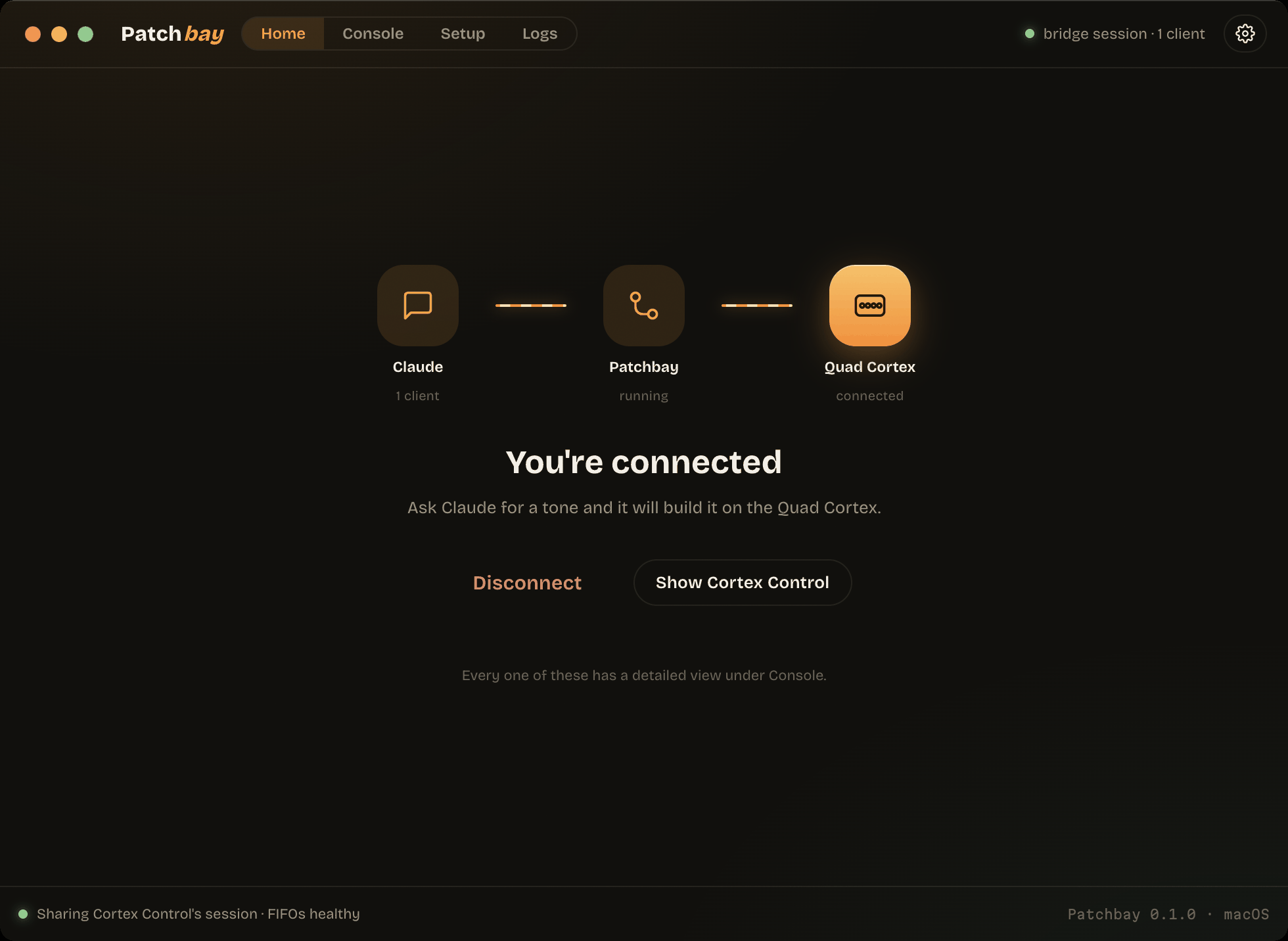
- One button. Home shows the signal path — Claude → Patchbay → Quad Cortex —
with each hop lit only when it is really live. Connect runs whatever is
missing, in order. - It brings its own Python. No prerequisites: the installer ships
uv,
which fetches CPython 3.12 and builds the environment in about eight seconds.
macOS's/usr/bin/python3is 3.9.6 and Windows has none, so this is the
difference between "it works" and "go install Python first". - A daemon that shares the device. One process owns the Quad Cortex and fans
device→host reports to every attached MCP client, each with a disjoint
request_idrange. Claude Code, Claude Desktop, Cursor and VS Code can all be
attached at once. - Use Cortex Control at the same time. On macOS a DYLD interposer rides the
app's own HID session; on Windows the daemon opens a second, non-exclusive
handle. Your installed Cortex Control is never modified — the instrumented
build is a local copy. - Setup that measures. Seven probes on macOS, five on Windows, each a real
check rather than a stored flag. It never asks for your password.
Install
- macOS —
Patchbay-0.1.0-mac-arm64.dmg(Apple silicon) or
Patchbay-0.1.0-mac-x64.dmg(Intel). Right-click → Open on first launch. - Windows —
Patchbay-0.1.0-win-x64.exe. More info → Run anyway.
Neither is signed with a paid certificate yet. The macOS bundle is ad-hoc
signed, so you get "unidentified developer" rather than "damaged".
Requires a Quad Cortex on USB and Cortex Control installed (CorOS 4.0 or 4.1).
Verified on hardware
Both platforms were run against a real Quad Cortex on CorOS 4.1.0, not inferred:
bridge mode on macOS sharing Cortex Control's live session, shared mode on
Windows 10 beside the running app, two concurrent clients reading the same live
preset through the daemon on each, and the full offline suite (38 tests) green
on both.
Known limitations
- No code signing on either platform, and no auto-update.
- macOS bridge mode depends on the instrumented copy staying up; it is a
re-signed local copy of a third-party app and can be less stable than the
original. Direct mode is unaffected. - Linux is not supported — there is no HID backend for it.
Unofficial, and not affiliated with Neural DSP. Built by inspecting a device I
own; see PROTOCOL.md.