Repository navigation
Osmo Client 1.6.0

Multiview, and the Osmo Pocket 3 tested with a real camera.
Unofficial and independent: not affiliated with, endorsed or sponsored by DJI.
New
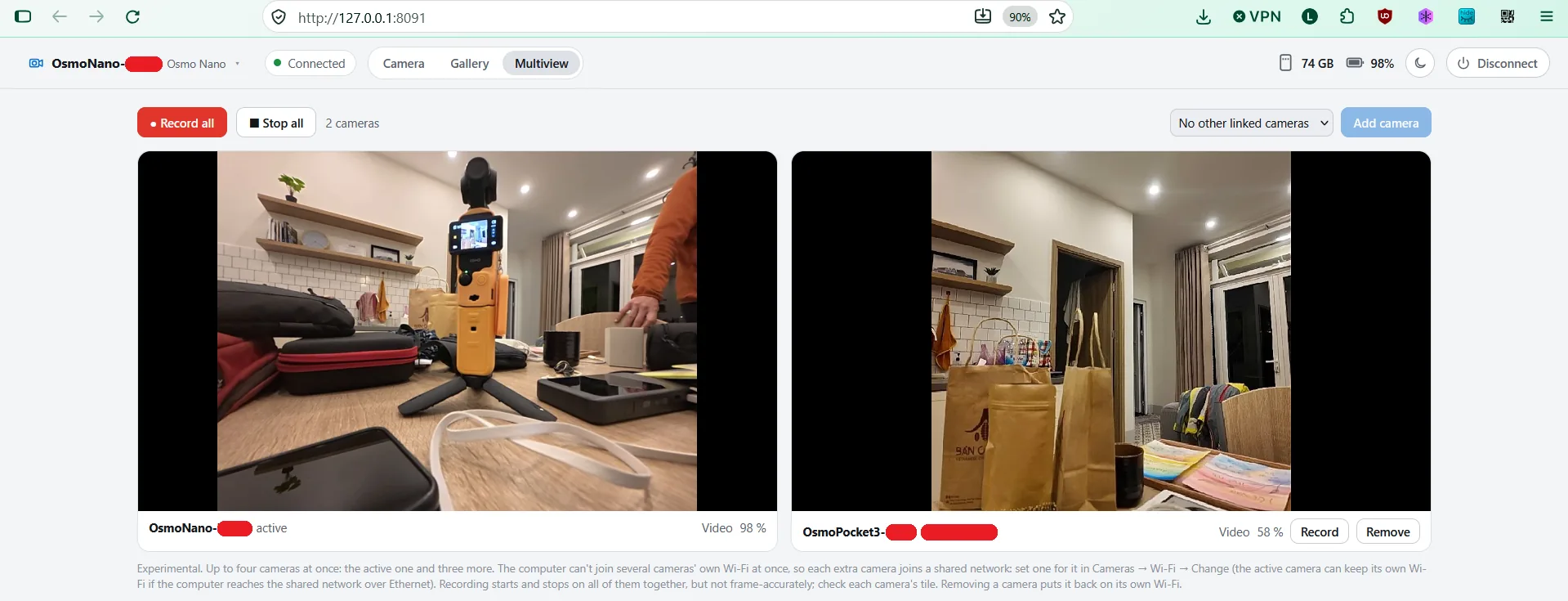
- Multiview (experimental): up to four cameras side by side: the active one and up to three more that join a shared Wi-Fi network (set one per camera under Cameras → Wi-Fi → Change). Each tile shows its live picture, recording state and battery. Record or stop one camera, or all of them at once (one command, confirmed by each camera; not frame-accurate sync). Remove, Disconnect or quitting puts each camera back on its own Wi-Fi. Tested with an Osmo Pocket 3 and an Osmo Nano.
- Osmo Pocket 3, tested with a real camera:
- Its own format choices (it has no 4:3): 4K, 2.7K and 1080p in 16:9, or 1:1 in 1080p, 2160p and 3K, at 24–60 fps; Low-Light in 4K or 1080p at 24–30 fps; slow motion 4K 100/120, 2.7K 120, 1080p 120/240 fps; photos 16:9 or 1:1; color Normal, HLG or D-Log M. Each of them was set on the camera and accepted.
- Gallery: browse, preview and download its files (from the microSD), with sharp thumbnails made from the camera's 720-pixel previews.
- The Gimbal & zoom card shows when the camera faces you and its Selfie Flip setting. Low-Light mode is called by its name.
- Mirror (next to the picture tools, key
M): flips the picture left to right on the computer only; the camera records as it is. Remembered per camera, also in Multiview and in saved stills.
Fixed
- Switching between two cameras on their own Wi-Fi kept showing the first one: every Osmo uses the same addresses, so the app took the computer for already being on the second camera's network. It now checks the network's name. On Windows 11 without location access the name comes from Windows' network list, so Disconnect now also puts the computer back on its usual Wi-Fi there.
- Disconnect releases every camera, the Multiview ones too.
- One copy of the app at a time (Windows): a second Osmo Client could start without any error and fight the first one over the camera. It now says the app is already running and stops.
- The format menus follow the active camera when you switch cameras.
Good to know (Osmo Pocket 3)
- It only sends its files over its own Wi-Fi. On a shared network the gallery lists them but can't show thumbnails or download, and offers to switch the camera back to its own Wi-Fi.
- The gallery lists the camera's newest files (up to 45) for now; cards with more files are not tested yet.
- Facing you, the camera may mirror its picture in some capture modes and not in others (its Selfie Flip setting): use Mirror to set the view you prefer. An automatic fix is being worked on.
- The Osmo Pocket 4 and 4P are still not tested with a real camera: if you have one, please open an issue with what works and what doesn't (the console output helps).
Install
See the README.