Repository navigation
Releases: luisreysan/osmo-client
Release list
Osmo Client 1.6.5

The Osmo Action 4 gets menus of its own, from its manual and a user's camera reports (thanks, @stvdrag225!).
Unofficial and independent: not affiliated with, endorsed or sponsored by DJI.
New
- Osmo Action 4 formats: in Video, 4K, 2.7K and 1080p 16:9 and 4K and 2.7K 4:3 at 24-60 fps, plus 100 and 120 fps at 4K and 2.7K 16:9 and up to 240 fps at 1080p; Low-Light 24-30 fps, Timelapse 25 and 30, Hyperlapse 30, Slow-mo 4K, 2.7K and 1080p at 120 fps and 1080p at 240 fps. The rates above 60 fps in Video come from the camera's manual and are not checked on a camera yet.
- Osmo Action 4 photos: 4:3 or 16:9 (one size, about 10 MP), instead of the Osmo Nano's sizes, which it refuses.
Install
See the README.
Contributors

Assets 2
Osmo Client 1.6.4
The Osmo Action 4 is tested, and its video format can be changed in Video mode. From a user's tests of 1.6.3 on a Raspberry Pi 4 with Linux (thanks, @stvdrag225!).
Unofficial and independent: not affiliated with, endorsed or sponsored by DJI.
Tested
- Osmo Action 4: live view (H.265), recording, photos, switching capture modes, status and gallery, on a Raspberry Pi 4 with Linux. It publishes no list of its formats, so the format menus are the Osmo Nano's for now: its 16:9 formats work in Low-Light, Timelapse, Hyperlapse and Slow-mo; the photo sizes don't yet.
Fixed
- Osmo Action 4: the video format could not be changed in Video mode. The app first set the sensor's aspect ratio, a step the Osmo Nano needs and the Action 4 refuses, and gave up there. It now sends the Action 4 the format directly.
Install
See the README.
Contributors
Assets 2
Osmo Client 1.6.3
The Osmo Action 4's live view, and a cleaner stop and Bluetooth recovery on Linux. From a tester's report with a recording of the camera's stream (thanks, @stvdrag225!).
Unofficial and independent: not affiliated with, endorsed or sponsored by DJI.
Fixed
- Osmo Action 4: no picture, the live view restarting in a loop ("a picture arrived incomplete"). The Action 4 starts each picture with a shorter header than the Osmo Nano and Pocket 3, and the app cut the start of every picture. It now reads the header's length from the camera. The Action 4's live view is H.265, 1280×720 at 25 fps. Checked against the tester's recording: every picture decodes, in one steady session.
- Action series after a reconnect: like the Osmo Pocket 3, the Action 4 refreshes its picture gradually, so a new connection joins its running stream when no keyframe comes, and the picture builds up within a second or two.
- Linux and macOS:
killstops the app cleanly, like Ctrl+C: the camera's Bluetooth link closes and the computer's Wi-Fi goes back to its own network. - Linux: camera "not found over Bluetooth" after the app was killed. BlueZ kept the camera's Bluetooth link, so the camera stopped advertising until
bluetoothctl disconnect. The app now drops that link itself and searches again.
Install
See the README.
Contributors
Assets 2
Osmo Client 1.6.2
Steadier Multiview with two cameras on a shared Wi-Fi network, Osmo Pocket 3 live view and gallery fixes, and a Record button and capture-mode menu on every Multiview tile. Found and tested with a real Osmo Nano and Osmo Pocket 3 streaming side by side.
Unofficial and independent: not affiliated with, endorsed or sponsored by DJI.
Fixed
- A Multiview camera froze while still showing as connected. With two cameras on one network, a command packet occasionally gets lost, and the camera then ignored every later command (an Osmo Pocket stops its video about 10 s after it last hears from the app). Lost commands are now sent again, so the picture and the controls keep going.
- Osmo Pocket 3: no picture, a frozen picture, or restarts in a loop after a reconnect. The Pocket 3 sends a keyframe only when its stream starts, and the stream keeps running between connections. A new connection now joins the running stream: the moving parts show at once and the whole picture builds up within a few seconds.
- Osmo Pocket 3 gallery sometimes showed no files. The camera can send the end of its file list before the list itself; the app now waits for the whole list. It also lists all the Pocket 3's files, not only the newest ones.
- Switching between cameras on a shared network: the previous camera always goes back to its own Wi-Fi, the network search no longer disturbs another camera the app is using, and joining the network no longer gives up when the camera takes a few seconds to answer.
New
- Multiview: every tile, the active camera's too, has its own Record button and a capture-mode menu (Video, Slow-mo, Timelapse, Hyperlapse, Low-Light / Super Night, Photo). A camera left in Photo mode is switched to Video when you record from Multiview.
- Gallery on a shared network: the Gallery says at once that it needs the camera's own Wi-Fi (on a shared network the camera lists its files but sends no thumbnails or downloads), with a button to switch.
- Diagnostics for live view problems: set
OSMO_VIDEO_DUMPto a folder before starting the app to save each camera session there; see Troubleshooting.
Install
See the README.
Osmo Client 1.6.1
A camera report for testers, fixes for the Osmo Pocket 4 and 4P, and clearer white balance choices.
Unofficial and independent: not affiliated with, endorsed or sponsored by DJI.
New
- Camera report (
--report): have an Osmo camera the app isn't tested with yet (Pocket 4 or 4P, Action 4, 5 Pro or 6…)? Start the app withosmo-client.bat --report(Windows) orsh osmo-client.sh --report(macOS, Linux). Once the live view is up it checks by itself, in about ten minutes, what the camera answers to each of the app's settings, puts everything back as it was, and savesosmo-client-report-….json. Attach that file to a camera report and say what you saw: it shows what works on your camera and what needs changing. Nothing is recorded, photographed or deleted on the camera.
The report holds no camera names or Bluetooth addresses, Wi-Fi names or passwords, IP addresses, folders on your computer, pictures, or file names and dates. It is a text file: open it to check before sending. See Test your camera. - White balance: the usual light sources are named in the menu (2,800 K Tungsten, 4,000 K Fluorescent, 5,600 K Daylight, 6,500 K Cloudy, 7,500 K Shade), with a hint: the value is the color of the light you are in, so a lower value makes the picture cooler and a higher one warmer, as on the camera.
Fixed (Osmo Pocket 4 and 4P)
Following the OpenPocketCine project's notes on a Pocket 4P; not tested with a real Pocket 4 or 4P yet (a camera report would tell):
- Slow motion formats now reach the camera the way it expects them (4K 100, 120, 200 and 240 fps, 1080p 120 and 240 fps); 200 fps has its name.
- Timelapse starts and stops with the record command, which these models use.
Install
See the README.
Osmo Client 1.6.0
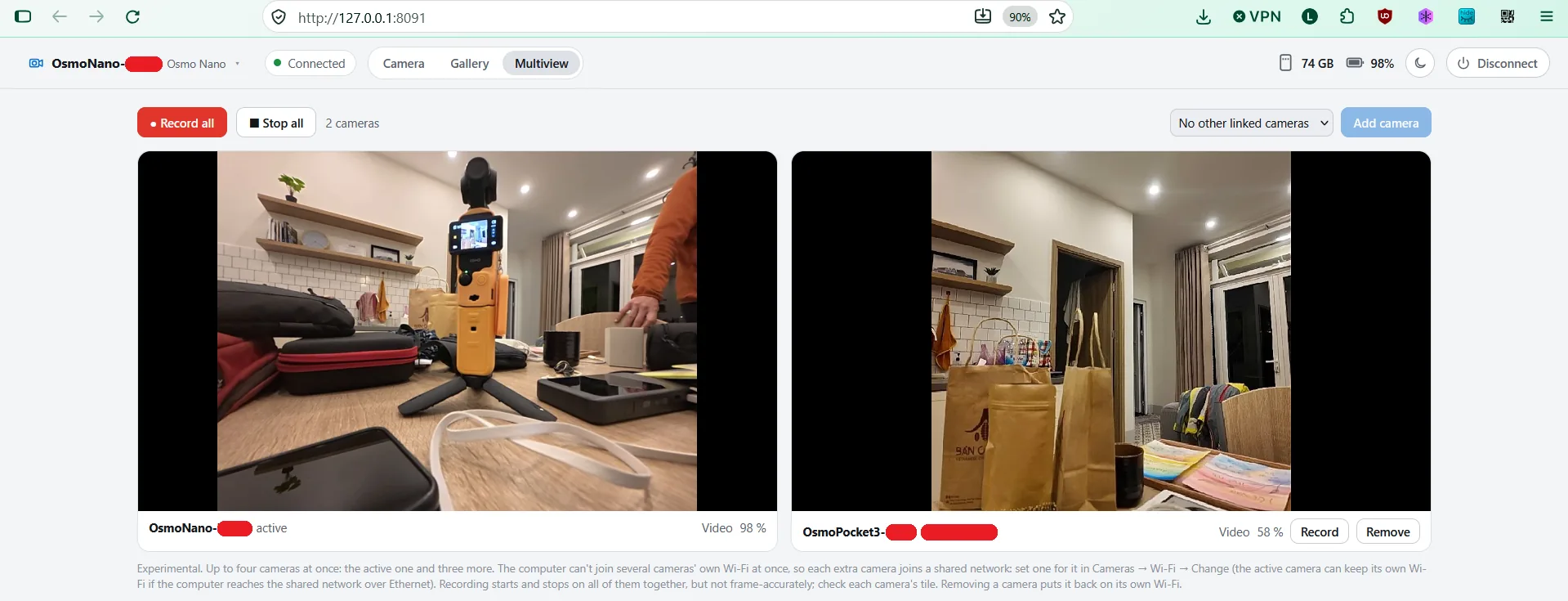
Multiview, and the Osmo Pocket 3 tested with a real camera.
Unofficial and independent: not affiliated with, endorsed or sponsored by DJI.
New
- Multiview (experimental): up to four cameras side by side: the active one and up to three more that join a shared Wi-Fi network (set one per camera under Cameras → Wi-Fi → Change). Each tile shows its live picture, recording state and battery. Record or stop one camera, or all of them at once (one command, confirmed by each camera; not frame-accurate sync). Remove, Disconnect or quitting puts each camera back on its own Wi-Fi. Tested with an Osmo Pocket 3 and an Osmo Nano.
- Osmo Pocket 3, tested with a real camera:
- Its own format choices (it has no 4:3): 4K, 2.7K and 1080p in 16:9, or 1:1 in 1080p, 2160p and 3K, at 24–60 fps; Low-Light in 4K or 1080p at 24–30 fps; slow motion 4K 100/120, 2.7K 120, 1080p 120/240 fps; photos 16:9 or 1:1; color Normal, HLG or D-Log M. Each of them was set on the camera and accepted.
- Gallery: browse, preview and download its files (from the microSD), with sharp thumbnails made from the camera's 720-pixel previews.
- The Gimbal & zoom card shows when the camera faces you and its Selfie Flip setting. Low-Light mode is called by its name.
- Mirror (next to the picture tools, key
M): flips the picture left to right on the computer only; the camera records as it is. Remembered per camera, also in Multiview and in saved stills.
Fixed
- Switching between two cameras on their own Wi-Fi kept showing the first one: every Osmo uses the same addresses, so the app took the computer for already being on the second camera's network. It now checks the network's name. On Windows 11 without location access the name comes from Windows' network list, so Disconnect now also puts the computer back on its usual Wi-Fi there.
- Disconnect releases every camera, the Multiview ones too.
- One copy of the app at a time (Windows): a second Osmo Client could start without any error and fight the first one over the camera. It now says the app is already running and stops.
- The format menus follow the active camera when you switch cameras.
Good to know (Osmo Pocket 3)
- It only sends its files over its own Wi-Fi. On a shared network the gallery lists them but can't show thumbnails or download, and offers to switch the camera back to its own Wi-Fi.
- The gallery lists the camera's newest files (up to 45) for now; cards with more files are not tested yet.
- Facing you, the camera may mirror its picture in some capture modes and not in others (its Selfie Flip setting): use Mirror to set the view you prefer. An automatic fix is being worked on.
- The Osmo Pocket 4 and 4P are still not tested with a real camera: if you have one, please open an issue with what works and what doesn't (the console output helps).
Install
See the README.
Osmo Client 1.5.1
A fix for Linux computers without NetworkManager.
Unofficial and independent: not affiliated with, endorsed or sponsored by DJI.
Fixed
- Linux without NetworkManager (
nmcli): the app can't move the computer's Wi-Fi there, so you join the camera's network by hand. Since 1.4.2 it gave up instead of waiting for that. Now it waits: the page says which network to join and where its password is (cameras.json, see the README), the camera stays awake over Bluetooth meanwhile (no pairing again every few seconds), and the live view starts as soon as the computer is on the camera's network. Cancel, or changing the camera's Wi-Fi setting, stops the wait.
A computer with no Wi-Fi at all still gets the "no Wi-Fi" message at once. Nothing changes on Windows or macOS.
Install
See the README.
Osmo Client 1.5.0
Movable scopes, and a shared Wi-Fi mode that is easier to set up and to leave.
Unofficial and independent: not affiliated with, endorsed or sponsored by DJI.
New
- Move the scopes anywhere on the picture. Drag the histogram, waveform, RGB parade or vectorscope wherever you like over the live view, in the page or in full screen. Each one keeps its place (also when you switch to full screen or resize the window). Double-click a moved scope to put it back in its row, or use Settings → Put back in place for all of them.
- See what the camera is doing while it joins a network: each attempt shows on the page ("Attempt 2 of 3…", with what the camera answered), then the search for it on the network.
- A show / hide button on the network password.
Fixed (shared Wi-Fi: the camera joins a network the computer is on)
- On a computer with WSL or Hyper-V, the search for the camera could take about half an hour: every address of the virtual adapter's network answered, and the app asked each of them in turn. Such networks are skipped now, and the addresses that do answer are asked all at once.
- Switching back to the camera's own Wi-Fi, Cancel or quitting now stops a join or a search at once instead of letting it run for minutes (Ctrl+C could hang).
- When the camera refuses the network, the app stops retrying and says what to check: the password, networks that only allow WPA3, or a 5 GHz network out of the camera's reach.
- If the computer was still on the camera's own Wi-Fi, the app could take that for the shared network and never ask the camera to join.
- After joining, the camera is looked for for up to 90 s (on a router it can take about a minute to show up).
- "Save and reconnect" now reconnects even after the app gave up.
Tested with an Osmo Nano on a 5 GHz WPA2 network, with the computer on Ethernet, on Wi-Fi, and switching between them during the live view. Osmo Pocket support is still experimental: if you have a Pocket, please open an issue with what works and what doesn't (the console output helps).
Install
See the README.
Osmo Client 1.4.2
Fixes from the first reports by Osmo Pocket users. Thank you for sending your console output!
Unofficial and independent: not affiliated with, endorsed or sponsored by DJI.
Fixed
- H.265 live view showed nothing: the decoder switched between H.265 and H.264 at every keyframe (
Live view: H.265/Live view: H.264over and over in the console). It now stays on the camera's codec. - Live view restarting in a loop right after it started: when a camera is slow to answer (an Osmo Pocket 3 took 3–4 s), the session was restarted about a second after its video began. The app now times the live view from the moment it is requested, gives the first video up to 8 s before trying again (longer if a camera keeps sending none), and sends no commands until the link is up.
- Changing a camera's Wi-Fi setting while it was connecting caused a needless restart.
- Computers without Wi-Fi (a desktop on Ethernet, for example): connecting through the camera's own Wi-Fi failed with
[Errno 1062] WlanOpenHandle failedand retried forever. The app now stops and says why. On such a computer, open Cameras → Wi-Fi → Change → "A network both are on": the camera joins your router's Wi-Fi and the computer finds it there (an Osmo Pocket 3 user confirmed that the camera joins and is found). - Disconnecting or cancelling now clears an old connection error from the page.
The Osmo Nano works as before. Osmo Pocket support is still experimental: if you have a Pocket, please open an issue with what works and what doesn't (the console output helps).
Install
See the README.
Osmo Client 1.4.1
Day and night themes for the app's page.
Unofficial and independent: not affiliated with, endorsed or sponsored by DJI.
New
- Day / night button in the header (sun / moon): switches the page between a light and a dark theme. Until you use it, the page follows your system setting; your choice is remembered by the browser.
- The live view with its monitoring tools, the gallery thumbnails and the media viewer stay dark in both themes.
- On narrow (phone-sized) windows the Camera / Gallery tabs move to a row of their own, so the header fits.
Osmo Pocket support is still experimental and not tested with a real Pocket (see 1.4.0).
Install
See the README.