Repository navigation
Animating A Sprite
The animate half never redraws a sprite. A brief names regions of the still and the effects that run inside them. pxw.py frames builds every frame in code from the still, snaps new colours to the still's palette, and gates the result. This page animates a 32x32 forge drawn in code: stone body, a fire in a dark mouth, a chimney, clear sky above.
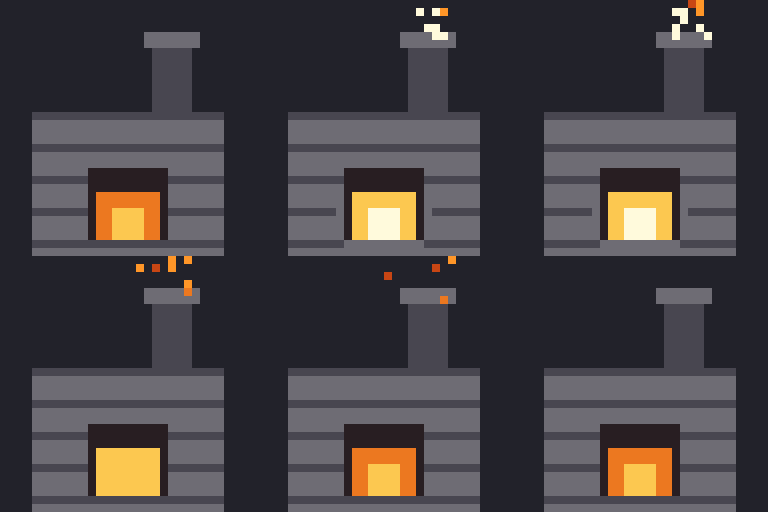
The GIF above was made for this wiki from the sheet frames wrote, scaled 8x on a dark ground. GIF stores delays in steps of 10 ms, so the 12 fps sheet plays at 80 ms a frame here. For timing, the skill uses the animated PNG preview that frames writes (.preview.png, 4x, still and animation side by side), never a GIF.
The schema is in the brief reference and the effects in the effects reference. This brief has three regions and three animations:
{
  "id": "forge",
  "still": "forge.png",
  "motion": "Use: the fire flares and sparks leave the chimney. Idle: the fire flickers. Place: powers on.",
  "extraColours": [[255, 250, 220]],
  "regions": {
    "fire":  {"rects": [[11, 21, 21, 30]], "select": "warm"},
    "front": {"rects": [[4, 14, 28, 32]]},
    "sky":   {"rects": [[0, 0, 32, 14]], "alpha": true}
  },
  "animations": {
    "use": {"frames": 10, "focal": "fire", "fps": 12, "tracks": [
      {"effect": "pulse", "region": "fire", "hot": [255, 250, 220],
       "curve": [0, 0.5, 1, 1, 0.8, 0.6, 0.4, 0.2, 0.1, 0]},
      {"effect": "spill", "region": "front", "source": [12, 24, 20, 30], "tint": [90, 50, 10], "radius": 8,
       "curve": [0, 0.5, 1, 1, 0.8, 0.6, 0.4, 0.2, 0.1, 0]},
      {"effect": "sparks", "region": "sky", "source": [19, 3, 24, 4], "bornFrames": [1, 2, 3],
       "colours": [[255, 250, 220], [255, 150, 40], [200, 70, 20]]}
    ]},
    "idle": {"frames": 8, "rest": "none", "focal": "fire", "tracks": [
      {"effect": "pulse", "region": "fire", "hot": [255, 250, 220],
       "curve": [0.2, 0.6, 1, 0.6, 0.2, 0.5, 0.9, 0.5]}
    ]},
    "place": {"frames": 8, "focal": "fire", "tracks": [
      {"effect": "darken", "region": "front", "curve": [1, 1, 0.9, 0.7, 0.4, 0.6, 0.2, 0]}
    ]}
  }
}-
firekeeps only the warm pixels of its rectangle ("select": "warm"), so the dark mouth around the fire never glows. -
skymay change alpha ("alpha": true), which the sparks need to draw into empty sky. - Rectangles are
[x0, y0, x1, y1]withx1andy1exclusive, in still pixels. -
extraColourslists the one colour the still lacks: the hottest white.
grid writes the still at 8x with a line every 8 pixels and a label every 16:
$ python pxw.py grid forge.png grid.png
{
  "ok": true,
  "out": "grid.png",
  "size": [
    32,
    32
  ],
  "zoom": 8
}
$ echo $?
0
mask tints each region on the still and counts its pixels. An empty region exits 1:
$ python pxw.py mask brief.json mask.png
{
  "ok": true,
  "out": "mask.png",
  "pixels_per_region": {
    "fire": 48,
    "front": 432,
    "sky": 448
  },
  "empty_regions": []
}
$ echo $?
0
$ python pxw.py mask brief-empty.json mask2.png
{
"ok": false,
"out": "mask2.png",
"pixels_per_region": {
"fire": 48,
"front": 432,
"sky": 448,
"screen": 0
},
"empty_regions": [
"screen"
]
}
$ echo $?
1That brief added a screen region with "select": "cool" over stone, which has no cool pixels:
{"screen": {"rects": [[4, 14, 10, 20]], "select": "cool"}}$ python pxw.py frames brief.json out-anim
{
"ok": true,
"id": "forge",
"gates": "out-anim/forge.gates.json",
"animations": {
"use": {
"pass": true,
"frames": 10,
"rest_frame_identical": true,
"changed_outside_mask": 0,
"new_colours": 0,
"noticeable": true,
"sheet": "out-anim/forge-use-10f.png"
},
"idle": {
"pass": true,
"frames": 8,
"rest_frame_identical": null,
"changed_outside_mask": 0,
"new_colours": 0,
"noticeable": true,
"sheet": "out-anim/forge-idle-8f.png"
},
"place": {
"pass": true,
"frames": 8,
"rest_frame_identical": true,
"changed_outside_mask": 0,
"new_colours": 0,
"noticeable": true,
"sheet": "out-anim/forge-place-8f.png"
}
}
}
$ echo $?
0Per animation it writes a horizontal sheet named <id>-<anim>-<N>f.png, one PNG per frame, a contact sheet and a preview, plus one gates file for the sprite:
forge-idle-8f.contact.png
forge-idle-8f.png
forge-idle-8f.preview.png
forge-idle-8f/f00.png
forge-idle-8f/f01.png
forge-idle-8f/f02.png
forge-idle-8f/f03.png
forge-idle-8f/f04.png
forge-idle-8f/f05.png
forge-idle-8f/f06.png
forge-idle-8f/f07.png
forge-place-8f.contact.png
forge-place-8f.png
forge-place-8f.preview.png
forge-place-8f/f00.png
forge-place-8f/f01.png
forge-place-8f/f02.png
forge-place-8f/f03.png
forge-place-8f/f04.png
forge-place-8f/f05.png
forge-place-8f/f06.png
forge-place-8f/f07.png
forge-use-10f.contact.png
forge-use-10f.png
forge-use-10f.preview.png
forge-use-10f/f00.png
forge-use-10f/f01.png
forge-use-10f/f02.png
forge-use-10f/f03.png
forge-use-10f/f04.png
forge-use-10f/f05.png
forge-use-10f/f06.png
forge-use-10f/f07.png
forge-use-10f/f08.png
forge-use-10f/f09.png
forge.gates.json
The use sheet is 320x32: ten frames the size of the still. The program also compared the sheet with the still directly:
sheet forge-use-10f.png: 320x32
frame 0 equals forge.png byte for byte: True
frames outside the regions changed: 0 pixels
The full gate record for use, from forge.gates.json:
{
  "rest_frame": 0,
  "rest_frame_identical": true,
  "changed_outside_mask": 0,
  "alpha_changed_outside_alpha_regions": 0,
  "new_colours": 0,
  "changed_share_per_frame": [
    0.0,
    0.072,
    0.1379,
    0.144,
    0.1152,
    0.0802,
    0.0082,
    0.0021,
    0.0,
    0.0
  ],
  "focal_mean_abs_luma_delta": [
    0.0,
    32.0,
    53.4,
    53.4,
    53.4,
    32.0,
    0.0,
    0.0,
    0.0,
    0.0
  ],
  "noticeable_thresholds": {
    "share": 0.08,
    "luma": 40
  },
  "noticeable": true,
  "drawn_outside_silhouette": 8,
  "flicker_pixels": 3,
  "flicker_at": [
    [
      26,
      0
    ],
    [
      17,
      1
    ],
    [
      24,
      3
    ]
  ],
  "pass": true,
  "frames": 10,
  "sheet": "out-anim/forge-use-10f.png",
  "preview": "out-anim/forge-use-10f.preview.png",
  "aw_pixel_frames": {
    "skipped": "artwright's aw.py not found (set PIXELWRIGHT_AW)"
  }
}drawn_outside_silhouette, flicker_pixels and flicker_at are new in 0.8.0 and 0.8.1 and are reported only, unless a brief asks for more (Gates). Gates explains each field. --only NAME builds one animation. Two runs gave the same sheet byte for byte, since effects with randomness (sparks, puffs) are seeded:
out-use/forge-use-10f.png and out-again/forge-use-10f.png identical: True
The animation's name sets which frame must equal the still:
| Name | Rest frame |
|---|---|
use |
the first |
place |
the last (it ends on the still) |
| any other | the first, unless the animation says "rest": "last" or "rest": "none"
|
"rest": "none" makes a loop. A loop has no rest frame (rest_frame_identical is null) and gets the seam gate instead: the jump from the last frame to the first may be no bigger than the largest step inside. The idle flicker passed it:
  "noticeable": true,
  "drawn_outside_silhouette": 0,
  "flicker_pixels": 0,
  "loop_seam_changed": 32,
  "loop_seam_ok": true,
  "pass": true,
buildup adds frames in front of an animation (6 by default, --frames N): the sprite rises from the ground behind a weld seam and a dotted outline. It writes a new brief:
$ python pxw.py buildup brief.json brief-built.json
{
  "ok": true,
  "out": "brief-built.json",
  "anim": "place",
  "frames": 14,
  "buildup_frames": 6
}
$ echo $?
0
$ python pxw.py frames brief-built.json out-built --only place
{
"ok": true,
"id": "forge",
"gates": "out-built/forge.gates.json",
"animations": {
"place": {
"pass": true,
"frames": 14,
"rest_frame_identical": true,
"changed_outside_mask": 0,
"new_colours": 0,
"noticeable": true,
"sheet": "out-built/forge-place-14f.png"
}
}
}
$ echo $?
0The skill prefers assemble, which brings parts in the way a building site would (crane, drones, trolley, telescope, hinge, weld) from a plan. A pixel belongs to the first step whose part holds it:
{"frames": 8,
 "regions": {"p_chimney": {"rects": [[18, 4, 25, 14]]}, "p_body": {"rects": [[4, 14, 28, 32]]}},
 "steps": [{"part": "p_body", "how": "weld", "dir": "up", "at": [0, 5]},
           {"part": "p_chimney", "how": "crane", "at": [3, 8]}]}
$ python pxw.py assemble brief.json brief-assembled.json --plan plan.json
{
"ok": true,
"out": "brief-assembled.json",
"anim": "place",
"frames": 16,
"assemble_frames": 8,
"uncovered_pixels": 0,
"empty_parts": [],
"steps_ending_after_assembly": []
}
$ echo $?
0$ python pxw.py frames brief-assembled.json out-assembled --only place
{
"ok": true,
"id": "forge",
"gates": "out-assembled/forge.gates.json",
"animations": {
"place": {
"pass": true,
"frames": 16,
"rest_frame_identical": true,
"changed_outside_mask": 0,
"new_colours": 0,
"noticeable": true,
"sheet": "out-assembled/forge-place-16f.png"
}
}
}
$ echo $?
0uncovered_pixels must be 0: a pixel no step covers would stand there from the first frame. A plan with only the chimney left the body's 432 pixels uncovered and exited 1:
$ python pxw.py assemble brief.json brief-partial.json --plan plan-short.json
{
  "ok": false,
  "out": "brief-partial.json",
  "anim": "place",
  "frames": 12,
  "assemble_frames": 4,
  "uncovered_pixels": 432,
  "empty_parts": [],
  "steps_ending_after_assembly": []
}
$ echo $?
1
Both commands rewrite the animation as "rest": "last" and push the existing tracks' curves and spark births back by the added frames.
contact lays a sheet's frames out in rows (--per frames a row, --zoom), and pack joins frames into a horizontal sheet in the order given. Frames of different sizes are refused:
$ python pxw.py contact out-anim/forge-use-10f.png contact.png --frames 10
{
  "ok": true,
  "out": "contact.png",
  "frames": 10,
  "frame_size": [
    32,
    32
  ]
}
$ echo $?
0
$ python pxw.py pack strip.png out-anim/forge-use-10f/f00.png out-anim/forge-use-10f/f03.png
{
  "ok": true,
  "out": "strip.png",
  "frames": 2,
  "frame_size": [
    32,
    32
  ]
}
$ echo $?
0
$ python pxw.py pack bad.png forge.png chest.png
{
  "ok": false,
  "error": "frames differ in size: [(12, 12), (32, 32)]"
}
$ echo $?
1
The building site above is the default vocabulary. Since 0.7.0 a plan with "vocabulary": "natural" raises a timber-framed building on site instead, for a village house seen from above at an angle: stakes and string on its ground diamond, a stone footing, posts and wall plates, the wall timbers and then the infill rising course by course, the gable and rafters, the roof laid from eave to ridge, and a ladder, ending on the still. It runs as the site effect, whose colours are sampled from the still, so it adds none. The plan names a roof region (and optionally a lumber pile), the groundBase diamond's corners, wallHeight and the eave and ridge lines; the fields are in the effects reference. Since 0.7.2 the site elements are clipped to the part of the finished building that explains them (string, footing and ladder inside the silhouette, posts and plates on the walls, rafters and laths on the roof), specks under 4 pixels are dropped, and a site animation fails its gates when any frame draws where the still is empty (drawn_outside_silhouette above 0); "clip": false draws the full lines as 0.7.0 did. The skill adds advice from later runs: trace the eave as a change of material at 8x and set aside buildings whose walls and roof are one material (0.7.1), trace the roof polygon on a grid rather than from a colour mask, and put loops shared by many copies out of step with a random hold on frame 0 (0.7.3); open-sided sheds take the ordinary natural plan (0.8.2). None of this was run for this wiki; the repository's tests build a 30-frame strip with it and check the clipping.
The skill puts each sprite's brief in <batch>/<id>/brief.json and its frames in <batch>/<id>/out/. The forge's frames went there first:
$ python pxw.py frames batch/forge/brief.json batch/forge/out --root batch/forge
{
  "ok": true,
  "id": "forge",
review serves a page on 127.0.0.1 with one section per animation found in any *.gates.json under the folder, and prints one line of JSON before it starts serving. The run read the page back; its sections and gate lines were:
$ python pxw.py review batch --port 8799
{"ok": true, "url": "http://127.0.0.1:8799/", "picks": "<tmp>/run/batch/picks.json"}
section: forge, use (10 frames)
section: forge, idle (8 frames)
section: forge, place (8 frames)
gate line: gates PASS: rest frame identical True, outside-mask changes 0, new colours 0, peak changed 14% of pixels, peak focal brightness change 53.4
gate line: gates PASS: rest frame identical None, outside-mask changes 0, new colours 0, peak changed 10% of pixels, peak focal brightness change 53.4
gate line: gates PASS: rest frame identical True, outside-mask changes 0, new colours 0, peak changed 80% of pixels, peak focal brightness change 71.3
Each click is POSTed to /picks and saved in <batch>/picks.json. The run posted one keep and one redo:
POST /picks answered 204
{
  "updated": "<time>",
  "items": {
    "forge/use": {
      "pick": "keep"
    },
    "forge/idle": {
      "pick": "redo",
      "note": "slower flicker"
    }
  }
}
An item picked anything but redo leaves the page at the next load; redo stays, with its note:
section: forge, idle (8 frames)
section: forge, place (8 frames)
A second server on the same port is refused, exit 1:
$ python pxw.py review batch --port 8799
{
  "ok": false,
  "error": "port 8799 is in use; stop the server on it or pick another port",
  "detail": "[WinError 10048] Only one usage of each socket address (protocol/network address/port) is normally permitted"
}
$ echo $?
1
On Linux the detail read [Errno 98] Address already in use. Extra sections (choose between candidate stills, approve a text brief) come from <batch>/review-extra.json. Since 0.6.3 an extra item with "display": "full" shows its images at their own resolution, smoothly scaled, for paintings beside the sprites, and one with "kind": "info" is a card of text and images with no buttons. None of the extra sections was run for this wiki. review --print-page prints the page's HTML and exits, for tests. The port in these examples is 8799 because other servers held 8765 (the default) and 8766 on the machine that ran them.
The sheet's name carries the frame count, so an importer can slice it without a side file: forge-use-10f.png is 10 frames of 320 / 10 = 32 pixels. The timing reference has notes for Unity, Godot and Aseprite; pixelwright writes no engine files, and none was tested here.
The effects glint, dust, brighten, rotate, model_rotate (and its filter: box, since 0.8.0), bend, bands, scroll, fill, arc (and its perfect option for clean one-pixel bolts, since 0.8.1), drone, cart, external and site, and the PixelLab fallback. shift ran only for the cadence report on Gates. The repository's animation tests (50) use every effect; see Development.