Repository navigation
Releases: marimo-team/marimo-studio
Release list
v0.4.1

Marimo Studio 0.4.1
Marimo Studio 0.4.1 supports Marimo 0.25.2 and improves view previews, provider builds, and CLI feedback.
- A notebook shows the first view's preview when it opens. Static exports opened from disk explain when a local server is needed for live Studio resources.
- Deno-backed view rebuilds reuse cached dependencies during offline runs. Analyzer errors include source locations, and failed provider builds name a recovery step.
- CLI commands report workspace, target, and publication errors with the affected path and next action.
- Guides and examples match the current provider, notebook, and CLI behavior.
Marimo Studio 0.4.1 supports Python 3.10 through 3.14 and Marimo 0.25.2. It requires marimo-export 0.2.2 or newer. The deno extra provides Deno 2.9.5 or newer for React, Reveal.js, Svelte, and Observable Notebook Kit authoring. The typst extra provides the Typst compiler 0.15 or newer. The Quarto provider needs Quarto 1.9.38 or newer on PATH, and the LaTeX provider needs Tectonic 0.15 or newer on PATH or in the notebook's pixi script environment. pixi environments need pixi 0.80 or newer. The lens extra requires marimo-lens 0.2.3 or newer, and Lens 0.2.4 records the page or time span of a selected region.
v0.4.0
Marimo Studio 0.4.0
Marimo Studio 0.4.0 places notebook results in typeset documents. Quarto, Typst, and LaTeX views render papers, reports, and bulletins from the cells, outputs, and values of a live notebook. Lens traces a chart or a table cell inside a rendered PDF back to the cell that computed it. A new New view dialog previews every starter, and third-party providers build on the same public SDK as the built-in ones.

Write papers and reports from notebook results
- Quarto. The
quartoprovider renders a Quarto Markdown document. The{{< marimo cell="chart" >}}shortcode places a cell or an output, and{{< marimo value="summary.rooms" >}}places a value inside a sentence. Studio renders with--no-execute, so computation stays in the notebook. - Typst. The
typstprovider compiles a Typst template to PDF.marimo_value(),marimo_output(), andmarimo_cell()read notebook results, and each call falls back to itsdefault, so the same project also compiles with plaintypst compile. Embedded fonts, the project'sfonts/, and a fixed compile clock make the same values produce the same PDF. Install the compiler with thetypstextra. - LaTeX. The
latexprovider compilesmain.texwith Tectonic through the bundledmarimo.sty.\marimovalueexpands in titles, bookmarks, and\ifnumtests,\marimonumand\marimodateformat through siunitx and datetime2, and\marimorowswrites one table row per item. The first compile prints each fallback, so the paper typesets before a kernel connects. - Figures are drawn at the size the document gives them.
marimo_output("chart", height: 4cm)and\marimographics[height=4cm]{chart}keep the notebook's aspect ratio, and labels keep their point size. - Documents follow the reader's notebook in the Python runtime, Browser edit mode, and Prepared previews. A
zero-pythonexport renders one document per prepared state. Browser run mode andwasmexports reportrender-results-unavailable. - Preview lays PDF pages on a page desk with selectable text and a Download link, and keeps the last document on screen while the next one renders. A control change cancels a render that the new value makes outdated.
| Typst report | LaTeX paper |
|---|---|
 |
 |
Render any file from notebook results
-
A view provider declares renders in
inspect()and turns the reader's values, outputs, and cells into a bundle of files, such as a PDF, a video with its poster, or HTML with images. A page shows the bundle with one host:<marimo-output render="main.typ"></marimo-output>
-
A page can present the files itself through
host.marimoRender, for example in a custom video player. Rendered bundles are content-addressed, shared between readers, and served with byte ranges for media seeking. -
<marimo-output value="chart" accept="image/svg+xml image/png">shows a value as the first listed image type it supports, in every runtime and in Prepared exports.
Trace parts of rendered files with Lens
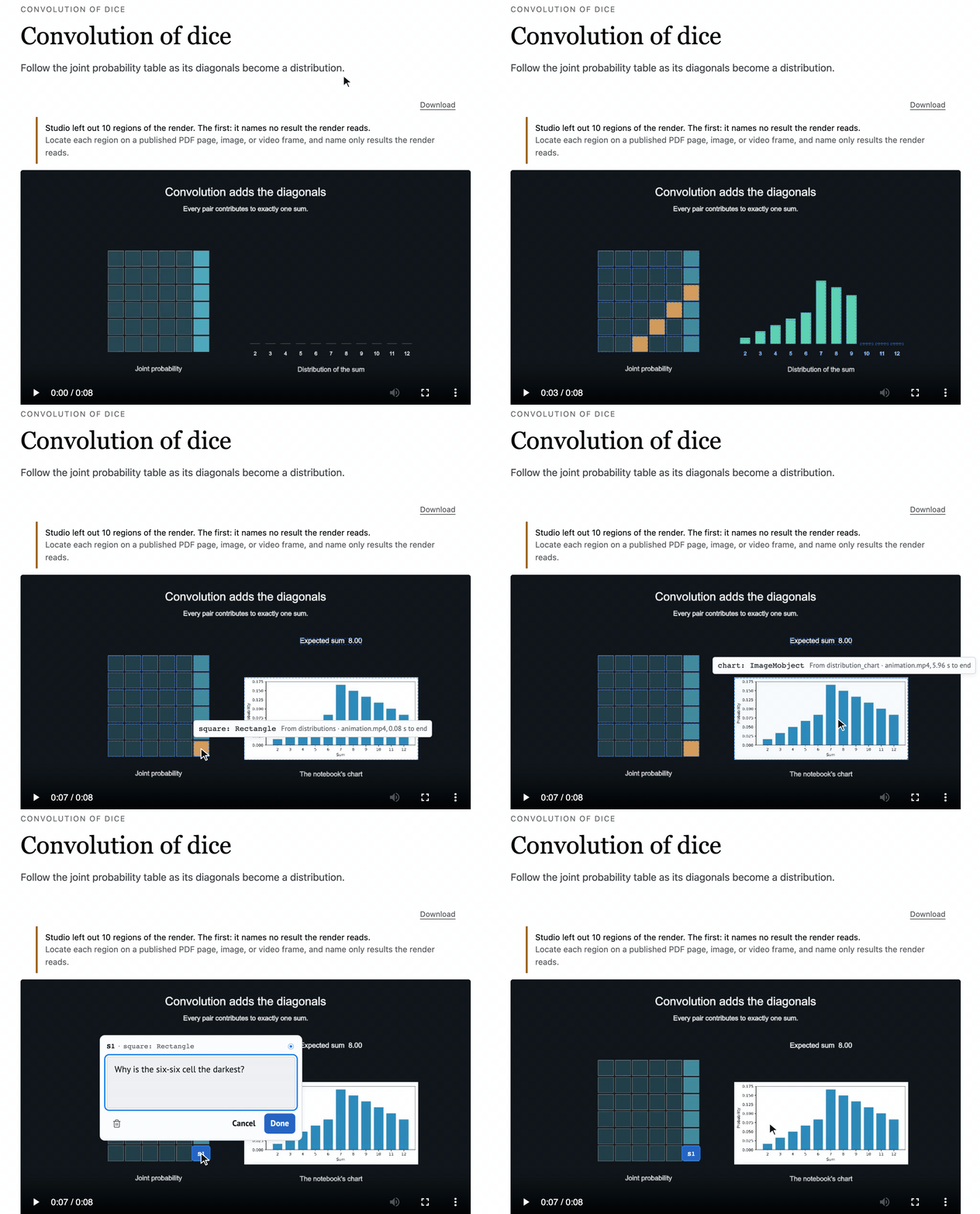
Renders can return regions: rectangles on a PDF page or an image, or a span of video frames, each naming the notebook results it shows. Preview makes each region a Lens target that traces to the cell that computed it and the value it narrows to, such as report.readings[6].occupancy.
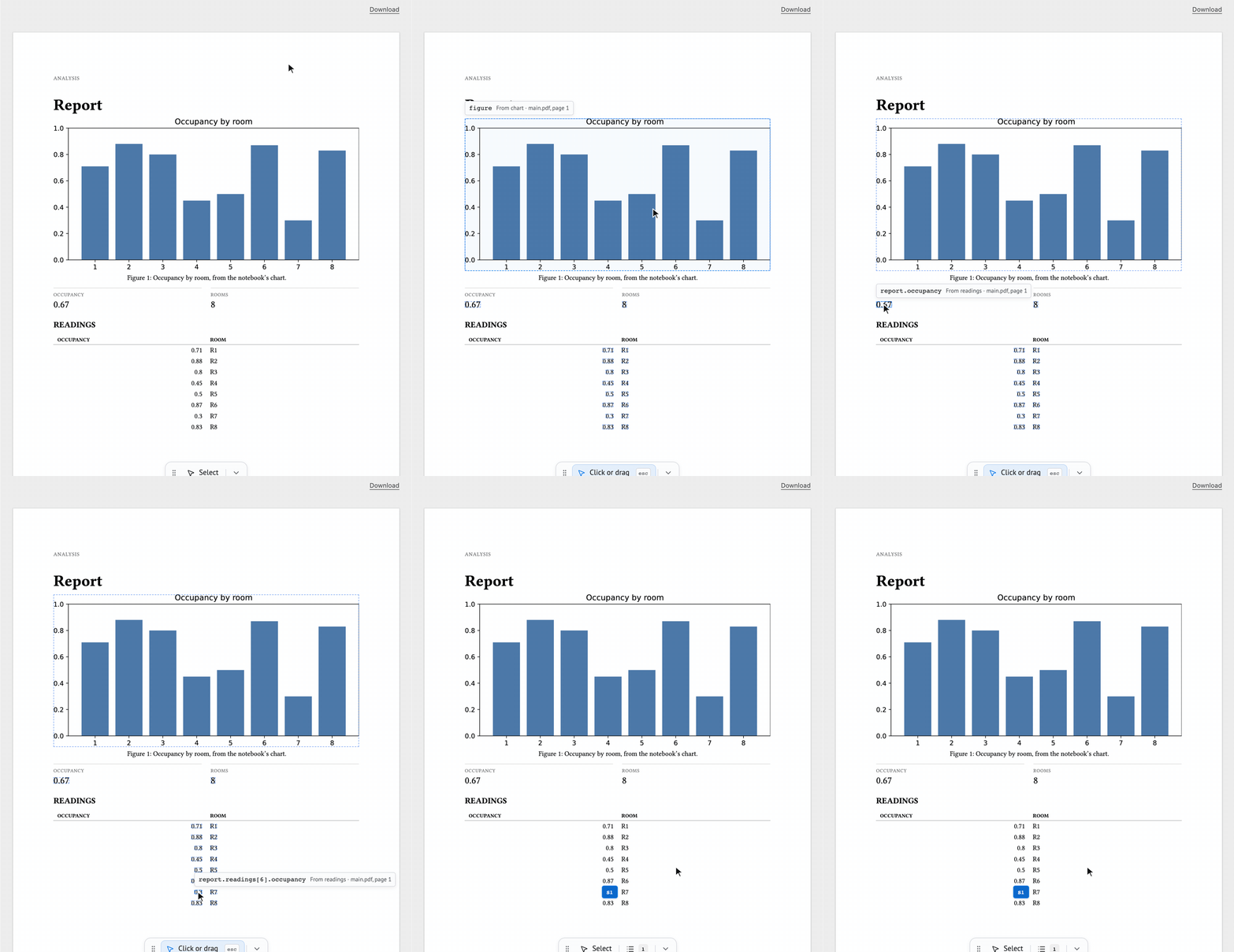
- The Typst and LaTeX providers locate every placed output and cell on its page. Mark other parts of a document with
marimo_region()or\marimoregion. - A video provider returns regions with time spans, and the targets follow the shapes as the movie plays.
Create views from the New view dialog
New view opens a dialog with a searchable starter list grouped by package, and the selected starter's preview, details, and settings beside it. A starter whose tools are missing says what it needs, such as "Needs Quarto 1.9.38+".

- Set the view title, make it the default view, and choose starter settings, such as the paper size for Typst and LaTeX or a table of contents for Quarto.
marimo-studio view create report --title "Quarterly report" --setting KEY=VALUE --make-defaultandWorkspace.create_view("report", title="Quarterly report", settings={…}, make_default=True)send the same request as the dialog.


Commit views beside the notebook
New views live in studio/<notebook>/, and their build state lives in marimo's output directory:
analysis.py
studio/analysis/dashboard/view.toml               # authored, committed
__marimo__/studio/analysis/dashboard/.artifacts/  # generated, ignores itself
A repository that ignores __marimo__/ can commit its views, and a host that discards __marimo__/ keeps them. PYTHONPYCACHEPREFIX moves build state out of the working tree together with marimo's caches, and marimo-studio status prints both locations. Views created by 0.3 keep working in place. Upgrade from 0.3 shows how to move them.
Run in pixi environments
- Studio runs inside an activated pixi workspace, and the dependency doctor reads the workspace's conda and PyPI declarations. Outside the workspace, commands print the
pixi runcommand to use. - A notebook can declare the system tools its views need in its inline
[tool.pixi.dependencies]. Withmarimo edit --sandbox=pixi, view builds take Tectonic and other provider tools from that script environment, so the LaTeX view builds with nothing installed globally. marimo-studio starters --target notebook.pyreports starter availability for one notebook.
Build view providers on the public SDK
marimo_studio.view_providersis the provider contract. The built-in providers import only that module, so an installed provider can do everything they do.- Inspection reports
documents,inputs,sites, and renders.ProviderErrorturns an author-fixable problem into a located diagnostic. - Helpers cover common provider work:
project_files,copy_inputs,probe_tool,find_tool,html_sites, andPackagedStarterwithcreate_starter. - Starters can declare an icon, a preview image, a homepage, and typed settings for the New view dialog.
marimo_studio.view_providers.testing.check_provider()runs a provider through Studio's inspection, build, render, and publication checks.
Authoring updates
- Source highlights Python, Markdown with YAML front matter, JSON, YAML, TOML, XML, SCSS, LaTeX, and Lua.
- Export and preflight warn with
prepared-states-skip-control-valueswhenstates.yamlleaves out values a slider, number, dropdown, radio, checkbox, or switch can take, and name the control and the skipped values. - The docs start from what a view is and how one view travels from its files to the browser, with a glossary, a Lens guide, and interactive figures. The examples add Quarto, Typst, and LaTeX views.
Fixes
- Every Studio tab loads when several tabs are open on one server. Event streams use WebSocket connections, which leave the browser's six HTTP connections per host free.
mo.ui.data_editor,mo.image,mo.download, and notebookpublic/files load inside views, including Prepared views.- A failed build keeps the previous build on screen with one notice, and
marimoStudio.diagnostics()lists the build error. - Preview keeps showing the newest publication after rapid saves, waits for a notebook's long first run, and reloads after a server restart. Projections stay live w...
v0.3.0
Marimo Studio 0.3.0
Marimo Studio 0.3.0 serves notebooks and views beneath reverse proxy path prefixes, works with marimohub's sandbox context, runs workspaces on network and synced file systems, and sends large dataframes to views as Arrow.
Deploy behind proxies and hosts
- Studio writes every page, redirect, record, and live-connection URL relative to the requested URL. A notebook works at the server root, under marimo's
--base-url, and behind a proxy that keeps or strips a path prefix, such as Posit Workbench, jupyter-server-proxy, and code-server. - Open a tokenized link with
?access_token=…in edit or run mode. Studio starts the session and removes the token with a redirect beneath the prefix. marimo-studio view preview --server URLandView.preview_url()return a preview URL beneath the same prefix as--server.--browser-clientandbrowser_clientselect the Studio tab a preview follows. An open preview keeps its address and reloads it after a server restart.- Set
MARIMO_STUDIO_TRUSTED_SERVER_RUNTIME=1to serve Server runtime view documents and Preview from the host origin, so a cookie-authenticated proxy admits their requests. Browser and Prepared runtimes keep their sandbox. Restart the Studio process after changing the setting. - Preview reports when it cannot reach the Studio server for 10 seconds, names the trusted Server runtime setting, and recovers once requests succeed.
Work in marimohub
- Studio reads the sandbox context that marimohub 0.4.16 provides. With proxy exposure, Server runtime views share the hub origin, so Preview works behind the hub sign-in. An explicit
MARIMO_STUDIO_TRUSTED_SERVER_RUNTIMEsetting takes precedence. - Code-mode
preview_url()returns the session's public address. View lists,status(), and Add view report whether the hub keeps view files. - View provider caches and build staging carry
CACHEDIR.TAG, so the hub leaves them out of saved workspaces. A notebook with a React and an HTML view saves about 3 MB. - Run mode redirects
/studio/<view>/to/<view>/and runs the hub's notebook bridge in view documents, so reloads, Copy URL, and Run as app keep the view the editor shows. - A direct
marimo-studio @ …reference in the notebook header stays as written when Studio creates a view, and MCPstart_sessionreaches a running kernel for Studio notebooks.
Run workspaces on more file systems
- View creation, builds, renames, and exports work on NFS, WSL drive mounts, and gVisor sandbox mounts.
- Windows workspaces synced by OneDrive or SharePoint build views from cloud placeholder files.
- Studio holds marimo's notebook lock while it rewrites the notebook header, so an editor save and a default-view or binding change keep both edits.
Project large dataframes
- Eager pandas, Polars, and PyArrow tables travel to views as Arrow IPC. One Arrow value can hold up to 64 MiB, and JSON values keep the 1,000,000 byte limit. Collect lazy dataframes in the notebook before projecting them.
- An oversized value read reports
response-too-largewith a hint to project fewer or smaller values.marimo-studio checkapplies the Python runtime budgets. - The Python runtime publishes Arrow values through shared memory. Containers with the default 64 MiB
/dev/shmfit about one large value, so start them with a larger--shm-size.
Fixes
- Studio retries notebook reads that overlap a marimo save, so a valid notebook stays valid while marimo rewrites the file. Notebook source errors name the line marimo cannot parse, duplicate definitions, cycles, and files that are not notebooks.
- Preview reads settle once notebook execution settles, including across reopened and concurrent tabs. Transient startup states keep retrying, and a terminal synchronization error names the notebook cells that need to run.
- Preview recovers on its own after a broken notebook is fixed and saved.
- Checked marimo checkboxes and similar controls stay visible inside views.
Preview builds
Every validated main commit publishes a wheel to the
preview release.
Its notes show the install command for the newest wheel. A notebook that
depends on a preview wheel URL installs that same wheel in sandboxed kernels.
Compatibility
Marimo Studio 0.3.0 supports Python 3.10 through 3.14 and Marimo 0.25.1, and it requires marimo-export 0.1.4 or newer; the deno extra provides Deno 2.9.5 or newer for authoring with React, Reveal.js, Svelte, and Observable Notebook Kit, while the lens extra requires marimo-lens 0.2.3 or newer.
Preview builds
Wheels built from main after CI, Browser acceptance, Platform acceptance, and GitHub Pages pass. The newest is marimo-studio 0.4.1.dev7 from 37571a3.
Install it as a tool:
uv tool install "marimo-studio @ https://github.com/marimo-team/marimo-studio/releases/download/preview/marimo_studio-0.4.1.dev7-py3-none-any.whl"Or declare it in a notebook's inline script metadata:
# /// script
# dependencies = ["marimo-studio @ https://github.com/marimo-team/marimo-studio/releases/download/preview/marimo_studio-0.4.1.dev7-py3-none-any.whl"]
# ///
Sandboxed kernels install Studio from the same URL. This release keeps the newest 30 wheels. Install marimo-studio from PyPI for released versions.
Check that a wheel was built by this repository:
gh attestation verify marimo_studio-0.4.1.dev7-py3-none-any.whl -R marimo-team/marimo-studiov0.2.3
Marimo Studio 0.2.3
Marimo Studio 0.2.3 improves view authoring, preview delivery, and agent workflows across Python, Browser, and Prepared runtimes.
Author and manage views
- Rename views from the CLI, Python API, and Studio workspace while keeping the selected view and its published artifact connected.
- Use the view catalog commands to inspect, create, rename, and remove views with consistent diagnostics.
View.remove()returnsViewCatalog, and the CLI catalog commands report the committed catalog record. Update integrations that consumedViewRemovalResultto readdefault_view,views, andcatalog_generationfromViewCatalog.- Start a notebook with a default view when the workspace has no explicit selection.
- Keep the current and previous artifact revisions available while a new build is prepared.
Inspect previews and sources
- Preview pages keep native notebook cells, controls, rich outputs, and projection state synchronized across view switches and reconnects.
- Local source files, view scripts, and provider projects report actionable errors when a script or source pattern cannot be loaded.
- Agent workflows can discover the active workspace, target a named view, and use the same source and publication records as the Studio UI.
Provider and documentation updates
- Custom frontend providers have a guide covering project layout, build inputs, source inspection, and runtime selection.
- The Marimo Hub guide shows how to add views, run notebooks as apps, and open a Studio workspace.
- CLI help and reference pages use the same view and runtime names as the Studio interface.
Compatibility
Marimo Studio 0.2.3 supports Python 3.10 through 3.14 and
Marimo 0.25.0. The deno extra provides
Deno 2.9.5 or newer for React,
Reveal.js, Svelte, and
Observable Notebook Kit authoring.
The lens extra requires
marimo-lens 0.2.3 or newer.
v0.2.2
Marimo Studio 0.2.2
Marimo Studio 0.2.2 lets notebook hosts embed Studio editors and run notebooks
before their first view exists, and launches editors that follow file edits.
Run Studio inside notebook hosts
- A host script in marimo's server-level
html_headcan declare its parent
withdata-parent-origin. Studio adds that origin to the framing policy of
the workspace, its embedded native editor, and the native documents served at
edit/. marimo runserves the notebook as a marimo app while its view root contains
no view, and the server logs a warning naming the notebook.
marimo-studio statusreportsneeds-viewfor that notebook.
Authoring updates
- Launch commands printed by
view create, the CLI help, and the agent
instructions include--watch, so edits from a coding agent or another
editor reload in the Studio editor and Preview. - Slider thumbs reach both ends of their track.
- CLI help, errors, and documentation name the Python, Browser, and
Prepared runtimes the way the Studio UI shows them. Theserver,wasm,
andzero-pythonoption values stay the same. - The PyPI project page shows the Studio lockup, the example wall, and the
commands to run and export a view.
Compatibility
Marimo Studio 0.2.2 supports Python 3.10 through 3.14 and
Marimo 0.25.0. The deno extra provides
Deno 2.9.5 or newer for React,
Reveal.js, Svelte, and
Observable Notebook Kit authoring.
The lens extra requires
marimo-lens 0.2.2 or newer.
v0.2.1
Marimo Studio 0.2.1
Marimo Studio 0.2.1 adds a terminal workflow for pairing coding agents with
live notebooks and a showcase of the views built from its examples.
Pair coding agents with notebooks
- The
marimo pairCLI lists local notebook servers
and runs Python in their kernels. Local discovery finds servers started with
--no-token. Give an agent the URL and token file to connect to a protected
server. uvx --with marimo-studio agent-plugins read marimo-studiogives an agent
the instructions shipped with the installed Studio version.uvx
comes with uv.- A single prompt can start a notebook for a new topic or target an existing notebook.
Browse the examples
The README and documentation landing page show each example notebook alongside
its views. Select a view poster on the docs site to open that example with the
view selected.
Compatibility
Marimo Studio 0.2.1 supports Python 3.10 through 3.14 and
Marimo 0.25.0. The deno extra provides
Deno 2.9.5 or newer for React,
Reveal.js, Svelte, and
Observable Notebook Kit authoring.
The lens extra requires
marimo-lens 0.2.2 or newer.
v0.2.0
Marimo Studio 0.2.0
Marimo Studio 0.2.0 updates its Marimo integration to 0.25 and makes standalone
browser previews the path for agents to inspect custom views.
Browser-native view inspection
View.preview_url(runtime="server")andmarimo-studio view previewreturn
a standalone URL that browser tools can open, interact with, and inspect.- Agents that used Studio-mediated browser validation should open the returned
URL and inspect the rendered view through their browser tool. - Stable preview URLs follow successful publications. A revision-specific URL
returns HTTP 409 when its requested revision is no longer current.
Provider-owned view dependencies
- Custom views that use UnoCSS, Iconify, HTMX, or other browser libraries load
them from their provider project. The Vanilla starter includes pinned
UnoCSS and Iconify assets. view_rootstores view projects in a directory selected by the notebook's
configuration, including directories that a host application persists.- Studio preserves host scripts in the outer page and validates configured
data-parent-originvalues against its framing policy.
Authoring and preview updates
- Python previews refresh after notebook cells are edited and run through code
mode, and standalone previews catch up after publication or reconnection. - Native controls and Markdown follow each view's projection variables across
Server, Browser, and Prepared runtimes. - Sandboxed notebooks load Studio and the server's Deno runtime for framework
view creation and builds. - The guides add a quadratic programs example that uses one notebook for a
Reveal.js lecture, an HTML explainer, and a Svelte and D3 lab.
Compatibility
Marimo Studio 0.2.0 supports Python 3.10 through 3.14 and Marimo 0.25.0. The
deno extra provides Deno 2.9.5 or newer for React, Reveal.js, Svelte, and
Notebook Kit authoring. The lens extra requires marimo-lens 0.2.2 or newer.
v0.1.6
Marimo Studio 0.1.6
Marimo Studio 0.1.6 adds Observable Notebook Kit views, zero-Python
documentation exports, and Lens feedback across custom view layouts.
Notebook Kit and prepared exports
marimo-studio/notebook-kit:defaultauthors Observable notebook HTML with
nativemarimo-cell,marimo-output, andmo-valueprojections. The
provider builds through Deno and Vite for Server, WebAssembly, and Prepared
runtimes.- Prepared exports replay committed notebook values when projection hosts mount
after the initial render or remount after a state change. - Every custom documentation example now publishes as a zero-Python export.
The Room 01 monitor uses Notebook Kit and Observable Plot, including its
prepared control states and narrow-screen chart layout.
Lens feedback
- Lens can select authored HTML regions alongside native notebook results. Each
custom view groups selections at#app-shellby default and can set a custom
boundary withdata-marimo-lens-scope. - Selection feedback reconnects after a view rebuild. Parent regions own the
visible outline while agent context retains the exact selected child.
Installation and runtime compatibility
marimo-studio[recommended]installs the Deno and Lens extras together.- Deno 2.9.5 or newer is supported. The Lens extra requires marimo-lens 0.1.2
or newer. - Native editor transactions retain their configuration snapshot when the
notebook moves during first-view creation.
Marimo Studio 0.1.6 supports Python 3.10 through 3.14 and Marimo 0.24.2.
v0.1.5
Marimo Studio 0.1.5
Marimo Studio 0.1.5 opens with every notebook and gives view authoring a
smaller toolbar, safer notebook handoffs, and stricter projection validation.
Notebook-first workspace
- Studio is available as soon as it is installed, including in a new unsaved
notebook. Add view opens Marimo's Save flow and preserves the running
kernel while the notebook gains its first view. - A thin toolbar selects views, toggles the notebook and Source panes, and
reports runtime context and diagnostics. The native editor and agent sidebar
remain available alongside custom views. - The split toggle switches between notebook-only and split layouts, then
restores the prior Source visibility and pane sizes.
Session and projection safety
- First save and kernel restart retain the notebook's signed editor identity.
View previews follow the replacement kernel while independent notebook
launches keep separate sessions. - Provider validation rejects self-closing non-void HTML and nested projection
hosts before publication. Source diagnostics identify the invalid markup and
the last successful preview remains available. - Native dialogs, notebook navigation, and error notifications remain
interactive over Studio panes, including at narrow widths.
Agent authoring and compatibility
- The packaged Studio skill requires notebook-derived values and analytical
claims to use live projections. Its review workflow also covers reactive
updates, Lens source metadata, and the selected design guidance. - Development, build, and example dependencies use tested lower bounds while
the release keeps exact Marimo and Deno versions.
Marimo Studio 0.1.5 supports Python 3.10 through 3.14 and Marimo 0.24.2. React,
Reveal.js, and Svelte authoring use the optional Deno 2.9.5 dependency.