Repository navigation
v0.4.0

Marimo Studio 0.4.0
Marimo Studio 0.4.0 places notebook results in typeset documents. Quarto, Typst, and LaTeX views render papers, reports, and bulletins from the cells, outputs, and values of a live notebook. Lens traces a chart or a table cell inside a rendered PDF back to the cell that computed it. A new New view dialog previews every starter, and third-party providers build on the same public SDK as the built-in ones.

Write papers and reports from notebook results
- Quarto. The
quartoprovider renders a Quarto Markdown document. The{{< marimo cell="chart" >}}shortcode places a cell or an output, and{{< marimo value="summary.rooms" >}}places a value inside a sentence. Studio renders with--no-execute, so computation stays in the notebook. - Typst. The
typstprovider compiles a Typst template to PDF.marimo_value(),marimo_output(), andmarimo_cell()read notebook results, and each call falls back to itsdefault, so the same project also compiles with plaintypst compile. Embedded fonts, the project'sfonts/, and a fixed compile clock make the same values produce the same PDF. Install the compiler with thetypstextra. - LaTeX. The
latexprovider compilesmain.texwith Tectonic through the bundledmarimo.sty.\marimovalueexpands in titles, bookmarks, and\ifnumtests,\marimonumand\marimodateformat through siunitx and datetime2, and\marimorowswrites one table row per item. The first compile prints each fallback, so the paper typesets before a kernel connects. - Figures are drawn at the size the document gives them.
marimo_output("chart", height: 4cm)and\marimographics[height=4cm]{chart}keep the notebook's aspect ratio, and labels keep their point size. - Documents follow the reader's notebook in the Python runtime, Browser edit mode, and Prepared previews. A
zero-pythonexport renders one document per prepared state. Browser run mode andwasmexports reportrender-results-unavailable. - Preview lays PDF pages on a page desk with selectable text and a Download link, and keeps the last document on screen while the next one renders. A control change cancels a render that the new value makes outdated.
| Typst report | LaTeX paper |
|---|---|
 |
 |
Render any file from notebook results
-
A view provider declares renders in
inspect()and turns the reader's values, outputs, and cells into a bundle of files, such as a PDF, a video with its poster, or HTML with images. A page shows the bundle with one host:<marimo-output render="main.typ"></marimo-output>
-
A page can present the files itself through
host.marimoRender, for example in a custom video player. Rendered bundles are content-addressed, shared between readers, and served with byte ranges for media seeking. -
<marimo-output value="chart" accept="image/svg+xml image/png">shows a value as the first listed image type it supports, in every runtime and in Prepared exports.
Trace parts of rendered files with Lens
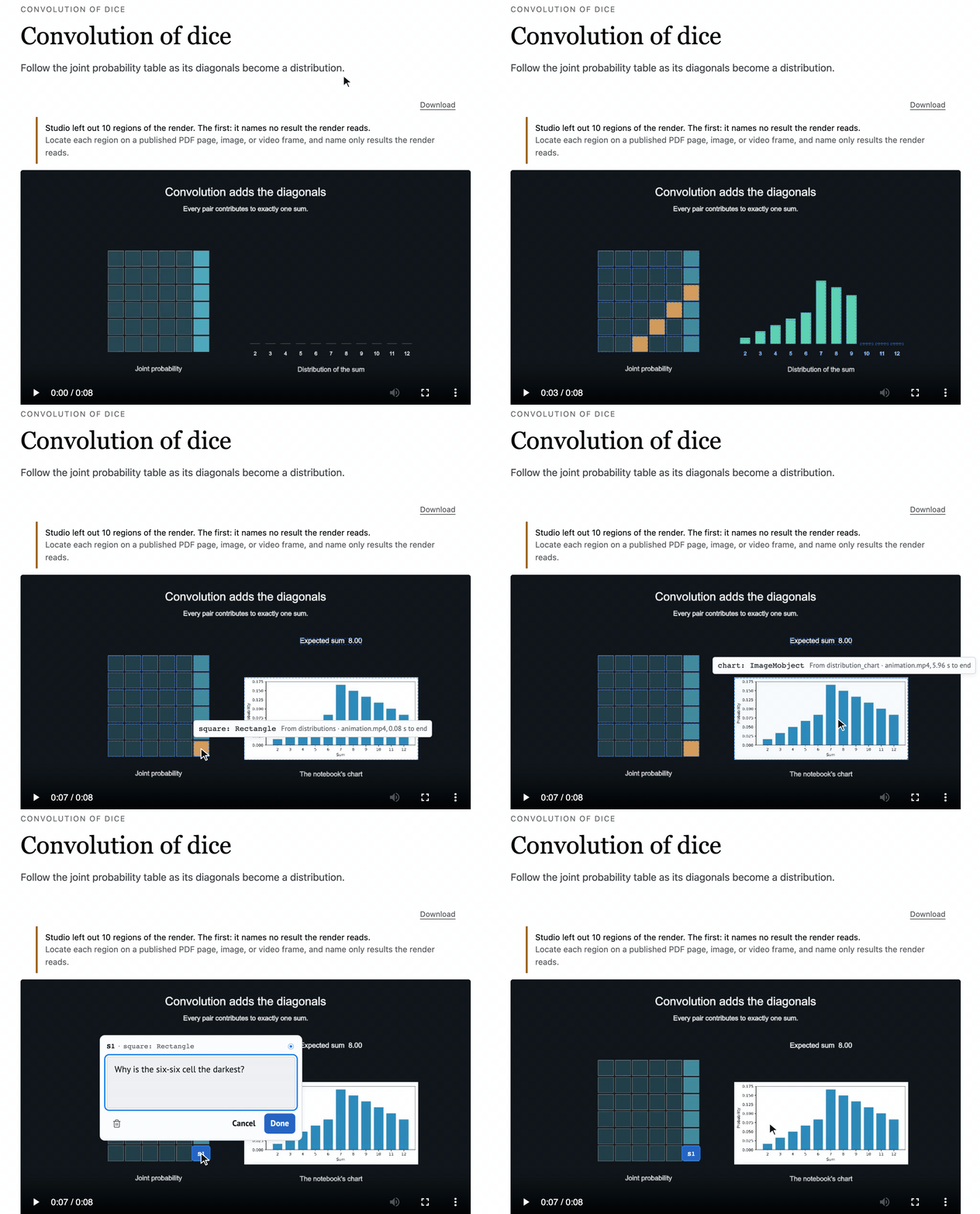
Renders can return regions: rectangles on a PDF page or an image, or a span of video frames, each naming the notebook results it shows. Preview makes each region a Lens target that traces to the cell that computed it and the value it narrows to, such as report.readings[6].occupancy.
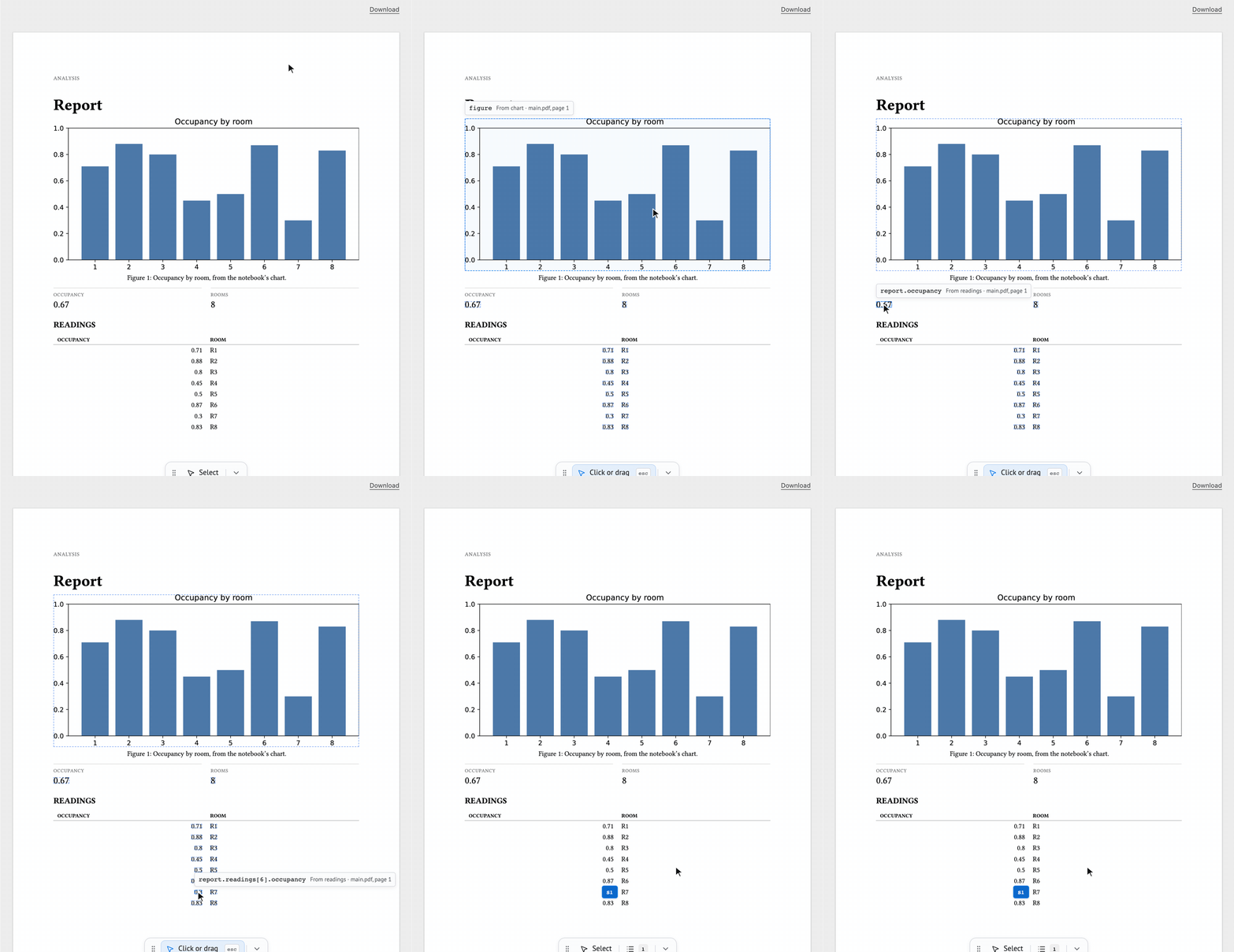
- The Typst and LaTeX providers locate every placed output and cell on its page. Mark other parts of a document with
marimo_region()or\marimoregion. - A video provider returns regions with time spans, and the targets follow the shapes as the movie plays.
Create views from the New view dialog
New view opens a dialog with a searchable starter list grouped by package, and the selected starter's preview, details, and settings beside it. A starter whose tools are missing says what it needs, such as "Needs Quarto 1.9.38+".

- Set the view title, make it the default view, and choose starter settings, such as the paper size for Typst and LaTeX or a table of contents for Quarto.
marimo-studio view create report --title "Quarterly report" --setting KEY=VALUE --make-defaultandWorkspace.create_view("report", title="Quarterly report", settings={…}, make_default=True)send the same request as the dialog.


Commit views beside the notebook
New views live in studio/<notebook>/, and their build state lives in marimo's output directory:
analysis.py
studio/analysis/dashboard/view.toml               # authored, committed
__marimo__/studio/analysis/dashboard/.artifacts/  # generated, ignores itself
A repository that ignores __marimo__/ can commit its views, and a host that discards __marimo__/ keeps them. PYTHONPYCACHEPREFIX moves build state out of the working tree together with marimo's caches, and marimo-studio status prints both locations. Views created by 0.3 keep working in place. Upgrade from 0.3 shows how to move them.
Run in pixi environments
- Studio runs inside an activated pixi workspace, and the dependency doctor reads the workspace's conda and PyPI declarations. Outside the workspace, commands print the
pixi runcommand to use. - A notebook can declare the system tools its views need in its inline
[tool.pixi.dependencies]. Withmarimo edit --sandbox=pixi, view builds take Tectonic and other provider tools from that script environment, so the LaTeX view builds with nothing installed globally. marimo-studio starters --target notebook.pyreports starter availability for one notebook.
Build view providers on the public SDK
marimo_studio.view_providersis the provider contract. The built-in providers import only that module, so an installed provider can do everything they do.- Inspection reports
documents,inputs,sites, and renders.ProviderErrorturns an author-fixable problem into a located diagnostic. - Helpers cover common provider work:
project_files,copy_inputs,probe_tool,find_tool,html_sites, andPackagedStarterwithcreate_starter. - Starters can declare an icon, a preview image, a homepage, and typed settings for the New view dialog.
marimo_studio.view_providers.testing.check_provider()runs a provider through Studio's inspection, build, render, and publication checks.
Authoring updates
- Source highlights Python, Markdown with YAML front matter, JSON, YAML, TOML, XML, SCSS, LaTeX, and Lua.
- Export and preflight warn with
prepared-states-skip-control-valueswhenstates.yamlleaves out values a slider, number, dropdown, radio, checkbox, or switch can take, and name the control and the skipped values. - The docs start from what a view is and how one view travels from its files to the browser, with a glossary, a Lens guide, and interactive figures. The examples add Quarto, Typst, and LaTeX views.
Fixes
- Every Studio tab loads when several tabs are open on one server. Event streams use WebSocket connections, which leave the browser's six HTTP connections per host free.
mo.ui.data_editor,mo.image,mo.download, and notebookpublic/files load inside views, including Prepared views.- A failed build keeps the previous build on screen with one notice, and
marimoStudio.diagnostics()lists the build error. - Preview keeps showing the newest publication after rapid saves, waits for a notebook's long first run, and reloads after a server restart. Projections stay live while an unrelated cell has a syntax error.
- Builds and Source recover from cancelled scans, files added during inspection, and damaged build state. Provider processes stop with the server, and errors name a recovery step.
- A failed Deno package download points to the network connection and proxy or npm registry settings.
- Abandoned renders leave the server log quiet.
- New views leave out Python bytecode caches from packaged starters.
- A source checkout with a stale browser build stops with the changed file and asks for
make build. A checkout without one asks formake setup.
| Before | After |
|---|---|
 |
 |
Upgrade notes
- Proxies. Forward WebSocket upgrades beneath
/_marimo-studio/for live updates, also when marimo streams kernel messages over server-sent events. - Existing views rebuild once. Artifact manifests move to schema 4.
- Readiness.
data-marimo-studio-statestaysreadyafter a failed build. Compare the revision or checkmarimoStudio.diagnostics()to detect a stale build. - Third-party providers. Records follow the SDK names,
ProviderInfo.optionsreplacesapi_version, and documents render throughRenderProvider,RenderRequest,RenderResult, andrender_page(). Starter files use__VIEW_TITLE_HTML__and__VIEW_TITLE_JSON__, andStarterContextrequirestitle. Pinmarimo-studio>=0.4,<0.5. Third-party view providers lists the changes.
Compatibility
Marimo Studio 0.4.0 supports Python 3.10 through 3.14 and Marimo 0.25.1. It requires marimo-export 0.2.1 or newer. The deno extra provides Deno 2.9.5 or newer for React, Reveal.js, Svelte, and Observable Notebook Kit authoring. The typst extra provides the Typst compiler 0.15 or newer. The Quarto provider needs Quarto 1.9.38 or newer on PATH, and the LaTeX provider needs Tectonic 0.15 or newer on PATH or in the notebook's pixi script environment. pixi environments need pixi 0.80 or newer. The lens extra requires marimo-lens 0.2.3 or newer, and Lens 0.2.4 records the page or time span of a selected region.