
A native SwiftUI SDK for rendering interactive human body muscle maps with highlighting, heatmaps, multi-select, zoom, gesture-rich interaction, and UIKit support.
Supports male & female body models with front & back views. Works with both SwiftUI and UIKit.
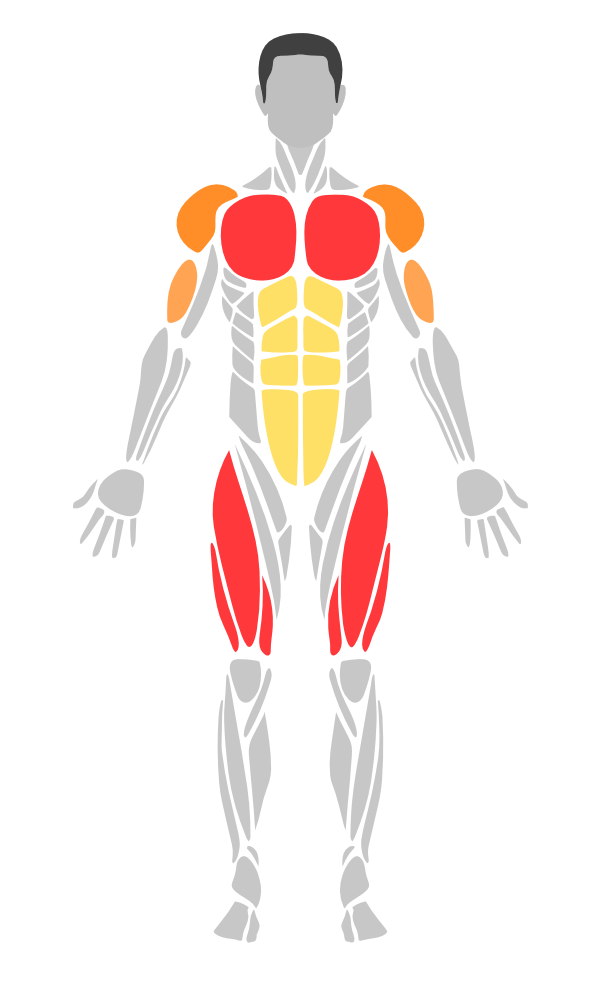
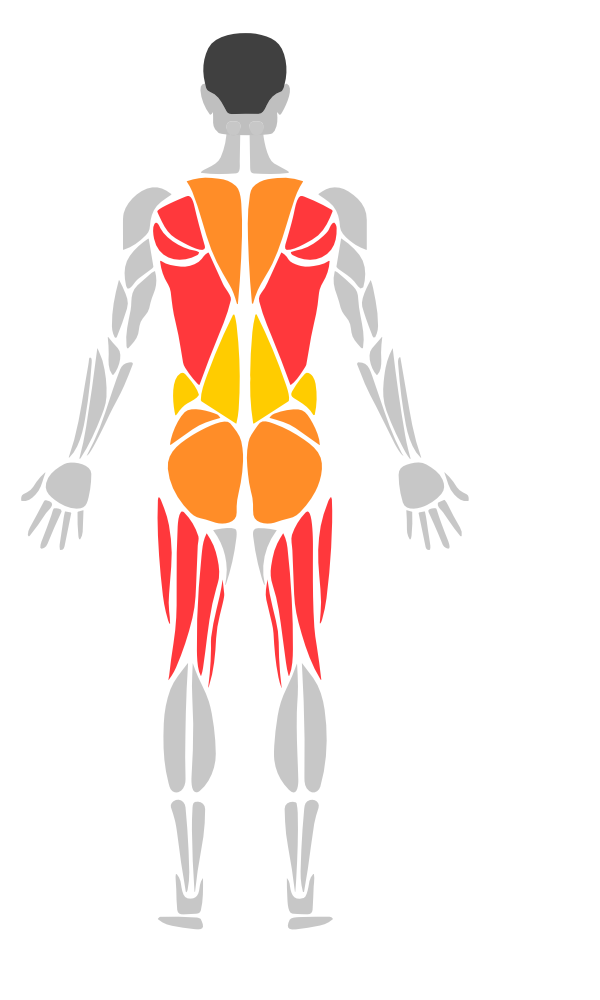
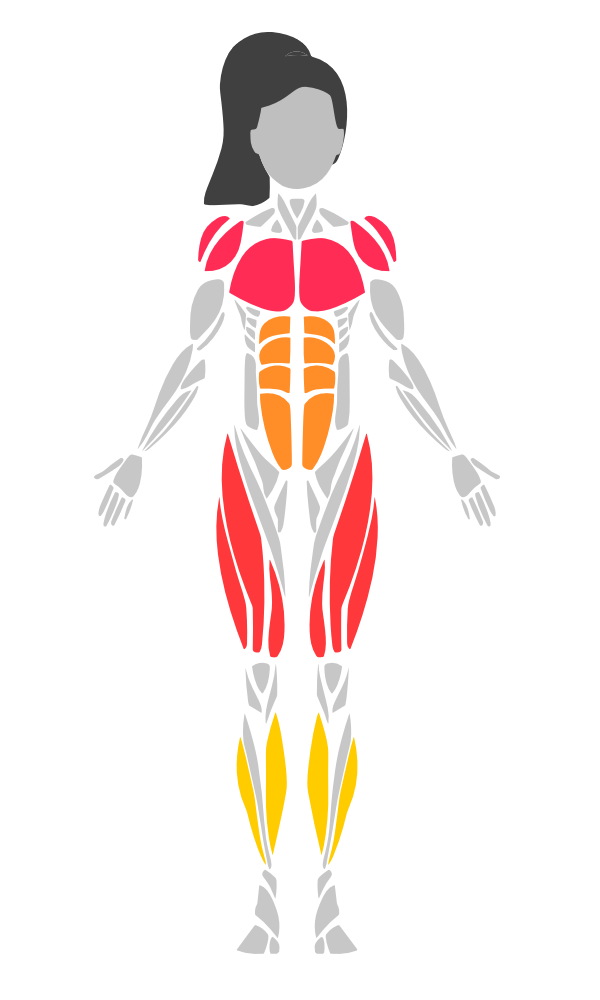
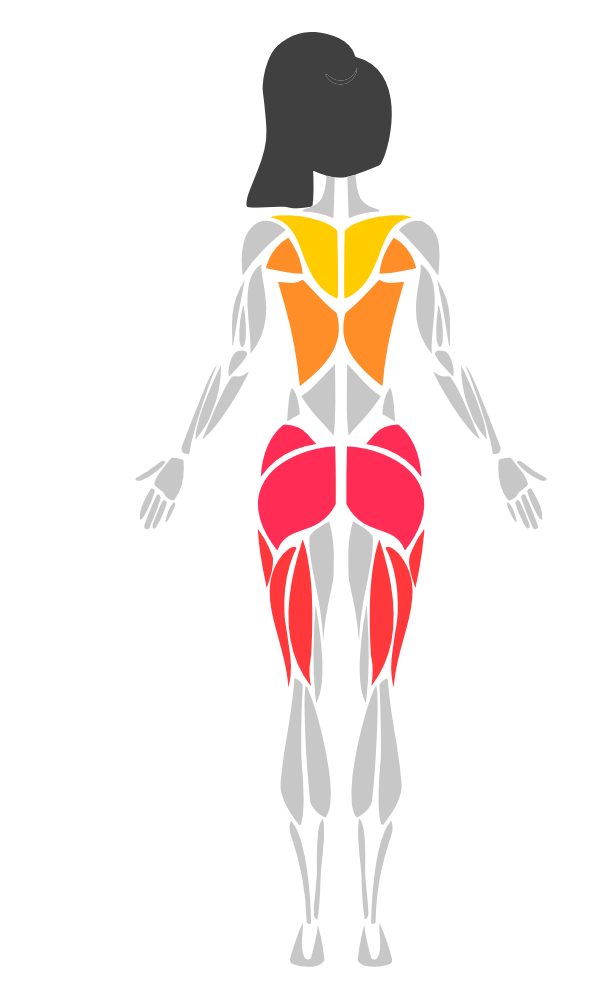
- SVG-based body rendering via SwiftUI
Canvas - 36 muscle groups (22 base + 14 sub-groups) with left/right side detection
- Muscle sub-groups with parent/child inheritance and priority hit testing
- Always-visible sub-groups (ankles, adductors, neck) — rendered by default, tap returns parent
- Heatmap visualization with customizable color scales
- Tap-to-select with hit testing
- Multi-select (select multiple muscles at once)
- Long press gesture (with configurable duration)
- Drag-to-select (paint muscles by dragging)
- Pinch-to-zoom & pan (with double-tap to reset)
- Tooltips (custom content positioned above selected muscles)
- Undo/redo (selection history tracking)
- 4 preset styles (default, minimal, neon, medical)
- Gradient fills (linear & radial gradients)
- Transition animations (fade in/out on highlight changes)
- Pulse/glow animation (for selected muscles)
- Shadow/drop shadow support
- UIKit wrappers (
MuscleMapView,HeatmapLegendUIView) - Accessibility (VoiceOver support with localized muscle names)
- Localization (11 languages: EN, TR, DE, ES, FR, JA, ZH, KO, AR, PT-BR, RU)
- DocC documentation catalog
- Zero external dependencies
- iOS 17+ / macOS 14+
Add to your Package.swift:
dependencies: [
    .package(url: "https://github.com/melihcolpan/MuscleMap.git", from: "1.9.0")
]
Or in Xcode: File > Add Package Dependencies and paste the repository URL.
Add to your Podfile:
pod 'MuscleMap', '~> 1.9.0'Then run pod install.
import SwiftUI
import MuscleMap

struct ContentView: View {
    var body: some View {
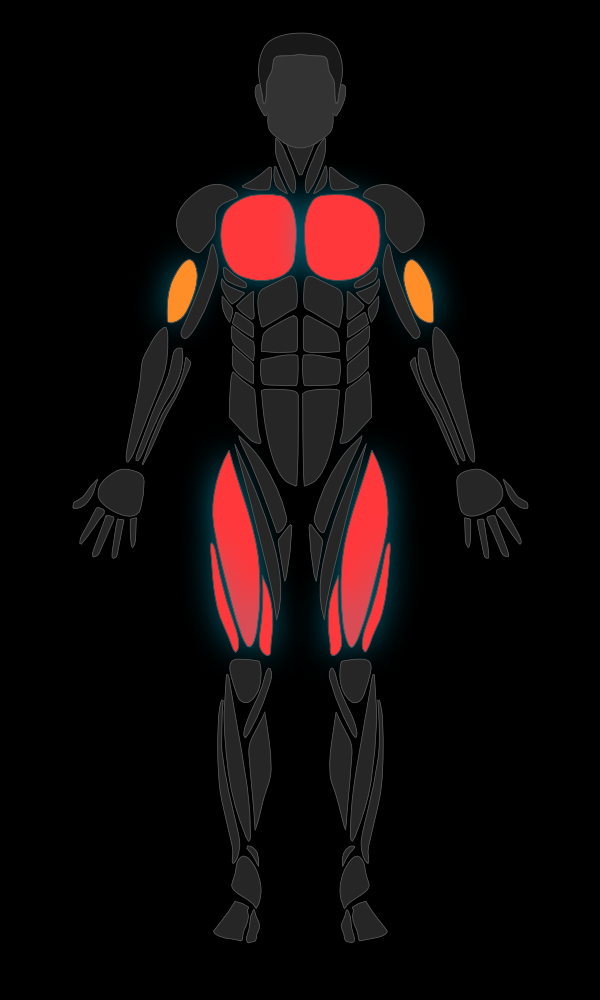
        BodyView(gender: .male, side: .front)
            .highlight(.chest, color: .red)
            .highlight(.biceps, color: .orange, opacity: 0.8)
            .frame(height: 400)
    }
}BodyView(gender: .male, side: .front)
.highlight(.chest, color: .red)
.highlight(.abs, color: .yellow, opacity: 0.6)
.highlight([.quadriceps, .calves], color: .orange)
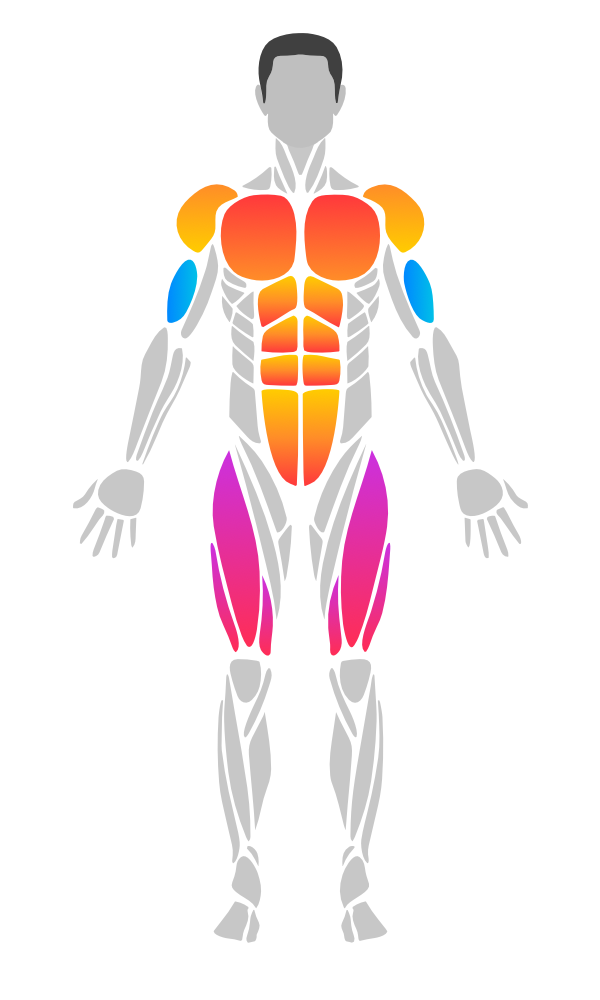
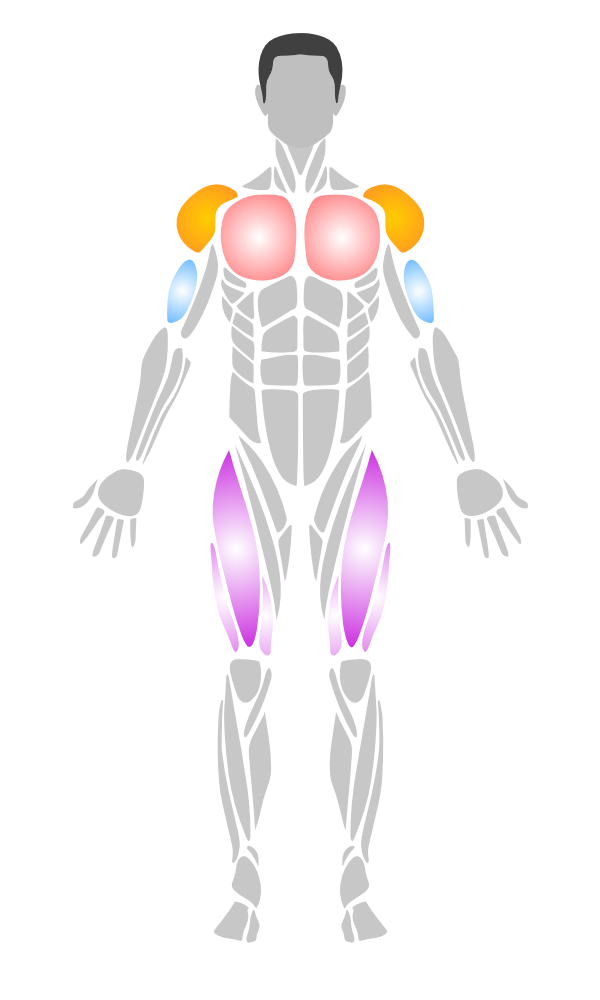
// Linear gradient (top to bottom)
BodyView(gender: .male, side: .front)
    .highlight(.chest, linearGradient: [.red, .orange], startPoint: .top, endPoint: .bottom)

// Radial gradient (center outward)
    .highlight(.biceps, radialGradient: [.white, .blue], center: .center, endRadius: 40)

// Mix gradients and solid colors
.highlight(.quadriceps, color: .purple)BodyView(gender: .female, side: .front)
.onMuscleSelected { muscle, side in
print("\(muscle.displayName) (\(side))")
}
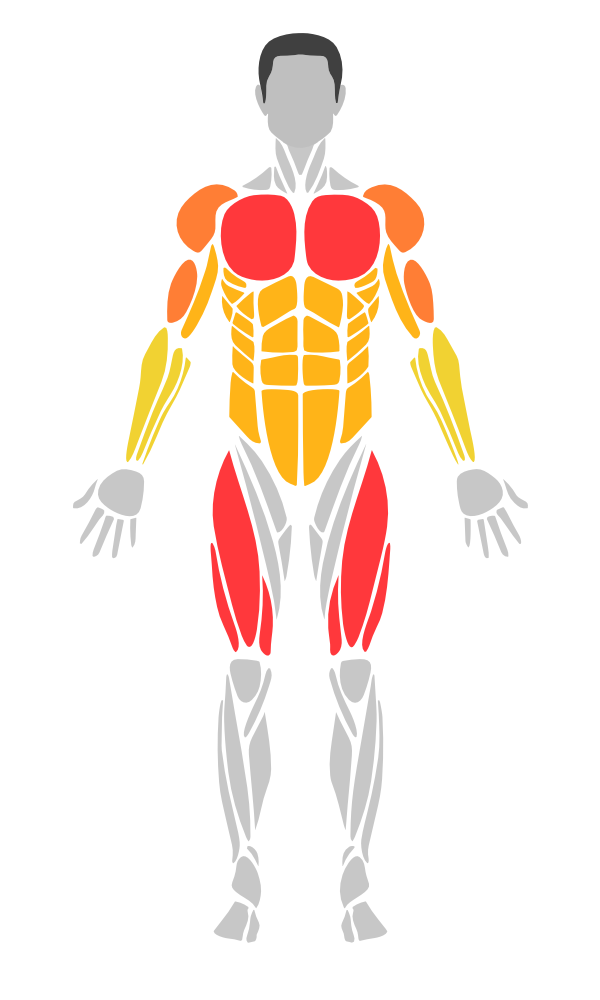
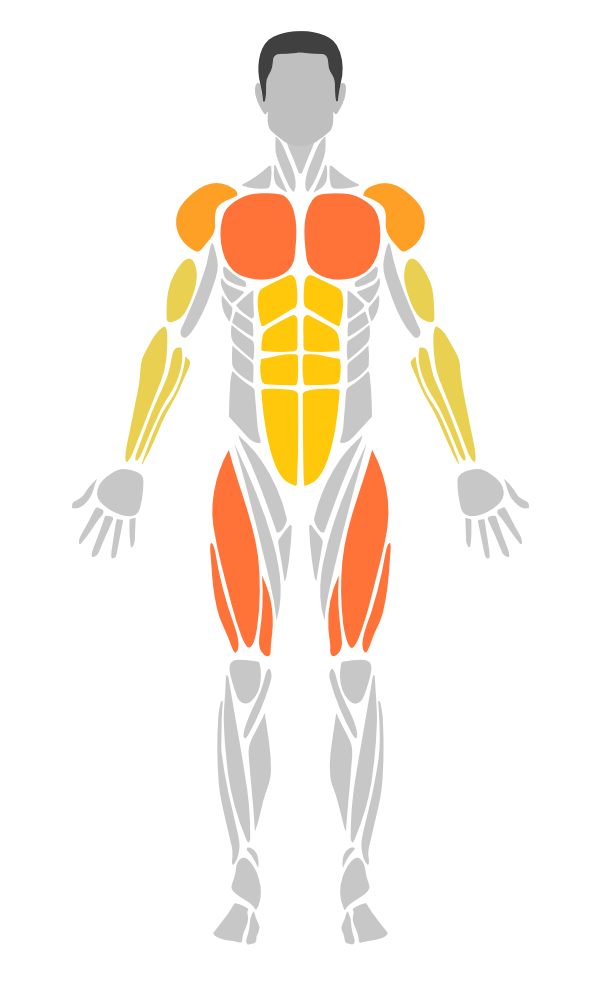
// Integer scale (0-4, like workout trackers)
BodyView(gender: .male, side: .front)
    .intensities([
        .chest: 3,
        .biceps: 2,
        .quadriceps: 4,
        .abs: 1
    ])

// Custom intensity data (0.0 - 1.0)
let data = [
    MuscleIntensity(muscle: .chest, intensity: 0.8),
    MuscleIntensity(muscle: .biceps, intensity: 0.5, side: .left),
    MuscleIntensity(muscle: .abs, intensity: 0.3, color: .purple)
]
BodyView(gender: .male, side: .front)
.heatmap(data, colorScale: .thermal)| Scale | Colors |
|---|---|
.workout |
gray -> yellow -> orange -> red |
.thermal |
blue -> green -> yellow -> red |
.medical |
green -> yellow -> red |
.monochrome |
light gray -> dark |
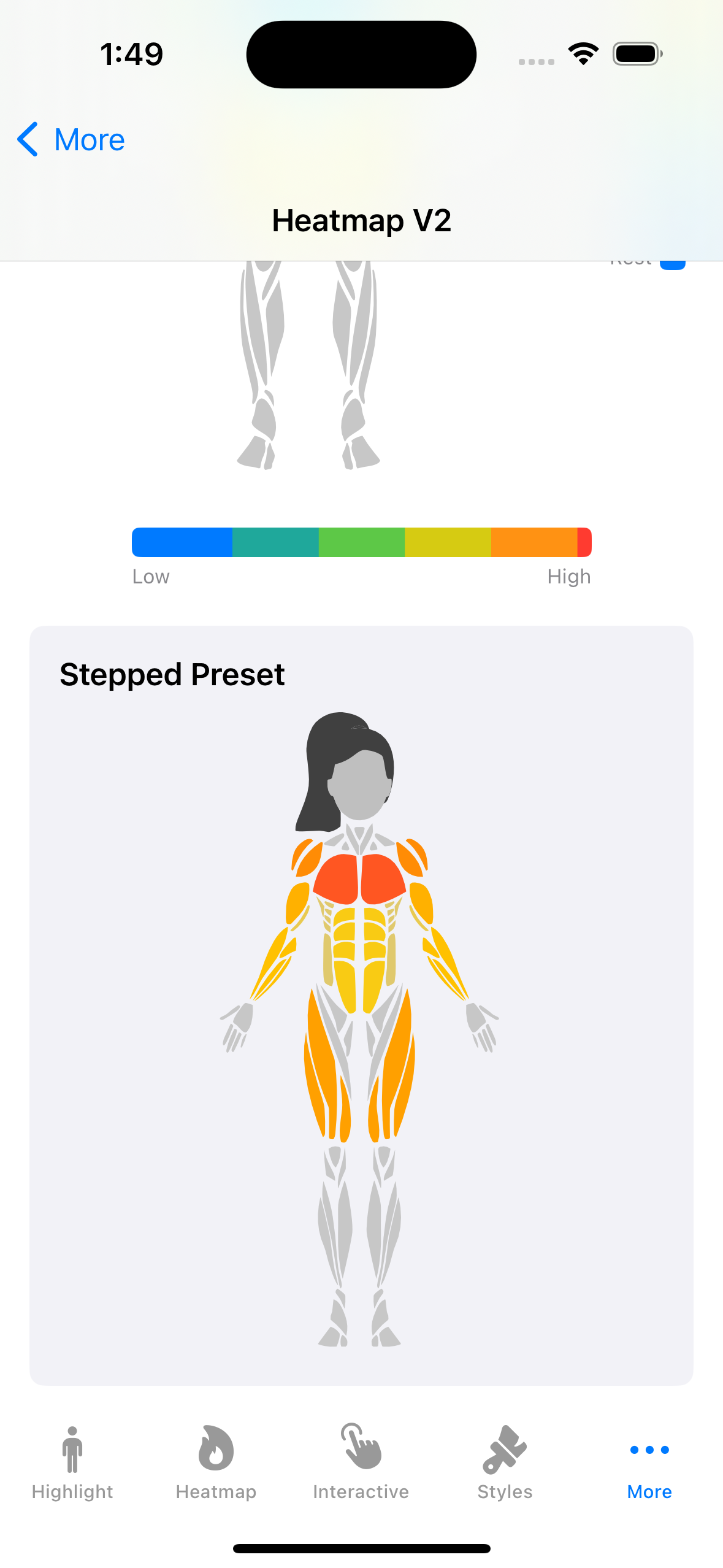
.workoutStepped |
workout with 5 discrete steps |
.thermalSmooth |
thermal with ease-in-out curve |
Custom:
let custom = HeatmapColorScale(colors: [.blue, .purple, .pink])
Control how intensity values map to colors across the scale:
// Ease-in-out for smoother transitions
BodyView(gender: .male, side: .front)
    .heatmap(data, colorScale: .thermal)
    .heatmapInterpolation(.easeInOut)

// Stepped (discrete levels)
BodyView(gender: .male, side: .front)
    .heatmap(data, colorScale: .workoutStepped)  // built-in 5-step preset

// Custom curve
.heatmapInterpolation(.custom { t in t * t * t })
Available interpolations: .linear, .easeIn, .easeOut, .easeInOut, .step(count:), .custom()
A color scale's own interpolation is used by default, so .workoutStepped renders in steps and .thermalSmooth eases. An interpolation set with .heatmapInterpolation(_:) or a HeatmapConfiguration takes precedence when it is not .linear.
Hide muscles below a minimum intensity:
BodyView(gender: .male, side: .front)
    .heatmap(data)
    .heatmapThreshold(0.2)  // muscles with intensity < 0.2 are hidden
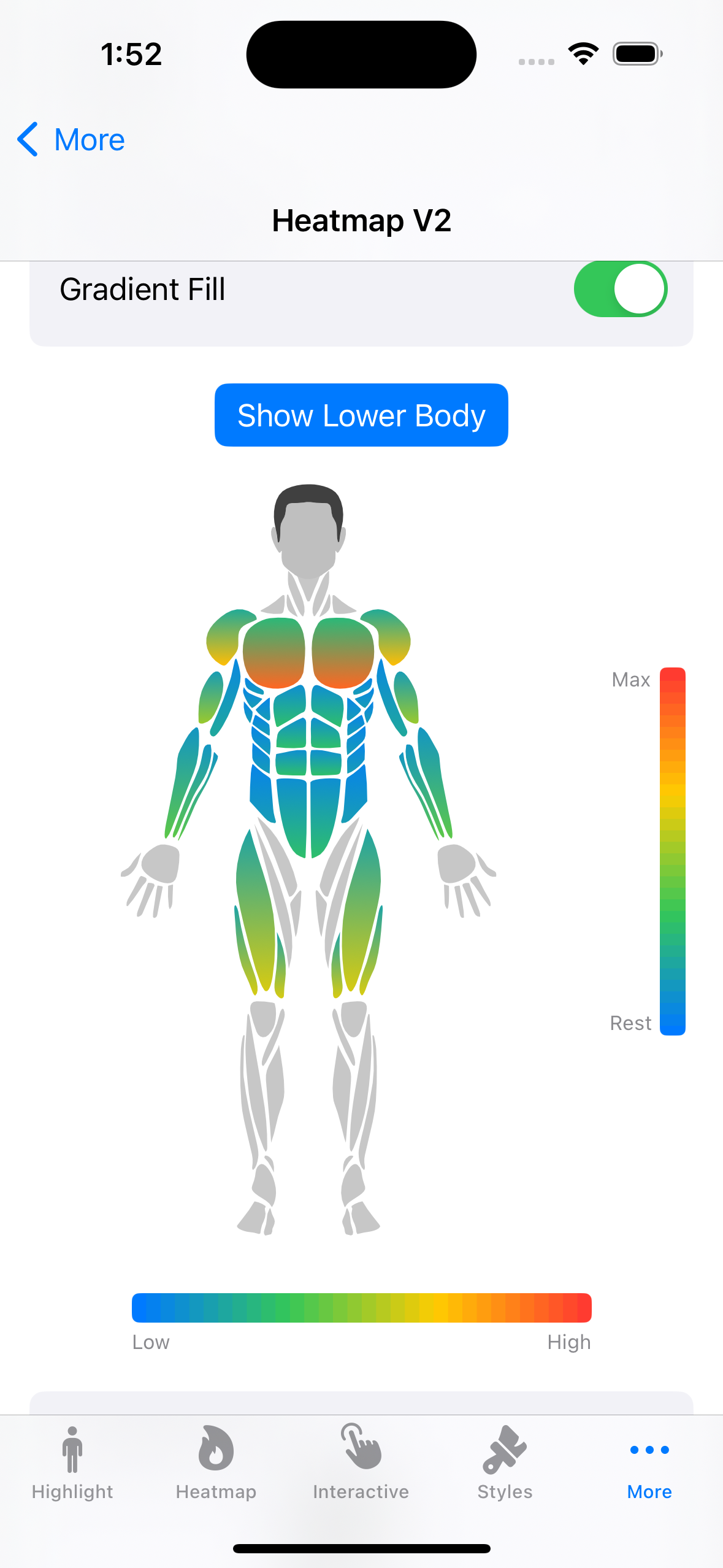
Apply intra-muscle gradients based on intensity (low-to-high color within each muscle):
BodyView(gender: .male, side: .front)
    .heatmap(data, colorScale: .thermal)
    .heatmapGradient(direction: .topToBottom, lowFactor: 0.3)
Directions: .topToBottom, .bottomToTop, .leftToRight, .rightToLeft
Combine all heatmap settings in a single configuration:
let config = HeatmapConfiguration(
    colorScale: .thermal,
    interpolation: .easeInOut,
    threshold: 0.2,
    isGradientFillEnabled: true,
    gradientDirection: .topToBottom,
    gradientLowIntensityFactor: 0.3
)

BodyView(gender: .male, side: .front)
.heatmap(data, configuration: config)Display a color bar legend alongside the body view:
// Horizontal legend
HeatmapLegendView(colorScale: .workout)
    .frame(width: 200)

// Vertical legend with custom labels
HeatmapLegendView(
    colorScale: .thermal,
    interpolation: .easeInOut,
    orientation: .vertical,
    barThickness: 20,
    labelMin: "Rest",
    labelMax: "Max"
)
.frame(width: 60, height: 200)When using .animated(), color transitions between heatmap states are now smoothly interpolated:
BodyView(gender: .male, side: .front)
    .heatmap(currentData, colorScale: .thermal)
    .animated(duration: 0.5)
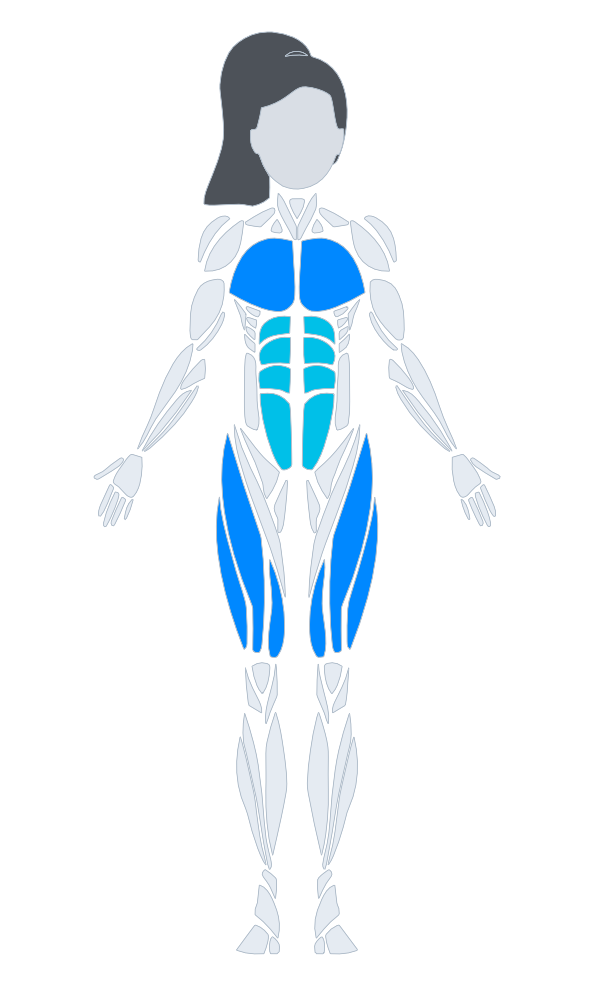
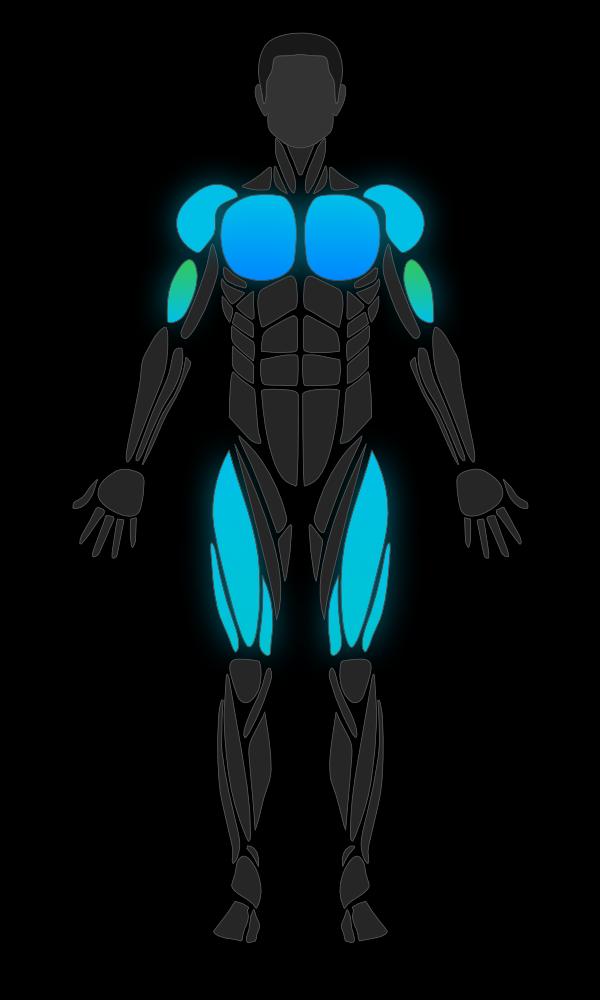
BodyView(gender: .male, side: .front)
.bodyStyle(.neon)| Style | Description |
|---|---|
.default |
Gray fill, green selection |
.minimal |
Subtle fill, thin strokes |
.neon |
Dark background, cyan selection, glow shadow |
.medical |
Clinical blue-gray tones |
Custom:
let style = BodyViewStyle(
    defaultFillColor: .gray,
    strokeColor: .white,
    strokeWidth: 1,
    selectionColor: .yellow,
    selectionStrokeColor: .yellow,
    selectionStrokeWidth: 3,
    headColor: .gray,
    hairColor: .black,
    shadowColor: .blue.opacity(0.5),
    shadowRadius: 6,
    shadowOffset: CGSize(width: 0, height: 2)
)Smooth fade-in/fade-out when highlights change:
BodyView(gender: .male, side: .front)
    .highlight(.chest, color: .red)
.animated(duration: 0.3)Pulsing glow effect on the selected muscle:
@State private var selected: Muscle?

BodyView(gender: .male, side: .front)
    .highlight(.chest, color: .red)
    .selected(selected)
    .pulseSelected(speed: 1.5, range: 0.6...1.0)
    .onMuscleSelected { muscle, _ in
        selected = muscle
}// Single selection (backward compatible)
@State private var selected: Muscle?
BodyView(gender: .male, side: .front)
.selected(selected)
.onMuscleSelected { muscle, _ in
selected = muscle
}@State private var selectedMuscles: Set<Muscle> = []
BodyView(gender: .male, side: .front)
.selected(selectedMuscles)
.onMuscleSelected { muscle, _ in
if selectedMuscles.contains(muscle) {
selectedMuscles.remove(muscle)
} else {
selectedMuscles.insert(muscle)
}
}BodyView(gender: .male, side: .front)
.onMuscleLongPressed(duration: 0.5) { muscle, side in
print("Long pressed: \(muscle.displayName)")
}BodyView(gender: .male, side: .front)
.onMuscleDragged({ muscle, side in
selectedMuscles.insert(muscle)
}, onEnded: {
print("Drag ended")
})BodyView(gender: .male, side: .front)
.zoomable(minScale: 1.0, maxScale: 4.0)BodyView(gender: .male, side: .front)
.selected(selectedMuscles)
.tooltip { muscle, side in
Text(muscle.displayName)
.font(.caption)
.padding(4)
.background(.ultraThinMaterial)
}@State private var history = SelectionHistory()
BodyView(gender: .male, side: .front)
.undoable(history)
Button("Undo") { if let state = history.undo() { selectedMuscles = state } }
.disabled(!history.canUndo)
Button("Redo") { if let state = history.redo() { selectedMuscles = state } }
.disabled(!history.canRedo)
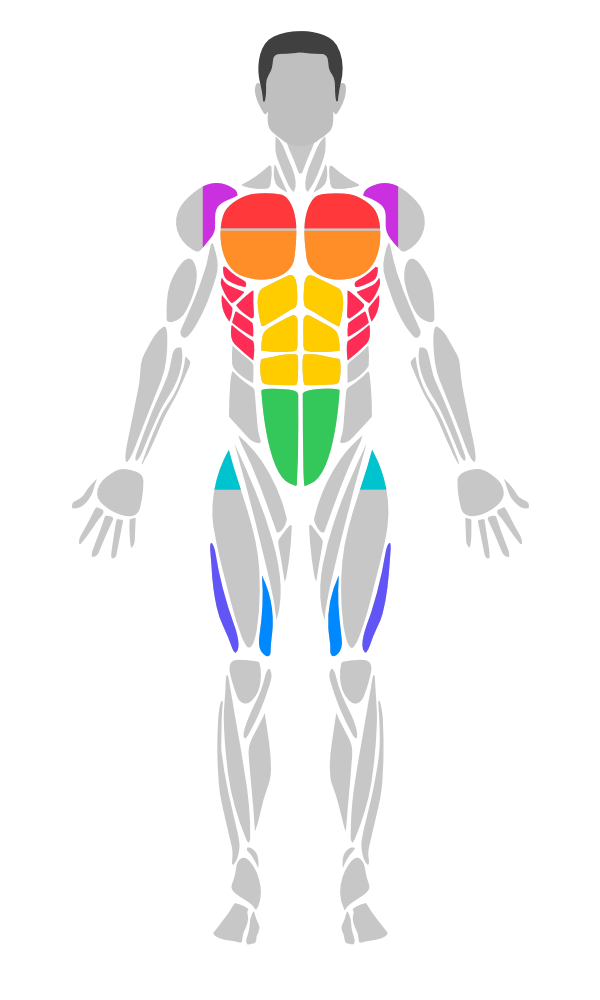
Sub-groups provide finer control over muscle regions. Each one is cut from its parent muscle's artwork: the upper and lower chest, the front deltoid, the upper and lower abs, the serratus slips on the ribs, the top of the quadriceps (hip flexors) and the inner and outer quadriceps heads. They inherit the parent muscle's highlight when no specific highlight is set, and take priority in hit testing.
Always-visible sub-groups (ankles, adductors, neck) are rendered by default but return their parent muscle on tap — so tapping the ankle area returns .feet, tapping the neck returns .head, etc.
// Highlight parent and sub-group with different intensities
BodyView(gender: .male, side: .front)
    .highlight(.chest, color: .red, opacity: 0.4)       // parent (dimmer)
    .highlight(.upperChest, color: .red, opacity: 0.9)   // sub-group (brighter)
    .highlight(.quadriceps, color: .blue, opacity: 0.4)
    .highlight(.innerQuad, color: .blue, opacity: 0.9)
Query sub-group relationships:
Muscle.chest.subGroups       // [.upperChest, .lowerChest]
Muscle.upperChest.parentGroup // .chest
Muscle.upperChest.isSubGroup  // true

// Always-visible sub-groups
Muscle.ankles.isAlwaysVisibleSubGroup  // true
Muscle.ankles.parentGroup // .feetBodyView(gender: .male, side: .front) // Male front
BodyView(gender: .male, side: .back) // Male back
BodyView(gender: .female, side: .front) // Female front
BodyView(gender: .female, side: .back) // Female back
Every muscle is drawn in at least one view, but many only on the front or the back. Use isDrawable to check a muscle mapping for a specific view, for example in a unit test:
Muscle.rhomboids.isDrawable                               // true (drawn somewhere)
Muscle.rhomboids.isDrawable(gender: .male, side: .back)   // true
Muscle.rhomboids.isDrawable(gender: .male, side: .front)  // false
Muscle.head.isDrawable(gender: .female, side: .back)      // false, the hair covers it
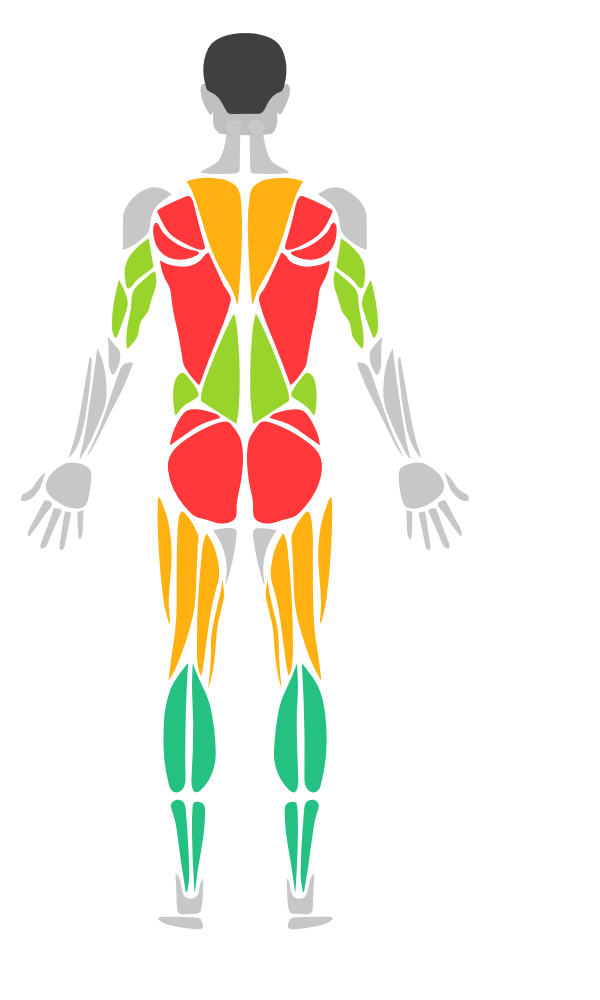
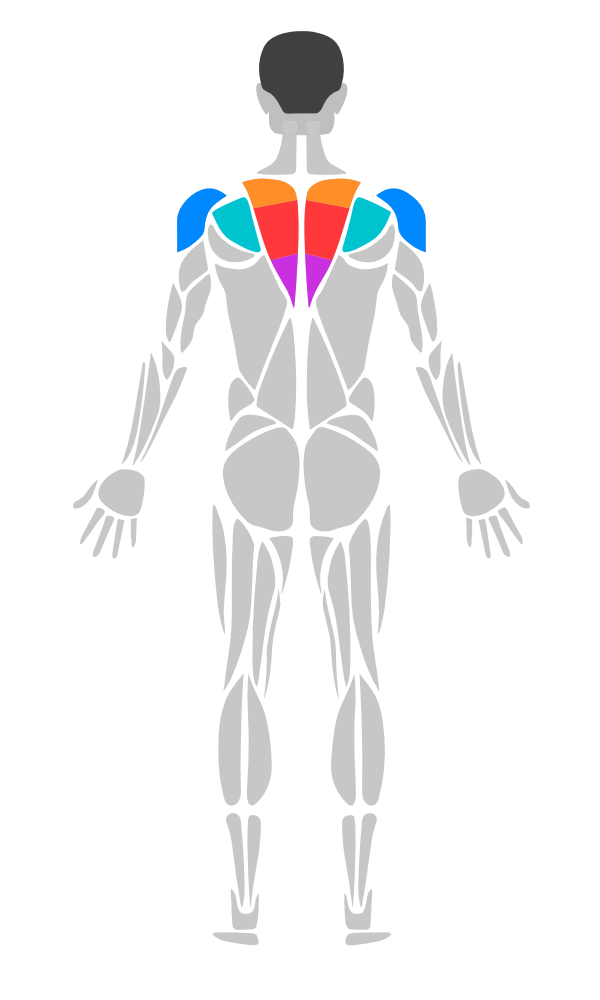
The back views have these extra regions (shown above with .showSubGroups()):
.upperTrapeziusand.lowerTrapezius: the trapezius above and below the rhomboids. On the front views the visible trapezius is the upper part..rhomboids: inside the trapezius, painted only while highlighted or selected, so an unhighlighted body and a.trapeziushighlight look exactly as before..rearDeltoid: the deltoid as seen from behind..rotatorCuff: the infraspinatus area above the shoulder blade. It shows the.upperBackhighlight when it has none of its own.
With sub-groups hidden (the default), tapping the rhomboids or the rotator cuff returns .trapezius / .upperBack.
Creating a BodyView starts parsing the body artwork in the background. To have it ready before the first body appears, start it at launch:
@main
struct MyApp: App {
    init() {
        BodyView.preloadArtwork()
    }
    // ...
}| Muscle | Key |
|---|---|
| Abs | .abs |
| Biceps | .biceps |
| Calves | .calves |
| Chest | .chest |
| Deltoids | .deltoids |
| Feet | .feet |
| Forearm | .forearm |
| Gluteal | .gluteal |
| Hamstring | .hamstring |
| Hands | .hands |
| Head | .head |
| Knees | .knees |
| Lower Back | .lowerBack |
| Obliques | .obliques |
| Quadriceps | .quadriceps |
| Rhomboids | .rhomboids (back views) |
| Rotator Cuff | .rotatorCuff (back views) |
| Serratus | .serratus |
| Tibialis | .tibialis |
| Trapezius | .trapezius |
| Triceps | .triceps |
| Upper Back | .upperBack |
| Sub-Group | Key | Parent | Always Visible |
|---|---|---|---|
| Upper Chest | .upperChest |
.chest |
|
| Lower Chest | .lowerChest |
.chest |
|
| Upper Abs | .upperAbs |
.abs |
|
| Lower Abs | .lowerAbs |
.abs |
|
| Inner Quad | .innerQuad |
.quadriceps |
|
| Outer Quad | .outerQuad |
.quadriceps |
|
| Hip Flexors | .hipFlexors |
.quadriceps |
|
| Front Deltoid | .frontDeltoid |
.deltoids |
|
| Rear Deltoid | .rearDeltoid |
.deltoids |
|
| Upper Trapezius | .upperTrapezius |
.trapezius |
|
| Lower Trapezius | .lowerTrapezius |
.trapezius |
|
| Ankles | .ankles |
.feet |
Yes |
| Adductors | .adductors |
.hamstring |
Yes |
| Neck | .neck |
.head |
Yes |
.rearDeltoid, .upperTrapezius and .lowerTrapezius are drawn on the back views, and .upperTrapezius on the front views too.
Drop-in UIView wrapper for UIKit-based projects:
import MuscleMap

class ViewController: UIViewController {
    override func viewDidLoad() {
        super.viewDidLoad()

        let muscleMap = MuscleMapView(gender: .male, side: .front)
        muscleMap.highlight(.chest, color: .systemRed)
        muscleMap.highlight(.biceps, color: .systemOrange, opacity: 0.8)
        muscleMap.onMuscleSelected = { muscle, side in
            print("\(muscle.displayName) tapped")
        }

        view.addSubview(muscleMap)
        muscleMap.translatesAutoresizingMaskIntoConstraints = false
        NSLayoutConstraint.activate([
            muscleMap.centerXAnchor.constraint(equalTo: view.centerXAnchor),
            muscleMap.centerYAnchor.constraint(equalTo: view.centerYAnchor),
            muscleMap.widthAnchor.constraint(equalToConstant: 300),
            muscleMap.heightAnchor.constraint(equalToConstant: 500)
        ])
    }
}UIKit wrapper for the heatmap legend:
let legend = HeatmapLegendUIView(colorScale: .thermal)
legend.orientation = .vertical
legend.labelMin = "Rest"
legend.labelMax = "Max"
view.addSubview(legend)MuscleMap includes full VoiceOver support. Each muscle region is exposed as an accessibility element with:
- Localized muscle name as the accessibility label; muscles drawn on both sides get one element per side ("Biceps, Left", "Biceps, Right")
- Selection state ("Selected" / "Not selected")
- Tap and long press hints
- Top-to-bottom traversal order (anatomical navigation)
Cosmetic parts (e.g., head) are excluded from the accessibility tree.
// Accessibility works automatically — no extra configuration needed
BodyView(gender: .male, side: .front)
    .highlight(.chest, color: .red)
    .onMuscleSelected { muscle, side in
        // VoiceOver users can double-tap to select
}All muscle names, side labels, and accessibility strings are localized in 11 languages:
| Language | Code |
|---|---|
| English | en |
| Turkish | tr |
| German | de |
| Spanish | es |
| French | fr |
| Japanese | ja |
| Chinese (Simplified) | zh-Hans |
| Korean | ko |
| Arabic | ar |
| Portuguese (Brazil) | pt-BR |
| Russian | ru |
Localized names are available via displayName:
// Returns localized name based on user's device language
Muscle.chest.displayName        // "Chest" (EN), "Göğüs" (TR), "Brust" (DE)
MuscleSide.left.displayName     // "Left" (EN), "Sol" (TR), "Links" (DE)
BodySide.front.displayName      // "Front" (EN), "Ön" (TR), "Vorderseite" (DE)
BodyGender.male.displayName // "Male" (EN), "Erkek" (TR), "Männlich" (DE)A demo app is included in the Example/ directory. Open Example/MuscleMapDemoApp.xcodeproj in Xcode to explore all features interactively.
- iOS 17.0+
- macOS 14.0+
- Swift 5.9+ (builds in the Swift 6 language mode on a Swift 6 toolchain)
swift test                                   # unit tests
swift run --package-path Tools/ScreenshotGenerator ScreenshotGenerator Screenshots
                                             # regenerate the README screenshots
Every push and pull request runs the tests, an iOS build, the demo app build, the documentation build and pod lib lint on GitHub Actions. Dependabot keeps the workflow's actions up to date.
The API documentation is on the Swift Package Index.
MIT License. See LICENSE for details.